

Today, select media outlets and YouTubers shared their first impressions of the iPhone 16 and iPhone 16 Plus, highlighting many of the incremental and notable updates.
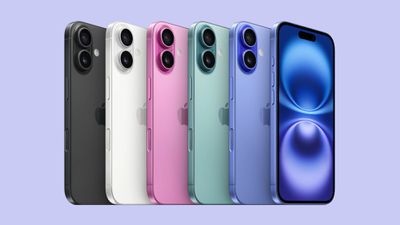
The key new features include the A18 chip, which provides enhanced performance and supports Apple Intelligence, faster charging, the Action Button, an enhanced ultra wide camera with support for macro photography, revamped Photographic Styles, and the all-new Camera Control button.
Design
The iPhone 16 retains a similar design to the iPhone 15. The color palette has become more vibrant, with options like Ultramarine, Pink, and Teal. The camera arrangement has also been redesigned, moving from the previous diagonal layout to a vertical stack, a change that helps enable Spatial Video and Photo capture for the Vision Pro headset. Tom's Guide's John Velasco said:
The iPhone 16 is a much more stylish phone than the iPhone 16 Pros, which is a shame because I'd love to see these bolder colors come to the Pro iPhones. I also love how the color-infused back glass with my ultramarine colorway review unit pops at just the right angle, while small details like the outline color of the rear cameras makes for a strong contrast as an accent color.
Speaking of cameras, that's one of the many new design changes with the iPhone 16. Instead of the diagonal arrangement that the series has been using for the last three years, it's been reverted to a vertical arrangement to allow support for Spatial video and photo capture.
TechRadar's Philip Berne:
The back is home to the biggest design change. The camera modules sit in a vertical orientation. The primary 48-megapixel Fusion camera sits atop the 12-megapixel ultrawide lens, stacked in a slightly raised glass bump that looks like a pill. The true tone flash is off to the side, but since Apple is sticking with larger lenses here, it's like the iPhone X's camera bump on steroids. I quite like this look. It's not just for looks though; this new orientation allows the iPhone 16 to capture Spatial Photos or Spatial Video for playback on the Apple Vision Pro.
Action Button and Camera Control
Among the standout additions to the iPhone 16 is the introduction of the Action Button and the Camera Control. Previously exclusive to the iPhone 15 Pro, the Action Button is a customizable button that replaces the traditional mute switch, offering users flexibility to assign various functions such as starting voice memos or launching shortcuts. Meanwhile, the new Camera Control capacitive button, located on the right side of the device, takes smartphone photography to the next level by mimicking a physical shutter button. It also integrates gestures for adjusting settings like zoom, exposure, and more.
Tom's Guide's John Velasco said:
The Camera Control button is positioned on the right side of the iPhone 16 and can recognize the amount of pressure applied to it—thus replicating the physical shutter button commonly found in today's best mirrorless cameras. I do like how the Camera Control can also discern swipes to change between some of the settings, like zoom controls, exposure adjustment, and more—all by slightly pressing the Camera Control button and swiping my finger left or right. Though it may take a bit getting used to all of this, it's a step in the right direction in making the iPhone feel more like a camera.
CNET's Lisa Eadicicco:
It may seem minor, but it feels like Apple has built a new miniature interface just for the camera, and it's a lot of fun to play around with. Between the Camera Control button and the Dynamic Island, it's nice to see Apple updating the iPhone's interface for two of the things we do the most on our phones: taking photos and switching between apps.
But the challenge behind Camera Control is that it requires you to build a new habit. I have to admit, I still find myself instinctively reaching for the camera button on my lock screen instead of the Camera Control button when taking a photo. Launching the camera already takes almost no time, so you could argue that it's a problem that didn't need solving. As much as I love the idea of the Camera Control button, I also worry that it could end up being ignored much like the MacBook Pro's touch bar.
The idea of using a button as a shortcut for launching the camera also isn't new; you could already do this with the Action button on last year's iPhone 15 Pro. Samsung's Galaxy phones also let you launch the camera by double pressing the side button, and certain Sony Xperia phones already include a dedicated shutter button.
That's why I think the real benefit behind Camera Control isn't the ability to launch the camera but the way you can easily swipe through different options and modes. It's easier to adjust settings while keeping your shot consistent since your finger isn't obscuring the screen, and you don't have to move your other hand to toggle between shooting modes.
Apple Intelligence
One of the iPhone 16's key features is support for Apple Intelligence. While many of these features are still on the way with future software updates, the A18 chip underpins the phone's ability to handle the AI tools, offering improvements in performance, battery efficiency, and overall user experience. Tom's Guide's John Velasco:
I think it's a bummer that the iPhone 16 arrives without Apple Intelligence. I’ve been using Apple Intelligence features with a developer beta, which is still a work in progress. But I think it's safe to conclude that Apple Intelligence will usher in a new era for the iPhone because of how useful these new capabilities are. I've already highlighted some of my favorite Apple Intelligence features, like how Siri is much more conversational than ever before as well as the effectiveness of Photo Clean Up to edit photos with the help of generative AI.
However, there's one Apple Intelligence feature I've yet to try out and am excited for. It’s Visual Intelligence, which is Apple's answer to Google Lens. This is going to be an exclusive Apple Intelligence feature for the iPhone 16 lineup, so it won’t be coming on other previous models and could be the reason to convince people to upgrade. Tied to the Camera Control button on the iPhone 16, Visual Intelligence will allow you to quickly search for anything just by taking a snapshot of it — but it can be integrated with any app or service running on the phone.
As much as I enjoy all the other Apple Intelligence features that are in preview with the iOS 18.1 developer beta, I don't think they're anything special or innovative. They're essentially responses to what I've seen out there, like the summarizing and translation features in Galaxy AI or the photo editing abilities of Google's Magic Editor. In fact, I'd go far to say that Google’s still ahead of Apple when it comes to AI features — more so when Apple's rival has spent years developing them.
Nonetheless, Apple's steering in the right direction by finally developing Apple Intelligence. It's just a bummer that it's not available at launch. Despite that, it's a bigger boost for the iPhone 16 specifically because it'll have the same features as the iPhone 16 Pro models. I believe this should be the right approach by keeping the experience uniform, but it certainly adds more weight to the cheaper iPhone 16.
Camera Improvements
The iPhone 16 brings several key camera upgrades, including an improved ultra wide camera, with support for macro photography for the first time on a standard iPhone model. Apple has also revamped its Photographic Styles, improving how the camera handles skin tones, shadows, and highlights in real-time. Tom's Guide's John Velasco:
Adding to its utility, the iPhone 16 finally gains the ability to capture proper macro photographs thanks to its refreshed ultrawide camera. I captured several closeups of different kinds of flowers and I cannot tell you how unbelievably good it is, especially in the gallery above that allow me to get closer to subjects than ever before — with unprecedented detail.
CNET's Lisa Eadicicco:
I was also impressed by the improvements in the ultrawide camera, which is much better at capturing photos in dim scenarios. Take a look at the image below taken with the ultrawide camera at an outdoor dinner party at night. The iPhone 16's photo is dramatically brighter than the iPhone 15's. However, I thought the Google Pixel 9 took a slightly better image that was a touch brighter and kept the subjects in focus even though they were moving.
Photographic Styles, which are different visual effects that can be applied to photos, have been around since the iPhone 13. But the company updated it to better identify skin undertones, colors, highlights and shadows, and the difference is huge. You can cycle through different Photographic Styles when previewing a photo before pressing the shutter (which is a breeze with the Camera Control button), or you can apply an effect after the fact.
It makes the old version of Photographic Styles feel limiting and basic by comparison. For someone like me who doesn't have a background in photography or video editing, it helped me create dramatic, striking images with little more than just the press of a button. I particularly liked the more dramatic looks, such as the vibrant option and the stark black and white choice.

















































Top Rated Comments
Apple should add a relevant exclusive pro feature instead of preventing 120hz in 2024. Next year I hope