iShowFast Review: USB 3.0 and Lightning Flash Drive Makes Secure File Transfers Between iOS and PCs Easy - MacRumorsOpen MenuShow RoundupsShow Forums menuVisit ForumsOpen Sidebar
Skip to Content

iShowFast Review: USB 3.0 and Lightning Flash Drive Makes Secure File Transfers Between iOS and PCs Easy

by

Last year, popular accessory company Sanho and its HYPER brand launched the iStick, a flash drive with both USB and Lightning connectors to make it easy to transfer files between iOS devices and computers. A Kickstarter campaign for the iStick raised over $1.1 million, with the device coming in capacities ranging from 8 GB to 128 GB.

Building on the success of the iStick, HYPER by Sanho has worked with Taiwanese firm iCirround to bring a next-generation version, the MFi-certified iShowFast, to the United States. By upgrading the USB connectivity to USB 3.0, the iShowFast is up to 14 times faster than the iStick and SanDisk's similar iXpand flash drives, offering read speeds of up to 140 MB/second over USB and 30 MB/second over Lightning.
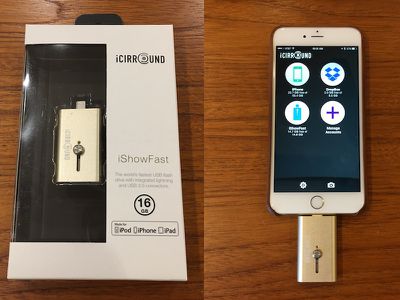
ishowfast
As it has done with a number of its other products, HYPER by Sanho is launching iShowFast via an Indiegogo campaign, but backers shouldn't expect an extended production timeline with potential stumbling blocks pushing delivery out even further than anticipated. iShowFast is already in production and ready to go, with HYPER by Sanho set to start shipping orders out as soon as the $50,000 Indiegogo campaign ends next month.

We've had a few days to play with an iShowFast stick, and while it's a pretty straightforward product that operates essentially identically to the iStick, it was good to see the device is indeed ready for launch in its retail packaging and to be able to try it out with its companion app for managing files on iOS devices.

The design of the iShowFast is clean and simple, with a gold aluminum body that is close to but not quite identical to the gold color Apple uses on its devices. A prominent slider button on the iShowFast makes it easy to switch between Lightning and USB connectors, although this cap-less design leaves one of the connectors unprotected when the drive is carried around in a pocket or bag.
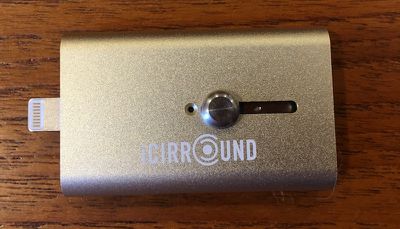
ishowfast_closeup
A blue LED next to the slider flashes briefly when the drive is connected to an iOS device or computer to confirm the connection and then occasionally as data is accessed on the drive.
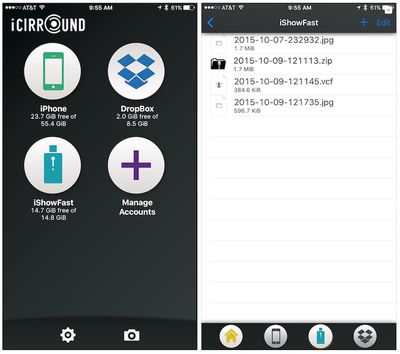
ishowfast_app_1
The iShowFast app for iOS is a simple utility that allows users to manage their files on both the flash drive and on the iOS device itself, as well as a linked Dropbox account. The usual file management tools are included, allowing users to delete, copy, move, share, and zip files, and password protection is supported. The app can also pull in items from the user's photo albums, music libraries, and clipboard, and offers one-step backup of the contacts stored on the device.
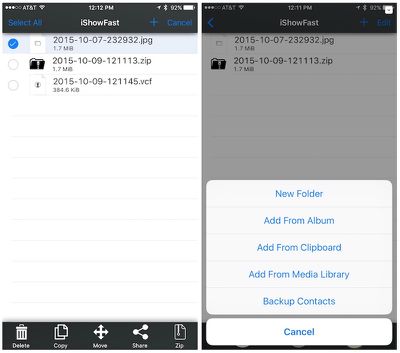
ishowfast_app_2
The main screen of the iShowFast app includes access to the device's camera functionality, making it easy to capture photos and videos and save them to the phone's local storage, the iShowFast stick, or Dropbox.
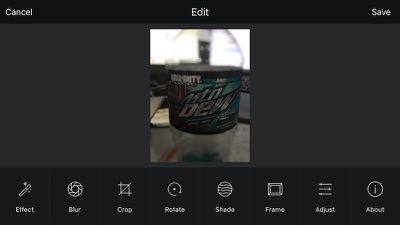
ishowfast_effects
For photos, the iShowFast app includes basic photo filters and editing from Camera360, making it easy to apply various effects, blurs, lens flare, and framing options while also supporting cropping, rotation, and a number of other image adjustments.
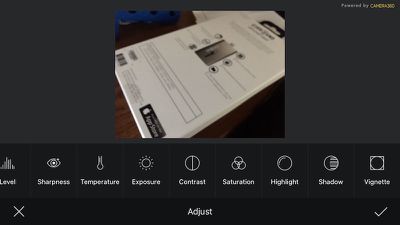
ishowfast_adjust
Overall, we found the iShowFast to work as advertised, offering a simple method for transferring files between iOS devices and computers and some nice basic camera integration and support for Dropbox. Given the ubiquity of wireless file transfers these days with Wi-Fi networking, AirDrop, iCloud, and more, many users won't have a need for the iShowFast. But for those who want or need to physically transfer files with support for password protection, the iShowFast looks like a solid option.

iShowFast's Indiegogo campaign kicks off today, offering early-bird backers and backers who previously supported the iStick campaign 40 percent off the eventual retail prices of the iShowFast.

$49 - iShowFast (16GB) for Early Birds & iStick Kickstarter backers
$59 - iShowFast (16GB). Regular retail price will be $80.
$60 - iShowFast (32GB) for Early Birds & iStick Kickstarter backers
$79 - iShowFast (32GB). Regular retail price will be $100.
$89 - iShowFast (64GB) for Early Birds & iStick Kickstarter backers
$99 - iShowFast (64GB). Regular retail price will be $150.
$149 - iShowFast (128GB) for Early Birds & iStick Kickstarter backers
$199 - iShowFast (128GB). Regular retail price will be $250.

The first batch of 3000 sticks will go out next month soon after the Indiegogo campaign ends, with the remainder of the orders going out in December.

Note: MacRumors received no compensation for this review.

Top Rated Comments

145 months ago

Good question. Apple's product description seems to indicate that this device ('http://www.apple.com/shop/product/MD822AM/A/lightning-to-sd-card-camera-reader') is a single-purpose device. It's for transferring photos from an SD card into an iDevice. They don't mention whether it is possible to use it in any other capacity (transfer files from the device to SD, or transferring other kinds of files.)

It would be interesting to find out if an app could enable its use for these additional purposes, but I suspect Apple wouldn't allow such an app on the App Store in the first place.
There is not a public or private API to access the sd card reader :( - the only way I know to access it is to mount it with a jailbroken iPad. I wonder why it isn't possible to access it via a sandbox app though - I guess root privileges are needed.

I personally feel like it's a very big missed opportunity. Even just having a private API that allowed imports from the sd card reader and/or usb camera kit would be amazing for businesses using their own personal app via enterprise certificates.

I'd still like to know how these company's can access information from a lightning device but no one has created an app (available on the App Store or not) to grab files from an sd card / usb plugged in via the camera kits....I'm definitely missing some details on how this is possible and I'd love to know what it is :p
Score: 2 Votes (Like | Disagree)
canesalato Avatar
145 months ago
I don't want to stick my thumb drive into their computer, I don't know what else it's been doing (seriously!).

Gary
....I understand...
Score: 1 Votes (Like | Disagree)
koruki Avatar
145 months ago
Just download Photosync from the App store, it works much better over wifi from PC, Mac, webbrowser everything. Costs $1

If you need to travel and need movies for your iPad get a Western Digital wireless drive, 1-2TB for that price.
Score: 1 Votes (Like | Disagree)
145 months ago


* People don't always know in advance what they're going to need. I use a 16GB phone and it works just fine for everything I do with it. If I should decide at some future date that I want to start transporting movies, I'm not going to suddenly drop another $900 to buy a new phone when I can spend $150 (or even $250 MSRP) for off-line storage.
Doing your research and future proofing on certain things would be much much more efficient. You could sell your phone and upgrade to a 64GB for about 150. Or... from the get go you could have not chosen a 16GB phone, and for 100 more gotten a 64GB phone. These, and many other options, are much much better than using one of these to store movies.
Score: 1 Votes (Like | Disagree)
pilot1226 Avatar
145 months ago
The only reason I could see wanting this is if I wanted to keep movies on a Flash Drive in the event I had no data access (like on an Airplane, etc.) and my kids wanted to watch a movie on the flight. Otherwise, that's what Cloud Storage is for. It's not like it's hard to get, I have probably over 1 TB for free between Dropbox, Box, and OneDrive.
Score: 1 Votes (Like | Disagree)

Popular Stories

duo aquarium

More Fun iPhone Duo Apps: 30 New Picks to Try

Friday November 6, 2026 3:27 pm PST by
When the iPhone Duo launched, we shared a list of some of the fun apps developers created for the new form factor. Two weeks out, developers are continuing to come up with fresh ideas, so we thought we'd share some of our favorites. Games Marbles Unhinged ($2.99) - Marbles Unhinged is a marble maze designed for the Duo. When you fold it, the floor turns into a ramp. If you stand the top...
apple pro tell logo

Apple Launching Five New Products Today

Thursday November 5, 2026 12:59 am PST by
Apple is launching five new products on Friday, November 6, following pre-orders that opened last week, including its first touchscreen MacBook Pro models. The following new products will be available from today: iPad mini with OLED display and A20 Pro chip iMac with M6 chip 14-inch MacBook Pro with M6 chip 14-inch MacBook Pro with OLED touchscreen 16-inch MacBook Pro with OLED...
iOS 28 AI

Apple Taking New Approach to Developing iOS 28 and macOS 28

Sunday November 8, 2026 7:42 am PST by
Apple has made a change to its development process for iOS 28, macOS 28, and corresponding software updates, according to Bloomberg's Mark Gurman. In his Power On newsletter today, he said Apple separates development of each year's new operating systems into three major stages. Typically, he said each stage consists of four weeks of coding followed by a four-week "convergence" period where...
Latest Stories
Apple Store Subscription Sign-Up Controversy Exposed
3 hours ago
Siri AI Rumored to Become 'More Like an Agent' as Early as Next Year
13 hours ago
Apple Taking New Approach to Developing iOS 28 and macOS 28
14 hours ago
Early Apple Black Friday Deals on Apple Watch, MacBook Air, and More
1 day ago
'Backglow' Lets You Customize New MacBook Pro's Glowing Apple Logo
1 day ago
Top Stories: Apple Product Launches, iOS 27.3 Beta, and More
2 days ago
More Fun iPhone Duo Apps: 30 New Picks to Try
2 days ago
Hands-On With Apple's New OLED Touchscreen MacBook Pro
2 days ago
Apple Store With All-New Design Opening Soon in Southern California
2 days ago
Control the Glowing Apple Logo on Your New MacBook Pro
2 days ago
Apple Shares New 'Apple Card: Apply and Use in Minutes' Ad
3 days ago
Apple Says More Than 100,000 Apps Optimized for iPhone Duo, Here's What's Still Missing
3 days ago
Early Black Friday Deals Kickoff With Steep Discounts on Apple Watch Ultras and More
3 days ago
The MacRumors Show: iOS 27.3 Looks Like a Huge Update
3 days ago
Best Buy's Black Friday Event Begins With Sitewide Savings on Apple, TVs, More
3 days ago
Apple Releasing Yet Another Two New Products Next Week
3 days ago
MacBook Air Drops to Lowest Price in Months With Amazon's $250 Discount
3 days ago
Apple Rumored to Drop the iPhone's Action Button Next Year
3 days ago
Apple's Extended Return Policy Now in Effect for 2026 Holiday Season
3 days ago
Apple Music Classical Updated With New Icon and Refreshed Design
3 days ago
OLED iPad Mini, M6 iMac, and New MacBook Pros Available From Today
3 days ago
Apple Surveys iPhone Duo Buyers About Crease and Camera
3 days ago
Apple's First Touchscreen Mac is Now Arriving to Customers
3 days ago
Claude Gets Personal Finance Feature With Bank Account Linking
3 days ago
Apple Arcade Adds Crossy Road Rush and NBA 2K27
3 days ago
Apple's New HomeView Smart Home Hub: Here's How Much RAM It Has
3 days ago
iPad Mini vs. iPad Air Buyer's Guide: Now Just $50 Apart
3 days ago
First iOS 27.3 and macOS Golden Gate 27.3 Public Betas Now Available
3 days ago
Apple Announces a New Mac Sales Record
4 days ago
Paid $200 for Logic Pro? Apple Says You Won't Get This New Feature
4 days ago










































