

Jackery makes a range of battery pack options from those designed for iPhones and iPads to those that are much more powerful, useful in emergency situations, power outages, and when camping.
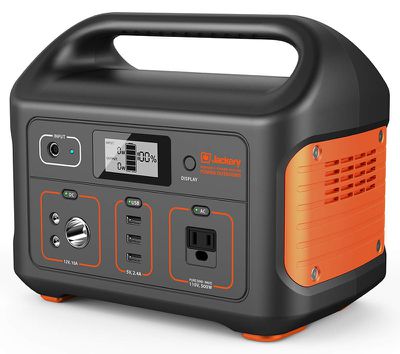
Jackery's Explorer 500 Portable Power Station is a middle tier 518Wh/144,000mAh portable battery that's expensive at $499.99, but also highly useful for keeping your necessary devices charged up when there's no other power source available.
Design
The Jackery Explorer 500 Portable Power Station is not your average battery pack - at just over 13 pounds, it's hefty and not something you're going to want to walk around with.
The E500 has a super rugged design that's going to hold up to abuse, which makes it perfect for camping and use outdoors. Both the shape and the ergonomic handle make it easy to carry, and though large, it has an attractive design.
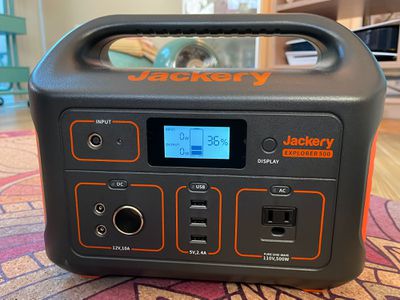
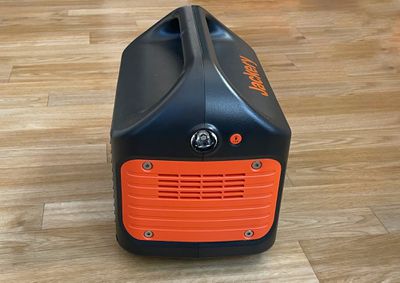
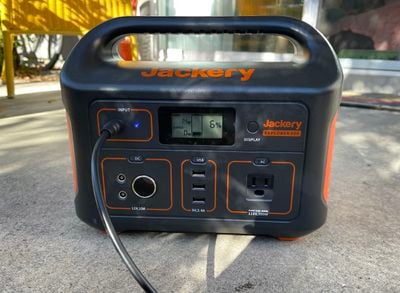
It's made from a black plastic material with orange accents and fan vents on the side. There's a small LCD display on the front, which is one of the handiest features. You can press on the display button to see the current charge level, the power draw of any connected devices, and the input power.
Next to the display there's a small input port for charging, and below that, there are a series of ports. At the sides, there's another button that toggles on a built-in LED light as a flashlight feature, which is a nice addition.
Ports
There's a standard 110V AC port that support up to 500W and 1000W surge, two 12V/7A 6.5x1.4mm DC outputs, a 12V/10A car outlet, three 2.4A/5V USB-A ports, and a DC input for charging purposes.
The number of devices and cables that use USB-A is dwindling, and at this point, more of my electronics have USB-C cables than USB-A cables. I wish the Explorer 500 had USB-C ports available both for convenience and for charging devices like my MacBook without having to pull out a power adapter, but unfortunately there are no USB-C ports.
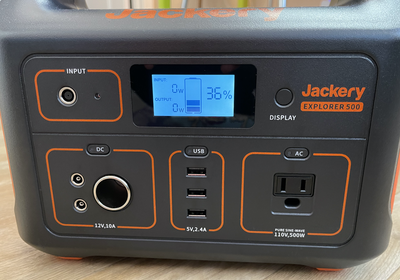
Aside from that, there are a good mix of ports available. The three USB-A ports can be used for your smaller devices that need minimal power, while the AC outlet works for just about anything.
As for the two 6.5x1.4mm DC output ports, I'm not sure most people are going to have devices able to take advantage of these. I do not. There is a 6mm DC to car cigarette lighter port converter that works with them, allowing for two car-compatible ports, but you will need to purchase this kind of adapter separately.
There are on/off switches for the DC, AC, and USB outputs, so these need to be turned on whenever you're charging something. Disabling them prevents power draw and keeps the battery in stasis so it's not draining. I haven't had the E500 long enough to test its ability to hold its battery over long periods of time, but it was able to maintain a charge for a week even when not in use.
Jackery recommends charging it up once every few months to ensure that it's ready in an emergency, so for the most part it can live tucked away in a closet until it's needed, as long as you remember to top it up now and then. The power to the ports is automatically disabled after 12 hours if the power usage is under 10 watts in order to conserve battery.
Charging
At 518Wh, the Jackery E500 has a good amount of power for everything from charging up electronics to powering appliances. How long each device lasts will depend on its power draw.
With my 15-inch MacBook Pro, I tested charging twice. The first time it took 20 percent of the battery to charge from zero to full, and the second time, it took 19 percent. So if you weren't using it for anything else, the E500 could charge a MacBook Pro to full about five times.
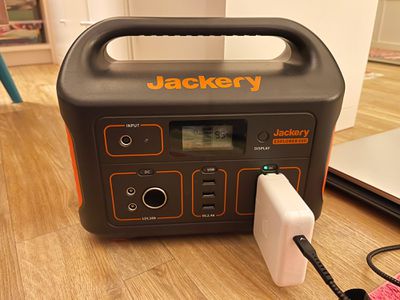
Charging my MacBook Pro to full took about two hours, which seems about full speed. I'm not 100 percent sure the LCD is giving me accurate watt levels when charging because it seemed to max out at about 75W and fluctuating at around 60 to 70W, while the MacBook Pro is capable of charging at 85W, but the charging didn't seem slow.
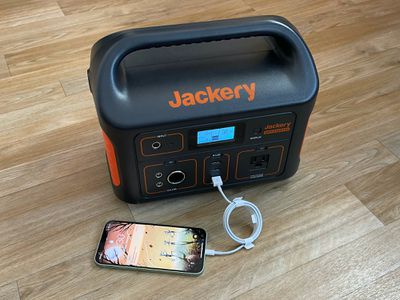
With my iPhone 11 Pro Max (the iPhone with the largest battery I have), it took three percent of the E500's battery to charge it up the first time I tested and four percent the second time, with the charge taking it from dead to full. Based on those metrics, I estimate that I could charge an iPhone 11 Pro Max about 29 times with the E500.
I tested the E500 with a Razer gaming laptop in use drawing around 150W on average, and it was able to last for a full four hours. I plugged in the laptop at 1:30 p.m. and the Jackery died at 5:40 p.m.
With my Dyson Air Purifier, I plugged it into the E500 at 12:00 p.m. and set it to medium, and it ran for 24 hours straight. When I finished this test, the E500 was still at 43 percent battery life, so for devices like fans and lights that have less power draw, it can work for quite some time.
I know the E500 is compatible with a wide range of little appliances like mini fridges, but I found out that a lot of my standard appliances draw too much power. My small Vornado heater, for example, is 750W/1000W depending on the power level, and my Vitamix blender is up to 1500W, so these aren't compatible.
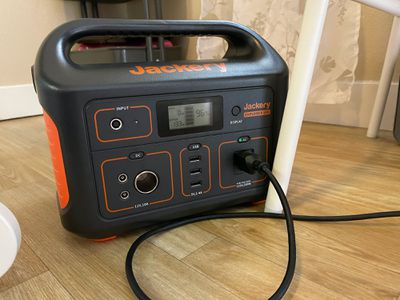
Things that are compatible include the PlayStation 4/5, a Dyson fan, a Netgear router, and a television, so there are still a lot of options, but make sure what you want to use with the E500 is under 500W. For appliances that require more power, Jackery has the more expensive E1000, which is a better solution for higher-powered devices and usage over a longer period of time.
When charging devices that draw a lot of power, the fans in the E500 do come on at times. They're not super loud, but they're noticeable and similar to running a standard fan at about a medium setting in decibel level.
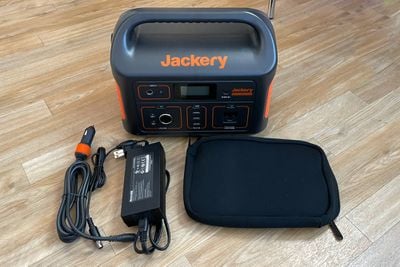
The E500 itself can be charged with a wall socket with the included power adapter that plugs into the input port, in a vehicle using the 12V port, or with a Solar Panel that Jackery sells as an add-on accessory. There's no charging method for this battery that's especially fast, which is one of the downsides to this charger. It takes about 7.5 hours to charge up to full using an AC adapter, and more than twice as long with the car adapter. Solar charging can be done in as little as 9.5 hours, but that depends on the conditions outside.
Note that passthrough charging is possible, so you can charge up devices that are plugged in while the E500 is plugged in to charge.
Solar Charger
Jackery sells a 100W Solar Panel alongside the Explorer 500, which uses the sun to charge it up so it can be used continually off grid. The SolarSaga Solar Panel is huge, which seems appropriate since this is a large battery.
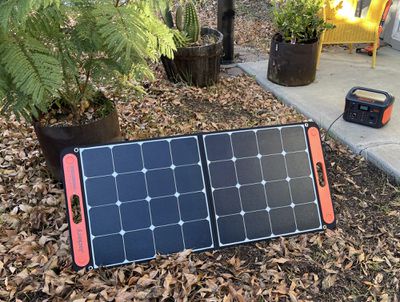
Even though it's a little unwieldy, I appreciated the design of the SolarSaga. There's a handle that makes it easier to transport, and it folds in half. There's also a pouch on the back for storing the charging cable, which was convenient.
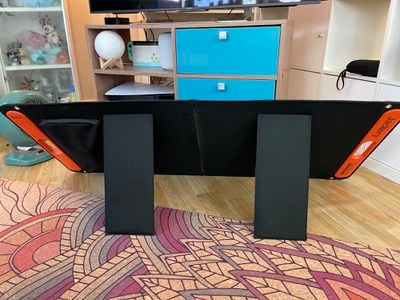
The SolarSaga connects to the E500 through a built-in DC cable that plugs into the Explorer, and it's simple to use. I just plugged it in and set up the panel using the included velcro-attached kickstands that let it be angled towards the sun. It took me all of two minutes to get it ready to charge.
Given that it's winter right now, we're not getting a whole lot of sun in Northern California, but I picked the day with the sunniest forecast for testing. I plugged in the SolarSaga in the morning, but I didn't see it charge over 20 percent over the course of the day nor did I max out its charging capabilities because it just wasn't sunny enough. In the most sun I could find during the winter, the SolarSaga was providing just about 60W, which would be enough to keep smaller appliances up and running.
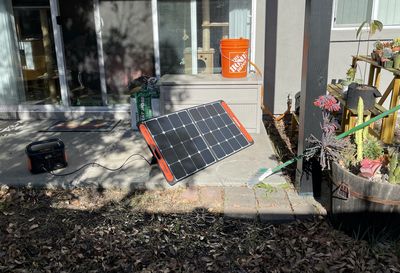
If you want to get the full charging power out of the SolarSaga, you're going to need good, direct sunlight that's not obscured by trees or other objects, so keep that in mind.
You're going to have quicker charging times when there's full sun to take advantage of, so the usefulness of the solar charger depends on where you're taking it. For a sunny camping spot, it might be able to keep many of your smaller devices topped off over a week, and if you're getting a full sun all day, you'll have enough power for large devices, too.
Jackery says that it should take around 9.5 hours to charge the battery to full, but I assume that's in optimal sun conditions. You can also plug devices directly into the SolarSaga because it has a USB-C port and a USB-A port.
Bottom Line
Living through a pandemic, raging fires in California, and a tenuous election in 2020 has caused me to be more of a stockpiler than I was before and it's caused me to put more thought into being prepared for emergency situations, and I don't think I'm alone in that.
This is not the kind of tech-related product I would have paid a lot of attention to in 2019, but it's something practical that makes sense to have on hand for those worried about being ready for power outages and other emergency situations, or even those who have gotten into camping this year in an effort to get out of the house.
The Explorer 500 supplies enough power to keep several devices running for a day or multiple days with conservation, and it can even power a router for a few hours if you have a random outage, which is useful now that most of us are working from home and can't get things done without a power source.
It's an investment at its price point, but for those who have the need, this is a solid portable power station that's worth considering if you're in the market for one.
I will say that if you're planning to use this kind of battery every day for powering a camper or whatever else, you may want to explore one of the models with a higher capacity because the E500 doesn't have enough power to keep appliances up and running for more than a day depending on what you're charging up, and it also isn't powerful enough for higher watt devices.
How to Buy
Jackery's Explorer 500 Portable Power Station can be purchased from Amazon for $499.99, and there's also a version with a 100W Solar Panel for $799.98.
Note: Jackery provided MacRumors with an Explorer 500 and SolarSaga 100W for the purpose of this review. No other compensation was received.















































Top Rated Comments
It is a lithium ion battery pack (in this case 500 wH) stuffed in a nice looking enclosure that also has a built in AC charger (to charge it when plugged into the wall) and a solar charge controller (to charge it when the solar panel is plugged into it) and an inverter (so you can power your AC gadgets) with USB outlets.
Everything is jammed in there to create a nice easy to carry "generator"
A person could make a much more powerful "generator" for the same price by purchasing all the parts separately from different vendors: Battery pack with AC charger, solar panel, solar charge controller, inverter, but the end result would be much larger, have lots of wires and be a hassle to transport.
So while these All-In-One battery powered "generators" are relatively expensive, their convenience and compact package makes them a compelling option.
Here are the specs for the Explorer 500:
* Portable Power Station Explore 500 Battery Capacity: 518Wh (24Ah, 21.6V)
* 1*AC Output: 1*110V, 500W (1000W peak)
* Car Port: DC 12V, 10A
* 3*USB-A port:5V, 2.4A
* 2*6.5mm*1.4mm DC outputs: 12V, 7A( for DIY)
* Input: 8mm DC, 12V~30V (100W Max)
* Dimensions: 11.8*7.6*9.5in
* Weight: 13.3lbs
With that said I have been extremely happy with build quality, dependability and performance of my Jackery products over the last 3 years. Just added their 300 v2 w/ MPPT solar controller which is perfect for 3-4 day trips supported by solar panels.
As for Chinese with no thought for durability or life cycle products from I see from your signature you already own plenty of those.