Kingston Nucleum USB-C Hub Review - MacRumorsOpen MenuShow RoundupsShow Forums menuVisit ForumsOpen Sidebar
Skip to Content

Review: Kingston's Nucleum USB-C Hub Adds Much-Needed Ports to Your MacBook or MacBook Pro

by

With Apple's decision to embrace USB-C on all of its modern Macs, the company has created a need for USB-C docks so that we can continue to use all of our non-USB C peripherals as we wait for the rest of the tech industry to catch up.

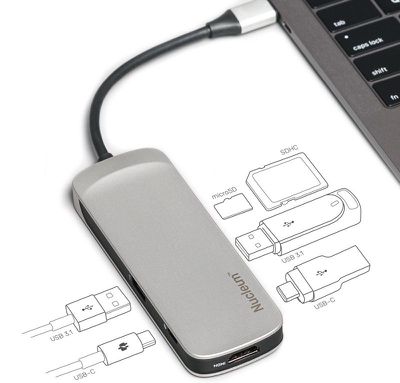
Kingston's Nucleum USB Type-C Hub is designed to meet that need, offering a selection of useful ports for MacBook, MacBook Pro, and iMac owners who still need to use the USB-A, HDMI, SD, and microSD ports that are no longer available on recent machines.
kingstonnucleum
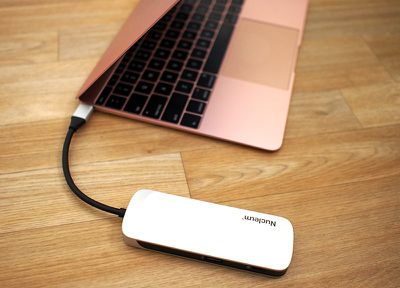
The Nucleum USB-C Hub, made from a silver Aluminum to match Apple devices, is small enough that it can be tucked into a purse or a bag, or, in a pinch, a pocket. It's narrower and shorter than an iPhone X, but a bit thicker, with a short built-in USB-C cord provided.

It's a bit larger than palm-sized, but it's still not going to take up much room during travel or when it's in use on a desk. There's a "Nucleum" logo on the top of the device, while the back features Kingston branding and necessary regulatory labels.
nucleumwithmacbook
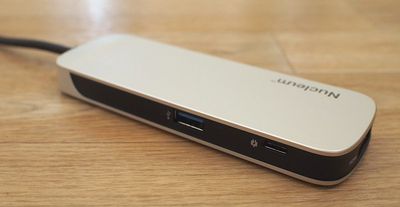
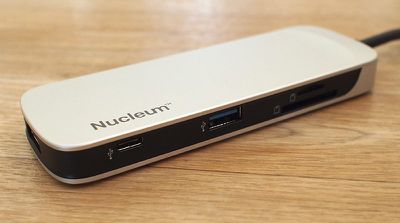
The left side of the dock features a USB-A port and a USB-C power delivery port so you can charge a MacBook or MacBook Pro while the hub is plugged in, and on the right side, there's another USB-C port for USB-C accessories, a single USB-A port, a microSD card slot, and an SD card slot. At one end, there's the aforementioned power cord, while the other end houses an HDMI port.

All in all, there are a total of seven ports available on the hub, which is not too bad for a device of this size. I don't often need more than two USB-A ports at a time, so the two-port setup worked for me, and it's nice to have access to both microSD and SD card slots for camera accessories.
nucleumsidea
This port arrangement is standard for many of the USB-C hubs that you'll find on sites like Amazon, but I've found that many of those hubs don't offer multiple USB-C ports. An extra USB-C port is surprisingly handy for my MacBook in particular (which has a single USB-C port) because I've found myself with more USB-C accessories as I transition from USB-A to USB-C.

If you have primarily USB-A accessories, you may find that the Kingston hub does not offer a sufficient number of USB-A ports. Competing (and more affordable) hubs on Amazon typically offer 3 to 4 USB-A ports, but again, Kingston has a nicer variety of ports available. Most dual USB-C hubs seem to have higher price tags.
nucleumsideb
You can use all of the hub's ports at once if so desired, and when testing multiple accessories plugged in at once, I ran into no problems. The HDMI port supports a 4K monitor (or a 1080p monitor), while passthrough charging functionality means your attached iPhones will charge up while plugged into the hub. Kingston says the Nucleum offers 5V/1.5A, which is best suited to iPhones and similar accessories. iPads will charge, but slowly.

When using the power delivery USB-C port with your USB-C cable and power adapter for charging purposes, the hub is able to deliver up to 60W of power. That is sufficient for charging the 12-inch MacBook (29W) or the 13-inch MacBook Pro (61W) but it falls a bit short of the full capacity of the 15-inch MacBook Pro (87W).
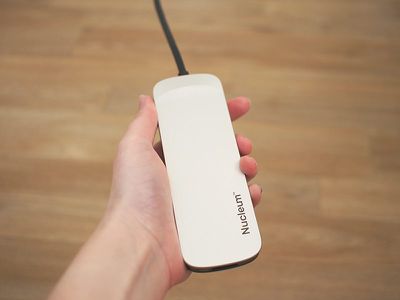
nucleuminhandsize
Still, 60W is enough to keep a 15-inch MacBook Pro topped up provided you're not doing something that's super battery intensive like rendering video or playing a graphics-heavy game. During my workday, the 60W provided by the hub was enough to keep my 15-inch MacBook Pro at 100 percent using apps like Safari, Mail, Slack, Photoshop, Pixelmator, Chrome, Tweetbot, and more all at once.

I did notice that when I unplugged my USB-C power adapter from the Nucleum or when I plugged it in, that it would cause the hub to shut off for a second. That means that any hard drives or other accessories I have attached temporarily disconnect, so you're going to want to be careful not to plug it into a power source or unplug it during file transfers.

As a side note, the Nucleum does not need to be plugged in to a power source other than the host computer for it to function. Using the passthrough charging feature is optional.

Transfer speeds were at what I'd expect for a USB-A device plugged into a USB-C hub. With a traditional Seagate Backup Plus hard drive, for example, it took about 20 seconds to transfer over 3GB of data. Speeds were a bit slower when I was utilizing all of the ports on the hub, but not unreasonably so. As a note, you can only connect USB-C and USB-A hard drives to the hub. If you have a Thunderbolt 3 drive, like I do, it is not compatible because the Nucleum does not support Thunderbolt 3.
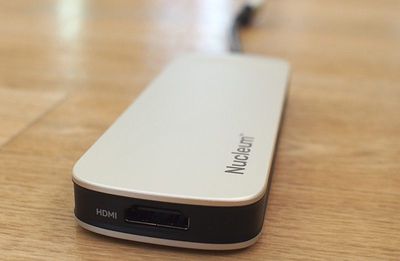
nucleumhdmi
Moving files from an SD card and a microSD card was also relatively speedy, with it taking about 25 seconds to copy over 1GB worth of photos from an SD card to my computer, and a little under a minute to copy them back from the MacBook Pro to the card. As someone with several cameras and a drone, having access to both microSD and SD card slots is invaluable.

Bottom Line

With Apple's focus on USB-C and its decision to remove all legacy ports, the company has created a thriving third-party hub market, and it can be difficult to narrow down what's good from what's just mediocre.

Kingston's Nucleum is in the former category, providing the ports you're most likely to need in your day to day life in a slim, portable hub from a trusted manufacturer. Kingston's hub is more expensive than some options you'll find on Amazon, but reliability is often worth the extra money.


I appreciated the compact size of the Nucleum, which makes it ideal for travel, and the variety of ports that it provides was perfect for me. It offers all of the ports that I need on a daily basis (primarily USB-C, USB-A, and an SD card slot), and everything worked as expected with no surprises.

I do wish that it perhaps had one more USB-A port for people who still need to use several USB-A accessories, but I have no complaints about an extra USB-C port. I don't need dual USB-C ports on my MacBook Pro, but for my 12-inch MacBook, dual ports is a valuable addition. While I used this with Macs, it's also going to be compatible with Windows-based machines.

The one major thing to be aware of with the Nucleum that it disconnects when connected to or disconnected from a power source. It's not a huge deal, but if you purchase this hub, make sure not to change its power settings during file transfers.

How to Buy

The Nucleum USB Type-C Hub can be purchased from the Kingston website or from Amazon.com for $80.

Note: Kingston provided MacRumors with a Nucleum USB-C Hub for the purpose of this review. No other compensation was received.


Tag: USB-C

Top Rated Comments

Quu Avatar
110 months ago
Just think in a few years they may be able to build a computer that has all these ports built in! - What a world that'd be.

Score: 32 Votes (Like | Disagree)
BenTrovato Avatar
110 months ago
It wasn’t Apple’s finest move by going full USB-C and requiring 99% of the people to buy a hub. Yes I know there is always that one person who is full cloud and doesn’t need any ports. The majority of those needing ports didn’t make sense. But that’s Apple, sometimes they nail it - on this one, way off.

The saddest part is that they boosted the usb hub segment in a big way. A ten fold increase in all that plastic for millions more USB hubs that in a few years will be in a landfill. Stay tuned for the iPhone launch in September when they open the keynote with a 5 minute presentation on how much more “green” Apple is :rolleyes:
Score: 7 Votes (Like | Disagree)
soupcan Avatar
110 months ago
Sooooooo, if the ports are much needed why are we buying laptops who lack every single usable port on them? Is it because of the Apple logo on the back of it? Because that's dumb.
Score: 7 Votes (Like | Disagree)
cBraunDesign Avatar
110 months ago
Just think in a few years they may be able to build a computer that has all these ports built in! - What a world that'd be.
Once again, confirmation that the 2015 MacBook Pro is the best computer Apple has ever made.
Score: 4 Votes (Like | Disagree)
blackrabbit1000 Avatar
110 months ago
Why do all those docks need to be so big and clunky? Not to mention they don’t really play along nicely with Apple’s design language.
HooToo USB-C dock matches really well actually.
[doublepost=1528839268][/doublepost]Weird thing is, none of these work with the super drive for that occasional need for a CD or DVD. Only the official Apple USB-C to USB dongle will work with that little beast.

Attachment Image
Score: 4 Votes (Like | Disagree)
110 months ago
Lol USB Type A, HDMI, SD Card Reader, and Ethernet ports are all legacy now?

I’ll give you FireWire and the 3.5 mm jack but the others? Really?
Every pair of headphones I own begs to differ as to their 3.5mm jack's being prematurely relegated to the dustbin.
Score: 4 Votes (Like | Disagree)

Popular Stories

duo aquarium

More Fun iPhone Duo Apps: 30 New Picks to Try

Friday November 6, 2026 3:27 pm PST by
When the iPhone Duo launched, we shared a list of some of the fun apps developers created for the new form factor. Two weeks out, developers are continuing to come up with fresh ideas, so we thought we'd share some of our favorites. Games Marbles Unhinged ($2.99) - Marbles Unhinged is a marble maze designed for the Duo. When you fold it, the floor turns into a ramp. If you stand the top...
apple pro tell logo

Apple Launching Five New Products Today

Thursday November 5, 2026 12:59 am PST by
Apple is launching five new products on Friday, November 6, following pre-orders that opened last week, including its first touchscreen MacBook Pro models. The following new products will be available from today: iPad mini with OLED display and A20 Pro chip iMac with M6 chip 14-inch MacBook Pro with M6 chip 14-inch MacBook Pro with OLED touchscreen 16-inch MacBook Pro with OLED...
silver iphone 18 pro

Apple Rumored to Drop the iPhone's Action Button Next Year

Friday November 6, 2026 6:07 am PST by
Apple plans to merge the iPhone's Action button with the Camera Control starting next year, according to the leaker known as "Instant Digital." In a new post on Weibo, the leaker claimed that a single press of the combined button would open the camera, while a long press would trigger the function assigned to the Action button. They explicitly clarified that the dedicated Action button would ...
Latest Stories
Siri AI Rumored to Become 'More Like an Agent' as Early as Next Year
7 hours ago
Apple Taking New Approach to Developing iOS 28 and macOS 28
9 hours ago
Early Apple Black Friday Deals on Apple Watch, MacBook Air, and More
1 day ago
'Backglow' Lets You Customize New MacBook Pro's Glowing Apple Logo
1 day ago
Top Stories: Apple Product Launches, iOS 27.3 Beta, and More
1 day ago
More Fun iPhone Duo Apps: 30 New Picks to Try
2 days ago
Hands-On With Apple's New OLED Touchscreen MacBook Pro
2 days ago
Apple Store With All-New Design Opening Soon in Southern California
2 days ago
Control the Glowing Apple Logo on Your New MacBook Pro
2 days ago
Apple Shares New 'Apple Card: Apply and Use in Minutes' Ad
2 days ago
Apple Says More Than 100,000 Apps Optimized for iPhone Duo, Here's What's Still Missing
2 days ago
Early Black Friday Deals Kickoff With Steep Discounts on Apple Watch Ultras and More
2 days ago
The MacRumors Show: iOS 27.3 Looks Like a Huge Update
2 days ago
Best Buy's Black Friday Event Begins With Sitewide Savings on Apple, TVs, More
2 days ago
Apple Releasing Yet Another Two New Products Next Week
2 days ago
MacBook Air Drops to Lowest Price in Months With Amazon's $250 Discount
2 days ago
Apple Rumored to Drop the iPhone's Action Button Next Year
2 days ago
Apple's Extended Return Policy Now in Effect for 2026 Holiday Season
2 days ago
Apple Music Classical Updated With New Icon and Refreshed Design
2 days ago
OLED iPad Mini, M6 iMac, and New MacBook Pros Available From Today
3 days ago
Apple Surveys iPhone Duo Buyers About Crease and Camera
3 days ago
Apple's First Touchscreen Mac is Now Arriving to Customers
3 days ago
Claude Gets Personal Finance Feature With Bank Account Linking
3 days ago
Apple Arcade Adds Crossy Road Rush and NBA 2K27
3 days ago
Apple's New HomeView Smart Home Hub: Here's How Much RAM It Has
3 days ago
iPad Mini vs. iPad Air Buyer's Guide: Now Just $50 Apart
3 days ago
First iOS 27.3 and macOS Golden Gate 27.3 Public Betas Now Available
3 days ago
Apple Announces a New Mac Sales Record
3 days ago
Paid $200 for Logic Pro? Apple Says You Won't Get This New Feature
3 days ago
Instagram's Edits Video Editor is Now Available on Mac
3 days ago









































