LaCie RAID Pro With SD Card Slot Review - MacRumorsOpen MenuShow RoundupsShow Forums menuVisit ForumsOpen Sidebar
Skip to Content

Review: LaCie's 4TB Rugged RAID Pro With SD Card Slot is Perfect for Photographers and Videographers

by

Seagate's LaCie brand is well-known for its line of rugged, durable hard drives that are protected by an iconic orange bumper, and this spring, LaCie unveiled its latest accessory in the rugged lineup, the 4TB USB-C LaCie Rugged RAID Pro.

Design

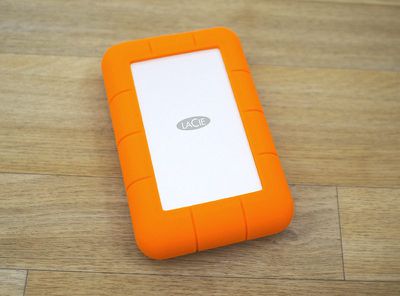
If you've seen a hard drive in LaCie's rugged collection before, the Rugged RAID Pro will look immediately familiar. It features an aluminum-encased hard drive wrapped in durable, shockproof orange rubber.

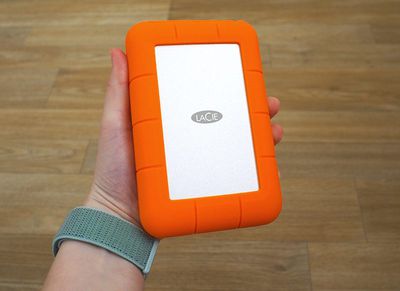
Compared to the former Rugged RAID hard drive LaCie offered, this new model is thinner and lighter. Size wise, the dimensions aren't hugely different, but it's noticeable. This new model measures in at 1.18 x 3.6 x 5.5 inches, compared to the Rugged RAID's 1.3 x 3.6 x 5.8 inch dimensions, and it weighs just about a pound.
lacieruggedraidprodesign
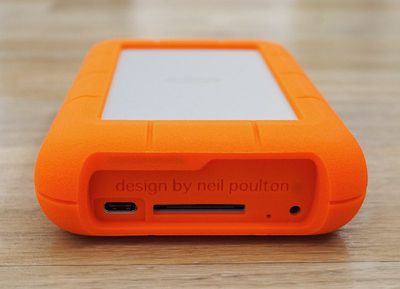
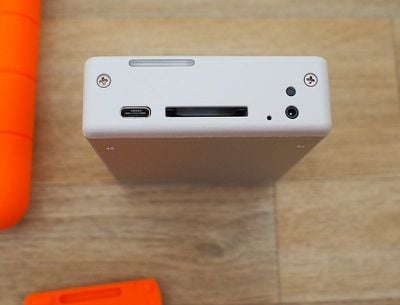
LaCie's previous Rugged hard drives have included built-in cables, but the Rugged RAID Pro uses a separate cable, which is one of the biggest design changes LaCie has introduced here. The other major change is the addition of an SD card slot, which is a fantastic addition for photographers, drone operators, and other people who often need to pull data from an SD card.

I often use an SD card reader to pull photos from my cameras, so I appreciated the addition of the SD card slot. I also prefer the removable cable to the built-in cable of the former LaCie Rugged RAID option because it offers more versatility. It's a bit messier with nowhere to wind the cord, but it overall isn't much more inconvenient.
lacieruggedraidports
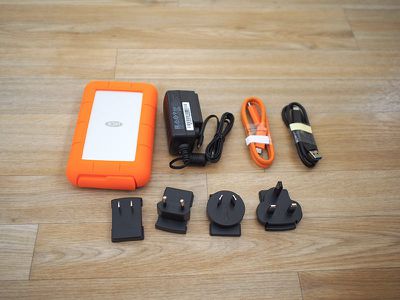
At the bottom of the Rugged RAID Pro, there's the aforementioned SD card slot and a USB-C port. LaCie has included a USB-C to USB-C cable for use with USB-C devices such as Apple's latest MacBook Pro and iMac models, and a USB-C to USB-A cable for use with older devices.
lacieruggedraidcomponents
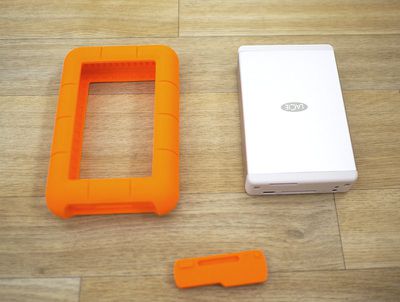
A rubber cover made out of the same material as the bumper protects these ports while in travel, and because it's a standalone piece that can be lost, LaCie includes an extra in the package. The Rugged RAID Pro hasn't left my office but I've still misplaced that port cover, so it's nice to have a backup.
lacieruggedraidproskinoff2
The hard drive also ships with a power supply and a range of different plug heads for use when traveling. When used with a Thunderbolt device such as Apple's 2016 and later MacBook Pros, the Rugged RAID Pro is bus-powered and does not require the included power supply, but with other devices, such as the 12-inch MacBook, the power supply is necessary.

On devices where the USB ports are not providing enough power to the LaCie Rugged RAID Pro, a light on the front will flash letting you know that it needs to be plugged in to the power supply.
lacieruggedraidnoskin
LaCie's Rugged RAID Pro, like all of the rugged hard drives, is designed to be resistant to dust and water, and it is designed to hold up to drops and damage. LaCie's documentation says it has drop resistance up to four feet (one foot less than the prior Rugged RAID), along with IP54 resistance to water and dust.

IP54 translates to protection from water spray from any direction, so it should hold up well in the rain, but you won't want to submerge it. It also means limited ingress protection from dust. According to LaCie, it can also withstand crushing from a 1-ton car.

I did test its drop resistance with about 10 drops from four feet with no damage inflicted (with the drive powered off, of course), but I didn't double check LaCie's crush rating.

Inside of the Rugged RAID Pro, there are two 2TB hard drives for up to 4TB of storage space depending on RAID configuration.

Software

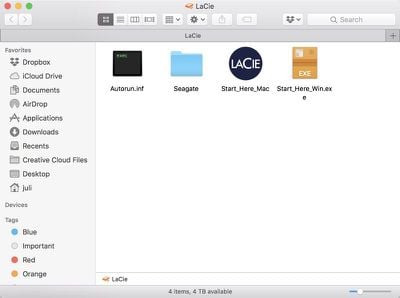
Setting up the Rugged RAID Pro is as simple as plugging it in and opening it up. There's a "Start Here Mac" and a "Start Here Windows" file, and you just need to click the appropriate file.
lacieruggedraidsetup
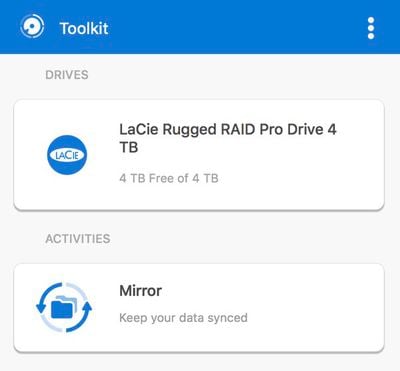
The Mac version of the software installs the LaCie Toolkit software. The Toolkit software lets you see how much storage you have available at a glance, and there's a Mirror feature that lets you set up a Mirror folder where files will sync to the Rugged RAID Pro automatically.
lacietoolkit
You just need to go through the menus and set up a source folder to enable this feature. Mirror is similar to something like Dropbox and can be handy if you have files that you want to keep safe on a secondary drive without having to worry about it.

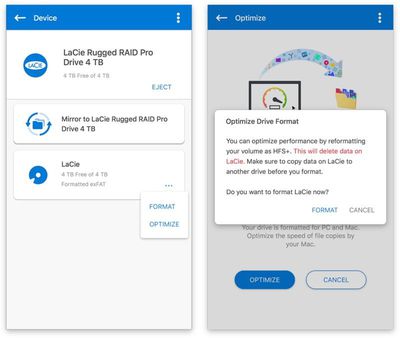
If you click on the drive in the Toolkit app, there is an option to "optimize" it by reformatting it from exFAT to HFS+.

In the settings section of the app, you can also use the Toolkit to toggle on an option to import data from SD cards that are added to the drive automatically, and there's a feature to turn off the app's ability to launch when you start your Mac up.
lacietoolkitoptimize
I preferred to manually import data from my SD cards rather than having it done automatically, but it's a useful option if that's what you plan to primarily use the drive for.

The LaCie Rugged RAID Pro comes configured as RAID 0 for maximum storage space and faster file transfers. If you want to reconfigure it to RAID 1 for data redundancy, you can download the LaCie RAID Manager.

RAID 0 is a setup that's going to give you the fastest file transfer speeds while also taking advantage of the full 4TB of storage space from the two included 2TB drives. RAID 1 is a setup that mirrors the two drives so that you always have a second copy of your data for extra protection.

LaCie includes a 3-year Seagate data rescue program with the Rugged RAID Pro, along with a free month of access to Adobe's Creative Cloud apps. With the rescue program, if the hard drive fails, files are accidentally deleted, or the drive is otherwise damaged, Seagate will provide data recovery services at no additional cost.

Performance

LaCie promises transfer speeds of 240MB/s over USB-C, and that is close to what I saw in my testing of the drive with a 2016 MacBook Pro. Transferring several hundred photos from an SD card in the SD card slot took just a few minutes, and file transfers from my MacBook Pro to the Rugged RAID Pro and vice versa were just as speedy.
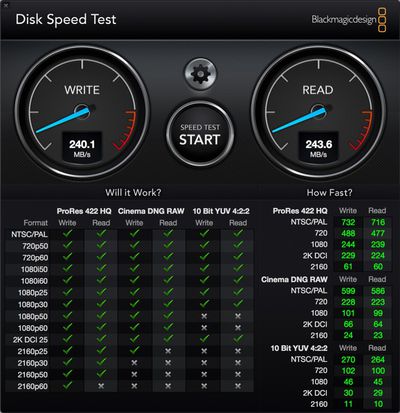
lacieruggedraidprodiskspeedtest
In my experience, the Rugged RAID Pro got very hot after about a half hour of usage, so this is something to be aware of.

lacietransferspeeds

Bottom Line

If you're looking for more storage space for a modern USB-C Mac or PC and want a RAID configuration for redundancy, the LaCie Rugged RAID Pro is an affordable option from a trusted brand that offers a solid compromise between price point and speed.
ruggedraidprosize
The addition of an SD card slot makes it more convenient than ever for photographers, videographers, and others who need backup and file transfers on the go, and with its rugged enclosure, it's ideal for taking along when traveling. Seagate's data rescue program, which is included, offers additional peace of mind.

I wouldn't buy this particular hard drive for a configuration where the external power source will be required, but it's nice that the option is included along with the relevant cables if you need to transfer files to an older machine.

How to Buy

The LaCie Rugged RAID Pro retails for $350, but it can be purchased from B&H Photo for $291 or from Amazon for $330.

Note: LaCie provided MacRumors with a Rugged RAID Pro for the purpose of this review. No other compensation was received. MacRumors is an affiliate partner with Amazon and B&H Photo When you click a link and make a purchase, we may receive a small payment, which helps us keep the site running.


Tags: LaCie, Seagate

Top Rated Comments

108 months ago
Most “modern” photo/video “pros” are taking out pictures/videos with an iPhone or drone while being connected either via cellular or wifi within minutes/hours of an urban area. The one that do use DSLR upload it to a computer and then to a NAS/storage tower. These individuals are not backing up or working directly from a portable HDD. Those serious enough have external SSD options.

This hasn't been my experience… I run a production company that makes mostly commercials, branded content, etc. Almost every project shoots on one of the Arri Alexa variants. We deploy mirrored pairs of drives to every shoot. When possible, 2-bay RAIDs (frequently OWC Mercury Elite Pro Dual actually!), but very frequently shuttle drives like Ruggeds as well. Sometimes the DIT (basically data manager responsible for downloading media) is working off a laptop, sometimes they don't have access to consistent power and can really benefit from bus power, and sometimes production needs to travel and don't want to pack multiple huge raids. As skeptical as I was of LaCie after their dark days in early 00s, Ruggeds have always served us well and I'm excited for these new ones -- though I sadly don't think the SD card slot will be very useful for us — maybe CFast ; )

No, raw media does not go to the cloud (for many reasons), and cards are very infrequently being dumped to SSDs -- the huge amounts of data generated per day and the disposable nature of on-set drives that need to be sent to several post production partners and frequently delivered to clients most often precludes that option b/c of the cost. Every so often you'll hire a particularly well kitted DIT that has a SSD RAID built into their cart, but this is just for getting media off of cards quickly, when then gets transferred to spinning drives to deliver to production at the end of the day.

Can't speak for serialized content where they have the luxury of working with a single team for months or years at a time and have consistent access to and control over locations -- maybe rugged drives are irrelevant in that world, but certainly not in commercial production!
Score: 5 Votes (Like | Disagree)
108 months ago
If you think most pros take pics with an iPhone, you can't really contribute to this conversation.

Most “modern” photo/video “pros” are taking out pictures/videos with an iPhone or drone while being connected either via cellular or wifi within minutes/hours of an urban area. The one that do use DSLR...
Score: 4 Votes (Like | Disagree)
Pupi Avatar
108 months ago
Never liked this design. Always looked cheap and unappealing to me, like some AliExpress / Wish random product. LaCie should step up their game.
Score: 4 Votes (Like | Disagree)
rodpascoe Avatar
108 months ago
Ah miss the mark by not incorporating WiFi direct transfer for the iOS users. Oddly enough I don’t use any external drives, I went entirely towards the cloud route. If only DSLR and consumer cameras include WiFi transfer we would not need external drives. Curious to know when this day will happen.

DSLR need a built-in SSD 512GB or higher with WiFi transfer. I cannot remember the last time I used a SD card or USB thumb drive.
The technology is not here yet for wifi transfer to cloud in the field.

Most pro's use gear producing tens of gigabytes a shoot, wifi could not transfer this fast enough let alone safely. That's before we even start talking about the privacy issue.
[doublepost=1533283831][/doublepost]
Most “modern” photo/video “pros” are taking out pictures/videos with an iPhone or drone while being connected either via cellular or wifi within minutes/hours of an urban area. The one that do use DSLR upload it to a computer and then to a NAS/storage tower. These individuals are not backing up or working directly from a portable HDD. Those serious enough have external SSD options.
I don't think you really know what "Most modern pro's" really do when in the field do you?...
Score: 3 Votes (Like | Disagree)
AngerDanger Avatar
108 months ago
Mmm, gotta love that premium inflatable-life-boat orange. I'm surprised they aren't advertising it like this…


Attachment Image
Score: 3 Votes (Like | Disagree)
108 months ago
I switched to a Samsung T5 but ~this~ has me almost wishing I didn’t. I’m a huge LaCie fan!
Score: 2 Votes (Like | Disagree)

Popular Stories

duo aquarium

More Fun iPhone Duo Apps: 30 New Picks to Try

Friday November 6, 2026 3:27 pm PST by
When the iPhone Duo launched, we shared a list of some of the fun apps developers created for the new form factor. Two weeks out, developers are continuing to come up with fresh ideas, so we thought we'd share some of our favorites. Games Marbles Unhinged ($2.99) - Marbles Unhinged is a marble maze designed for the Duo. When you fold it, the floor turns into a ramp. If you stand the top...
apple pro tell logo

Apple Launching Five New Products Today

Thursday November 5, 2026 12:59 am PST by
Apple is launching five new products on Friday, November 6, following pre-orders that opened last week, including its first touchscreen MacBook Pro models. The following new products will be available from today: iPad mini with OLED display and A20 Pro chip iMac with M6 chip 14-inch MacBook Pro with M6 chip 14-inch MacBook Pro with OLED touchscreen 16-inch MacBook Pro with OLED...
silver iphone 18 pro

Apple Rumored to Drop the iPhone's Action Button Next Year

Friday November 6, 2026 6:07 am PST by
Apple plans to merge the iPhone's Action button with the Camera Control starting next year, according to the leaker known as "Instant Digital." In a new post on Weibo, the leaker claimed that a single press of the combined button would open the camera, while a long press would trigger the function assigned to the Action button. They explicitly clarified that the dedicated Action button would ...
Latest Stories
Siri AI Rumored to Become 'More Like an Agent' as Early as Next Year
8 hours ago
Apple Taking New Approach to Developing iOS 28 and macOS 28
10 hours ago
Early Apple Black Friday Deals on Apple Watch, MacBook Air, and More
1 day ago
'Backglow' Lets You Customize New MacBook Pro's Glowing Apple Logo
1 day ago
Top Stories: Apple Product Launches, iOS 27.3 Beta, and More
2 days ago
More Fun iPhone Duo Apps: 30 New Picks to Try
2 days ago
Hands-On With Apple's New OLED Touchscreen MacBook Pro
2 days ago
Apple Store With All-New Design Opening Soon in Southern California
2 days ago
Control the Glowing Apple Logo on Your New MacBook Pro
2 days ago
Apple Shares New 'Apple Card: Apply and Use in Minutes' Ad
2 days ago
Apple Says More Than 100,000 Apps Optimized for iPhone Duo, Here's What's Still Missing
2 days ago
Early Black Friday Deals Kickoff With Steep Discounts on Apple Watch Ultras and More
2 days ago
The MacRumors Show: iOS 27.3 Looks Like a Huge Update
2 days ago
Best Buy's Black Friday Event Begins With Sitewide Savings on Apple, TVs, More
2 days ago
Apple Releasing Yet Another Two New Products Next Week
2 days ago
MacBook Air Drops to Lowest Price in Months With Amazon's $250 Discount
2 days ago
Apple Rumored to Drop the iPhone's Action Button Next Year
3 days ago
Apple's Extended Return Policy Now in Effect for 2026 Holiday Season
3 days ago
Apple Music Classical Updated With New Icon and Refreshed Design
3 days ago
OLED iPad Mini, M6 iMac, and New MacBook Pros Available From Today
3 days ago
Apple Surveys iPhone Duo Buyers About Crease and Camera
3 days ago
Apple's First Touchscreen Mac is Now Arriving to Customers
3 days ago
Claude Gets Personal Finance Feature With Bank Account Linking
3 days ago
Apple Arcade Adds Crossy Road Rush and NBA 2K27
3 days ago
Apple's New HomeView Smart Home Hub: Here's How Much RAM It Has
3 days ago
iPad Mini vs. iPad Air Buyer's Guide: Now Just $50 Apart
3 days ago
First iOS 27.3 and macOS Golden Gate 27.3 Public Betas Now Available
3 days ago
Apple Announces a New Mac Sales Record
3 days ago
Paid $200 for Logic Pro? Apple Says You Won't Get This New Feature
3 days ago
Instagram's Edits Video Editor is Now Available on Mac
3 days ago









































