

Logitech in March introduced a new series of POWERED wireless charging options, one of which is a new 3-in-1 dock meant to charge the iPhone, Apple Watch, AirPods, and other devices that support Qi-based wireless charging.
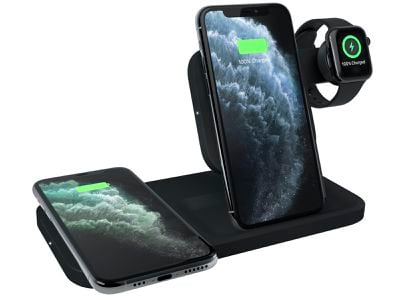
After Apple canceled the AirPower charging dock in March of 2019, multi-device charging options soared in popularity. It seems like every company is coming out with a 3-in-1 wireless charging dock, and Logitech is no exception.
Logitech has been making wireless chargers for Apple devices for a couple of years now, and the first iteration of the POWERED stand, which charged a single iPhone, continues to be one of my favorite chargers to this day. The new $130 POWERED 3-in-1 dock is similar to that original POWERED stand, but it adds expanded charging capabilities that make it a useful all-in-one charging solution.
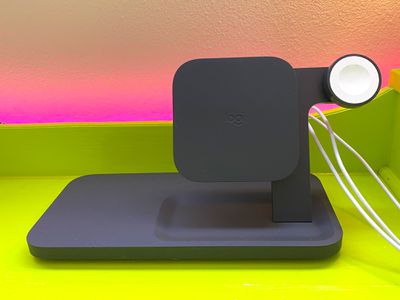
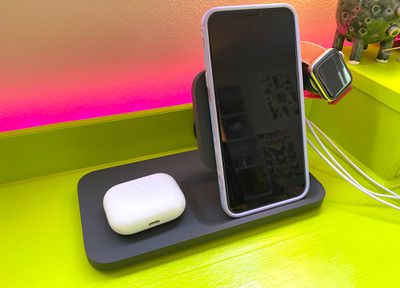
Logitech is offering the POWERED 3-in-1 dock in two colors, charcoal and white, and my review version is the charcoal model. The black is sleek and unassuming, and it looks attractive despite its plastic construction. It's made from a thick, heavy plastic with a rubber coating that keeps devices in place, and it feels sturdy and stable.
The dock features a flat wireless charging space on the left that can charge AirPods, an iPhone, or another smartphone, along with an upright charger in the middle able to charge an iPhone or other smartphone. On the right side, there's a built-in Apple Watch charging puck, and the whole thing is charged with a single power adapter.
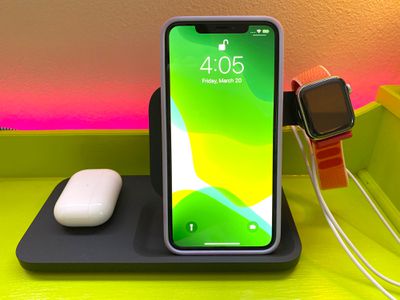
The dock overall is compact and doesn't take up a whole lot of space on my desk, which I like, and design wise, it's one of my favorite charging multi-device wireless charging docks that I've tried because of the convenience of the upright charger. The square-shaped upright charger guides the iPhone into the right spot, and it works with iPhones of all sizes.
I'm not entirely sure why the Apple Watch charging puck is located over to the right side of the dock rather than the left over the flat charging surface, which would have saved more space, but maybe it was intended to make it easier to get each device in its proper charging spot.
The way the Apple Watch arm sticks out looks a little funny, but it is a functional design and I've had no issues dropping my Apple Watch, iPhone, and AirPods Pro in their respective spots and getting charging started right away. With some chargers, there's a bit of adjustment needed to make sure things are properly situated, which can lead to charging mishaps.
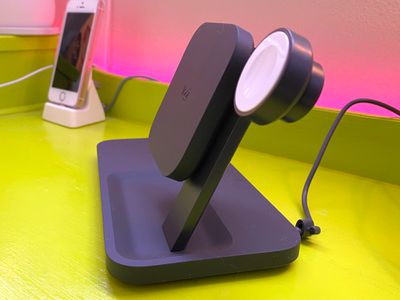
For the most part, I had no problem with that thanks to the upright charger, though when using the secondary charger with an iPhone, you might want to take a few seconds to make sure the iPhone is properly positioned. I was able to drop and go most of the time, but it's still possible to put the iPhone down a little off center, which prevents charging.
There's a light at the top of the charger that lets you know when your iPhone is in the right spot, and it's not super bright when the lights are out.
The two charging spots are able to charge Apple devices at up to 7.5W, which is the maximum charging speed for an iPhone at this time. In my testing, my iPhones charged to around 20 to 23 percent in about a half hour depending on battery capacity.
Both spots charge at 7.5W simultaneously, so you can charge two devices at max speed, and if you have an Android smartphone, it'll charge at a maximum of 10W in either spot.
Wireless charging is not meant to be speedy and it's not a great solution if you need power fast, but it's certainly convenient for trickle charging during the day or while you sleep. My AirPods also charged at the expected speed, as did my Apple Watch. For reference, the Apple Watch charger included is 5W.
The 3-in-1 dock works with most cases that are 3mm or thinner, and I had no problems with an Apple Smart Battery Case, a standard Apple silicone case, a Speck case of average thickness, and a thicker Lifeproof case.
I don't often pay as much attention as I should to built-in safety features in chargers, but Logitech says that the POWERED Dock has internal heat sensors for temperature management, overcharge protection that shuts it off when a device battery is full, and foreign object detection to shut it off if a foreign object is detected in the charging zone.

Overall, I have no complaints with Logitech's Dock. It's well designed, the upright charger is convenient and can be used for watching videos or FaceTiming when you charge, and the extra open spot that fits either an iPhone or AirPods is versatile and useful.
Bottom Line
I see a lot of complaints about the prices of these kinds of docks, and the POWERED 3-in-1 Dock from Logitech is not what I'd call affordable. It's $130, which is about in line with other name-brand 3-in-1 docks on the market.
You can get cheaper options from Amazon, and it's also a whole lot cheaper to just use the cords and cables that come with your devices, so these 3-in-1 charging solutions certainly aren't for everyone.
What the POWERED dock lacks in affordability, it makes up for in convenience and reliability. An all-in-one wireless charging spot makes it simple to drop your iPhone and Apple Watch on the dock and go, and the dock charges with a single cord so there's less overall cord clutter.
If you're looking for a multi-device charging solution and aren't sure what 3-in-1 dock to go with, the Logitech POWERED is definitely worth considering.
How to Buy
The Logitech POWERED 3-in-1 Dock can be purchased from the Logitech website for $130.



















Top Rated Comments
The author/photographer did not pay enough attention to detail like these (or didn’t care).
https://satechi.net/products/trio-wireless-charging-pad