

Nanoleaf in June launched the Nanoleaf 4D Screen Mirror and Lightstrip Kit, which is an LED gradient light strip designed to go behind a television set. It uses a camera to detect what's on the screen, matching the colors of the light strip to the content on the TV.
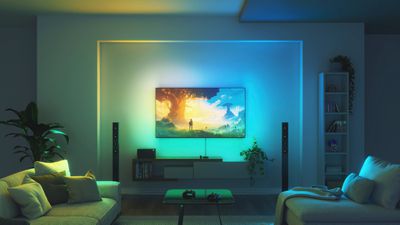
The light strip comes in two sizes, one that fits TVs and monitors up to 65 inches and one that fits TVs up to 85 inches. Either one can be cut to the ideal size for the TV or computer monitor that it's being used with. I tested with an 85-inch TV, so I didn't need to do any trimming, and in terms of size, the light strip was able to wrap almost the entire way around the TV.
There are 10 color zones per meter, so the light strip can display several different colors at once, and like other LED light strips on the market, it supports more than 16 million colors. Nanoleaf designed the light strips specifically for TV sets and monitors, and these are meant to be used for backlighting.
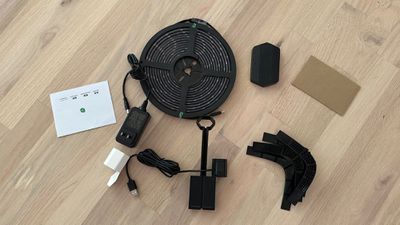
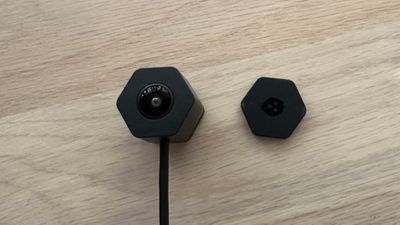
A camera attaches to the top of the TV with a mounting stand or it can be positioned at the bottom of the screen, and the colors detected by the camera are relayed to the light strip so that it can match what's displayed. Both the light strip and the camera attach to a controller unit that itself plugs into a power outlet.
Because of the way my TV is mounted, I have a small power strip at the back of it where I plugged in the light. I used adhesive to attach the controller, so all of the cords are hidden behind the TV. The design of the light does facilitate a setup where all of the cords can be hidden, but you will need some strong adhesive. The controller unit has options to turn on the lighting effect, so you might want to place it in a reachable location unless you're able to always use the app for control purposes.
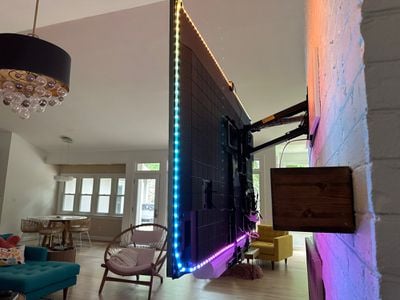
So far, the adhesive on the light strip has kept it up on my TV, but there are a couple corners where it's coming loose. Nanoleaf included some corner mounting hardware to route the 4D Lightstrip around corners, but the exterior design of my Sony TV didn't work with the hardware. I had to use the light strip alone, and I didn't have a good way to do the corners so they're always going to be angled in an odd way.
The main feature of the Nanoleaf 4D is the setup's ability to mirror the colors on the display to the LEDs on the light strip so the backlighting matches the TV content. There are HDMI boxes like the Hue Sync that do this, but with Nanoleaf's method, you don't need to have everything plugged into a central box and there are no limitations like no support for HDMI 2.1.
Backlighting that matches the content on a TV set or display adds to the immersiveness of what's being viewed, and it's a fun addition to a home theater or gaming setup. Not having to route accessories like my consoles and Apple TV through a secondary box is a major plus of the method that Nanoleaf is using to get this effect.
It's a little odd to have a camera at the top of the TV, but it blends into the background quickly enough and I don't notice it now. Nanoleaf included a privacy cover for the camera for when it's not in use, but the camera does not capture content and is only used to relay color to the light strip.
Nanoleaf has four "Mirror Modes" that affect the intensity of the light and the frequency of the color changes. There's 1D, 2D, 3D, and 4D. 1D is a plain white lighting effect, 2D is a single color that matches one of the colors on the screen, 3D is multiple colors, and 4D is similar to 3D, but the colors shift more often. I prefer 2D or 3D mode over 4D, which can be a little too distracting. My partner, who does not care for behind-the-TV lighting, did not have a problem with 1D or 2D mode. I definitely appreciate Nanoleaf providing options, because it ensures the Lightstrip can suit a wide range of tastes.
There are two modes to control the saturation of the color. Cinematic is more subtle, while vivid is more saturated. For movie content, I prefer Cinematic, while games work well with Vivid, but there's also an option to choose your own settings for saturation, dynamic range, and white balance. A rhythm mode can be enabled to time the colors to the sound coming from the TV, but the colors change so frequently that I wouldn't recommend this mode if you're actually watching the TV. It's nice for if you have music on in the background and want matching ambient lighting.
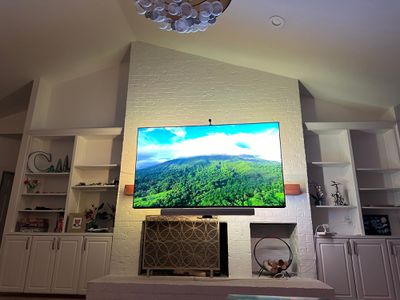
To match the colors of the light with the appropriate part of the TV content, there is a calibration process done through the Nanoleaf app. You mark each corner of the Nanoleaf Lightstrip once it's been applied to the TV, and then you use the camera view to adjust what the camera can see. You need to make sure it only has a view of the TV and not anything in the surrounding area, because this will determine the colors you get.
The size of my TV (or maybe the position) seemed to be an issue for the camera and I wasn't able to get it to align accurately with each corner. I had to cut off a bit of the bottom corner, but I'm not sure how much of an impact this has on the colors that are displayed.
Color vibrancy will depend on the saturation of your TV, the lighting in the room, and what's behind the TV. If you have your TV a foot or two in front of a blank wall with a high-quality TV, you'll see bright, vivid colors depending on the content that you're playing. My TV is mounted above a brick fireplace with shelving on either side so I don't have the most ideal setup for a light strip, but even in this scenario, it throws off a lot of light and casts color over much of the area behind the TV.
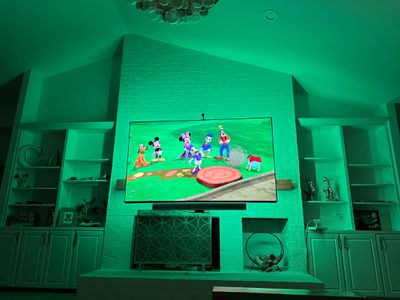
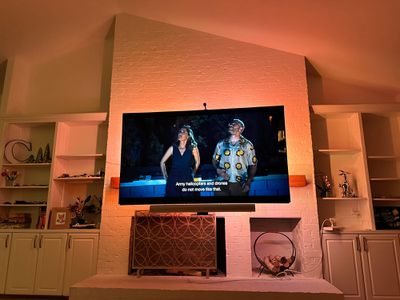
A lot of TV shows and movies have subtler colors than you might imagine, so colors are not always super saturated and bright even in 4D mode. For black shades, the Nanoleaf seems to default to red, which does not always match, and I also seem to get a lot of green when there doesn't seem to be much green on the screen. Sometimes the camera is also choosing a dominant color like white instead of an accent color like blue or green, which would look better with the scene, so there may be some work to do on whatever algorithm Nanoleaf is using.
I thought there might be some lag between what the camera picks up and the colors that are relayed on screen, but the 4D setup seems to be quick at shifting colors. The colors match and blend with the background for the most part rather than becoming distracting, and that's especially true of the more subdued modes.
I think the camera method works well overall and I've enjoyed the Lightstrip's color effects as a person who likes TV backlighting, but where something like the Hue Sync might have an edge is the color interpretation. The Sync Box is pulling color from video signal instead of using a camera and I feel that it gives me a more vibrant overall look, but it's hard to compare because they are two different lighting systems.
Like the Philips Hue setup, you can pair other Nanoleaf lights to the Nanoleaf 4D kit. If you have Nanoleaf Light Panels, bulbs, or light strips around your TV area or in your gaming setup, all of those will also automatically sync with the colors being picked up by the 4D Camera. There is a calibration process where you can choose where each light is in the room for the best color syncing.
Being able to sync Light Panels and bulbs to the Nanoleaf 4D is great for gaming, but I think it might get a little overwhelming when watching TV if the panels are on the same wall. I don't have Light Panels in my living room where I tested the 4D, but I did bring some out to test the syncing, and it definitely adds another layer of depth to the system. Nanoleaf has so many different lighting options at this point, including the Lines, Light Panels, bulbs, and light strips, that you can create an incredible entertainment area. Later this year, the Skylight ceiling panels are coming for even more flexibility.
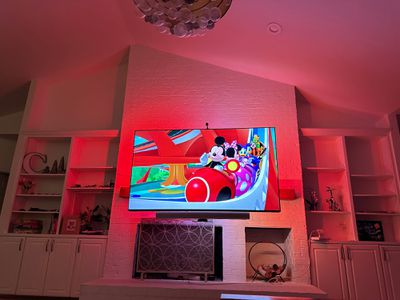
The Nanoleaf 4D setup is controlled through the Nanoleaf app, where you can set the Mirror Mode, choose a color shifting scene that has nothing to do with the content on the TV, or set a solid backlighting color. As with all of Nanoleaf's products, you can create your own lighting scenes too.
You can control the Nanoleaf 4D with the Home app, but it can only be turned on or off or set to a static color, so this is an accessory where you need to have the Nanoleaf app.
Nanoleaf 4D Bottom Line
At $100, the Nanoleaf 4D Screen Mirror and Lightstrip Kit is a solid deal for what you're getting. It's an all-in-one hassle free Lightstrip that goes on the TV and a matching camera for color syncing, so you can have a whole entertainment setup for $100 and 10 minutes of time.
Comparatively, the 4D kit is a lot more affordable than something like the Hue Sync Box, which is priced at $250, making it a much easier lighting ecosystem to get into. I wouldn't recommend this if you have a whole setup of Hue lights in your Living Room because it's designed to work solely with Nanoleaf lights, but if you're starting from scratch or already have Nanoleaf panels, it's a must buy.
Nanoleaf's Ultra Black Hexagons
Alongside the Nanoleaf 4D, Nanoleaf also introduced Shapes Ultra Black Hexagons, which join the Ultra Black Triangles that we reviewed last year. The Ultra Black Hexagons are identical to the standard Hexagons, but are made from a black plastic material that better matches darker-colored decor schemes when not activated.
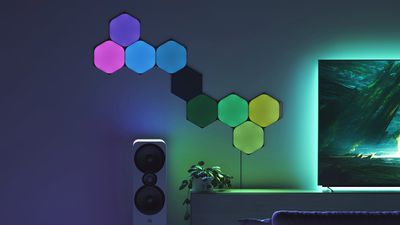
The Hexagons are probably my favorite panel shape, and the black color looks better than the white color. With the darker plastic, the edges that connect the hexagons better blend into the background, and it's an overall sleeker look. The Black Hexagons look better on the wall when the lights are off, and when turned on, the color brightness is the same. If you've ever wanted Nanoleaf panels but were put off by the stark white plastic look when the lights aren't on, the black panels are an excellent alternative.
As with all of Nanoleaf's Light Panels, the Hexagons can be set to any color, paired with the triangles, and synced with content on a TV or display. There are thousands of patterns and colors available through Nanoleaf's app, or you can create your own. The major downside to Nanoleaf's Ultra Black Hexagons is the price - these are $220 for a set of nine, like Nanoleaf's other products.
Given the amount of light these put off, you can use them in place of a standard lamp, and the color options are second to none for those who like accent lighting. I don't think people who are intrigued by the light panels will be disappointed, even at the price point. Nanoleaf has bundles and sales that can make them slightly more affordable, so it may be worth waiting for a discount.
How to Buy
The Nanoleaf 4D and Lightstrip Kit for up to a 65-inch television set is priced at $100, while the Nanoleaf Lightstrip Kit for an up to an 85-inch TV is priced at $120. There's also a camera-only kit for $80, which can be used with an existing light strip.
The Nanoleaf Shapes Ultra Black Hexagons can be purchased from the Nanoleaf website for $220 for a set of nine panels.















































Top Rated Comments
In March, I purchased the new Nanoleaf devices that support Thread. Right from the start, I encountered issues with integration into the Home app, even for basic tasks. I contacted customer support, which was very quick to respond, but the only solution they could offer was to reset the device and, if necessary, update the firmware. However, even the updates often struggled to install properly. Nanoleaf's official subreddit is filled with complaint posts and support requests, which speaks volumes about the situation. Despite the devices having a pleasant design, the software is completely unreliable, both in the iPhone app and the Mac app. In September, five months after the purchase, Thread-compatible devices continue to be problematic, and the updates (three in six months) haven't patched any issues. I even still have trouble changing my username in the Mac app, just to give you an idea of the app's state. If basic tasks don't work properly, it's clear that the rest is equally problematic.
The company is small, with fewer than 100 employees, according to Wikipedia. I even reached out to all three CEOs on LinkedIn to explain my experience and provide feedback on their products to help them improve. Small companies are usually more prone to respond and listen to customers to enhance their products, but none of the three CEOs ever got back to me. Clearly, they are not interested in understanding what went wrong in my purchasing experience, and that speaks volumes...
I don't recommend purchasing these products.