

If you have a collection that you want to show off, whether it's high-end sneakers, expensive collectible vinyl figures, or something else you want to draw attention to, Nanoleaf's EXPO Smart LED Display Cases are worth checking out. They're priced at $270 for a pack of four, with additional expansion cases available for $63.
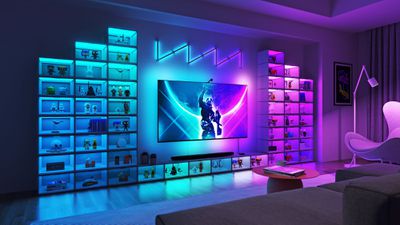
The EXPO Smart Cases are LED equipped display boxes for collectibles. They're rectangular, with white plastic sides and clear plastic at the front and the back. The front panel opens up so that items can be placed inside.
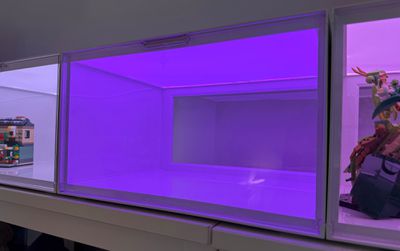
In terms of size and shape, they remind me of the shoe boxes that people get to store their sneakers. They're just under 15 inches long, 11.4 inches deep, and 8.7 inches tall. The inside measurements are a bit smaller, so you have about 7.5 inches in height. The height has been the most limiting factor in my testing, since taller collectible items won't fit inside. For shoes, which these cases are definitely designed for, you can fit up to a size 15 sneaker. Nanoleaf has a guide on what other kinds of things fit inside, but there isn't a mention of a weight limit. Most collectibles that will fit aren't wildly heavy, and the cases are sturdy, so weight probably won't be a concern for most people.
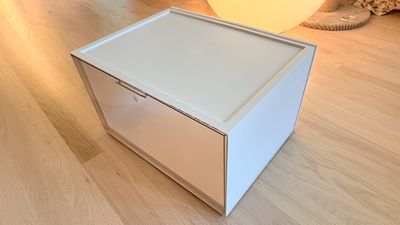
These ship in flat-packed, and each box has to be assembled one-by-one. The pieces only go together one way and it's not terribly hard to get them put together, but it did take me a good half hour to set up four of them. I found setting them up to be somewhat frustrating because it takes more force than you might think to get them to snap in place.
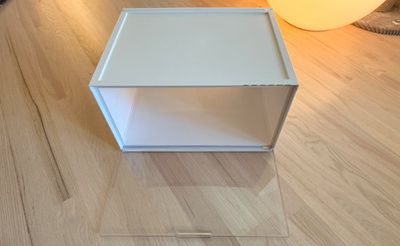
Once assembled, they feel sturdy, even though they're made of plastic. They don't look or feel cheap, but it is clear that they're plastic and not another material. Nanoleaf only makes the EXPO Cases in white, and that isn't going to fit some aesthetics. I suspect there are a lot of collectors who might prefer black, but the white does work well for highlighting the items inside. Either way, the assembly keeps what's inside dust free, but Nanoleaf doesn't mention UV protection so I assume that's not included.
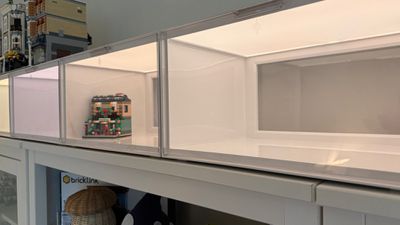
Like Nanoleaf's lighting panels, the EXPO Cases link together with connectors, which are included in the box. There's a main controller box that provides power and that the power adapter plugs into, and the rest of the boxes plug into it. Nanoleaf designed them to be set up all in one row or stacked up, so you can actually make several different designs. There isn't any wall mounting hardware, so they're designed more to go on the floor or on a surface like a desk or a shelf.
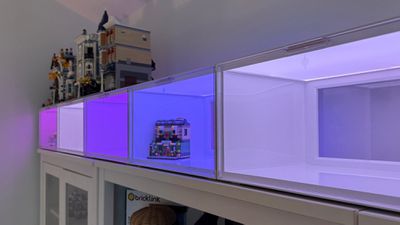
The controller box has a set of touch-based controls on it for changing the colors and the brightness without the app, and I hate them. They use touch activation instead of physical buttons. The buttons are too sensitive, and if you even brush them, they activate. They're also somewhat annoying for actions like resetting the EXPO Cases. I would have preferred standard physical buttons.
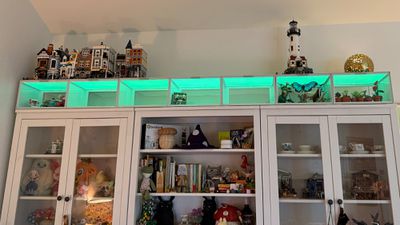
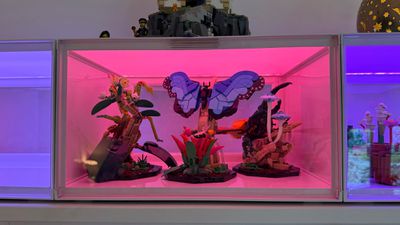
I set the cases up across a set of bookcases in my office in a horizontal line, but I also tested them in a two row vertical orientation, and they stack well. There's an indentation at the top of each box that the base of a second box sits in for a secure fit, but there's no clip or other mechanism that holds them in place other than surface area and the indentations. I wanted to be able to put LEGO that I have on top of the cases, but the depressions would have made for an unstable surface, which is something to keep in mind if you want to have something on top. I added some craft foam to have a flat surface, and that ended up working well.
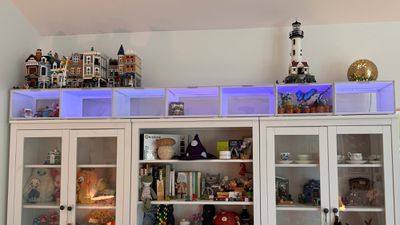
I have seven cases to fit across my bookcase, but up to 300 can be connected together. Once you have over eight cases, you need a 75W power supply unit from Nanoleaf, which I believe is sold separately because the base kits ship with a 42W power supply. A 75W power supply supports 14 cases, so if you go over that number, you'll need two or more power supplies. Note that while 300 can be connected, Nanoleaf says you should only stack them 16 high vertically. There's no limitation in a horizontal orientation.
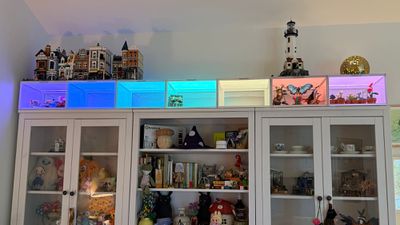
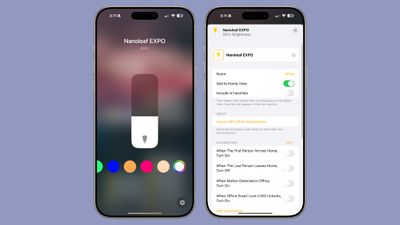
The EXPO Cases connect to the Nanoleaf app, and are HomeKit-enabled, so you can access them in the Home app and control them with Siri. Thread is included too, for improved connectivity. Like other Nanoleaf products, they can be set to over 16 million colors, with different patterns and light sequences that are available in the app. I like Nanoleaf's app, and I think the company has done a good job making it easy to get a whole range of different scenes and color options for its products with little effort.
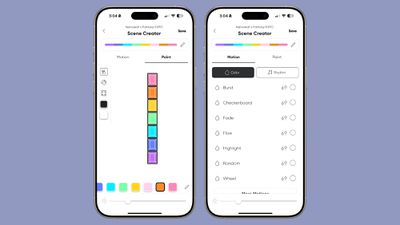
You can set the EXPO Cases to solid colors or create your own animated scenes in the app, but there are also community created scenes and AI Magic Scenes. With community scenes, you can download a lot of really great color/pattern combos created by others, and the AI Magic Scene lets you put in any phrase to have AI come up with something. There's an option to create a playlist to have the EXPO Cases cycle through scenes, and there is a rhythm option, which allows the selected colors to shift in time with music that's playing. You can also connect them to a PC or Mac setup with other Nanoleaf lights using the Nanoleaf desktop app.
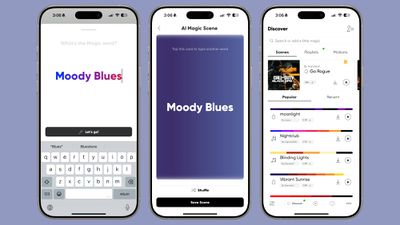
There are multiple shades of white in addition to color, which I think is important for the EXPO Cases. Depending on what you have inside, some of the deeper colors and the animations can make the contents hard to focus on. If I'm showing off collectibles, I generally like them to be visible, so I have been setting the EXPO Cases to lighter colors and shades of white (1200K to 6500K). The deep colors do look nice with sneakers or more simple items, and the backlighting is definitely eye-catching.
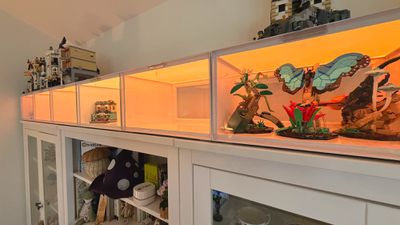
You can select a brightness level for the cases along with a color, and they get fairly bright. Nanoleaf says they're each 50 lumens, and I usually have them on half brightness or lower.
I don't want to do a Nanoleaf review without addressing connectivity and customer service, two areas where Nanoleaf has historically struggled. Older Nanoleaf products can have issues, and I've had controllers fail on the Aurora and Canvas panels. The newer Thread-enabled products seem to be more reliable so far, and I've tested the EXPO Cases since last August with only one connectivity hiccup during setup. They haven't disconnected from Wi-Fi since, and the Nanoleaf Skylights I've had set up since last year have also been stable. My only recent issue was with the Sense+ Switch intermittently disconnecting, but it's been okay for a couple months now.
As for my customer service experience, I needed a seventh box and I bought it directly from Nanoleaf. They mistakenly sent me a controller case instead of an expansion case, so I got in touch with support as a regular customer. I got a reply back quickly, and received a replacement. I've seen Nanoleaf support being more active on various social channels like Reddit recently, so I think they're trying to improve. I am hoping that newer products are going to have a longer life than some of the older devices with fewer connectivity issues, but time will tell.
Nanoleaf's EXPO Cases come with a two-year warranty and a 30-day return period (when purchased from the Nanoleaf website).
Bottom Line
Nanoleaf's EXPO Cases were clearly designed for showing off high-end sneaker collections given the shape and size, but they work well for any small collectible. They pair up with other Nanoleaf lights and make for a great desk accessory, room decoration, or ambient light source.
It's nice to have an ambient lighting option that also has some utility, and Nanoleaf's EXPO cases are a solid alternative to adding LED lights to a standard display case or curio cabinet. I didn't love the physical buttons and I wish there were more color options for those who don't love white, but overall, it's a solid product that's unique and has value for collectors.
I do think these are on the expensive side at around $67 per case, but the target audience for these likely spends a lot more on what goes inside the cases.
How to Buy
The Nanoleaf EXPO Smart LED Display Cases can be purchased from the Nanoleaf website or from Amazon for $270, which includes a set of four cases. Additional cases are available for $63.
Note: Nanoleaf provided MacRumors with a set of EXPO Smart LED Display Cases for the purpose of this review. No other compensation was received.

































Top Rated Comments
There are cool ideas for lighting out there, but less is more when it comes to “things”.
[..edit..]
And that wall of 54 boxes costs over $3,640 USD… the things “in” the boxes aren’t worth half that much in the aggregate.
Or you could just buy the shoeboxes I linked to above for ~$100 for the same amount and add LEDs
https://www.containerstore.com/s/closet/drop-front-shoe-boxes/drop_front-shoe-boxes/12d?productId=11019063