Porsche Macan S CarPlay Review - MacRumorsOpen MenuShow RoundupsShow Forums menuVisit ForumsOpen Sidebar
Skip to Content

Hands-On With Wireless CarPlay on the Porsche Macan S

by

Five years after the launch of CarPlay, there are still very few car manufacturers supporting Apple's in-car platform wirelessly. The main benefit of wireless ‌CarPlay‌ is a nearly seamless experience of having much of your phone's core functionality available just a fingertip or voice command away on your car's infotainment system while your phone remains in your pocket.

So far, wireless ‌CarPlay‌ support is largely limited to some premium brands, and Porsche is one of those brands that recently rolled out support for it.

For a taste of that experience, Porsche invited me down to Atlanta for a day to take a look at how wireless ‌CarPlay‌ works hand-in-hand with the native infotainment system on the 2019 Macan S crossover. I also got to spend some time behind the wheel of the Macan S on the track at the Porsche Experience Center and check out the Heritage Gallery, a frequently changing display of some of the most important and collectible vehicles in Porsche's storied history.

porsche heritage gallery 914

Porsche 914 display in Heritage Gallery

While the Macan is certainly a fun crossover to drive and I had a great time putting it through its paces on the track and the other elements in the Porsche Experience Center, the primary purpose of my trip was to check out the infotainment system and how it works with ‌CarPlay‌.

porsche macan exterior

2019 Porsche Macan S in Mamba Green Metallic

Porsche's infotainment system is known as Porsche Communication Management (PCM), and as on most cars, it's the hub for much of the technology you need to interact with on a regular basis. The Macan comes with a 10.9-inch widescreen infotainment display, which allows for terrific integration between ‌CarPlay‌ and the tile-based PCM system.

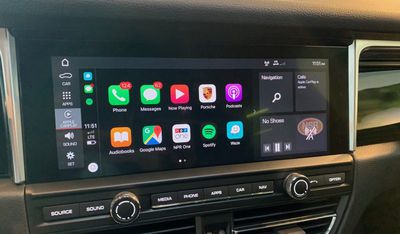
porsche macan carplay home

‌CarPlay‌ home screen integrated with PCM

When active, ‌CarPlay‌ takes over a significant portion of the display, but a top status bar, left-side shortcuts bar, and multiple right-side app tiles remain visible at all times, making it easy to manage both systems simultaneously.
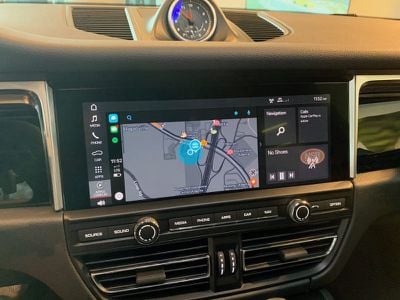
porsche macan carplay waze

Waze in ‌CarPlay‌

All of the home screen tiles on PCM are configurable, so you can customize things just the way you want, and support for multiple layouts makes it easy to switch between tile sets.
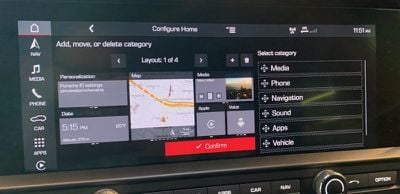
porsche macan pcm customize

Customizing the PCM home screen layouts

The Macan offers a relatively clean center stack dominated by the widescreen display, with a handy set of hardware buttons and a couple of knobs thankfully making for quick access to a number of important functions merely by feel.

The simplicity of the center stack is made possible due to Porsche's decision to move the vast majority of hardware controls down to the center console clustered around the gearshift. There are over 30 buttons and switches located down on the center console, including climate control, heated/ventilated seat controls, and various driving mode options. It's an overwhelming experience when you first sit down in the cockpit, but you quickly discover that many of the important ones should become familiar to find by feel while others are used infrequently enough that their location isn't an issue for everyday driving.
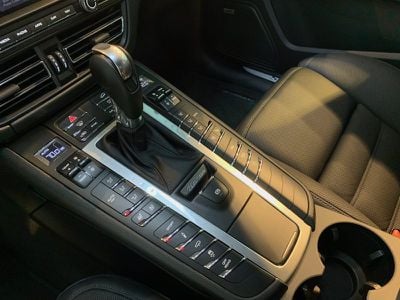
porsche macan console

Macan center console

With available built-in navigation capable of taking over nearly the entire widescreen display, you certainly get an expansive view of what's around you. The display sits a little lower on the dash than I prefer for visibility, but I'd say it's about average in this regard.
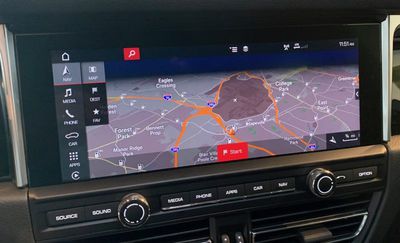
porsche macan nav

Widescreen built-in navigation

The persistent top and left status/navigation bars and the hardware buttons make it easy to jump between functions even while enjoying a wide fullscreen experience. A small digital display on the driver's dashboard can also serve as a configurable supplemental screen for navigation to make it easier to see directions and other vehicle information like audio, phone, settings, and more at a glance.
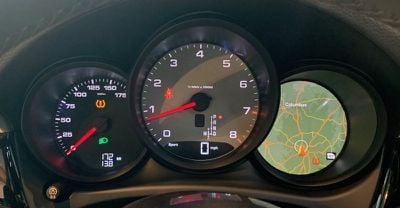
porsche macan driver display

Driver display

While ‌CarPlay‌ is available on all Macan models, it is not a standard feature. ‌CarPlay‌ support is priced at $360 as a standalone option, or it's available as part of several premium packages.

The 2019 Macan doesn't offer wireless charging, but the recently launched 2020 model does include it as an option, allowing for an even more seamless experience. The wireless charger is included in an optional $690 smartphone compartment located in the center console, with the compartment also able to serve as an antenna booster for improved signal strength.
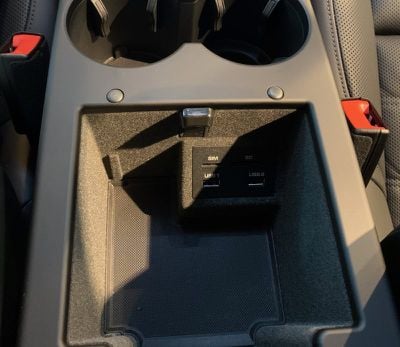
porsche macan center compartment

Center console compartment with USB-A ports

If you don't opt for the wireless charger or just want to plug in your phone, you'll have two available USB-A ports inside that center console. Two more USB-A charging ports are located on the rear of the console to serve passengers in the back.
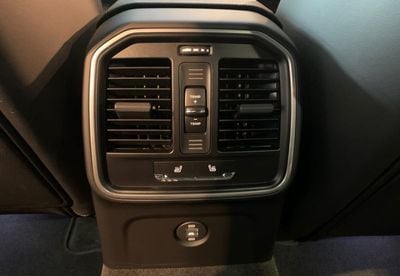
porsche macan rear controls

Rear USB ports and controls

Wired ‌CarPlay‌ is available across the Porsche lineup, and the company is working on rolling out wireless ‌CarPlay‌ on a number of its models as the infotainment systems get refreshed, and for the 2020 model year, the Macan, Taycan Turbo/Turbo S, and all 911 Carrera variants will offer wireless ‌CarPlay‌.

One of the major points of difficulty with ‌CarPlay‌ is frequently integration with a vehicle's native infotainment system, as swapping between the two systems or seeing what's going one while using the other one can be difficult, but Porsche has done a great job making multitasking across PCM and ‌CarPlay‌ nearly seamless. The widescreen display offers plenty of room to show a traditionally sized ‌CarPlay‌ screen while still giving you access to all sorts of menus and information tiles from PCM, all visible at the same time.

To me, this is the best way to take advantage of widescreen displays with ‌CarPlay‌, rather than going to a wide fullscreen ‌CarPlay‌ interface that forces you to exit ‌CarPlay‌ in order to access native infotainment functions. On systems like this whether both ‌CarPlay‌ and the native interface are available simultaneously, you can sometimes run into conflicts where certain native functions like phone and messages are unavailable because they're currently being handled by ‌CarPlay‌, but with the extensive home screen tile customization available in PCM it's easy to configure things in just the way you like.

Wireless ‌CarPlay‌ is an extra bonus that really needs to start trickling its way down beyond a small handful of luxury car manufacturers at this point. For short trips where you don't need or want to bother plugging in your phone, it's super convenient for ‌CarPlay‌ to simply pop up on the dash even with your phone still in your pocket. The growing prevalence of wireless phone charging in vehicles even lets you top off your phone without needing to worry about cables.

The one major downside with all of this is cost, and ‌CarPlay‌ doesn't exactly come cheaply on the Macan. As noted above, ‌CarPlay‌ is a $360 option on its own, or it comes as part of some other packages. And if you want wireless phone charging as well, that's another significant cash outlay since it comes bundled as with the antenna-boosting smartphone compartment. It may not make a huge amount of difference to luxury car buyers already laying out quite a bit of cash for their purchases, but the ability to have your phone's functions and data conveniently accessible on your car's dashboard is such a benefit that I can only hope we see a trend toward ‌CarPlay‌ (and Android Auto) support being included standard on an increasing number of vehicles.
Related Roundup: CarPlay

Top Rated Comments

HenryFSU Avatar
91 months ago
Somebody needs to keep up with their calls/vm's/text messages.

Score: 6 Votes (Like | Disagree)
91 months ago
The Macan has an _obscene_ amount of Center control push buttons near the shifter. It’s almost convoluted to the point where unfamiliarity would probably be more common given that row of lengthy buttons.

Score: 3 Votes (Like | Disagree)
WildCowboy Avatar
91 months ago

Somebody needs to keep up with their calls/vm's/text messages.

In my defense, that's a Porsche rep's phone paired to the system in that photo. :)
Score: 3 Votes (Like | Disagree)
91 months ago

Good UI/UX is still shockingly rare... that's pretty much why we are all here on this particular forum.
I don't have any of this stuff in my pickup, but from riding in other people's cars I think I'd rather have the buttons on the console, instead of try to figure out which sub sub sub sub menu of some ridiculously named category the functions were in using the touch screen. Of course then you have to decipher the button hieroglyphics. Yup, it is all shockingly rare. A sign of the times.
Score: 2 Votes (Like | Disagree)
91 months ago
The cockpit controls and infotainment systems in luxury cars are UI/UX nightmares. You need a goddamn co-pilot so you can focus on driving.
Score: 2 Votes (Like | Disagree)
91 months ago
Having all the extra Porsche stuff around the edges kinda takes away from the beautiful simplicity and cleanness of the CarPlay interface that can be seen on some of the less expensive cars that just have a single rectangular screen. I’m sure it all has functionality, and I assume Porsche has decent designers, but it just makes me jones for what an Apple car interior and control panel might look like on their own car.
Score: 2 Votes (Like | Disagree)

Popular Stories

Apple HomeView lineup feature5

Apple HomeView Has These 15 Apps, Some CarPlay Apps and Widgets Also Supported

Wednesday October 14, 2026 9:03 am PDT by
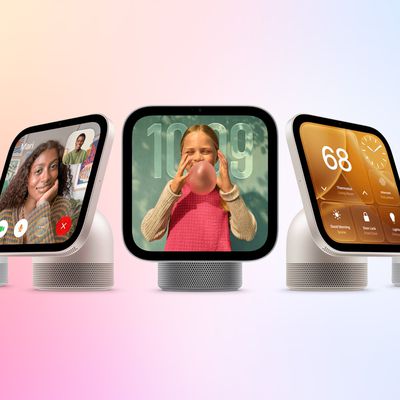
Apple's tech specs page for its all-new HomeView smart home hub contains a list of all of the built-in Apple apps available on the device. While it has no App Store, the HomeView can also display CarPlay-enabled audio and video apps from a paired iPhone. This includes Audiobooks, Apple Music Classical, Apple News, and Apple TV, along with third-party apps such as Spotify, according to WIRED. ...
duo aquarium

More Fun iPhone Duo Apps: 30 New Picks to Try

Friday November 6, 2026 3:27 pm PST by
When the iPhone Duo launched, we shared a list of some of the fun apps developers created for the new form factor. Two weeks out, developers are continuing to come up with fresh ideas, so we thought we'd share some of our favorites. Games Marbles Unhinged ($2.99) - Marbles Unhinged is a marble maze designed for the Duo. When you fold it, the floor turns into a ramp. If you stand the top...
apple pro tell logo

Apple Launching Five New Products Today

Thursday November 5, 2026 12:59 am PST by
Apple is launching five new products on Friday, November 6, following pre-orders that opened last week, including its first touchscreen MacBook Pro models. The following new products will be available from today: iPad mini with OLED display and A20 Pro chip iMac with M6 chip 14-inch MacBook Pro with M6 chip 14-inch MacBook Pro with OLED touchscreen 16-inch MacBook Pro with OLED...
Latest Stories
Apple Store Subscription Sign-Up Controversy Exposed
6 hours ago
Siri AI Rumored to Become 'More Like an Agent' as Early as Next Year
16 hours ago
Apple Taking New Approach to Developing iOS 28 and macOS 28
18 hours ago
Early Apple Black Friday Deals on Apple Watch, MacBook Air, and More
2 days ago
'Backglow' Lets You Customize New MacBook Pro's Glowing Apple Logo
2 days ago
Top Stories: Apple Product Launches, iOS 27.3 Beta, and More
2 days ago
More Fun iPhone Duo Apps: 30 New Picks to Try
2 days ago
Hands-On With Apple's New OLED Touchscreen MacBook Pro
3 days ago
Apple Store With All-New Design Opening Soon in Southern California
3 days ago
Control the Glowing Apple Logo on Your New MacBook Pro
3 days ago
Apple Shares New 'Apple Card: Apply and Use in Minutes' Ad
3 days ago
Apple Says More Than 100,000 Apps Optimized for iPhone Duo, Here's What's Still Missing
3 days ago
Early Black Friday Deals Kickoff With Steep Discounts on Apple Watch Ultras and More
3 days ago
The MacRumors Show: iOS 27.3 Looks Like a Huge Update
3 days ago
Best Buy's Black Friday Event Begins With Sitewide Savings on Apple, TVs, More
3 days ago
Apple Releasing Yet Another Two New Products Next Week
3 days ago
MacBook Air Drops to Lowest Price in Months With Amazon's $250 Discount
3 days ago
Apple Rumored to Drop the iPhone's Action Button Next Year
3 days ago
Apple's Extended Return Policy Now in Effect for 2026 Holiday Season
3 days ago
Apple Music Classical Updated With New Icon and Refreshed Design
3 days ago
OLED iPad Mini, M6 iMac, and New MacBook Pros Available From Today
3 days ago
Apple Surveys iPhone Duo Buyers About Crease and Camera
3 days ago
Apple's First Touchscreen Mac is Now Arriving to Customers
3 days ago
Claude Gets Personal Finance Feature With Bank Account Linking
3 days ago
Apple Arcade Adds Crossy Road Rush and NBA 2K27
4 days ago
Apple's New HomeView Smart Home Hub: Here's How Much RAM It Has
4 days ago
iPad Mini vs. iPad Air Buyer's Guide: Now Just $50 Apart
4 days ago
First iOS 27.3 and macOS Golden Gate 27.3 Public Betas Now Available
4 days ago
Apple Announces a New Mac Sales Record
4 days ago
Paid $200 for Logic Pro? Apple Says You Won't Get This New Feature
4 days ago