

Apple's Beats brand in April 2019 introduced Powerbeats Pro, the brand's first truly wireless earphones. The fitness-focused Powerbeats Pro consist of two independent earpieces with no wire between them, connect to paired devices over Bluetooth, and offer earhooks to help secure the earphones in place during vigorous activity.


We went hands-on with the Powerbeats Pro at their initial launch, but read on below for our full review.
Setup
If you've used a pair of Apple's AirPods earphones, you'll be familiar with how to get started with the Powerbeats Pro in the Apple ecosystem. The Powerbeats Pro are equipped with Apple's H1 chip, so all you have to do is open the case in close proximity to an unlocked iOS device, and you'll quickly see a pop-up on your device's screen offering to connect the earphones. After a few seconds, they're ready to go, and with iCloud-based pairing the Powerbeats Pro will also easily connect to any of your other devices with just a few taps.
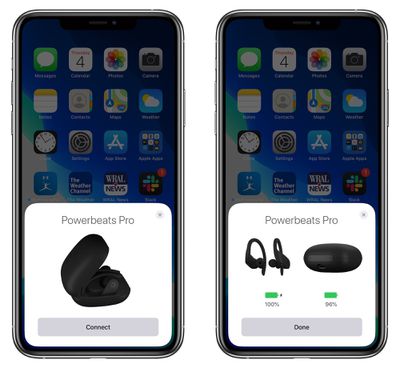
For those with an Android phone or other type of device, you can still pair Powerbeats Pro to it, but it won't be quite as seamless of an experience. Beats does offer an Android app that helps simplify the pairing process and manage firmware updates for the earphones, but if you don't want to go that route or you're on a different platform, you'll generally have to head into the Bluetooth settings on your device, open the Powerbeats Pro case, and press the system button inside the case to initiate the pairing process. Either way, you won't get the easy pairing sync to other devices that you get with Apple's ecosystem.
Design and Fit
The design of the Powerbeats Pro earphones is similar to some other recent Powerbeats products, but with a redesigned angled main body for a more comfortable fit. Earhooks go over the top of the ear to help secure the Powerbeats Pro in place, and once they're on, they're going to stay put, which is great if you're going for a run or working out in the gym. The earhooks are adjustable, so if you firmly grasp the stem near the earphone body, you can bend the rest of the earhook a bit to help optimize for comfort.
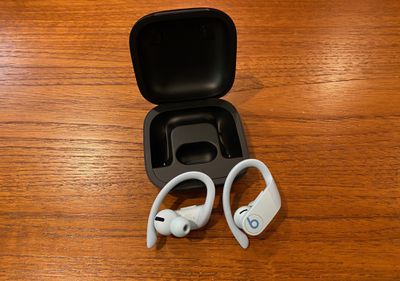
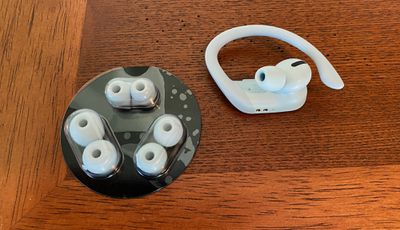
The Powerbeats Pro come with four different styles of eartips that can be swapped out in just a few seconds. A set of medium eartips comes installed on the earphones, but you'll definitely want to give some of the other sizes a try to see what feels best for you. I initially thought the medium tips worked great for me, but after an hour or so of listening I began to experience some ear fatigue, and switching to a smaller tip helped tremendously. I do still find my AirPods Pro more comfortable to wear for long periods of time, but fit and comfort is such a personal issue that it's hard to generalize.
Controls
While AirPods have limited onboard controls, the Powerbeats Pro offer a bit more functionality, most importantly being volume control. A button the top of each earpiece lets you adjust the volume, with a press toward the front portion of the button increasing the volume while a press toward the back of the button decreases the volume. The button works easily, and I didn't have any trouble figuring out which part of the button to push by feel.
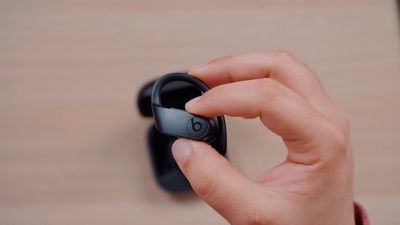
All of the other onboard controls are handled by a fairly large button with a "b" Beats logo on it on the outside face of each earphone. A single press of the button will play or pause if you're listening to music or a podcast or watching video, while it will answer or hang up a phone call if one is coming in to your phone. A double press of the button skips forward a track, while a triple press skips back to either the beginning of the current track or to the previous track.
A long single press of the main button activates Siri, but thanks to the H1 chip, you can also just say "Hey Siri" to activate Apple's voice assistant.
I've found both the "b" main button and the volume button to be easy to find by feel, with the volume button easily managed by sort of squeezing the main body of the earphone while the "b" button offers a large target to hit with your finger. Pressing either button can generate a little discomfort in the ear as any pressure you apply gets transmitted through to the ear, but irritation can be minimized by ensuring an initial comfortable fit with the multiple eartip options and earhook adjustments.
Audio Quality and Noise Isolation
I've found the audio quality of the Powerbeats Pro to be quite solid, with good dynamic range and crisp, clear sound. They tend to be a little heavy on the bass, which is unsurprising for Beats earphones, but there's no muddiness and I don't find it to be overwhelming as the mids and highs still come through, though the highs feel a bit on the weak side.
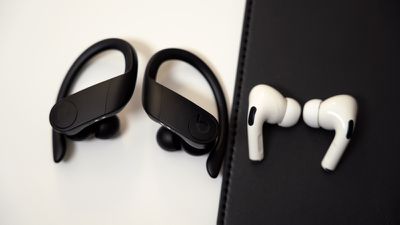
Unlike the AirPods Pro, the Powerbeats Pro do not offer active noise cancellation, so they won't completely shut out noise around you. But the in-ear design does help block out some ambient noise, which can be good or bad depending on your needs. There's also no transparency mode like on the AirPods Pro to help amplify ambient noise when desired.
Audio quality on phone calls is very good, with a full, ear-filling sound that avoids the tinniness frequently heard on phone calls. The microphones pick up sound well, with users on the other end of my calls reporting that they can clearly hear me.
The H1 chip in the Powerbeats Pro helps to maintain a stable connection with good range and limited dropouts. Wearing the Powerbeats Pro paired with an iPad on the second floor at one end of my house, I was able to move anywhere within the house and experienced no audio dropouts. I was even able to walk outside around the perimeter of my house and found only a couple of spots where the audio briefly dropped out.
Hey Siri
Just like the AirPods and many of Apple's other devices, the Powerbeats Pro offer "Hey Siri" functionality, which lets you activate Siri by simply speaking the magic phrase. Once you say it (or press and hold the "b" button), you'll be able to ask questions or give commands to your paired device, with the full array of possible commands for that device available to you. You can use Hey Siri to adjust volume, open apps, check the weather or time, perform conversions and calculations, and translate between languages, among other tasks.
Audio Sharing
Like AirPods and other recent Beats wireless headphones, the Powerbeats Pro support audio sharing with recent iOS devices, letting two people listen to the same audio simultaneously with two sets of compatible earphones. Audio sharing is managed through the AirPlay icon in Control Center, the audio widget on the Lock screen, or in the audio app that's in use.
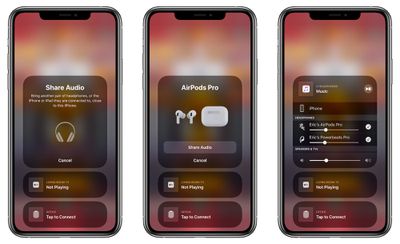
Volume levels on the two sets of earphones can be managed independently, either through separate volume sliders on the Lock screen or in Control Center, or via volume control on the earphones themselves if available.
Sensors and Microphones
The Powerbeats Pro come packed with sensors, including dual beam-forming microphones for high-quality voice capture for Siri and phone calls. Unlike AirPods where the microphone is located on the base of the stem pointed generally toward the user's mouth, the microphones for the Powerbeats Pro are located on the top and bottom of the main body next to the volume button and charging contacts. Despite their location that's more in the ear than on the AirPods, voice quality for phone calls was very good in our testing.
Voice quality is also improved by the inclusion of a speech accelerometer that detects when you're speaking to help focus on your voice and separate it from ambient noise. There's also a motion accelerometer to conserve battery life by idling the earphones when motion stops.
And finally, there are dual optical sensors to detect when the Powerbeats Pro are placed in the ears or removed from the ears. Like AirPods, playback will automatically start and stop as you insert or remove the earphones.
Water Resistance
While Beats doesn't publicly give the Powerbeats Pro a specific rating for water and dust resistance, it does say the earphones are sweat- and water-resistant and they are indeed rated IPX4, which is to be expected for earphones designed with a fitness focus. While they're not intended to be subjected to significant splashes or submerged in water, they held up just fine in our testing, including after being submerged for 20 minutes.

Battery Details
The Powerbeats Pro are rated to last for up to nine hours on a single charge, which is nearly twice the five hours you can get out of AirPods or AirPods Pro on a good day. With the charging case to give the earphones some more juice, you'll get a total of about 24 hours of battery power.
Powerbeats Pro include a Fast Fuel feature that will give fully drained earphones up to an hour and a half of battery life after just five minutes in the charging case.
Recharging the Powerbeats Pro is as simple as dropping them into the charging case. There's a pair of charging contacts on the bottom of each earpiece that line up with pins inside the case, and everything is held in place with magnets to ensure proper charging alignment, that the earphones don't fall out of the case, and that the case itself stays closed.
When it's time to recharge the case, you'll need to do it over Lightning, as wireless charging is not supported. That's a little bit of a bummer, but I can live with it. I have an old iPhone Lightning Dock on my desk, and I can just pop the Powerbeats Pro case onto it for charging. The status light on the case is facing away from me in this position, so it's a little hard to tell when it changes from red to off to signify that charging is done, but I mostly just let it charge for a while and don't worry about it.
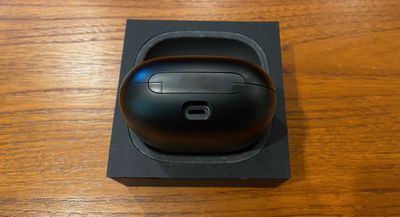
You can of course also charge the case with any Lightning cable, and the Powerbeats Pro come with a black 1-meter USB-A to Lightning cable in the box. It's one of the only ways to get an official Apple Lightning cable in black, which is kind of cool.
The charging case is quite large as wireless headphone cases go, necessitated by the earhooks that make the headphones themselves comparatively large. You can fit the case in some pockets, but it's not particularly comfortable and can look a little funny, so these are better off carried in a gym bag or computer bag of some sort.
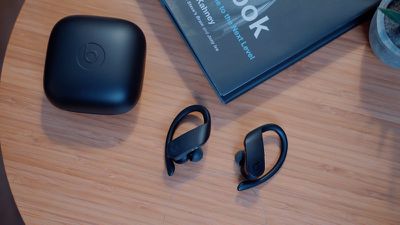
Checking the battery level of the Powerbeats Pro is a little more complicated than some other earphones on the market, as there are no LEDs on the earphones themselves to provide any idea of battery level. Even on the Powerbeats Pro case, there's only a single LED that lights up to let you know it's charging, turns off when the case is fully charged, and blinks when in pairing mode.
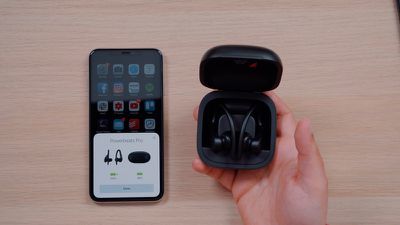
To really tell the battery level of your Powerbeats Pro and case, you'll need a paired iOS device. With the iOS device unlocked, just open the Powerbeats Pro case, and a pop-up will display the current battery level of both the earphones and the case. There's no need to actually remove the earphones from the case and put them in your ears. Battery levels can also be viewed at any time while using the earphones by using the Batteries widget in the Today view on your iOS device.
Bottom Line
The Powerbeats Pro are excellent earphones, particularly for those users who want to use them in the gym or while running. The earhooks offer much more stability than AirPods or other truly wireless earphone that just sit in the ear with no additional support, so you won't need to worry about them falling out.
The combination of audio quality, H1 chip benefits like easy pairing and "Hey Siri" support, and great battery life is a winning one, so there's a lot to like with these earphones. I don't find them quite as comfortable as my AirPods Pro, but they're not uncomfortable, and the four eartip sizes give you a decent amount of flexibility to try to fit your ears.
I do wish the case supported wireless charging so I could just plunk it down on a charging pad on my desk, end table, or nightstand rather than needing to find a cable or dock, but that's a fairly minor complaint. I also wish the case was a bit more compact or at least flatter so that it could fit in a pocket more easily.
The Powerbeats Pro are not cheap either, coming in at $249.95, although they're sometimes on sale for around $200 through Apple/Beats and other retailers like Verizon, B&H Photo, Best Buy, and more. So their regular retail price is on par with AirPods Pro and more expensive than regular AirPods and many other wireless earphone options. But they have a lot to offer, so for many they'll be worth the price.
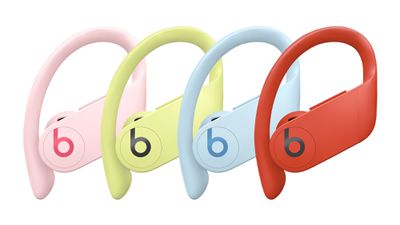
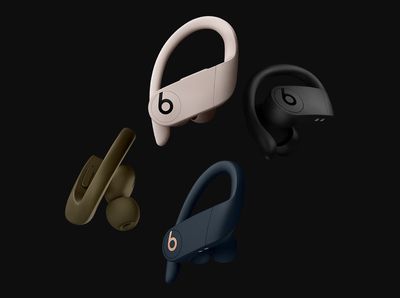
For those who like some personality for their earphones, the Powerbeats Pro are available in eight colors as of June 2020: Black, Ivory, Navy, Moss, Lava Red, Cloud Pink, Glacier Blue, and Spring Yellow. Most of the hues with the exception of Lava Red are rather subdued, but it's still an opportunity to choose something that fits your style, unlike AirPods which only come in white.














































