

Any typical search for a consumer Mac monitor inevitably leads to the Apple Studio Display – a seamless but prohibitively expensive option for most users at $1,599. That's where BenQ's MA270U steps in, offering Mac-native features at a much more palatable $459.99.

Unlike typical PC monitors that often feel retrofitted for Mac compatibility, this is a 27-inch 4K display that arrives ready for MacBook use out of the box, complete with built-in color matching, keyboard integration, and even Focus mode support. But can a third-party monitor truly deliver Apple-like integration without the Apple price tag?
Key Display Specifications
- 27-inch IPS panel with Nano Matte coating
- 3840 x 2160 (4K) resolution
- 400 nits peak brightness
- 1200:1 native contrast ratio
- 99% sRGB, 95% P3 color gamut
- 60Hz refresh rate
- 5ms response time
- HDR10 with VESA Display HDR 400 certification
- 178° viewing angles
Design and Build Quality

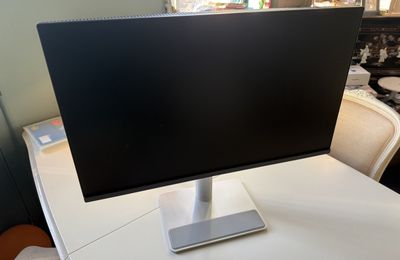
Peeling the protective material off the "Nano Matte" IPS panel reveals a thin black bezel around the top and sides, and a slightly thicker chin with the BenQ logo centered in an inoffensive, almost hidden black finish. The rear of the display is plastic with a metallic finish that curves outwards slightly, while the stand is a brushed metal pipe about 2.5 inches in diameter.

Assembly is extremely simple and requires no tools. You just click the neck of the stand to the back and then use the key-screw to fasten on the rectangular base, which includes a rubber strip along the front for placing accessories.

Once the monitor was set up alongside my Apple Studio Display, BenQ's design perhaps inevitably looked a little dated. The monitor sports clean lines and thin bezels, but its predominantly plastic construction lacks Apple's signature sophistication. The aluminum-effect back cover tries to bridge this gap, though it can't match Apple's minimalist refinement and keen eye for curves and lines.

That said, build quality impresses where it matters. The steel neck provides rock-solid stability, while the soft-touch area on the base is a nice afterthought. While it won't win any design awards in my book, the construction feels reassuringly robust.
Connectivity and Setup

Connectivity-wise, the monitor is fairly well-accommodated round the back. The 90W USB-C port connects and provides power to your Mac, while an additional 15W USB-C port and one 7.5W USB-A port offer options for connecting other devices (in my case, a Bluetooth receiver for my mouse, and an external USB hard drive).

Crucially, the hub can provide power even when the display is off, so you can keep your MacBook and whatever else plugged in and charging regardless. There are also two HDMI 2.0 ports (sadly not 2.1), plus a headphone jack and an extra 7.5W USB-A port located under the panel, next to a glowing power button and a physical toggle to manually set brightness, volume, and display output.
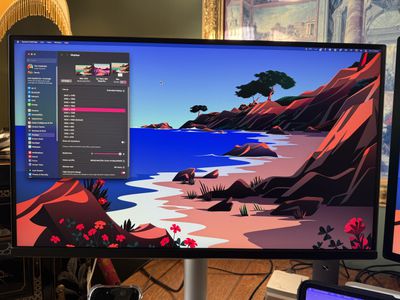
Getting started couldn't have been easier. I plugged in the supplied USB-C cable and my MacBook Air instantly recognized the display and began drawing 90W of power from it. I also tried connecting to an M4 Mac mini, both directly and via a Ugreen Thunderbolt 4 dock, and had zero issues.
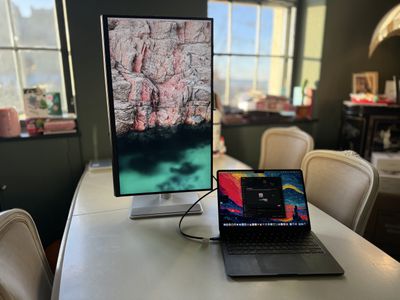
As I got comfortable with the setup, I was impressed by the flexibility of the MA270U's stand, offering a range of adjustments that make it easy to find your ideal viewing position. The height adjustment provides a generous 115mm of vertical travel, while the tilt mechanism allows the screen to move from -5° backward to 20° forward. Paired with 15° of swivel in each direction, you can fine-tune the display's position to minimize glare and maximize comfort. The robust stand keeps the display stable at any position, and the smooth pivot function rotates 90 degrees in either direction for portrait orientation viewing.
The built-in 3W speakers are adequate for system sounds but won't replace dedicated audio solutions – you won't be surprised to learn that they're noticeably inferior to MacBook speakers, and the less said about them the better.
Display Performance and Color Accuracy
Here's where the MA270U excels. The 60Hz panel's 3,840 x 2,160 resolution delivers crisp, vibrant visuals, while the 5ms response time is perfectly adequate (unless you're a hardcore FPS gamer). Colors pop without appearing oversaturated, and BenQ's color-matching technology is impressive – the difference between my MacBook Air's display and the MA270U was barely perceptible when using the recommended color profile. I even swapped out my Air for a MacBook Pro with a Liquid Retina XDR display, and only the brightness difference was visible. The monitor maintained consistent color reproduction across its 400 nits brightness range. Indeed, I was impressed with how good it looked alongside my Studio Display.

The Nano Matte panel handles glare admirably under normal conditions. However, direct sunlight remains challenging. It's not quite as effective as Apple's nano-texture glass option in this respect, but remember – that's a $300 upgrade on the Studio Display, which also boasts a higher 600 nits of brightness. One other thing worth mentioning is how fast the MA series monitor wakes from sleep – it impressively matched the speed of my Mac and the Studio Display.
Display Pilot 2 Software

The Display Pilot 2 software deserves special mention, as it's clear BenQ has put serious effort into making this feel like a natural extension of the Mac experience. I never had to use the physical toggle on the bottom of the display to change settings via the OSD – the menu bar app effectively replaced it, offering native control of the MA270U. You can adjust these settings independently for each connected display, with options to sync them if desired, and you can customize which settings appear in the interface. For color management, Display Pilot 2 provides quick access to different color modes including M-Book (designed to match MacBook displays), Display P3, and sRGB. You can switch between them with a single click when dealing with color-critical work, and you can assign specific color modes to launch automatically with different applications – a nice touch that you'd usually only expect when using a reference monitor.

On the other hand, the Display Pilot software feels like it's half-baked in some respects, and some of the functions work better than others. I found the HDR option so-so – it blew out the colors when viewing my desktop, and only vaguely improved the movie-watching experience. The app also enables features like automatic display rotation and desktop partitioning, though macOS Sequoia's built-in window management makes the latter a little redundant. Meanwhile, the Low Blue Light mode seemed to have almost no effect. However, credit where credit is due: The Mac keyboard integration works seamlessly – adjusting the brightness and volume of the external panel from your MacBook feels natural, and the syncing is seamless. The ICCSync feature ensures the monitor's colors stay perfectly matched with your MacBook's display, and I particularly appreciated the Brightness Sync feature, which automatically matches the brightness levels between your MacBook and the MA270U.

FocuSync connects with macOS Focus modes to adjust display settings automatically based on your selected Focus state, while the B.I.+ Gen2 feature uses the monitor's ambient light sensor (located at the top of the panel) to adjust brightness and color temperature based on your environment. FocuSync isn't something I would ever use, but it worked as advertised once I granted the necessary permissions. The same can't be said for BenQ's Brightness Intelligence feature, which often made everything overly dim and washed out in normal lighting conditions.

You can adjust the resolution in the app with a slider, but I found this wanting. In my experience, the native 3,840 x 2,160 resolution made text too small to read comfortably for any length of time, though the 32-inch model may fare better in this regard. My biggest bugbear is that the scaled options were too few and far between for me to find an optimal setting, so I ended up using the Better Display app instead, settling on 2,560 x 1,440 resolution, which paired well alongside the Studio Display (a 5K panel scaled to 2,560 x 1,440). Sat back normally and looking at both monitors, I got a decently uniform picture from them, with only the superior brightness of the Studio Display making the difference. Of course, in most contexts, comparing a 4K panel to a 5K panel is like comparing apples to oranges, but macOS scaling is so good these days that I genuinely can't tell the difference unless my nose is almost touching the screen.
Summing Up
The BenQ MA270U delivers where it counts – 4K display quality and Mac integration. While its design may not match Apple's aesthetic, its performance-to-price ratio is compelling. The 32-inch MA320U offers higher brightness (550 nits vs 400 nits) and a slightly better color gamut, but the core features remain identical.
This monitor should suit Mac users seeking a quality external display without Studio Display pricing (so long as you bring your own webcam and external speakers). It's especially appealing for productivity work, content consumption, and even light creative tasks, thanks to its excellent color reproduction. Professional creators might prefer BenQ's Thunderbolt PD series or the brighter image of a Apple's 5K Studio Display, but for everyone else, the MA270U represents excellent value.
Where to Buy
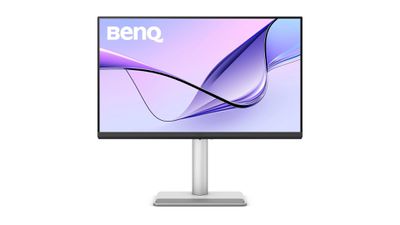
The BenQ MA270U is available from BenQ's website and authorized retailers for $459.99/£449.99. The 32-inch MA320U retails for $599.99/£549.99.
Note: BenQ provided MacRumors with a 27-inch MA270U 4K monitor for the purpose of the review. No other compensation was received.















































Top Rated Comments
I can't tell any difference between the three.
I will reiterate: the most asinine aspect of all of this is that the iMac has ALL OF THE HARDWARE necessary to replicate the Studio Display, at 24-inches and 4.5K, but Apple has decided that it hates its users, hates the environment, and loves money more than both. If Apple made the M# iMacs work in a Target Display Mode, I can guarantee they'd sell AT LEAST 3 times as many. AND it would keep millions of 8GB M# iMacs from landfills… where they ABSOLUTELY are destined in the next few years. Shameful.
(I currently have 3—A TOTAL OF THREE!—M1 iMacs deployed among clients, while having dozens of 5K and 4K Intel iMacs. None of my clients are dumb enough to pay the ridiculous price of the M# iMac if it cannot be used in Target Display Mode with a MacBook or mini. The 4K and 5K iMacs saw spectacular resale value for Windows 10 users. The M1 iMacs—most of which were sold with only 8GB of RAM—are seeing resale prices already falling BELOW that of the 2019/2020 Intel 5K iMacs. It is absurd. At this point, we're moving to multiple $300 27-inch 4K displays in most cases. Apple is literally leaving cash on the table and losing sales. And the fact that M4 Mac minis are sold out at Amazon until mid-Feb and March really should tell the exec team how moronic their decisions in the past several years have been.)