Rain Design mBar Pro Review - MacRumorsOpen MenuShow RoundupsShow Forums menuVisit ForumsOpen Sidebar
Skip to Content

Review: Rain Design's mBar Pro is a Portable Aluminum Stand for Your MacBook

by

Rain Design, a maker of accessories for Apple products, released three laptop stands made of anodized aluminum to match Apple's MacBook and MacBook Pro models earlier this year: the mBar, mBar Pro, and mBar Pro+. The mBar is a minimalist MacBook stand with fixed arms that's not meant to be portable, and the mBar Pro and Pro+ have folding arms for easy portability.
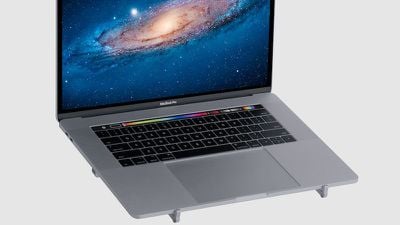
gallery mbarpro5

A laptop stand can be a critical accessory for a home or office workstation to elevate your laptop to a more comfortable and ergonomic position for extended use. But a portable laptop stand is more of an option than a necessity, and size and weight are crucial factors in determining if it's worthy of adding to your bag.

I received the mBar Pro to review and tested it with a 15-inch MacBook Pro. I've personally owned several Rain Design stands, including the iLap, mStand, and iLevel (which is a permanent fixture at my treadmill desk at home).
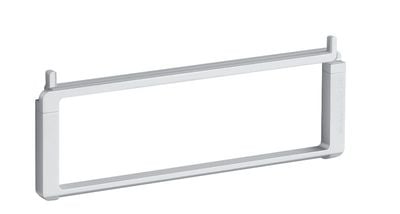
mbar pro silver main

Design and Materials

All three mBar models are made of anodized aluminum and come in silver or space gray. All have rubber strips on all contact points to protect your laptop, as well as rubber feet for stability.

The mBar Pro folds up into a rectangle with two nubs that stick out on one side. It measures 9.6 inches (243 mm) wide, 3.6 inches (91mm) tall, and 1/2 inch (12.4 mm) thick when folded. The nubs are on the extendable legs and prevent your laptop from sliding off. It folds up tightly though it takes a little trial and error to figure out which leg flips out which way to set it up.
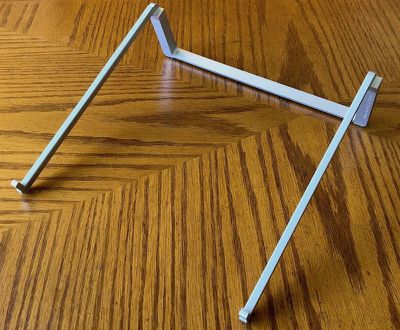
mbar pro unfolded
When the legs are extended, it measures 9.6 inches from front to back and it and raises the rear of a MacBook Pro by 3 inches. It feels solid yet light, weighing in at 4.6 ounces (130 grams). I found that my MacBook Pro felt stable and didn't wobble at all while on it.

Overall, the mBar Pro feels solid and well-designed. It's definitely an attractive accessory that complements Apple's laptop line.

Usage

It's compact when folded and is light enough to not be noticeable as extra weight in my laptop bag. The mBar comes with a lightweight microfiber case with a snap closure. While the stand doesn't have any sharp edges, it feels like it could mark my laptop if placed next to it in the laptop bag I use the most. With the included carrying case—or if you use a protective sleeve for your laptop—this won't be an issue for you, of course.
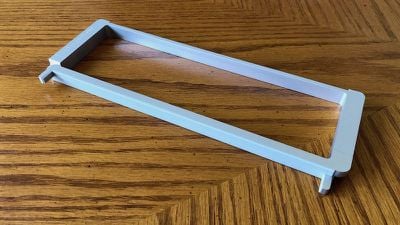
mbar pro folded
I used the mBar while working at coffee shop tables and standing at kitchen counters. General ergonomic principles for laptop use dictate that you should keep your wrists in as neutral a position as possible. Depending on your height or chair position, the height of the table or counter, the mBar may or may not help with that. When standing at a counter, I tend to rest my wrists right on my laptop below the keyboard and have to focus on keeping them neutral while using the mBar Pro.
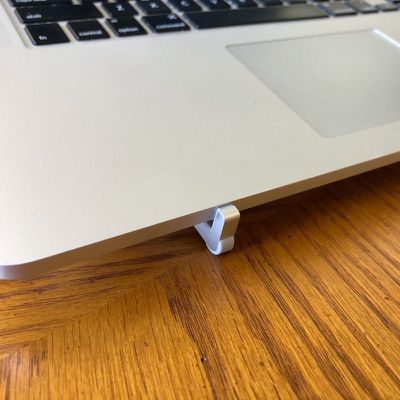
mbar pro foot
When sitting at a table, the mBar Pro raises my MacBook Pro to a level that allows me to keep my neck in a more neutral position. If you've heard about "text neck," which is neck strain that results from looking down at a phone (or your favorite electronic device), the mBar Pro can definitely help avoid this, at least while you're using your laptop. As an avid iPhone user, I definitely want to avoid neck strain as much as possible and I'm all for a product that helps me with that.
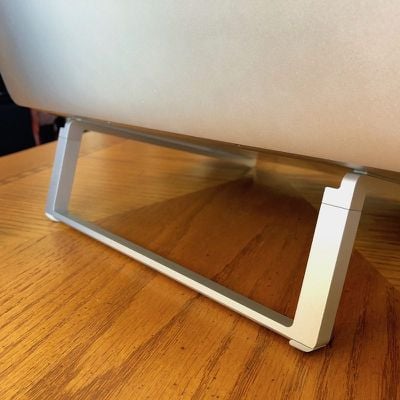
mbar pro rear
The height of the mBar Pro isn't adjustable, so if that's a feature you need, you'll need to look elsewhere (or use magazines, books, or other impromptu items on hand to add some height).

An added benefit of the mBar Pro's minimalist design allows for excellent air flow around your laptop. If you're doing processor-intensive work, it can help keep your MacBook Pro a little cooler since heat can dissipate more quickly.

Bottom Line

The mBar Pro is a lightweight, attractive, and functional portable laptop stand that aesthetically matches Apple's MacBook line. It can help relieve neck strain, though without any height adjustments, its ability to help will vary based on the furniture you use and your own habits.

However, it's not cheap at just under $55. At this price point, I can't recommend it as a must-buy but if you have the cash and need a light, easy solution to elevate your MacBook Pro, it's one of the nicest portable stands I've seen.

How to Buy

The mBar Pro can be purchased directly from Rain Design or from Amazon.

Note: Rain Design provided MacRumors with an mBar Pro for the purpose of this review. No other compensation was received.

Update: This review has been updated to reflect the fact that a carrying sleeve was included with the review unit received.


Top Rated Comments

106 months ago
On what planet is that worth $55?
Score: 11 Votes (Like | Disagree)
106 months ago
The Roost Stand:
MacRumors content image

Can't tell if it's part laptop stand or part walker:
MacRumors content image
At $75 it probably should do both.:p
Score: 5 Votes (Like | Disagree)
keysofanxiety Avatar
106 months ago
On what planet is that worth $55?
Well in its defence, it probably does the same job as a 55-high stack of $1 bills.

So at least it, err, looks nicer I guess?
Score: 5 Votes (Like | Disagree)
madoka Avatar
106 months ago
I own four Rain design laptop stands. The rubber bumpers fall off over time. Rather than fix this adhesive issue, Rain Design's response is to ask users to BUY more rubber bumpers at $6 a pop. Since when should a laptop stand have a wear item?!?!!?

The laptop stand I switched to for portable use is the Roost Stand. BRILLIANT design and blows away Rain Design's version in every way but price.


Score: 3 Votes (Like | Disagree)
frode Avatar
106 months ago
It looks nice and it's good for the eyes to have the screen up a bit but it's awful ergonomics for the hands. Natural human hand positions are slightly down, not up. It's quite surprising how many products ignore this basic fact of anatomy (yes, I am a certified ergonomist in case someone wants to question that part...). :-)
Score: 2 Votes (Like | Disagree)
SoyCapitanSoyCapitan Avatar
106 months ago
Looks terrible. Even a stack of books would look more attractive.
Score: 2 Votes (Like | Disagree)

Popular Stories

duo aquarium

More Fun iPhone Duo Apps: 30 New Picks to Try

Friday November 6, 2026 3:27 pm PST by
When the iPhone Duo launched, we shared a list of some of the fun apps developers created for the new form factor. Two weeks out, developers are continuing to come up with fresh ideas, so we thought we'd share some of our favorites. Games Marbles Unhinged ($2.99) - Marbles Unhinged is a marble maze designed for the Duo. When you fold it, the floor turns into a ramp. If you stand the top...
apple pro tell logo

Apple Launching Five New Products Today

Thursday November 5, 2026 12:59 am PST by
Apple is launching five new products on Friday, November 6, following pre-orders that opened last week, including its first touchscreen MacBook Pro models. The following new products will be available from today: iPad mini with OLED display and A20 Pro chip iMac with M6 chip 14-inch MacBook Pro with M6 chip 14-inch MacBook Pro with OLED touchscreen 16-inch MacBook Pro with OLED...
silver iphone 18 pro

Apple Rumored to Drop the iPhone's Action Button Next Year

Friday November 6, 2026 6:07 am PST by
Apple plans to merge the iPhone's Action button with the Camera Control starting next year, according to the leaker known as "Instant Digital." In a new post on Weibo, the leaker claimed that a single press of the combined button would open the camera, while a long press would trigger the function assigned to the Action button. They explicitly clarified that the dedicated Action button would ...
Latest Stories
Siri AI Rumored to Become 'More Like an Agent' as Early as Next Year
10 hours ago
Apple Taking New Approach to Developing iOS 28 and macOS 28
12 hours ago
Early Apple Black Friday Deals on Apple Watch, MacBook Air, and More
1 day ago
'Backglow' Lets You Customize New MacBook Pro's Glowing Apple Logo
1 day ago
Top Stories: Apple Product Launches, iOS 27.3 Beta, and More
2 days ago
More Fun iPhone Duo Apps: 30 New Picks to Try
2 days ago
Hands-On With Apple's New OLED Touchscreen MacBook Pro
2 days ago
Apple Store With All-New Design Opening Soon in Southern California
2 days ago
Control the Glowing Apple Logo on Your New MacBook Pro
2 days ago
Apple Shares New 'Apple Card: Apply and Use in Minutes' Ad
2 days ago
Apple Says More Than 100,000 Apps Optimized for iPhone Duo, Here's What's Still Missing
2 days ago
Early Black Friday Deals Kickoff With Steep Discounts on Apple Watch Ultras and More
2 days ago
The MacRumors Show: iOS 27.3 Looks Like a Huge Update
2 days ago
Best Buy's Black Friday Event Begins With Sitewide Savings on Apple, TVs, More
3 days ago
Apple Releasing Yet Another Two New Products Next Week
3 days ago
MacBook Air Drops to Lowest Price in Months With Amazon's $250 Discount
3 days ago
Apple Rumored to Drop the iPhone's Action Button Next Year
3 days ago
Apple's Extended Return Policy Now in Effect for 2026 Holiday Season
3 days ago
Apple Music Classical Updated With New Icon and Refreshed Design
3 days ago
OLED iPad Mini, M6 iMac, and New MacBook Pros Available From Today
3 days ago
Apple Surveys iPhone Duo Buyers About Crease and Camera
3 days ago
Apple's First Touchscreen Mac is Now Arriving to Customers
3 days ago
Claude Gets Personal Finance Feature With Bank Account Linking
3 days ago
Apple Arcade Adds Crossy Road Rush and NBA 2K27
3 days ago
Apple's New HomeView Smart Home Hub: Here's How Much RAM It Has
3 days ago
iPad Mini vs. iPad Air Buyer's Guide: Now Just $50 Apart
3 days ago
First iOS 27.3 and macOS Golden Gate 27.3 Public Betas Now Available
3 days ago
Apple Announces a New Mac Sales Record
3 days ago
Paid $200 for Logic Pro? Apple Says You Won't Get This New Feature
3 days ago
Instagram's Edits Video Editor is Now Available on Mac
3 days ago








































