Seagate Backup Plus 4TB Portable Hard Drive Review - MacRumorsOpen MenuShow RoundupsShow Forums menuVisit ForumsOpen Sidebar
Skip to Content

Seagate Review: Hands-On With the 4TB Backup Plus Portable Hard Drive With Lyve Integration

by

Seagate has long sold a line of Backup Plus external hard drives that offer large amounts of storage space at a reasonable price, and in June, the company announced two new features added to all hard drives in the Backup Plus line: 200GB of Microsoft OneDrive cloud storage and the Lyve photo and video management app for automatically backing up photos.

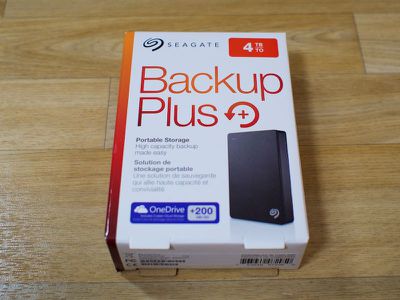
Seagate also announced a new high capacity Backup Plus Portable hard drive, with 4TB of storage and a 20.5mm form factor, priced at $240. Seagate invited us to test out its newest hard drive to test the Backup Plus hard drive and the new Lyve app and service it ships with.
seagatebackupplusinbox
Seagate's new Backup Plus offers the same 4TB of storage that the Backup Plus Fast offers, but it's less expensive and it is a single 4TB hard drive instead of two external drives in a RAID 0 configuration. It's also got more storage than the Backup Plus Slim, which caps out at 2TB, allowing Seagate's newest offering to fill a void between the two existing products (Fast and Slim) in the Backup Plus family.

Design and Features

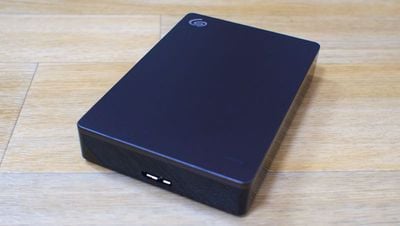
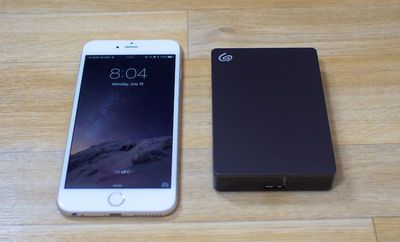
Seagate's been selling its Backup Plus line for years. Design wise, the 4TB Backup Plus looks like any standard 2.5-inch portable hard drive. It measures in at 4.5 inches in length, 3.1 inches in width, it's .807 inches thick (20.5mm), and it weighs 0.54 pounds. In terms of usability, those dimensions mean it's slim and easy to slip into a bag or a backpack.
seagatebackupplusfront
The Backup Plus has a traditional black casing that's half metal and half plastic, with the metal plate located on the front of the drive. An LED on the front lights up when the hard drive is plugged in, and there's a single USB port on one side.
seagatebackupplussizecomparison
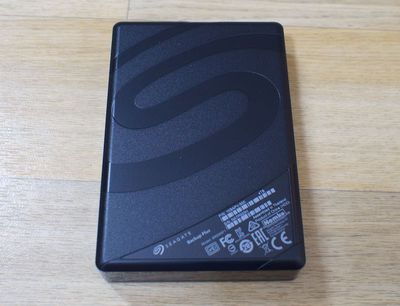
There's a large but subtle Seagate logo on the back and another small logo in silver on the front. The Backup Plus is USB 2.0/3.0 only and ships with an 18-inch USB 3.0 cable, which is an adequate length for use on a desktop or while on the go.
seagatebackupplusbackside

Software and Performance

Seagate ships the 4TB Backup Plus in an NTFS format, so to use the drive without formatting, users will need to install Seagate's NTFS driver for Mac. With the driver, the Backup Plus can be used interchangeably between Windows and Mac computers without needing to reformat.

With the Blackmagic Disk Speed Test, we saw write speeds of 119 MB/s and read speeds of 114 MB/s, which is comparable to many other similar hard drives on the market. I also did standalone tests transferring 10GB chunks of photos and videos to and from the Backup Plus and saw similar but slightly lower average speeds of 97MB/s read and 99MB/s write. While conducting these tests, the drive got warm, but not hot.

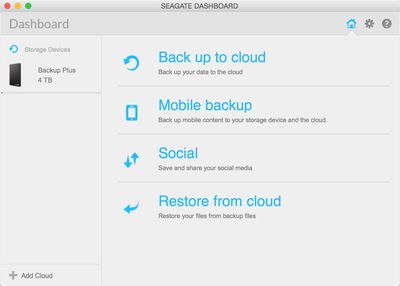
There are multiple options for using the Backup Plus for backing up files, including the Lyve service, Microsoft OneDrive, and Seagate's own software, the Seagate Dashboard. Software doesn't come pre-installed on the drive, but can be downloaded from a link in the setup instructions.
seagatedashboard
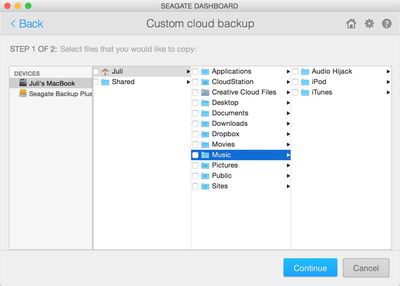
The Seagate Dashboard is Seagate's standard backup/restore software. It can be used to automatically backup files on a Mac, iPhone or iPad, and social networking sites, and it can transfer important files to a cloud service like Microsoft OneDrive for extra protection. Purchasing the Seagate Backup Plus entitles users to create a free OneDrive account with 200GB of storage, which will last for a period of two years.
seagatecloudbackup
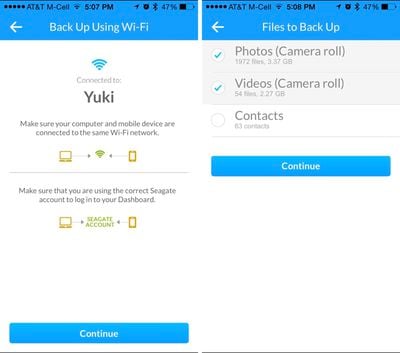
Backing up files from an iPhone or iPad will require the Seagate Dashboard app on the Mac and the accompanying Seagate Backup app. Files can be transferred via WiFi when at home or stored in the cloud when away from home using Google Drive or Dropbox.
seagatemobilebackup
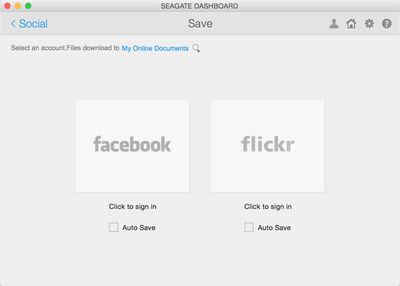
Photos and videos can be uploaded automatically from the drive to Flickr, Facebook, or YouTube, and photos from Facebook or Flickr can be downloaded from the social networking sites to the drive. There's also an option that will continually download photos from social networking sites whenever you upload them, which is a useful way to make sure you always have multiple copies of your photos.
seagatesocialbackup
I set up the Seagate Dashboard so my iPhone and iPad photos would upload automatically to the Backup Plus, which in turn uploaded those files to the Microsoft OneDrive account that I set up. I use iCloud to store my photos so the Seagate Dashboard to Microsoft OneDrive option seemed like overkill, but if you don't use iCloud Photo Library and store your photos in the cloud, it's a good option. It's also a solid solution if you need something that's going to work across Windows and Mac devices.

Lyve is a separate service that works with the Backup Plus. Lyve is designed to sync with specific apps or folders on a Mac, continuously importing all new photos and videos that are added. For example, it can sync with the Photos app, transferring each photo uploaded to the hard drive.
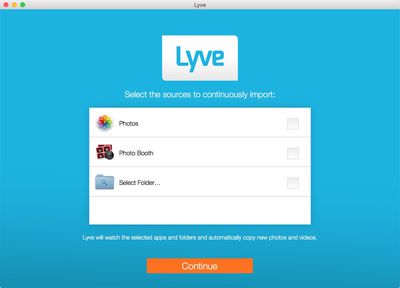
lyvesetup
In my testing, Lyve was easy to use and it worked quickly. When synced with a folder on my Mac, every photo I uploaded to the folder was synced to the Lyve service and then uploaded to the Seagate Backup Plus. For people who only need to back up photos from a Mac and would like something automated, Lyve is even simpler to use than the Seagate Dashboard and it works well as a tertiary backup for iCloud Photo Library. Lyve and Seagate Dashboard can be used in tandem.
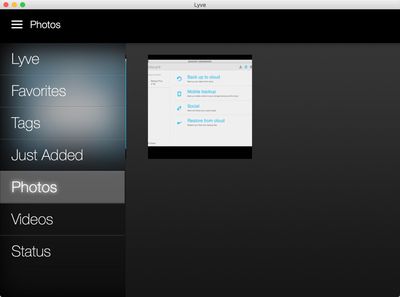
lyvemenu
As of July, all hard drives in the Backup Plus family, this one included, ship with the 200GB of OneDrive storage for two years and Lyve integration, bringing these backup options to all of the hard drives in the line up.

Bottom Line

The 4TB Backup Plus is a solid option for people who want a high capacity external hard drive that's compact and easily portable, plus it's one of the first 4TB 2.5" drives available. It's priced at $240, but sites like Amazon and Best Buy are selling it for $170 to $199, which is a much better deal and makes it a worthwhile purchase.

Along with a high storage capacity, the Backup Plus offers features that can't be found elsewhere. With Seagate Dashboard, it can backup files across a range of devices, including mobile devices, and it's able to backup the photos you upload to sites like Facebook and Flickr in a way that's fast and hassle free.
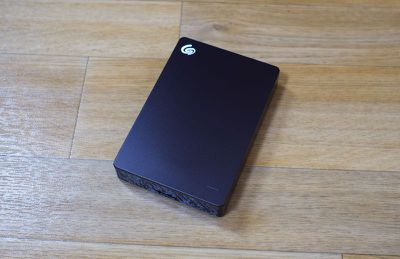
seagatebackupplusangled
Performance is average and on par with other similar hard drives, so there's nothing special there, but the addition of Lyve makes this useful for people who want to use to automatically backup photos, and having 200GB of Microsoft OneDrive storage is also a nice perk, as it provides a way to make sure important files and photos are backed up on the drive and in the cloud.

Pros:

  • High capacity
  • Slim, portable design
  • Classic look with minimal branding
  • Lots of software options
  • Microsoft OneDrive storage

Cons:

  • Pricier than some of the larger 4TB external drives
  • Performance is nothing special

How to Buy

The 4TB Seagate Backup Plus Portable has an MRSP of $240, but it can be purchased from Amazon.com for $179.99.


Top Rated Comments

iammenasco Avatar
147 months ago
Con: It's Seagate.

Score: 7 Votes (Like | Disagree)
147 months ago
Seagate has long sold a line of Backup Plus external hard drives that offer large amounts of storage space at a reasonable price, and in June, the company announced two new features added to all hard drives in the Backup Plus line: 200GB of Microsoft OneDrive cloud storage and the Lyve photo and video management app for automatically backing up photos.

Seagate also announced a new high capacity Backup Plus Portable hard drive, with 4TB of storage and a 20.5mm form factor, priced at $240. Seagate invited us to test out its newest hard drive to test the Backup Plus hard drive and the new Lyve app and service it ships with.

MacRumors content image

Seagate's new Backup Plus offers the same 4TB of storage that the Backup Plus Fast offers, but it's less expensive and it is a single 4TB hard drive instead of two external drives in a RAID 0 configuration. It's also got more storage than the Backup Plus Slim, which caps out at 2TB, allowing Seagate's newest offering to fill a void between the two existing products (Fast and Slim) in the Backup Plus family.

Design and Features

Seagate's been selling its Backup Plus line for years. Design wise, the 4TB Backup Plus looks like any standard 2.5-inch portable hard drive. It measures in at 4.5 inches in length, 3.1 inches in width, it's .807 inches thick (20.5mm), and it weighs 0.54 pounds. In terms of usability, those dimensions mean it's slim and easy to slip into a bag or a backpack.

MacRumors content image

The Backup Plus has a traditional black casing that's half metal and half plastic, with the metal plate located on the front of the drive. An LED on the front lights up when the hard drive is plugged in, and there's a single USB port on one side.


Click here to read more... ('https://www.macrumors.com/review/seagate-4tb-backup-plus-portable-hard-drive/')

Article Link: Seagate Review: Hands-On With the 4TB Backup Plus Portable Hard Drive With Lyve Integration ('https://www.macrumors.com/review/seagate-4tb-backup-plus-portable-hard-drive/')
Have you been able to test the drive with large chunks of photos - say over 100GB? I've been dealing with this issue on an ongoing basis with Seagate recently. Somewhere between 30GB and 70GB into a large transfer of photos (common when upgrading to a new drive) the Backup Plus slows to less than ~30MB/s and never recovers. The problem is peculiar to HFS+ - it doesn't occur under NTFS (or any other filesystem, as far as I know). It won't happen with large files (like videos) or under the common Windows filesystems.

When I was working with Seagate on it, they acknowledged the issue with their 5TB (desktop) SMR drive, but then suddenly denied the same issue was also occurring with their desktop 4TB (non-SMR) drive. I don't know what happened, because up until that point their engineers were able to closely duplicate my findings.


Could you test the new drive under HFS+ with a large number of photos? A Mac forum would be the perfect place for this, and Mac users will care about this issue. Seagate took me very seriously and was trying to fix the issue, but I don't know if they succeeded. I'm curious whether they've fixed it quietly, or whether the issue also exists for the portable line.
Score: 5 Votes (Like | Disagree)
Michael Scrip Avatar
147 months ago
Rotational HD are old tech. Bring SSD. Once you try it, you never go back.
For a boot drive... SSD is amazing.

But SSD for mass storage is a little unnecessary and quite expensive.
Score: 3 Votes (Like | Disagree)
applepuree Avatar
147 months ago
Hitachi and WD drives are the same company since 2012.

http://www.wdc.com/en/company/hgst/
Score: 2 Votes (Like | Disagree)
John.B Avatar
147 months ago
...so to use the drive without formatting, users will need to install Seagate's NTFS driver for Mac. With the driver, the Backup Plus can be used interchangeably between Windows and Mac computers without needing to reformat.
I can think of lots of uses for an NTFS driver for OSX, but I'm not sure that's the path I'd choose for my backup drive, even an automated one.

In the interest of disclosure, I'm currently using a 2GB 2.5" external drive for Time Machine backups and a set of 1GB 2.5" external drives for cloned (i.e. bootable) drive backups via SuperDuper!, easily one of my favorite Mac features.
Score: 2 Votes (Like | Disagree)
AlecZ Avatar
147 months ago
Too bad it's somewhat expensive, as most external hard drives are. I wish my Mac Pro just had more than 4 eSATA slots. I've tried using bare external enclosures so I could have the freedom to swap out drives, but all 4 I've used have broken down extremely quickly. Not sure why they're so unreliable.

But they WOULD outlast any Seagate drive. :p Hitachi FTW!
Score: 1 Votes (Like | Disagree)

Popular Stories

apple pro tell logo

Apple Launching Five New Products Today

Thursday November 5, 2026 12:59 am PST by
Apple is launching five new products on Friday, November 6, following pre-orders that opened last week, including its first touchscreen MacBook Pro models. The following new products will be available from today: iPad mini with OLED display and A20 Pro chip iMac with M6 chip 14-inch MacBook Pro with M6 chip 14-inch MacBook Pro with OLED touchscreen 16-inch MacBook Pro with OLED...
duo aquarium

More Fun iPhone Duo Apps: 30 New Picks to Try

Friday November 6, 2026 3:27 pm PST by
When the iPhone Duo launched, we shared a list of some of the fun apps developers created for the new form factor. Two weeks out, developers are continuing to come up with fresh ideas, so we thought we'd share some of our favorites. Games Marbles Unhinged ($2.99) - Marbles Unhinged is a marble maze designed for the Duo. When you fold it, the floor turns into a ramp. If you stand the top...
silver iphone 18 pro

Apple Rumored to Drop the iPhone's Action Button Next Year

Friday November 6, 2026 6:07 am PST by
Apple plans to merge the iPhone's Action button with the Camera Control starting next year, according to the leaker known as "Instant Digital." In a new post on Weibo, the leaker claimed that a single press of the combined button would open the camera, while a long press would trigger the function assigned to the Action button. They explicitly clarified that the dedicated Action button would ...
Latest Stories
Siri AI Rumored to Become 'More Like an Agent' as Early as Next Year
19 minutes ago
Apple Taking New Approach to Developing iOS 28 and macOS 28
2 hours ago
Early Apple Black Friday Deals on Apple Watch, MacBook Air, and More
21 hours ago
'Backglow' Lets You Customize New MacBook Pro's Glowing Apple Logo
21 hours ago
Top Stories: Apple Product Launches, iOS 27.3 Beta, and More
1 day ago
More Fun iPhone Duo Apps: 30 New Picks to Try
2 days ago
Hands-On With Apple's New OLED Touchscreen MacBook Pro
2 days ago
Apple Store With All-New Design Opening Soon in Southern California
2 days ago
Control the Glowing Apple Logo on Your New MacBook Pro
2 days ago
Apple Shares New 'Apple Card: Apply and Use in Minutes' Ad
2 days ago
Apple Says More Than 100,000 Apps Optimized for iPhone Duo, Here's What's Still Missing
2 days ago
Early Black Friday Deals Kickoff With Steep Discounts on Apple Watch Ultras and More
2 days ago
The MacRumors Show: iOS 27.3 Looks Like a Huge Update
2 days ago
Best Buy's Black Friday Event Begins With Sitewide Savings on Apple, TVs, More
2 days ago
Apple Releasing Yet Another Two New Products Next Week
2 days ago
MacBook Air Drops to Lowest Price in Months With Amazon's $250 Discount
2 days ago
Apple Rumored to Drop the iPhone's Action Button Next Year
2 days ago
Apple's Extended Return Policy Now in Effect for 2026 Holiday Season
2 days ago
Apple Music Classical Updated With New Icon and Refreshed Design
2 days ago
OLED iPad Mini, M6 iMac, and New MacBook Pros Available From Today
2 days ago
Apple Surveys iPhone Duo Buyers About Crease and Camera
3 days ago
Apple's First Touchscreen Mac is Now Arriving to Customers
3 days ago
Claude Gets Personal Finance Feature With Bank Account Linking
3 days ago
Apple Arcade Adds Crossy Road Rush and NBA 2K27
3 days ago
Apple's New HomeView Smart Home Hub: Here's How Much RAM It Has
3 days ago
iPad Mini vs. iPad Air Buyer's Guide: Now Just $50 Apart
3 days ago
First iOS 27.3 and macOS Golden Gate 27.3 Public Betas Now Available
3 days ago
Apple Announces a New Mac Sales Record
3 days ago
Paid $200 for Logic Pro? Apple Says You Won't Get This New Feature
3 days ago
Instagram's Edits Video Editor is Now Available on Mac
3 days ago









































