SnapPower Charger Review - MacRumorsOpen MenuShow RoundupsShow Forums menuVisit ForumsOpen Sidebar
Skip to Content

Review: The Easy-Install SnapPower Charger Adds a USB Port to Your Outlet

by

The SnapPower Charger, designed to make it easy to add USB ports to a wall outlet with no complicated wiring, originated on Kickstarter in 2015. It's basically an outlet replacement that features two standard sockets and an additional USB port, and it's meant to be simple enough to install in just a couple of minutes.
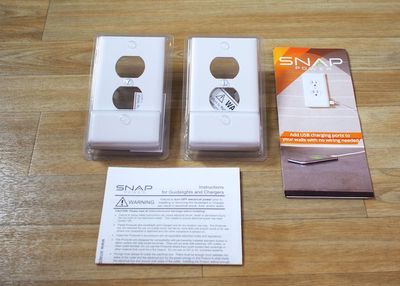
snappowercharger
SnapPower is available in three colors (white, light almond, and ivory) to match different home decor. Design wise, it looks identical to a standard outlet cover, but it features a hump at the bottom that houses a USB port for charging iOS devices. There are two versions of the SnapPower, designed to fit square or round outlets, which make up most of the types of modern outlet plates in the United States.

The SnapPower works by connecting the two metal tabs at the sides of the outlet cover to the screws of the outlet, allowing for a small amount of power to be drawn into the USB port of the device.
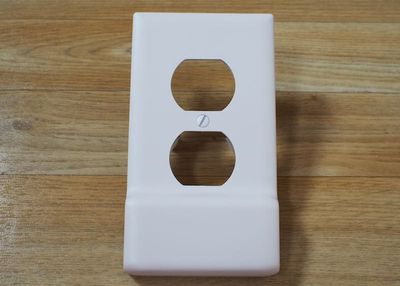
snappowerchargerfront
My apartment, which is fairly modern, is equipped with square-style outlets and the square SnapPower fit well. Some older houses and apartments might have outlets that are not compatible with the SnapPower, so that's something to be aware of when considering a purchase.
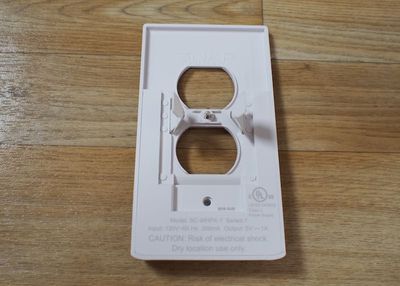
snappowerchargerback
I have zero electrical experience and I was able to install the SnapPower without running into problems. I turned off the power to my office through the circuit breaker, unscrewed my existing outlet cover, pulled it off the wall, snapped the SnapPower into place over the bare sockets, and then put the screws back in and turned the power back on. It took all of five minutes to do and was very straightforward.
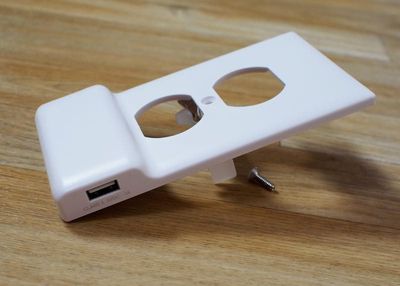
snappowerchargerside
One caveat -- I had an outlet that had been installed by an electrician upside down. The SnapPower still worked, but I had to install it upside down as well to get the contacts to line up properly to power the USB port.
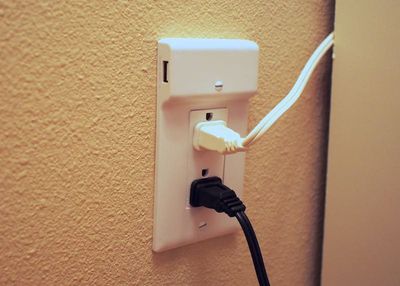
snappowerupsidedown
The SnapPower is bit thicker overall than a standard outlet cover and much thicker at the bottom to accommodate a USB port, so it makes outlets stand out visually more than a normal outlet would, but it wasn't enough of an aesthetic difference to be super noticeable.

Any USB device can be charged with the SnapPower, but it's limited to one amp, which is best suited to iPhone charging. Charging speeds are comparable to charging with an Apple iPhone charger, so it's not great for charging iPads.
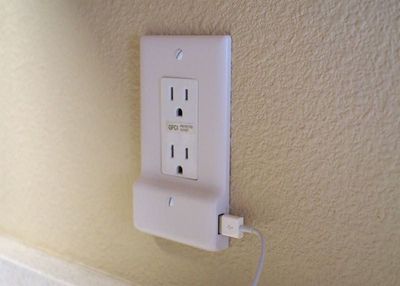

I was able to charge an iPhone 6s Plus in about the same amount of time that it takes to charge with a standard iPhone charger and Lightning cable, but my 9.7-inch iPad Pro took much longer, and I didn't even attempt to charge my 12.9-inch iPad Pro with such a low-power charger.

When I charge my iPhone, I don't typically use Apple's included charger because it's too slow, so I thought the SnapPower, while convenient, just wasn't worth it for me. It's not something that I'd use on a regular basis because I generally want faster charging for my iPhone and my other iOS devices.

If you're charging an iPhone overnight (or an Apple Watch) the speed of the charging doesn't matter quite as much, which makes the SnapPower more useful. I could see installing this next to a bedside table for a simple way to charge a device overnight without taking up a full socket.

Bottom Line

At a price ranging from $16 to $20 based on the number of SnapPower Chargers purchased, the device seems expensive for what you get - a single USB port. Comparatively, a little Anker PowerPort that can plug into a socket and offer 4 USB ports with faster charging speeds costs $25 from Amazon, which seems like a better deal to me. I'd rather spend my money on a multi-port charger that can go anywhere.
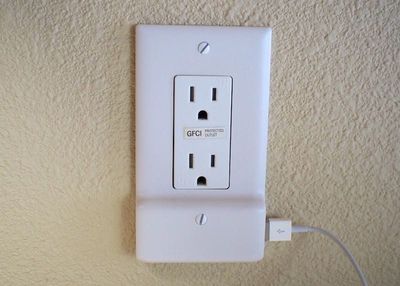
snappowerinstalled2
That said, if you're looking for a sleek solution that doesn't add visible bulk to your sockets and is easier to install than a solution that requires wiring expertise, the SnapPower is a good option. It was quick and easy for me to put in place and since I didn't need to do any wiring, I could install it in my apartment on my own.

If I had a house, I might seek out something more permanent and robust, able to charge devices at a faster rate. The SnapPower is limited to 1 amp, which is a major drawback if you have a lot of larger devices like iPads that require more power to charge at a reasonable rate.

Pros:

  • Easy installation
  • Clean, simple look
  • Leaves both sockets open

Cons:

  • Only adds 1 USB port
  • 1 amp

How to Buy

The SnapPower Charger can be purchased from the SnapPower website. It costs $20 for a single charger, $38 for two, $85 for five, and $160 for 10.


Top Rated Comments

134 months ago
If you're going to take off the cover plate you might as well just remove the socket and put in a new one with USB ports capable of charging at full speed.. They are about the same price and will require 2 more screws and 5 minutes. Don't see any point in this

Score: 7 Votes (Like | Disagree)
zorinlynx Avatar
134 months ago
The design of this product doesn't seem safe to me. I wonder if it's compliant with NEC. There's a UL logo on it but I'm still skeptical.
Score: 3 Votes (Like | Disagree)
rdlink Avatar
134 months ago
I just installed that same model a couple weeks ago. Works great.

I can understand someone who is a bit worried about messing with electrical wires going with one like in the article though.
Yep. I agree. Even though it's as easy as throwing the breaker some people still kind of freak about it. Fortunately, I'm not one of those people. ;-)

I replaced every switch and outlet in my house when I took possession of it. Changed everything from standard to Decora, replaced almost all of my light switches with Lutron Caseta HomeKit compatibles, and replaced every wallplate except for the five I put the Guidelights on with Lutron Claro hidden screw wallplates.
Score: 2 Votes (Like | Disagree)
134 months ago
One caveat -- I had an outlet that had been installed by an electrician upside down. The SnapPower still worked, but I had to install it upside down as well to get the contacts to line up properly to power the USB port. ]
Believe it or don't, the "proper" way per NECA standards is for NEMA 5-15R outlets to be installed with the grounding pin at the top or neutral prong if installed sideways. That's why an ELECTRICIAN installed it that way.

(I obtained the master electrician certification in two states so I could legally do the wiring in the new construction on my houses.)
Score: 1 Votes (Like | Disagree)
rdlink Avatar
134 months ago
If you're going to take off the cover plate you might as well just remove the socket and put in a new one with USB ports capable of charging at full speed.. They are about the same price and will require 2 more screws and 5 minutes. Don't see any point in this
I recently moved into my new house, and I did exactly that. I bought 5 outlets with two USB ports in them, and installed them in strategic locations through the house.

However, these guys, SnapPower make another great product that I have installed in several locations throughout my place, which gives me LED night lights:

https://www.snappower.com/select-guidelight/
Score: 1 Votes (Like | Disagree)

Popular Stories

apple pro tell logo

Apple Launching Five New Products Today

Thursday November 5, 2026 12:59 am PST by
Apple is launching five new products on Friday, November 6, following pre-orders that opened last week, including its first touchscreen MacBook Pro models. The following new products will be available from today: iPad mini with OLED display and A20 Pro chip iMac with M6 chip 14-inch MacBook Pro with M6 chip 14-inch MacBook Pro with OLED touchscreen 16-inch MacBook Pro with OLED...
duo aquarium

More Fun iPhone Duo Apps: 30 New Picks to Try

Friday November 6, 2026 3:27 pm PST by
When the iPhone Duo launched, we shared a list of some of the fun apps developers created for the new form factor. Two weeks out, developers are continuing to come up with fresh ideas, so we thought we'd share some of our favorites. Games Marbles Unhinged ($2.99) - Marbles Unhinged is a marble maze designed for the Duo. When you fold it, the floor turns into a ramp. If you stand the top...
silver iphone 18 pro

Apple Rumored to Drop the iPhone's Action Button Next Year

Friday November 6, 2026 6:07 am PST by
Apple plans to merge the iPhone's Action button with the Camera Control starting next year, according to the leaker known as "Instant Digital." In a new post on Weibo, the leaker claimed that a single press of the combined button would open the camera, while a long press would trigger the function assigned to the Action button. They explicitly clarified that the dedicated Action button would ...
Latest Stories
Siri AI Rumored to Become 'More Like an Agent' as Early as Next Year
2 hours ago
Apple Taking New Approach to Developing iOS 28 and macOS 28
3 hours ago
Early Apple Black Friday Deals on Apple Watch, MacBook Air, and More
22 hours ago
'Backglow' Lets You Customize New MacBook Pro's Glowing Apple Logo
22 hours ago
Top Stories: Apple Product Launches, iOS 27.3 Beta, and More
1 day ago
More Fun iPhone Duo Apps: 30 New Picks to Try
2 days ago
Hands-On With Apple's New OLED Touchscreen MacBook Pro
2 days ago
Apple Store With All-New Design Opening Soon in Southern California
2 days ago
Control the Glowing Apple Logo on Your New MacBook Pro
2 days ago
Apple Shares New 'Apple Card: Apply and Use in Minutes' Ad
2 days ago
Apple Says More Than 100,000 Apps Optimized for iPhone Duo, Here's What's Still Missing
2 days ago
Early Black Friday Deals Kickoff With Steep Discounts on Apple Watch Ultras and More
2 days ago
The MacRumors Show: iOS 27.3 Looks Like a Huge Update
2 days ago
Best Buy's Black Friday Event Begins With Sitewide Savings on Apple, TVs, More
2 days ago
Apple Releasing Yet Another Two New Products Next Week
2 days ago
MacBook Air Drops to Lowest Price in Months With Amazon's $250 Discount
2 days ago
Apple Rumored to Drop the iPhone's Action Button Next Year
2 days ago
Apple's Extended Return Policy Now in Effect for 2026 Holiday Season
2 days ago
Apple Music Classical Updated With New Icon and Refreshed Design
2 days ago
OLED iPad Mini, M6 iMac, and New MacBook Pros Available From Today
2 days ago
Apple Surveys iPhone Duo Buyers About Crease and Camera
3 days ago
Apple's First Touchscreen Mac is Now Arriving to Customers
3 days ago
Claude Gets Personal Finance Feature With Bank Account Linking
3 days ago
Apple Arcade Adds Crossy Road Rush and NBA 2K27
3 days ago
Apple's New HomeView Smart Home Hub: Here's How Much RAM It Has
3 days ago
iPad Mini vs. iPad Air Buyer's Guide: Now Just $50 Apart
3 days ago
First iOS 27.3 and macOS Golden Gate 27.3 Public Betas Now Available
3 days ago
Apple Announces a New Mac Sales Record
3 days ago
Paid $200 for Logic Pro? Apple Says You Won't Get This New Feature
3 days ago
Instagram's Edits Video Editor is Now Available on Mac
3 days ago









































