

Sphero last summer acquired a company called Specdrums, which made finger-worn rings that are designed to turn colors into music. Specdrums are now being sold under the Sphero brand, and are now available in Apple retail stores.
Specdrums fit on an index finger and are meant to allow kids and adults alike to play a musical note when tapping one of the rings against a specific color, creating music by using different colored notes. We tested out the Specdrums ahead of their Apple Store release to see if they're worth the $65 asking price.
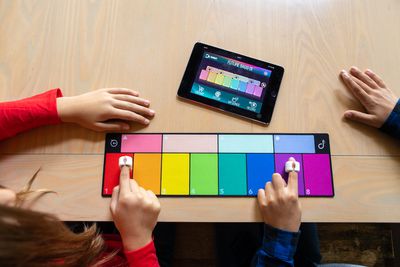
Design
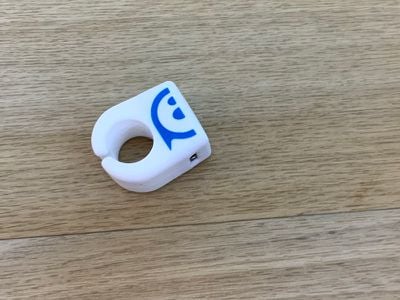
Specdrums are small, silicone rings that have optical sensors embedded into the front. The silicone is stretchy, so it can fit a small finger or a larger finger without issue.
I have relatively small fingers and the Specdrums fit comfortably and snugly, and it was not a problem to wear it for a long period of music making. There's a slit at the bottom that allows the ring to expand if necessary.
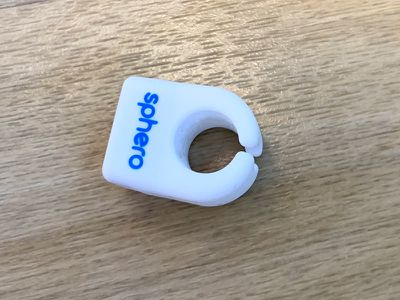
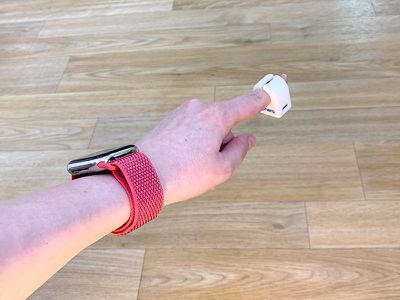
Specdrums are meant to be worn on an index finger with the optical sensor in the front facing downwards so that you can tap it on various colored surfaces to make sounds.
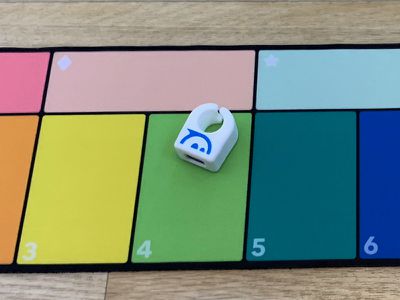
On the side of the Specdrums, there's a micro-USB port that's used for charging through the included micro-USB cable that comes with it. At the top of the silicone ring, there's a Sphero logo, and at the bottom, the Sphero name.
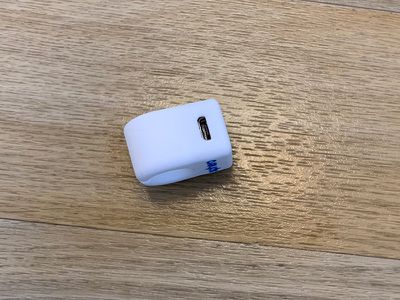
The optical sensor built into the Specdrums will light up when tapped against a surface, and the rectangular front of the sensor takes up most of the ring. It's comfortable to tap on things and was very responsive, easily recognizing different colors.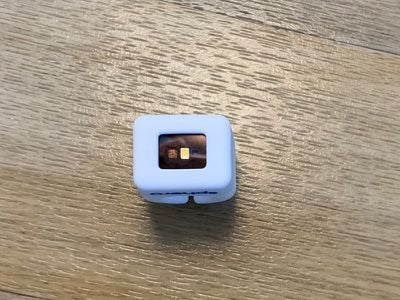
Specdrums ship with a soft mouse pad-like color mat that has 12 different colors on it, each of which can make a different sound. Specdrums will work with other colored objects like rugs, blankets, clothing, colored furniture, toys, and so on, but the mat is a convenient way to have access to all available colors that make sounds in one spot.
The Specdrums' battery life seems decent. I played with the Specdrums for about an hour, left them alone for a week, came back, and was able to get another hour of use out of it before needing to recharge.
How it Works
I want to say upfront that I play no musical instruments and I don't own any musical equipment to determine how these interface with other musical products and software musicians use, so take that into account when reading this review and my account of using the Specdrums.

To use the Specdrums, you need to connect the ring to your iPhone over Bluetooth using Sphero's Specdrums Mix app. Specdrums are entirely dependent on the app, and when you tap on a color using the optical sensor, a sound will play from your iPhone.
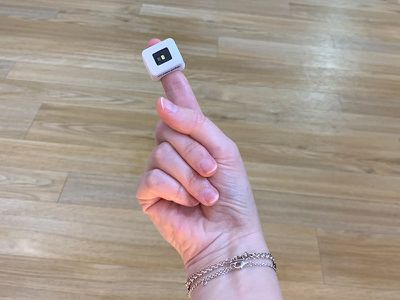
No sound comes from the Specdrums itself, it's all synced to the iPhone. It also does not work outside of the Specdrums app, which is something to be aware of. So the idea is that the sensor associates one of twelve colors (red, orange, yellow, lime green, grass green, blue, purple, pink, light pink, light orange, light green, and light blue) with a different sound on the iPhone. Each time that color is tapped, the sound plays.
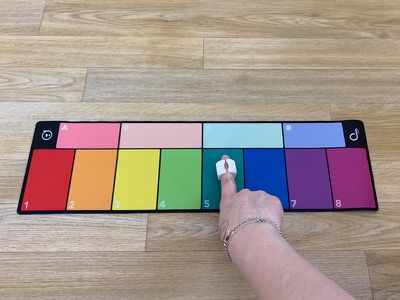
There are many preset sounds available for download in the Specdrums app that you can use, or you can create your own sounds, so really, there are an endless number of sounds that you can associate with each color. There are eight base colors that can be linked to single sounds and four additional colors that you can link to sounds that loop for a base track.
You can combine the looping sounds with the sounds that you add in to make music. When you set a loop using one of the four looping colors, it sets the timing for all of the rest of the beats that you produce, so it always sounds somewhat decent.
Using the Specdrums
I like color so I have a lot of colorful things in my room, and it was fun to tap on each one to play sounds. I think kids would really enjoy being able to produce sounds from their surroundings, but some of the app controls might be a little complicated and could require some parental help, especially when it comes to recording new sounds.
There are only 12 colors in total that the Specdrums will recognize, so if you tap on something that's a shade of red, it's going to play the red sound, not a random sound or a sound specific to that particular color.
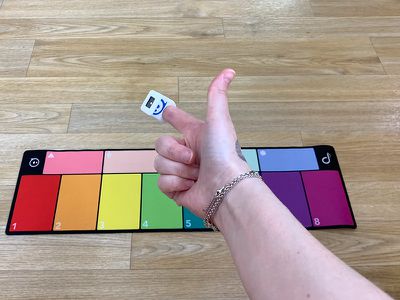
At any given time, you're working with four looping sounds and 8 spontaneous sounds that you can add, but because you can change things up and customize both sounds and which color plays what sound, there are a lot of options to work with and it doesn't feel limited.
It's fun experimenting with what sounds work well together, and it's a neat experience to be able to turn color into sound to make music wherever you happen to be. The only downside is that the Specdrums have to be connected to an iPhone or an iPad that's open to the Specdrums app to make and record music.
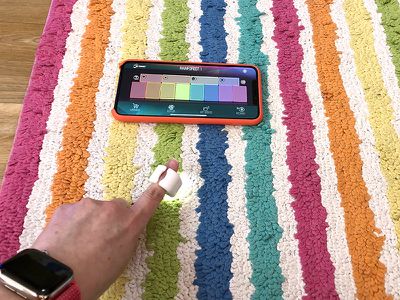
I was impressed with how well the Specdrums detect color. I never had the wrong color activated, except when a color was between two shades, such as a pinky purple or a yellowish green.
I ran into some issues with the Specdrums where it occasionally failed to connect to my iPhone, which was frustrating. There were times when the app simply could not see my Specdrums, but it worked all right after a restart.
You can connect up to six Specdrums to one color mat, which means a group of kids could all play together to make music.
App
The Specdrums Mix app is designed to mirror the color mat that comes with the Specdrums, showing all of the different color buttons on the display of the iPhone or iPad. You can tap the Specdrums on a color to make sounds and start loops, but you can also do this right in the app, so technically you can make similar music without even using the Specdrums if you wanted to.
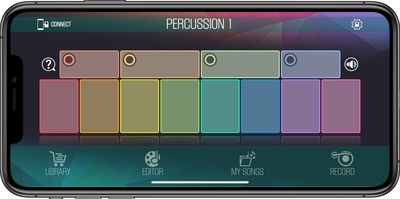
That's obviously not the point, though, as the real fun with the Specdrums is just tapping on different objects in the environment and seeing if you can come up with something catchy and fun.


There's a built-in library where you can download different sound sets (all free). While there are more than 40 sound sets to choose from, I hope Sphero will keep adding more in the future, because you really can never have enough variation with a product like this.
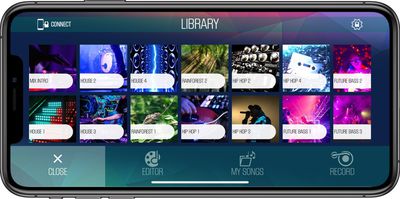
You can choose a whole wide range of sounds, from hip hop and house music to rainforest sounds, drum sounds, funk, soul, a capella, and more. Some of my favorite sounds were in the retro arcade genre, which sounded just like old school video games. Percussion and retro funk were also fun for just making noise.
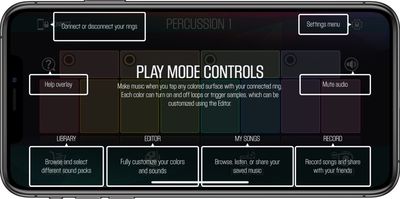
If you don't want to use any of the included sounds, you can record your own by using the Editor function built into the app. You can associate any sound you want with any color, and change any color to any sound. There's a record button included in the app that will record what's being played, and songs are stored in a "My Songs" section.
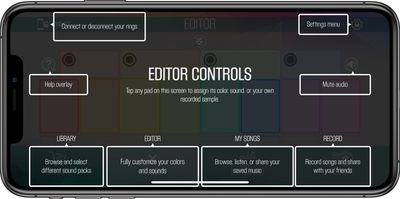
Content created using the app can be played back or shared to Messages, Mail, iMovie, social networks, and more.
Specdrums are definitely noisy, but you can connect headphones to an iPhone or iPad so the sounds only play through the headphones rather than out loud.
Original Specdrums
Specdrums are the result of a company that Sphero purchased, so before there were Sphero Specdrums, there were Specdrums sold to Kickstarter backers.
Based on comments on the Kickstarter, Kickstarter backers haven't been entirely happy with the original version, which Sphero overhauled and improved. I don't know how the original model worked, but Sphero's works well and apparently has a better app than the first version, and I saw complaints of latency issues.
Sphero is offering original Kickstarter backers 25 percent off of the new product for those who want the updated, improved version of the Specdrums.
There's a Specdrums Music app that was available before Specdrums Mix, and this was the app designed for the original Specdrums. Specdrums Music works with Sphero's version of the Specdrums, but I thought it was buggy, harder to use, and not as fun.
Bottom Line
Having a finger-worn music maker that responds to color is a lot of fun for noise making and song creation, and kids that are into music will enjoy the Specdrums.
The Specdrums app is simple but effective, though it would be nice to see Specdrums integrate with third-party apps and services in the future if Sphero can make it happen, because right now you can only make music in the Specdrums app.
Specdrums are a fun and engaging toy that I wouldn't hesitate to buy for a child that loves music, though I might pair them with a set of headphones because this definitely isn't an accessory that's quiet.
How to Buy
Specdrums can be purchased from the Sphero website for $65 at the current time as well as the Apple online store and Apple retail locations.
Note: Sphero provided MacRumors with Specdrums for the purpose of this review. No other compensation was received.















































Top Rated Comments
You know, like a screen… that you touch. Ah, maybe someday!