SwitchEasy CoverBuddy for iPad Pro Review - MacRumorsOpen MenuShow RoundupsShow Forums menuVisit ForumsOpen Sidebar
Skip to Content

Review: SwitchEasy's CoverBuddy Protects Your iPad Pro and Holds an Apple Pencil [Updated]

by

Apple offers protection for the iPad Pro in the form of a Smart Cover and a Silicone Case for the back of the device, but Apple's products are priced rather high at $59 and $79 respectively, for a total price of $138 for complete iPad Pro coverage.

Luckily, third-party manufacturers have already started coming out with some clever cases and covers for the iPad Pro, and one of the first available rear shells comes from popular accessory maker SwitchEasy. The iPad Pro CoverBuddy is SwitchEasy's first product for Apple's tablet, and it's designed to work alongside Apple's own Smart Cover and Smart Keyboard.

coverbuddypieces
SwitchEasy funded the iPad Pro CoverBuddy through Indiegogo, but now it's ready to ship out to customers. While the Indiegogo campaign was still ongoing, SwitchEasy sent me a prototype CoverBuddy to check out, which I've been using for the last week.

coverbuddynoapplepencil
Made of a thin but rigid polycarbonate, the CoverBuddy snaps onto the back of the iPad Pro. Since it's only 1.5mm thick, it adds very little additional weight and bulk. The polycarbonate of the CoverBuddy is textured and it's super grippy. The grip on the CoverBuddy is probably my favorite aspect of the case because it makes the unwieldy iPad Pro a lot easier to hold on to.

CoverBuddy's polycarbonate material isn't going to protect the iPad Pro from serious damage, but it feels sturdy enough to protect it from the scratches, dings, and minor drops that occur from day-to-day use and travel.

coverbuddyapplepencil
The CoverBuddy leaves all of the ports and the rear camera accessible with precise cutouts, and it has a Lightning port cutout that's able to accommodate the Apple Pencil for charging purposes. On the back, there's a removable plastic Apple Pencil holder, which is actually quite versatile.
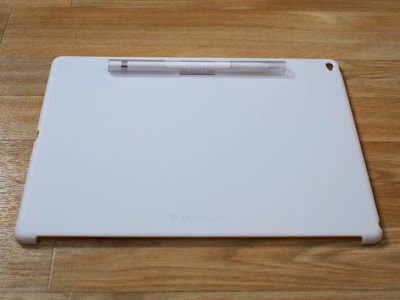
coverbuddyapplepencilinside
It keeps the Apple Pencil in place on the back of the iPad Pro so it doesn't get lost, and when used on a desk or a lap, it props the iPad Pro up at a slight angle that's ideal for drawing or playing games. SwitchEasy's calling this "Sketch Board" mode, and I found it to be useful for writing and sketching.

coverbuddyangle
It's fairly easy to get the Apple Pencil in and out of the built-in holder to use it because it's open at the middle. A quick slide with a finger is enough to remove it, and putting it back is as easy as sticking it into the holder.

When an Apple Pencil isn't in use, the Pencil holder snaps off of the back of the CoverBuddy and can be replaced with a thin strip of plastic that covers the holder. The holder itself can be used on a standalone basis to keep the Apple Pencil safe in a bag, but it's not the most elegant solution when not attached to the case.

coverbuddysmartcovernopencil
Having an additional piece of plastic that covers the Apple Pencil cutout area is a bit of an imperfect solution because it's easy to misplace or lose. I'm fairly well organized, but I still have a tendency to misplace the odds and ends that accessories sometimes ship with. I also had some trouble getting the plastic cover to stay in place, but SwitchEasy has told me small manufacturing issues like this will be ironed out with the final release of the CoverBuddy.
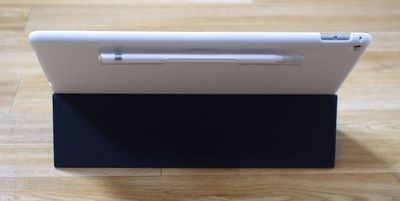
coverbuddywithkeyboard2
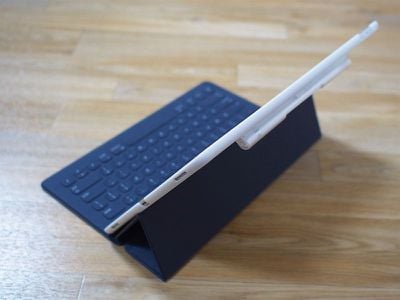
Along with leaving the ports uncovered, the CoverBuddy also has an opening on the left side that's designed to work with the iPad Pro Smart Cover or the Smart Keyboard. The cutout is sized perfectly for the Smart Keyboard that I have, and the CoverBuddy worked well alongside it. The CoverBuddy doesn't get in the way of the keyboard and it keeps the Apple Pencil out of the way at the top.
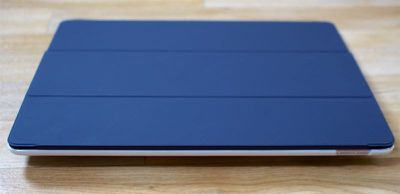
coverbuddyfront
The CoverBuddy is designed to stay on the iPad Pro at all times, but it's easy enough to take it off if you want to use the iPad Pro sans case. It snaps off at the corners and takes only a couple seconds to remove. Given the rigidity of the material I worry that it could crack from the force of removing it, but that didn't happen during the time that I tested it.
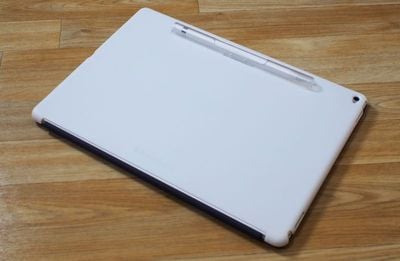
coverbuddysmartcoverback
I tested an opaque white version of the CoverBuddy designed to match the white Apple Smart Cover, but it also comes in translucent black to match the charcoal Smart Cover and the charcoal Smart Keyboard and a clear translucent color that's perfect for the gold iPad Pro.

Bottom Line

SwitchEasy's CoverBuddy isn't quite as premium as Apple's own Silicone Case for the iPad Pro, but it offers full rear protection for the tablet in a slim form factor that preserves its thin design. At $39, the CoverBuddy is reasonably priced and it works well with existing Apple accessories.

The add-on Apple Pencil holder is useful because it keeps the $99 accessory close at hand and it provides a comfortable drawing angle when used in a lap or on a desk. I do wish SwitchEasy produced a version without the Apple Pencil holder for those totally uninterested in it, but the existing CoverBuddy is convertible and suitable for use with or without an Apple Pencil.
coverbuddywithkeyboard
If you're looking for a rear shell solution that's more affordable than what Apple offers, the CoverBuddy is definitely worth checking out.

It's worth noting the CoverBuddy is a product that's been around for awhile, so it's not something that's untried and untested. SwitchEasy has been making CoverBuddy cases for Apple's iPad lineup for some time, and it's received largely positive reviews from media outlets and buyers.

Pros:

  • Slim design
  • Adds grip
  • Holds Apple Pencil
  • Works with Smart Keyboard/Smart Cover

Cons:

  • Plasticky - not as high quality as Apple's products
  • Swappable components are easy to lose
  • Flap to cover Apple Pencil slot doesn't stay in place well
  • Apple Pencil slot is unattractive when not used with Apple Pencil holder

How to Buy

The CoverBuddy for iPad Pro can be pre-ordered from the SwitchEasy website for $39.99. Orders are expected to ship on December 14.

Update 5/3/2016: SwitchEasy also makes a CoverBuddy designed for the 9.7-inch iPad Pro, available in Translucent Black, Translucent Clear, Space Gray (rubber coated), and Rose (a pink shade designed to make the Rose Gold iPad Pro pinker. It's priced at $29.99 and can be purchased from the SwitchEasy website.

Note: MacRumors received no compensation for this review.

Top Rated Comments

jclo Avatar
142 months ago
I can't take a review seriously that offers a giveaway and a direct link to buy the product. The omission of the regular "pros" and "cons" list is suspicious too.
Sorry. I've been working on a lot of reviews lately and I left out a pros/cons list on accident. Wasn't intentional. Thanks for pointing out the oversight -- I've added it in. Review was written before SwitchEasy offered to give some of the cases away, and I agreed to the giveaway because it's always nice to offer you guys free stuff when we can. My reviews are always unbiased regardless of whether or not a review includes a giveaway. I'm not compensated by the company offering the review product and I have nothing to gain. By the way, we always offer links to purchase in all of our reviews because it's convenient for people who might like the product.

Add to that this quote and I find it even more suspicious:

I also had some trouble getting the plastic cover to stay in place, but SwitchEasy has told me small manufacturing issues like this will be ironed out with the final release of the CoverBuddy.
It's true that I had a prototype unit, and SwitchEasy told me up front that it was rougher than the finished units. I chose to take them at their word because this is a seasoned manufacturer that has produced CoverBuddy cases for previous iPad generations that have been well received and positively reviewed. I'm happy to get a production unit CoverBuddy and update the review. The plastic cover for the Apple Pencil slot is definitely fiddly (it takes some patience to get it in place), and as I mentioned, I don't really like the look of it. I would much prefer a CoverBuddy that didn't have this feature for people who don't plan to use an Apple Pencil.


Score: 2 Votes (Like | Disagree)
142 months ago
The single biggest issue I have with my Ipad Pro, which I like very much, is that there is no place to put the pencil. The pencil is incredibly annoying to carry around. It is very expensive and easier to lose than your average pen. Mine currently has a paper clip scotched taped to it. Microsoft said in the Surface Pro 4 launch that users complained there was no place for their pen. That will be a large complaint of iPad Pro users too. Its really maddening they made the pencil far less usable by not including some way to attach it to a pocket or a case.

This coverbuddy is that like an answer to prayer :p.
Score: 1 Votes (Like | Disagree)
142 months ago
I can't take a review seriously that offers a giveaway and a direct link to buy the product. The omission of the regular "pros" and "cons" list is suspicious too.
Add to that this quote and I find it even more suspicious:

I also had some trouble getting the plastic cover to stay in place, but SwitchEasy has told me small manufacturing issues like this will be ironed out with the final release of the CoverBuddy.
Score: 1 Votes (Like | Disagree)

Popular Stories

apple pro tell logo

Apple Launching Five New Products Today

Thursday November 5, 2026 12:59 am PST by
Apple is launching five new products on Friday, November 6, following pre-orders that opened last week, including its first touchscreen MacBook Pro models. The following new products will be available from today: iPad mini with OLED display and A20 Pro chip iMac with M6 chip 14-inch MacBook Pro with M6 chip 14-inch MacBook Pro with OLED touchscreen 16-inch MacBook Pro with OLED...
duo aquarium

More Fun iPhone Duo Apps: 30 New Picks to Try

Friday November 6, 2026 3:27 pm PST by
When the iPhone Duo launched, we shared a list of some of the fun apps developers created for the new form factor. Two weeks out, developers are continuing to come up with fresh ideas, so we thought we'd share some of our favorites. Games Marbles Unhinged ($2.99) - Marbles Unhinged is a marble maze designed for the Duo. When you fold it, the floor turns into a ramp. If you stand the top...
silver iphone 18 pro

Apple Rumored to Drop the iPhone's Action Button Next Year

Friday November 6, 2026 6:07 am PST by
Apple plans to merge the iPhone's Action button with the Camera Control starting next year, according to the leaker known as "Instant Digital." In a new post on Weibo, the leaker claimed that a single press of the combined button would open the camera, while a long press would trigger the function assigned to the Action button. They explicitly clarified that the dedicated Action button would ...
Latest Stories
Siri AI Rumored to Become 'More Like an Agent' as Early as Next Year
2 hours ago
Apple Taking New Approach to Developing iOS 28 and macOS 28
3 hours ago
Early Apple Black Friday Deals on Apple Watch, MacBook Air, and More
22 hours ago
'Backglow' Lets You Customize New MacBook Pro's Glowing Apple Logo
22 hours ago
Top Stories: Apple Product Launches, iOS 27.3 Beta, and More
1 day ago
More Fun iPhone Duo Apps: 30 New Picks to Try
2 days ago
Hands-On With Apple's New OLED Touchscreen MacBook Pro
2 days ago
Apple Store With All-New Design Opening Soon in Southern California
2 days ago
Control the Glowing Apple Logo on Your New MacBook Pro
2 days ago
Apple Shares New 'Apple Card: Apply and Use in Minutes' Ad
2 days ago
Apple Says More Than 100,000 Apps Optimized for iPhone Duo, Here's What's Still Missing
2 days ago
Early Black Friday Deals Kickoff With Steep Discounts on Apple Watch Ultras and More
2 days ago
The MacRumors Show: iOS 27.3 Looks Like a Huge Update
2 days ago
Best Buy's Black Friday Event Begins With Sitewide Savings on Apple, TVs, More
2 days ago
Apple Releasing Yet Another Two New Products Next Week
2 days ago
MacBook Air Drops to Lowest Price in Months With Amazon's $250 Discount
2 days ago
Apple Rumored to Drop the iPhone's Action Button Next Year
2 days ago
Apple's Extended Return Policy Now in Effect for 2026 Holiday Season
2 days ago
Apple Music Classical Updated With New Icon and Refreshed Design
2 days ago
OLED iPad Mini, M6 iMac, and New MacBook Pros Available From Today
2 days ago
Apple Surveys iPhone Duo Buyers About Crease and Camera
3 days ago
Apple's First Touchscreen Mac is Now Arriving to Customers
3 days ago
Claude Gets Personal Finance Feature With Bank Account Linking
3 days ago
Apple Arcade Adds Crossy Road Rush and NBA 2K27
3 days ago
Apple's New HomeView Smart Home Hub: Here's How Much RAM It Has
3 days ago
iPad Mini vs. iPad Air Buyer's Guide: Now Just $50 Apart
3 days ago
First iOS 27.3 and macOS Golden Gate 27.3 Public Betas Now Available
3 days ago
Apple Announces a New Mac Sales Record
3 days ago
Paid $200 for Logic Pro? Apple Says You Won't Get This New Feature
3 days ago
Instagram's Edits Video Editor is Now Available on Mac
3 days ago









































