

Ugreen caught my attention earlier this year when it launched a new line of "Uno" accessories that are equipped with LED screens that can display fun emoji faces. The Uno range has everything from wireless chargers to power banks, and I've spent several months testing the products to see how they perform.
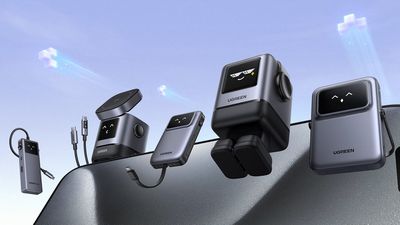
Everything in the Uno line was designed with a "robot-inspired" aesthetic, according to Ugreen, which equates to a boxy style with an LED screen that can display emoji-like faces. The emoji faces are amusing and bring some fun to accessories that are typically boring, but they're also useful and can change based on power level and other factors.
Ugreen Uno Magnetic Wireless Power Bank
Priced at $45, the Magnetic Wireless Power Bank looks like a lot of other power banks on the market at first glance, featuring a rectangular design that mirrors the shape of the iPhone. An LED screen and an attached stand that happens to look like a set of headphones set it apart, though.
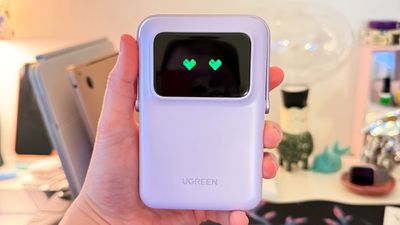
The power bank is made from a smooth, metallic plastic material, with a soft silicone on the back where it attaches magnetically to a MagSafe iPhone. It feels relatively lightweight, but it is a bit over 3/4ths of an inch thick, so it does add some bulk to the iPhone. It comes in black, which looks similar to Apple's space black, and a light purple shade. Though it's a bit thick, it is pocketable, measuring in at 4.2 inches by 2.8 inches. The plastic material feels a little cheap, but it's light and I don't expect too much more for the price.
The LED display protrudes slightly which does indeed give it a distinctly robot-like look, and it often displays an emoji face that corresponds to power level. I say "often" because a lot of the time, it actually shows a percent reading of the exact power level. I don't know what triggers the emoji face to show up, and I wish there was a button to toggle between the power percent and the face.
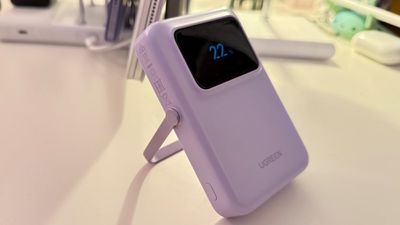
You need to turn the power bank on by pressing the side button when it is attached to an iPhone, which initiates charging. More than once, I've attached it to my iPhone and forgotten to activate it, but having a sleep state seems to preserve battery level when it's not in use. The button has other functions as well, and a single press will turn on the LCD, while a double press will turn it off.
When the power is on, it displays a "Hi" message, and when it's powering down, it shows a "bye" message. The emoji face that's displayed changes based on power level. At 100 percent, the face shows heart eyes, and at 99 to 80 percent, it changes to a happy face with smiling eyes. At 79 to 21 percent, it's a happy face with a more neutral eye expression, and 20 percent or below, there's a sad face. Each face animates slightly, with the eyes and mouth changing position.
This is a Qi2 charger, so it can charge MagSafe iPhones at up to 15W. 15W is no longer the maximum charging speed because iPhone 16 models support 25W MagSafe charging, but it is equivalent to the original 15W MagSafe charging. It has a 10,000mAh capacity, which is standard for smaller chargers these days.
In an hour-long test, it charged my iPhone 16 Pro Max from one percent to 39 percent, and there was 67 percent of the battery left. After charging my iPhone to 80 percent (the maximum I have set), the power bank had 20 percent power remaining.
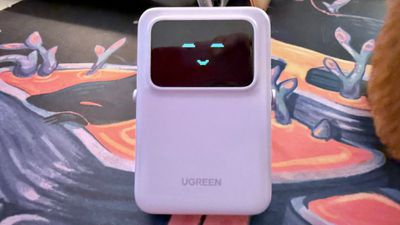
I've tested several times, and I am able to reliably get one full charge of the 16 Pro Max from the power bank, and I've had no issues with it during my testing. My iPhone does sometimes get warm, but it does that with any MagSafe power bank that I use.
Along with Qi2 charging, there is a USB-C port that can be used for charging iPhones and other accessories, plus it's used for charging the power bank. The USB-C port is 20W, so you can get faster iPhone charging using a USB-C to USB-C cable (included) or a USB-C to Lightning cable depending on which iPhone you have. 20W can also charge an iPad at a reasonable speed, but it's not enough for fast charging. Passthrough charging is supported, so you can charge the power bank via USB-C while also charging an attached iPhone.
There is an included stand on the power bank that flips down from the top. It holds an iPhone in an ideal position for FaceTime calls or watching videos, and it's sturdy. The stand has multiple positions so the viewing angle is adjustable, and it can be used in landscape or portrait mode. When not in use, it folds up at the top of the power bank and looks like a set of headphones.
Ugreen Uno 30W Power Bank
The $38 10,000mAh Ugreen Uno USB-C Power Bank is similar to the Magnetic Wireless Power Bank in design, but it doesn't have wireless charging. Instead, it offers 30W charging over USB-C, and it has a built-in USB-C cable.
All the emoji faces are the same and the build quality is identical, but the power bank is slightly slimmer and taller at 4.6 inches by 2.8 inches. This model is a little over a half inch thick, and does not magnetically attach to an iPhone.
While it has the same headphone-like design at the top, there is no stand. Instead, one side of the "headphones" features a power button for turning the power bank on and off.
Along with the built-in USB-C cable, there are additional USB-C and USB-A ports at the top, so more than one device can be charged at once. The flat USB-C cable tucks into a slot at the back of the charger, and it feels well-attached. I couldn't get it to budge by pulling on it, but there's always a danger that attached cables will break.
30W is fast charging for an iPhone, and my iPhone 16 Pro Max charged from one percent to 54 percent in a 30-minute period when testing, which is in line with fast charging tests using standard 30W power adapters. I was able to get one full charge out of the power bank before exhausting the battery.
Because it has a built-in USB-C cable, this model is best for the iPhone 15 and iPhone 16 models that have USB-C ports, but since it has an extra USB-C and USB-A port, it can be used with a Lightning cable, too.
For charging at fast speeds, the USB-C Uno power bank is the better pick over the Qi2 model, and it's nice not to have to carry a USB-C cable around.
100W USB-C Charger
Ugreen's $48 100W USB-C Uno Charger is probably my favorite of the bunch, and it has the most robot-like design. It's a square-shaped charger but there's an LED display that shows emoji faces, a headphone-like band at the top, and a set of feet that cover the plug at the bottom.
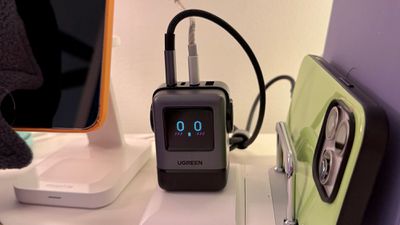
The feet detach so that you can plug the Uno Charger into an outlet, and it's best suited as a desktop charger because of the position of the prongs. If you plug it into a standard wall outlet, the face will be either up or down, but it can definitely be used that way. I haven't lost the little feet yet, and they do have a magnet inside that can attach to a laptop when the charger is plugged in if it's being used while on the go.
This charger is surprisingly compact and heavy, and it's made from the same black plastic material as the power banks.
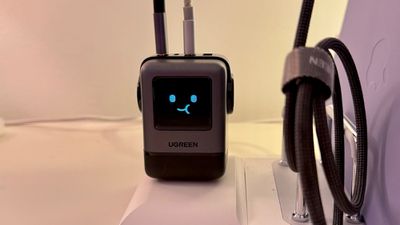
When plugged in, the LCD face is continually active. I have the charger on top of my desk, and it sits and blinks at me all day. If you have this in your line of sight, it might get annoying. When something is charging, there are three faces, including one with shining eyes and an eating face. When a device is fully charged, there's a face with sunglasses.
There are four ports at the top of the charger, including three USB-C ports and one USB-A port. Since this is a 100W charger, it can charge a 16-inch MacBook Pro and anything below that. To get the fastest charging with a MacBook Pro (the full 100W), you'll need to plug it in by itself in one of the top two ports.
With multiple devices charging, the power is split up between the ports. When two devices are plugged in, the split is 65W/30W with the USB-C ports, or 65W/22.5W with one USB-C and one USB-A port.
The three port split has 45W/30W/20W, 45W/30W/22.5W, and 80W/7.5W/7.5W options, while four ports in use will split the power to 45W/30W/7.5W/7.5W. The manual that comes with the charger has more specific information on how power is divided to each port.
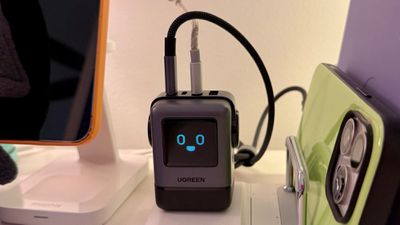
Ugreen says that the charger has overvoltage, overcurrent, overload, and temperature protections, and I haven't run into any issues using the charger.
There's also a 65W version that comes in white/purple and blue/pink shades, and it's nice to see options that aren't the standard black.
USB-C Cable
Ugreen has an $8 Uno USB-C to USB-C 100W PD cable that has little emoji eyes on it, and it's a good companion to the 100W charger. It's braided nylon and feels like a good quality cable.
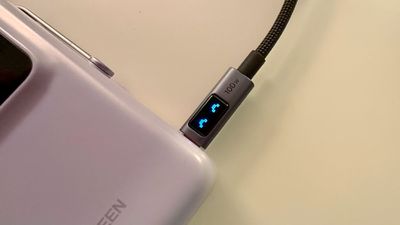
The base cable is 1.6 feet, but there are more expensive 3.3 foot, 6.6 foot, and 10 foot models. For data transfers, it supports speeds up to 480Mb/s.
2-in-1 Wireless Charger
Ugreen's $49 Uno 2-in-1 Wireless Charger is also Qi2, with support for up to 15W charging on MagSafe iPhones. It has a fold-out design with a charging puck for the iPhone and a second 5W charging space for the AirPods Pro. The iPhone charger can be adjusted to different angles, and an iPhone can be placed in either landscape or portrait mode, so you can use StandBy.
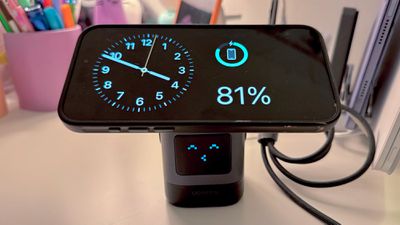
The square-shaped 2-in-1 Wireless Charger looks like the other Uno products, and it's made from the same black plastic material. It has an LCD face at the front, and the headphone-style design at the top. The face isn't as animated as other models, but it does show two happy eyes when turned on and in standby mode, and a happy face with a mouth when a device is charging.
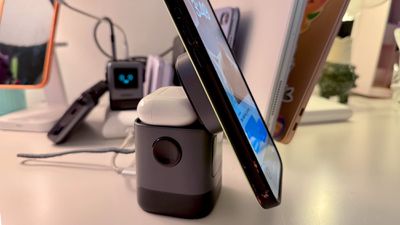
Ugreen includes a USB-C cable that plugs into the back, but you'll need to supply your own power adapter. You can also buy an optional Apple Watch charger to add to the side so you can charge three devices at once.
The charger is relatively compact, so it doesn't take up much space on a desk at all, but it's weighted so it's not going to tip over.
Uno 6-in-1 Hub
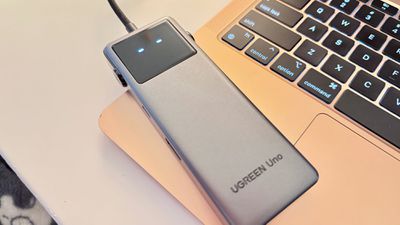
Ugreen's final product in the Uno line is the 6-in-1 USB-C Hub, which is $18. This is a cheap hub, but it's serviceable for passthrough charging and connecting accessories to your Mac. Design wise, it has the black plastic that Ugreen uses for most of the Uno line, and an LCD face that displays different emoji animations.
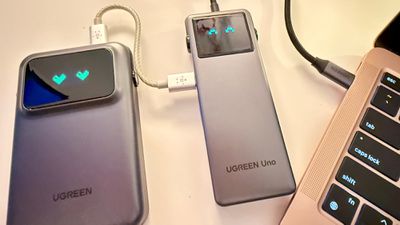
The build quality of the hub feels cheap, and I wasn't impressed with it. It's the same plastic as Ugreen's other products, but the hub feels so lightweight and almost flimsy. The emoji faces were also less useful on the hub, featuring only separate idle faces and charging faces.
There are three USB-C ports, two USB-A ports, and an HDMI port that supports up to 4K/60Hz. It offers 85W passthrough charging for a Mac, with 15W available for connecting peripherals. 85W is generally fine for all Mac notebooks, but you're not going to get maximum charging speed for the 16-inch MacBook Pro.
I've had some issues with data transfers using this hub, with a transfer stopping in the middle. I'm not sure why, but multiple ports were affected. I doubt this is a problem with all models, but I don't like the size or the utility of this hub, and I think there are better options out there.
Bottom Line
If you're looking for an accessory that's brings a little more fun to your desk than the standard power adapter or power bank, I think Ugreen's Uno line is well worth checking out. I especially liked the 100W USB-C charger and the Qi2 Magnetic Wireless Charger, though everything but the hub performed well.
Ugreen's Uno products also make for fun gifts, and I think a power bank with a little emoji face would go over well with anyone that has an iPhone. I do want to note that the Qi2 Charger seems to be iPhone only, as some of the reviews mentioned that it does not work with Android devices.
How to Buy
Ugreen's Uno products can be purchased from the Ugreen website or from Amazon.
Note: Ugreen provided MacRumors with the Uno products included in the review for the purpose of the review. No other compensation was received.























Top Rated Comments