Ultimate Ears EVERBOOM Review - MacRumorsOpen MenuShow RoundupsShow Forums menuVisit ForumsOpen Sidebar
Skip to Content

Review: Ultimate Ears' EVERBOOM Bluetooth Speaker Packs a Punch With a Rugged Design

by

Logitech subsidiary Ultimate Ears has been in the portable wireless speaker market for over a decade now, gradually building a full set of models across a range of sizes, power, and price points. The most recent addition to the lineup is the EVERBOOM, a mid-range speaker that debuted a few months ago. I've been testing one out and I've found it to be a handy and capable speaker in a variety of settings.
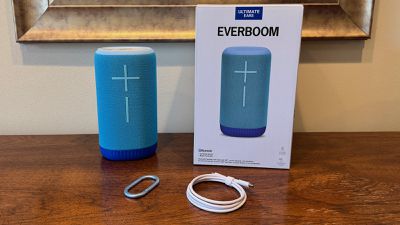
ue everboom parts
Priced at $249.99, the EVERBOOM sits in the middle of the Ultimate Ears lineup, which currently ranges from the WONDERBOOM 4 at $99.99 all the way up to the HYPERBOOM at $399.99. Like many of Ultimate Ears' speakers, the EVERBOOM is designed for an active lifestyle, offering IP67 water and dust resistance to stand up to not just splashes but full dunks in water. The speaker even floats, and it's been drop tested from a height of one meter.

The EVERBOOM is more or less an elliptic cylinder, measuring a little over 8 inches (200 mm) high, 4.3 inches (110 mm) wide, and 3.25 inches (85 mm) deep. Aside from plastic toward the top and bottom of the speaker, it is wrapped entirely in a speaker mesh, with Ultimate Ears touting 360-degree sound. In reality, the audio largely comes from the two sides of the speaker, but with them firing in opposite directions, you do indeed get pretty solid sound projection all around. The EVERBOOM includes a pair of full-range transducers paired with two customized passive radiators to help deliver full sound from the relatively small form factor.

I found sound quality to be quite good, with the 360-degree sound easily filling even a fairly large room and remaining quite audible and well-balanced outdoors. It can get quite loud if you turn it up, although distortion becomes a bit of an issue as you start to max it out in more enclosed environments.
ue everboom front
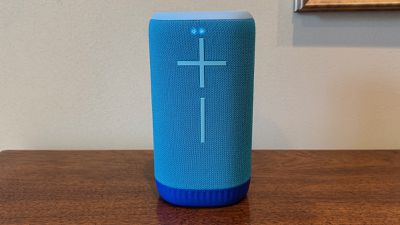
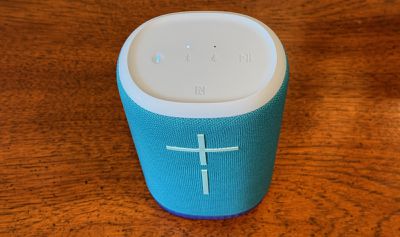
Volume is easily controlled right from the speaker with the huge iconic plus and minus buttons on the front. They're a bold design decision, but they make an Ultimate Ears speaker pretty much instantly recognizable. Pressing both of them simultaneously while the speaker is powered on gives you a general sense of battery level with some lights hidden behind the mesh up at the top.

An Outdoor Boost mode can be activated with a button on the speaker or from within the UE | BOOM app, offering a bit more punch with the sound output optimized for outdoor spaces. The increase in bass is definitely noticeable when it's turned on.

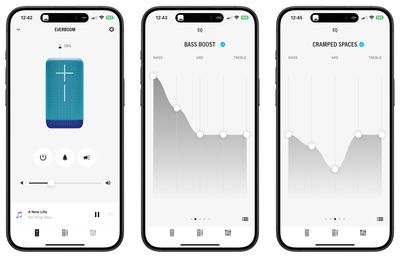
Speaking of the UE | BOOM app, it offers an array of functionality for managing one or more speakers from the Utimate Ears lineup. You can of course use the EVERBOOM as a standalone Bluetooth speaker right from the options on your iPhone or other device, but the app includes features like an equalizer, the ability to link multiple speakers, and more. With PARTYUP mode, you can sync up to 150 speakers from the UE lineup to maximize your sound. The app also offers convenient controls for changing tracks and volumes, turning the speaker on and off, activating Outdoor Boost, and activating a Microphone mode that lets you broadcast your voice over the speaker via your phone.
ue everboom app 1
The equalizer panel offers five preset configurations: a flat Signature curve, a Bass Boost setting that does just what you'd expect, a Cramped Spaces option that drops the mids a bit, a Deep Relaxation mode that drops the treble way down, and a Podcast/Vocal setting that drops the bass. Any of these presets can be customized via five sliders spanning the various frequencies.
ue everboom app 2
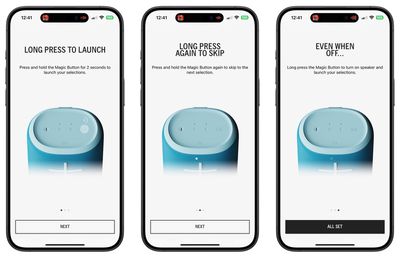
Another handy aspect of the UE | BOOM app is management of the Magic Button, which is a function of the play/pause hardware button on the speaker itself. The play/pause button offers the usual functionality with a single press playing or pausing music, a double press skipping forward, and a triple press skipping backward. But there's also a fourth function, and that's a long press to activate the Magic Button.
ue everboom app 3
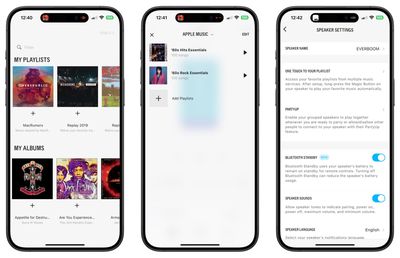
In the app, you can configure the Magic Button to activate a playlist from either Apple Music or Amazon Music. It requires connecting the UE | BOOM app to those services, at which point you'll be able to see all of your saved playlists and select up to four of them to link to the Magic Button. A long press on the button on the speaker immediately starts the first playlist you've configured, and subsequent long presses will cycle through your selected playlists.

Overall, the app only gets middling reviews from users, with some citing Bluetooth connection problems and ads covering important controls, but I haven't experienced any of those issues in my testing, so hopefully they've been resolved.
ue everboom top
Beneath the buttons on the top of the EVERBOOM is an NFC chip that allows for quick pairing and switching with Android devices. It doesn't currently work with iOS devices, but perhaps it will at some point in the future as Apple gradually opens up the NFC capabilities of its devices.
ue everboom rear
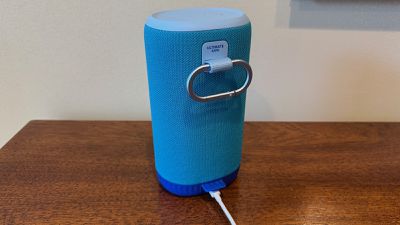
The EVERBOOM offers up to 20 hours of battery life and a Bluetooth range of up to 55 meters (180 feet), offering solid flexibility while on the go. A small loop on the back of the speaker and an included carabiner make it easy to hang the EVERBOOM from a backpack, tent, or other convenient spot. It recharges over USB-C, with the device's port located at the bottom rear behind a flap that helps prevent water intrusion.

The EVERBOOM is available now for $249.99 from Ultimate Ears and Amazon in Azure Blue or Charcoal Black. Lilac and Raspberry color options are currently sold out. Alongside the EVERBOOM launch in June, Ultimate Ears also refreshed its WONDERBOOM, BOOM, and MEGABOOM speakers with USB-C ports and new colors in 100% post-consumer recycled fabric. The BOOM and MEGABOOM also received enhanced deep bass radiators while the WONDERBOOM added an audio mode optimized for podcasts.

Note: Ultimate Ears provided MacRumors with the EVERBOOM for the purposes of this review. No other compensation was received. MacRumors is an affiliate partner with Ultimate Ears and Amazon. When you click a link and make a purchase, we may receive a small payment, which helps us keep the site running.

Top Rated Comments

Analog Kid Avatar
29 months ago

it reminds me of the christian cross.

I had exactly the same first response. Weird industrial design choice there...
Score: 7 Votes (Like | Disagree)
WarmWinterHat Avatar
29 months ago
I've heard these and they generally sound pretty good... I really don't like the look of the lines, as it reminds me of the christian cross.

That said, I think BT is the way to go with speakers, over the propriety protocols that google and apple want to push.
Score: 6 Votes (Like | Disagree)
jayducharme Avatar
29 months ago

Not only are those volume buttons awkward, they look like a cross which is a turn off for me these days.
There’s a marketing opportunity: “The only Bluetooth speaker endorsed by the Catholic Church!”
Score: 5 Votes (Like | Disagree)
macmyworld Avatar
29 months ago
I’ve had these and never found them to be a standout. The design is really meh for me, especially at $249.
Score: 5 Votes (Like | Disagree)
29 months ago
Not only are those volume buttons awkward, they look like a cross which is a turn off for me these days.
Score: 4 Votes (Like | Disagree)
29 months ago
Everboom? Sounds like a name made up in Shenzhen. No thanks.
Score: 3 Votes (Like | Disagree)

Popular Stories

apple pro tell logo

Apple Launching Five New Products Today

Thursday November 5, 2026 12:59 am PST by
Apple is launching five new products on Friday, November 6, following pre-orders that opened last week, including its first touchscreen MacBook Pro models. The following new products will be available from today: iPad mini with OLED display and A20 Pro chip iMac with M6 chip 14-inch MacBook Pro with M6 chip 14-inch MacBook Pro with OLED touchscreen 16-inch MacBook Pro with OLED...
duo aquarium

More Fun iPhone Duo Apps: 30 New Picks to Try

Friday November 6, 2026 3:27 pm PST by
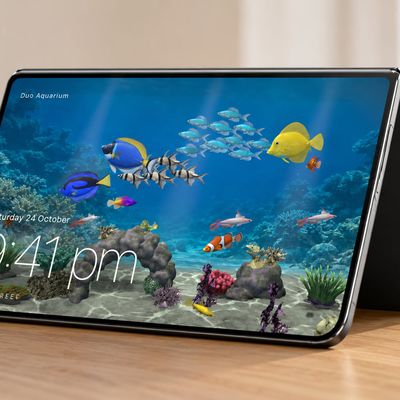
When the iPhone Duo launched, we shared a list of some of the fun apps developers created for the new form factor. Two weeks out, developers are continuing to come up with fresh ideas, so we thought we'd share some of our favorites. Games Marbles Unhinged ($2.99) - Marbles Unhinged is a marble maze designed for the Duo. When you fold it, the floor turns into a ramp. If you stand the top...
silver iphone 18 pro

Apple Rumored to Drop the iPhone's Action Button Next Year

Friday November 6, 2026 6:07 am PST by
Apple plans to merge the iPhone's Action button with the Camera Control starting next year, according to the leaker known as "Instant Digital." In a new post on Weibo, the leaker claimed that a single press of the combined button would open the camera, while a long press would trigger the function assigned to the Action button. They explicitly clarified that the dedicated Action button would ...
Latest Stories
Early Apple Black Friday Deals on Apple Watch, MacBook Air, and More
17 hours ago
'Backglow' Lets You Customize New MacBook Pro's Glowing Apple Logo
17 hours ago
Top Stories: Apple Product Launches, iOS 27.3 Beta, and More
1 day ago
More Fun iPhone Duo Apps: 30 New Picks to Try
2 days ago
Hands-On With Apple's New OLED Touchscreen MacBook Pro
2 days ago
Apple Store With All-New Design Opening Soon in Southern California
2 days ago
Control the Glowing Apple Logo on Your New MacBook Pro
2 days ago
Apple Shares New 'Apple Card: Apply and Use in Minutes' Ad
2 days ago
Apple Says More Than 100,000 Apps Optimized for iPhone Duo, Here's What's Still Missing
2 days ago
Early Black Friday Deals Kickoff With Steep Discounts on Apple Watch Ultras and More
2 days ago
The MacRumors Show: iOS 27.3 Looks Like a Huge Update
2 days ago
Best Buy's Black Friday Event Begins With Sitewide Savings on Apple, TVs, More
2 days ago
Apple Releasing Yet Another Two New Products Next Week
2 days ago
MacBook Air Drops to Lowest Price in Months With Amazon's $250 Discount
2 days ago
Apple Rumored to Drop the iPhone's Action Button Next Year
2 days ago
Apple's Extended Return Policy Now in Effect for 2026 Holiday Season
2 days ago
Apple Music Classical Updated With New Icon and Refreshed Design
2 days ago
OLED iPad Mini, M6 iMac, and New MacBook Pros Available From Today
2 days ago
Apple Surveys iPhone Duo Buyers About Crease and Camera
3 days ago
Apple's First Touchscreen Mac is Now Arriving to Customers
3 days ago
Claude Gets Personal Finance Feature With Bank Account Linking
3 days ago
Apple Arcade Adds Crossy Road Rush and NBA 2K27
3 days ago
Apple's New HomeView Smart Home Hub: Here's How Much RAM It Has
3 days ago
iPad Mini vs. iPad Air Buyer's Guide: Now Just $50 Apart
3 days ago
First iOS 27.3 and macOS Golden Gate 27.3 Public Betas Now Available
3 days ago
Apple Announces a New Mac Sales Record
3 days ago
Paid $200 for Logic Pro? Apple Says You Won't Get This New Feature
3 days ago
Instagram's Edits Video Editor is Now Available on Mac
3 days ago
Prevent Siri and Search From Accessing Specific iPhone Apps
3 days ago
Best Early Black Friday Deals on iPhone 18 Pro and iPhone Duo
3 days ago