Lion: Assigning Apps to All Desktops in Mission Control - MacRumorsOpen MenuShow RoundupsShow Forums menuVisit ForumsOpen Sidebar
Skip to Content

Lion: Assigning Apps to All Desktops in Mission Control

by

alldesktops
With the introduction of Lion, Apple moved -- or removed entirely -- numerous options and settings.

For more advanced users, the old Expose & Spaces preference panel included controls to adjust what "Spaces" -- now called Desktops -- apps would appear in. For example, I had my Mail program set to display in Space 2, while iTunes would only appear in Space 4. With Expose & Spaces gone, it was tricky to figure out how to adjust where apps would appear.

It's easy, once you know where to look.

Update: Make sure you have multiple desktops open before doing this or else you won't see anything. Enter Mission Control. In the top-right of the screen is a button to create a new desktop. Click that button and create as many desktops as you wish. To delete a desktop space, option-click one of the desktops.

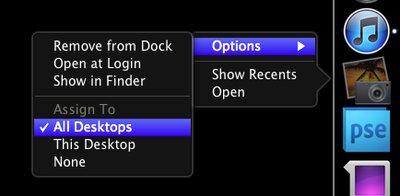
Now, simply right-click (control-click, two-finger-click) on an application icon in the Dock. In the Options menu, you'll see three choices related to Spaces:

- Assign To All Desktops
- This Desktop
- None

Play around with the choices until you get a feel for how they work. I put my instant messaging program into "All Desktops" so I can chat from wherever I'm working at the moment. Safari goes in the first desktop and my RSS reader stays in the second. With the advent of full-screen apps, I no longer need dedicated spaces for Mail and iTunes. They simply go full-screen and it accomplishes the same task.

Thanks Kbmb for the tip about needing multiple desktops!

Top Rated Comments

HackerJL Avatar
200 months ago
I used spaces with my mac pro and 4 Monitors. Now, since full screen apps dont allow for multiple monitors, ill never use that feature. The entire full-screen system is broken and not well though out in regards to more than one monitor. I understand the awesomeness of it if you just have one monitor, but with 2 or 4, a full screen app is a waste. Hope they fix that.

</oldnews>
Score: 4 Votes (Like | Disagree)
bushido Avatar
200 months ago
why can't we just simply drag and drop the desktops in mission control to rearrange them, is it too much to ask or am i missing something. do we really have to close all the apps if we want to get them in a different order?

like ... lets say i have safari open on my main desktop, i open iMail and it moves to the 2nd, itunes moves to the 3rd but now i open safari in fullscreen mode and it jumps behind the other two. in order to get it right after my main desktop i have to close iMail and iTunes in order for Safari to move to the 2nd spot???
Score: 3 Votes (Like | Disagree)
200 months ago
As a real Professional Mac user since 1987 it pisses me off that Apple is only thinking of the consumer market and forgetting some of us are Pro's.
After upgrading (Really?) to Lion, I open Illustrator CS5 and it keeps crashing. What does a Power User do? Look for the com.adobe.illustrator preference in the Home folder... But where the hell is it? Like a consumer is going to mess with the folder and screw up the whole OS... Yeah, right... :roll eyes:

As a "real professional Mac user since 1987" you should have known better than to upgrade to a dot-zero OS on release day when you rely on third party applications to get your job done. There are always compatibility issues with pro apps after a major OS upgrade, there is no reason this should have been a surprise for you.

It bothers me that some features are set by default. Like the stupid move content in the direction of the finger... Apple ass-umes that you have a mac book and a track pad or a magic mouse. I don't... Luckily I was able to turn the thing off...

I'm sure they'll remember to bury new features where no one can find them in the next OS upgrade. It really makes no sense to make them accessible by default. There might be someone out there using old equipment who could be grievously inconvenienced by having to make 4 clicks on their mouse.

I also have 2 monitors. Most things are designed for just one. Again, thinking of iMacs and Mac Books but then they want to sell u an overpriced Mac Display but the dual monitor support is crippled.

I use two monitors as well (non-Apple monitors on a Mac Mini), I also have a MacBook Pro that I use on its own. Full screen apps are awesome on the MacBook Pro. Swiping back and forth from one app to another is remarkably efficient on a laptop, no doubt about it.

On my desktop, with dual monitors, I don't use the full screen app feature. It doesn't make sense in that scenario. Instead, I open up Mission Control and assign multiple desktops. Each desktop supports both monitors. I can then swipe back and forth between desktops running multiple apps on my trackpad.

This is again, remarkably efficient. Anyone who uses their dual screen Mac for multitasking between apps will love it. Yes, it is designed with the trackpad in mind--which is available for your desktop, and will work alongside your mouse. The preference for multitouch trackpads was made quite evident in all of the pre-launch publicity. If you refuse to use one, then you won't see these benefits. That's your decision to make.

I was really looking forward to AutoSave. Great, but it only works with Apple Apps. Doesn't work with any Adobe or non-Apple stuff... Bad, and sort of false advertising.

False advertising? When did Apple make the claim that autosave would work out of the "box" with anything other than their apps? The API's were made available for all developers to use. If Adobe or others haven't taken advantage of that yet, you surely can't blame Apple. Considering that Adobe hasn't yet updated their very popular (on the Mac) pro apps to support Lion at all, this shouldn't be much of a surprise. Adobe is a software company. It's their job to write and update their applications as needed, which they have apparently not done yet.

I like some of the features but others are just useless for people like me, who use the computer to work... :confused:

None of the features are "useless" for people who use their computer to work. There are lots of different ways to do work on computers, and lots of different computers to do work on. You are simply frustrated because you updated your OS before your work apps were updated and are venting that frustration in the wrong direction.

For your workflow, using dual screens, you're right that full-screen apps don't do much of anything for you. Instead of trying to shoe-horn that feature into your workflow (which it was clearly not designed for) try taking advantage of some of the other new things. Multiple desktops in Mission Control is phenomenal. Yes, you'll need a trackpad to really benefit from it, but I promise--once you try it, you'll never go back.

I'm personally frustrated right now because we use Pro Tools on our studio Mac Pro. There's no way it's ready to work with Lion yet. Being able to swipe from one desktop running PT to another running our email, calendars and web browser, to another running our iWork apps will be a huge help for us. Being able to Airdrop files to artists MacBooks in the studio will be a huge help as well. Unfortunately, we have to wait to use Lion at work. Fortunately I don't have those issues for my home office setup or my laptop.
Score: 2 Votes (Like | Disagree)
InnerSongs Avatar
200 months ago
I find it annoying that you lost the functionality of dragging windows to the edge of the desktop to change which space they were in. That was a nice feature.

Also, if you close desktops in mission control to "clean up" you lose the settings you have assigned to apps. In other words, it won't open a non existent desktop for your app.

You can do that in the following way:

On your current screen have the App or Window you want to move.
Go to Mission Control mode.
Select and hold on the App or Window you want to move and drag it to the Desktop of choice.
Score: 2 Votes (Like | Disagree)
200 months ago
I find it annoying that you lost the functionality of dragging windows to the edge of the desktop to change which space they were in. That was a nice feature.

Also, if you close desktops in mission control to "clean up" you lose the settings you have assigned to apps. In other words, it won't open a non existent desktop for your app.
Score: 2 Votes (Like | Disagree)
200 months ago
You have to have the desktops already open before you can add anything to it. Go create a desktop, THEN follow these steps.
Score: 2 Votes (Like | Disagree)

Popular Stories

duo aquarium

More Fun iPhone Duo Apps: 30 New Picks to Try

Friday November 6, 2026 3:27 pm PST by
When the iPhone Duo launched, we shared a list of some of the fun apps developers created for the new form factor. Two weeks out, developers are continuing to come up with fresh ideas, so we thought we'd share some of our favorites. Games Marbles Unhinged ($2.99) - Marbles Unhinged is a marble maze designed for the Duo. When you fold it, the floor turns into a ramp. If you stand the top...
iOS 28 AI

Apple Taking New Approach to Developing iOS 28 and macOS 28

Sunday November 8, 2026 7:42 am PST by
Apple has made a change to its development process for iOS 28, macOS 28, and corresponding software updates, according to Bloomberg's Mark Gurman. In his Power On newsletter today, he said Apple separates development of each year's new operating systems into three major stages. Typically, he said each stage consists of four weeks of coding followed by a four-week "convergence" period where...
apple pro tell logo

Apple Launching Five New Products Today

Thursday November 5, 2026 12:59 am PST by
Apple is launching five new products on Friday, November 6, following pre-orders that opened last week, including its first touchscreen MacBook Pro models. The following new products will be available from today: iPad mini with OLED display and A20 Pro chip iMac with M6 chip 14-inch MacBook Pro with M6 chip 14-inch MacBook Pro with OLED touchscreen 16-inch MacBook Pro with OLED...
Latest Stories
Apple's Siri Boss May Leave - Here's Who Could Take Over
7 minutes ago
Apple Launching Two More New Products This Friday
19 minutes ago
Apple Store Subscription Sign-Up Controversy Exposed
9 hours ago
Siri AI Rumored to Become 'More Like an Agent' as Early as Next Year
19 hours ago
Apple Taking New Approach to Developing iOS 28 and macOS 28
21 hours ago
Early Apple Black Friday Deals on Apple Watch, MacBook Air, and More
2 days ago
'Backglow' Lets You Customize New MacBook Pro's Glowing Apple Logo
2 days ago
Top Stories: Apple Product Launches, iOS 27.3 Beta, and More
2 days ago
More Fun iPhone Duo Apps: 30 New Picks to Try
3 days ago
Hands-On With Apple's New OLED Touchscreen MacBook Pro
3 days ago
Apple Store With All-New Design Opening Soon in Southern California
3 days ago
Control the Glowing Apple Logo on Your New MacBook Pro
3 days ago
Apple Shares New 'Apple Card: Apply and Use in Minutes' Ad
3 days ago
Apple Says More Than 100,000 Apps Optimized for iPhone Duo, Here's What's Still Missing
3 days ago
Early Black Friday Deals Kickoff With Steep Discounts on Apple Watch Ultras and More
3 days ago
The MacRumors Show: iOS 27.3 Looks Like a Huge Update
3 days ago
Best Buy's Black Friday Event Begins With Sitewide Savings on Apple, TVs, More
3 days ago
Apple Releasing Yet Another Two New Products Next Week
3 days ago
MacBook Air Drops to Lowest Price in Months With Amazon's $250 Discount
3 days ago
Apple Rumored to Drop the iPhone's Action Button Next Year
3 days ago
Apple's Extended Return Policy Now in Effect for 2026 Holiday Season
3 days ago
Apple Music Classical Updated With New Icon and Refreshed Design
3 days ago
OLED iPad Mini, M6 iMac, and New MacBook Pros Available From Today
3 days ago
Apple Surveys iPhone Duo Buyers About Crease and Camera
4 days ago
Apple's First Touchscreen Mac is Now Arriving to Customers
4 days ago
Claude Gets Personal Finance Feature With Bank Account Linking
4 days ago
Apple Arcade Adds Crossy Road Rush and NBA 2K27
4 days ago
Apple's New HomeView Smart Home Hub: Here's How Much RAM It Has
4 days ago
iPad Mini vs. iPad Air Buyer's Guide: Now Just $50 Apart
4 days ago
First iOS 27.3 and macOS Golden Gate 27.3 Public Betas Now Available
4 days ago












































