

Making Lion Act More Like Snow Leopard - MacRumorsOpen MenuShow RoundupsShow Forums menuVisit ForumsOpen Sidebar
Skip to Content

Making Lion Act More Like Snow Leopard

by

Since Lion's release, we've been collecting tips on reverting changes found in Lion back to behavior found in Snow Leopard. Now some might argue its better to get used to the stock installation, but if that's not you, here are the tips we've seen.
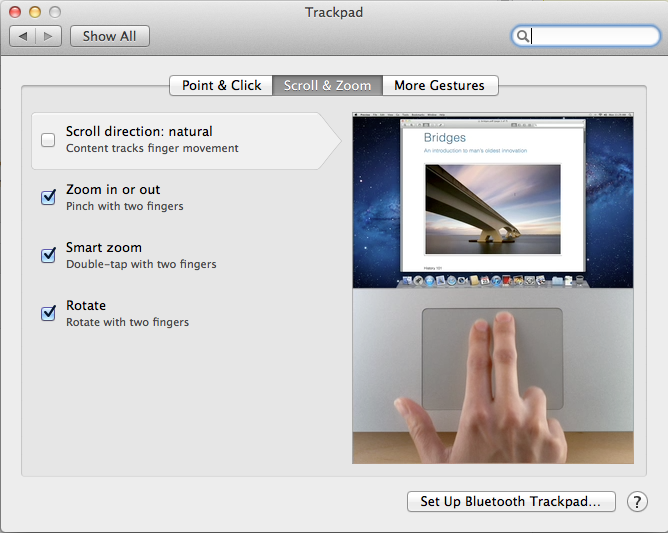
scroll1
Natural Scroll: This change seems to have generated the most outcry. In Lion, Apple has reversed the normal scrolling direction for trackpads and scroll wheels. In the past, the metaphor has been that swiping down has caused the page to scroll up. Now, swiping down means scrolling down. It takes a few days to get used to, but if you can't there's an option to revert back.

Key Repeat: @mikeindustries (requires Terminal):

To turn off Lion's stupid ban on key repeating, quit apps and type "defaults write -g ApplePressAndHoldEnabled -bool false" in Terminal.

New Window Animations: @tomasf (requires Terminal):

Want to turn off window opening animations in Lion? defaults write NSGlobalDomain NSAutomaticWindowAnimationsEnabled -bool NO

Don't Save: @tomasf (requires Terminal):

Restore ⌘D to mean "Don't Save" in Lion! defaults write NSGlobalDomain NSSavePanelStandardDesktopShortcutOnly -bool YES

Resume: Disable resume in Lion.

Spaces: Assigning apps to one space or all spaces.
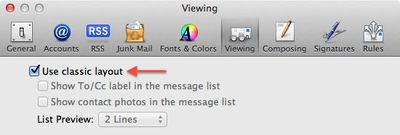
classic mail
Classic Mail: Lion's Mail takes on a distinct iOS look, but the classic Mac OS X Mail look is available through a checkbox preference in Mail.

Front Row: Mad Hatter has instructions on how to re-enable FrontRow on Lion, though we've heard some mixed results about it working. - Use at your own risk, we've heard it has caused problems.

LimeiBook86 posts some instructions which duplicate ones we have shown here, but also includes restoring Finder Window's Path and Status Bar as well as turning off Dashboard as a space.


Top Rated Comments

198 months ago
Anyone figure out how to make the mouse wake the computer from sleep? This is a major annoyance for me.

Just requires a click instead of mouse movement for me, IMO this is much better as it greatly reduces the chance of accidentally waking your Mac up.
Score: 23 Votes (Like | Disagree)
198 months ago
The most stupidest things that i ever hear is articles "how make new thing work like old". Apple always was company with advanced technology. If Apple change something they always know why and because.

The most stupidest things that i ever hear is people who blindly accept everything Apple does as the best way.

Just because Apple "know why and because" they've made a change, doesn't make it right. And certainly not right for everyone.

Check your EULA. There is no condition of owning Apple products that you must agree with and like everything Apple does.
Score: 19 Votes (Like | Disagree)
198 months ago
"Turn off Lion's stupid ban on key repeating"?? I you kidding me?? :eek: This is the one of the small and useful function, than F.. Windows will never had.

It's a reasonable thing that people would want to turn again.

"Disable resume in Lion"! :eek: Sure! Thank Steve, that you add disable function for your new great OS, now all people around the world can turn it off!! Btw who can tell me how to disable stupidest touchscreen on my iPad?

Resume might be useful to some, but I don't want my last used things to reappear when I re-open that app. Might have personal stuff there, or open a document that you don't want to work on, so you end up having to close it anyway.

So, dear Mac users, if you are true :apple: user remember - all new functions is always look strange (because they new), but after some time, you will accustomed and THIS new functions became a great canyon between your Mac and others pfsht.

I'm not a 'true' Apple user by your definition, but I'm a power user. And small changes like ones described here can really interrupt my workflow. Whether I have to "re-learn" isn't always the case, I've got my workflow adapted to how previous OS X versions worked. Lion has changed a lot of that, some for the better, some of the worse.
Score: 17 Votes (Like | Disagree)
GSPice Avatar
198 months ago
Here's an idea, rather than make Lion act like Snow Leopard. Stick to Snow Leopard.
Answers like this don't require any critical thinking or intellectual honesty. It's the kind of stuff people skip over in google's search results.
Score: 14 Votes (Like | Disagree)
AAPLaday Avatar
198 months ago
Some people really don't like change, now do they?

Only if its for the better ;)
Score: 13 Votes (Like | Disagree)
John.B Avatar
198 months ago
If you have slow Mac don't install Lion! Or upgrade the Mac
Maybe you didn't get the memo, but there are seriously cool security enhancements in Lion as well as that whole iCloud thing coming in iOS 5 in September, not to mention document revisions and a very cool new implementation of FileVault. Just to name a few.

I'll never understand people who insist on dictating how others should use their computers... :rolleyes:
Score: 12 Votes (Like | Disagree)

Popular Stories

iOS 27 Next to iPhone

Here's When iOS 27 Rolls Out Today in Every Time Zone [Update: It's Out]

Sunday September 13, 2026 3:00 am PDT by
Update 10:04 a.m.: iOS 27 is rolling out now, though it may take a bit for all users to see it, so keep checking! Apple is about to release iOS 27, which will finally deliver more advanced Siri AI capabilities as well as a variety of other refinements, improvements, and new features to iPhones. It's Apple's biggest software update of the year, and Apple announced at Wednesday's iPhone event...
iOS 27 Icon iPhone

iOS 27 Available Now With These 8 New Features

Monday September 14, 2026 9:00 am PDT by
Update — 10 a.m. Pacific Time: Apple has released iOS 27. During its iPhone 18 Pro and iPhone Duo event last week, Apple announced that iOS 27 will be released widely on Monday, September 14. iOS 27 should be available around 10 a.m. Pacific Time / 1 p.m. Eastern Time today via the Settings app, under General → Software Update. Below, we have highlighted eight new features and...
Apple iCloud Plus expansion hero

iCloud+ Now Includes Apple TV, Apple Arcade, and Curated Apple Music Stations in Over 100 Countries

Tuesday September 15, 2026 1:43 am PDT by
Apple today announced a new subscription initiative that turns paid iCloud+ subscriptions into a broader services bundle in more than 100 countries. In select countries, Apple says every paid iCloud+ plan, including the cheapest 50GB tier, now includes Apple TV and Apple Arcade "at no additional cost," while family sharing extends the storage, TV and Arcade access to up to five people....














