

Apple TV Update 6.1 Allows AirPlay Discoverability Over Bluetooth - MacRumorsOpen MenuShow RoundupsShow Forums menuVisit ForumsOpen Sidebar
Skip to Content

Apple TV Update 6.1 Allows AirPlay Discoverability Over Bluetooth

When the Apple TV was updated to version 6.1 earlier this week, it was initially thought that there were minimal changes outside of the ability to hide icons in the main menu. However, a new report from AFP548 (via Daring Fireball) indicates that Apple also enabled AirPlay device discovery over Bluetooth as well.

Here’s one that will make educators and education network administrators realllllly happy. There’s a hidden gem in the AppleTV 6.1 update that was released today.

In addition to bonjour negotiation for AirPlay, iOS 7.1 devices will also look for AirPlay sources over bluetooth when doing it’s scan! This means you do NOT need bonjour to AirPlay.
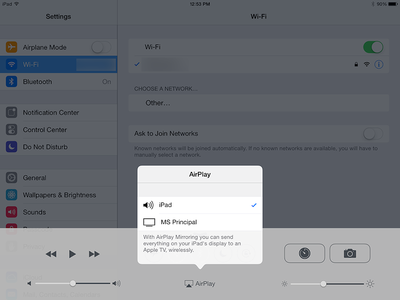
appletvbluetoothImage via AFP548

This change allows Apple TV to search for connectable devices over Bluetooth, bypassing Bonjour and making it easier for education and business administrators to set up iOS device and Apple TV pairings. Previously, Apple TVs could have a difficult time discovering devices on networks that might block Bonjour.

The new feature has three requirements: an Apple TV updated to 6.1, an iOS device updated to 7.1, and IP connectivity between both devices. AFP548 found during its testing that the feature doesn't yet support Macs, but that the ability could be added in a future update.

Apple TVs have become an important replacement for traditional projectors in both educational and business settings, and these changes are likely to make it even easier for administrators to consider switching to Apple's solution.


Related Roundup: Apple TV
Buyer's Guide: Apple TV (Don't Buy)

Popular Stories

tvOS 26 Feature

Apple Releases tvOS 26.5

Monday May 11, 2026 10:02 am PDT by
Apple today released tvOS 26.5, the fifth update to the tvOS operating system that came out last fall. tvOS 26.5 is available for the Apple TV 4K, and it comes over a month after Apple released tvOS 26.4. tvOS 26.5 can be downloaded using the Settings app on the ‌‌Apple TV‌‌. Open up Settings and go to System > Software Update to get the new software. ‌‌Apple TV‌‌ owners who...
General visionOS watchOS and tvOS Betas Feature Redux

Apple Releases First watchOS 26.6, tvOS 26.6 and visionOS 26.6 Betas

Tuesday May 26, 2026 10:03 am PDT by
Apple today provided developers with the first betas of upcoming watchOS 26.6, tvOS 26.6, and visionOS 26.6 betas for testing purposes. The software two weeks after Apple launched the 26.5 versions of each platform. The software updates are available through the Settings app on each device, and because these are developer betas, a free developer account is required. There's no word on...
Where is the New Apple TV Feature

Apple Previews New tvOS 27 Feature

Wednesday May 20, 2026 1:02 pm PDT by
Apple has announced that "Larger Text" support is coming to tvOS, allowing users to increase the on-screen text size to make it easier to read. "Larger Text" lets you adjust the size of text in supported apps, with the option already available on other devices like the iPhone, iPad, and Vision Pro. This was one of the new accessibility features that Apple previewed earlier this week, with ...

Top Rated Comments

zorinlynx Avatar
160 months ago
Once again, Apple does things half-assed.

It would be great if Bluetooth could be used to negotiate a direct Wifi connection between the devices, so it would be possible to stream media to an Apple TV even when there's no local WiFi network both devices can connect to.

It isn't even that difficult to implement, and would be awesome in situations where someone brings along an Apple TV and plugs it into an available projector or TV, then streams to it with their phone or iPad, without having to join any local Wifi networks.

But of course, this is Apple we're talking about. They tend to half-ass really cool ideas.
Score: 7 Votes (Like | Disagree)
JerryCards Avatar
160 months ago
That is a great feature. Apple should have done this long time ago.
Score: 5 Votes (Like | Disagree)
160 months ago
So I don't get it. What's the advantage? My iPhone syncs instantly with my Apple TV over the AirPort router at work. But the work network is really unstable. I wish I could just connect via Bluetooth.

No advantages for regular customers.

Bonjour is for automatically establishing a connection between two endpoints without doing any configuration, it's used to find a specific resource (computer, printer, etc) on the network to register your app with. The actual data transfer is then handled by Wi-Fi or ethernet now that the two know each other.

In a home network, it's not a problem to have bonjour running sending out data to find services/devices to register with.

If we didn't have bonjour, we would have to figure out the IP address manually on the printer/computer, and then manually enter it in the app to start the connection.

This is for networks where Bonjour is restricted or blocked outright, such as corporate or school networks where there might be dozens or hundreds of devices.

Instead of using Bonjour to establish the connection, you can now use Bluetooth, which doesn't use up the network traffic and instead uses short-wave radio to find other bluetooth devices to establish the connection. After the connection is established, Airplay will use the Wi-Fi network to transmit the data now it knows both endpoints to transmit the data between.
Score: 3 Votes (Like | Disagree)
160 months ago
But of course, this is Apple we're talking about. They tend to half-ass really cool ideas.

You apparently didn't bother to think this through. In fact, your comment is entirely irrelevant to this article. Allowing Bluetooth handshaking does NOT have anything to do with ad hoc streaming. They are two entirely different things. To allow this to happen, ad hoc streaming would have to be added, completely independent of Bluetooth, to the AppleTV software stack. In fact, while this capability would be nice, there is no need for bluetooth to be involved at all, only the ability for the AppleTV to join ad hoc networks, which, again, has nothing to do with Bluetooth.
Score: 2 Votes (Like | Disagree)
w0lf Avatar
160 months ago
Wi-Fi is just a bit faster than bluetooth. A rather large bit. You can send high quality audio over bluetooth, but not YET the video resolution WiFi can do.
Clearly you misread what they wrote. They wanted bluetooth to initiate an ad-hoc Wi-Fi connection, not actually use a bluetooth connection to stream the content.
Score: 2 Votes (Like | Disagree)
Solver Avatar
160 months ago
Once again, Apple does things half-assed.

It would be great if Bluetooth could be used to negotiate a direct Wifi connection between the devices, so it would be possible to stream media to an Apple TV even when there's no local WiFi network both devices can connect to.

It isn't even that difficult to implement, and would be awesome in situations where someone brings along an Apple TV and plugs it into an available projector or TV, then streams to it with their phone or iPad, without having to join any local Wifi networks.

But of course, this is Apple we're talking about. They tend to half-ass really cool ideas.

Wi-Fi is just a bit faster than bluetooth. A rather large bit. You can send high quality audio over bluetooth, but not YET the video resolution WiFi can do.
Score: 2 Votes (Like | Disagree)













