

Office for iPad Design Manager Talks About Design Process - MacRumorsOpen MenuShow RoundupsShow Forums menuVisit ForumsOpen Sidebar
Skip to Content

Office for iPad Design Manager Talks About Design Process

Office for iPadMicrosoft's design manager for Office for iPad has posted an interesting piece discussing the company's design philosophy behind the software.

The software, released back in March, has been well received by both users and critics. It's seen more than 27 million downloads and has already seen a significant update to add features that weren't ready for launch.

Han-Yi Shaw writes about the scenarios that the team imagined Office for iPad users would find themselves in, as well as the user experience goals they had:

- Familiar Office experience, with no learning curve
- Unmistakably Office, optimized for iPad
- Immersive and removes distractions
- Document content, not UI, takes center stage
- Experience is always beautiful, fast, and fluid

The purpose of a familiar Office experience is simple: a low learning curve and high user confidence. However, it’s just as important to strike a balance between “unmistakably Office” and “platform optimization,” which means optimizing for iOS platform conventions and touch-first user expectations. The most important, yet challenging, goal was finding the sweet spot between the essence of Office and iOS. Fortunately, since the Office for iPad and Mac team (formally known as the Macintosh Business Unit) is made up of Apple platform specialists, we were able to apply our deep knowledge of Apple platforms to the task.

The piece talks about how Microsoft redesigned The Ribbon -- the control strip at the top of all Office programs -- to mesh with Apple's design philosophies following the release of iOS 7. "That meant stripping out extraneous detail," said Shaw. "If there was a visual treatment or text label that wasn't absolutely necessary, we stripped it away."
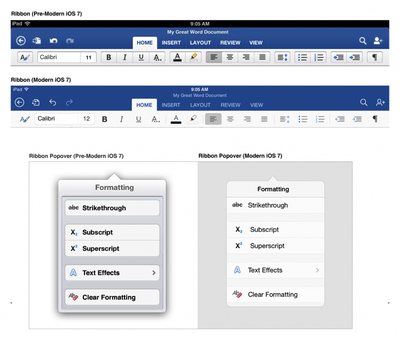
Old and New Office
The full piece is an interesting peek behind the curtain for designers and anyone interested in how software used by millions of people gets built.

Office for iPad is available from the App Store. [Direct Link: Word, Excel, PowerPoint]

Popular Stories

iPhone 18 Pro and Pro Max Feature

'Apple Upgrade' Program Reportedly Launching Next Week

Tuesday July 21, 2026 8:30 am PDT by
Apple and Klarna are partnering on a new "Apple Upgrade" leasing program set to launch in the U.S. on Tuesday, July 28, according to Bloomberg's Mark Gurman. The program will allow you to finance most iPhone, iPad, Mac, and Apple Watch models, with a 24-month term for iPhones and Apple Watches and a 36-month term for iPads and Macs. Customers will be able to pay off the device early during...
iPhone 18 Pro Deep Red Feature

iPhone 18 Pro Launching in Two Months With These 12 New Features

Friday July 17, 2026 10:39 am PDT by
It is now mid-July, and that means the iPhone 18 Pro and iPhone 18 Pro Max are now just two months away. The devices are expected to look similar to the iPhone 17 Pro and iPhone 17 Pro Max, but there will still be many year-over-year changes, with rumored features including a smaller Dynamic Island, 5G via satellite, and more. Apple is expected to unveil the iPhone 18 Pro, iPhone 18 Pro Max, ...
iPhone 18 Pro Deep Red Feature

iPhone 18 Pro Launching in Two Months With These 12 New Features

Tuesday July 21, 2026 6:22 am PDT by
It is now mid-July, and that means the iPhone 18 Pro and iPhone 18 Pro Max are now just two months away. The devices are expected to look similar to the iPhone 17 Pro and iPhone 17 Pro Max, but there will still be many year-over-year changes, with rumored features including a smaller Dynamic Island, 5G via satellite, and more. Apple is expected to unveil the iPhone 18 Pro, iPhone 18 Pro Max, ...

Top Rated Comments

AngerDanger Avatar
159 months ago
Based on the screenshots, it made "designing" the UI a lot easier.

"Should we add some borders or shadows to distinguish between various tappable areas?"
"What, no! Next thing you know, people will want graphics or something to go along with them!"

I personally cannot wait until design becomes so simple, intuitive, refined, beautiful, gorgeous, (insert denigrated aesthetic term) that our homescreens are white backgrounds with a list of unformatted text. Ahhh, that'll be something…

MacRumors content image (http://i.imgur.com/VpYGPUS.png)

</misplaced anger>
Score: 38 Votes (Like | Disagree)
surfingarbo Avatar
159 months ago
I really like the green, blue, and orange colours Microsoft use for each app. Both classic and modern at the same time. Great design work.
Score: 18 Votes (Like | Disagree)
maflynn Avatar
159 months ago
I will say I like the pre iOS 7 ribbon better but nonetheless word and excel are great apps on the iPad.
Score: 14 Votes (Like | Disagree)
Sky Blue Avatar
159 months ago
The new iOS 7 version looks ssoooo much better

new Office for Mac please :)
Score: 12 Votes (Like | Disagree)
159 months ago
Note how the pre-iOS 7 ribbon defers to content much better than the "modern" one.
Score: 9 Votes (Like | Disagree)
159 months ago
Its just to bad you have to pay a subscription to use Office on the iPad :( Because of that I won't touch it.

I think we're all going to find a LOT of software for Mac / PC / iPad etc. going the way of subscription.

Remember the days of buying a program on disk... using it for a long while and eventually deciding to get the next updated version-- (2 years later !)

Now, Adobe CS is Subscription based, AVID MC is going that way it seems, MS Office is that way now... It's the ONLY way to have a continuous revenue stream for these companies.

It's Sad, but soon, with the cost of the hardware, the cost of monthly data and the cost of subscription based software... who will be able to afford today's technology ?!?!
Score: 8 Votes (Like | Disagree)













