

Back in October, popular Mac image editing app Pixelmator was brought to iOS in the form of an iPad app, and as of today, that iOS app is being expanded to the iPhone. Pixelmator for iOS is now a universal app, giving iPhone users a way to edit their images with Pixelmator's powerful image editing tools for the first time.
iPhone support is an important step in Pixelmator's evolution and will let the company reach a much wider customer base. For many people, the iPhone has largely replaced point and shoot cameras. Image sharing site Flickr, for example, lists Apple's iPhones as the top three most popular cameras.
There are already a wealth of image editing apps available for the iPhone, but Pixelmator sets itself apart with a solid set of tools packaged in an accessible interface and iCloud interconnectivity with the Pixelmator Mac app.

Pixelmator for iPhone offers the same tools available in the iPad app, so those who have used the previous version of the app will be familiar with its capabilities. On the iPhone, Pixelmator's photo editing tools are likely to be the most useful, letting users adjust colors, fix lighting, add filters, crop, straighten, and distort photographs.
There are also powerful retouching tools that can be used to remove unwanted objects from images, much like in the Mac app. Tools have granular adjustments for making minor tweaks to the look of a photo, and there are brush-on effects in the "Retouch" menu that let users paint on image-correcting adjustments with a finger.
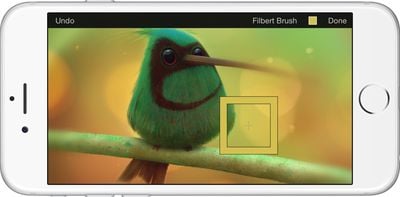
Pixelmator can also be used by artists and mobile designers to create original paintings, drawings, and compositions directly on the iPhone. It has support for more than 100 brushes and it includes a color picker and an eyedropper for managing colors. There's a smear tool for softening image edges, and a wet-painting feature for creating watercolor images. Pixelmator also includes support for words, shapes, and layers, with non-destructive layer styles and blending modes.
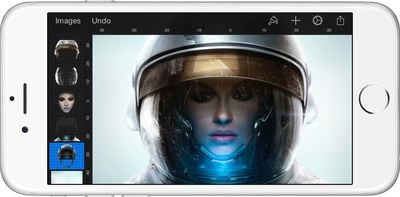
Like the previous iPad version, the new Pixelmator has support for iOS 8 features like iCloud Drive, Extensions, and Handoff. Images created on the iPhone will sync to the iPad and the Mac automatically, and it's also possible to begin an image on one device and switch over to another using Handoff. A Photos extension mades Pixelmator's editing tools available directly in the Photos app.
The iPhone app is being included in the existing Pixelmator app as an update, so all consumers who have previously purchased Pixelmator for iPad can download the new iPhone app at no charge.
Pixelmator for iOS can be downloaded from the App Store for $4.99. [Direct Link]
















Top Rated Comments
TBH, I bought the Mac App when it first hit the App Store thinking I could use it to do some quick touch ups while using PS for heavy works. It turns out, I'm using Pixelmator so much I haven't fire up PS more than 3 or 4 time last year. Once you get the hold of it, you can do so much, it's amazing (even more, with the Vectormator mode [Command-Shift-V]).
of course it will be. for a documented bajillion people, it's a pleasurable experience just taking pics and putting crappy filters on them, now you have MORE capabilities than the norm. on your phone. which travels everywhere with you.