

Apple Working to Put a Stop to iCloud Calendar Spam - MacRumorsOpen MenuShow RoundupsShow Forums menuVisit ForumsOpen Sidebar
Skip to Content

Apple Working to Put a Stop to iCloud Calendar Spam

Over the course of the last week, many iCloud users have been the target of spam that's delivered in the form of an unsolicited Calendar event invitation, and now Apple is working on a way to stop it.

In a statement given to iMore's Rene Ritchie, an Apple spokesperson said the company working to block spam invites.

We are sorry that some of our users are receiving spam calendar invitations. We are actively working to address this issue by identifying and blocking suspicious senders and spam in the invites being sent.

iCloud calendar spam isn't new, but there's been a serious uptick in calendar spam since last week. Because iCloud calendar invites are sent to an iCloud calendar automatically by default and there's no easy way to ignore them, there's no clear way to stop the spam.
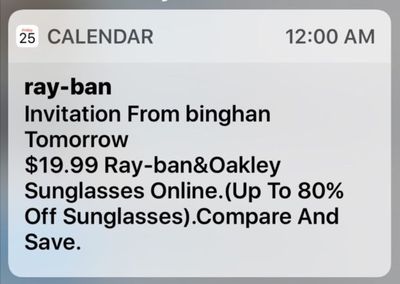
icloudcalendarspam

Image via OS X Daily

Declining, accepting, or choosing "Maybe" on an incoming iCloud invite lets spammers know an iCloud email address is valid, so until Apple can put a stop to the spam, there are two fixes. First, by logging in to iCloud via a web browser and accessing the Calendar settings (Click the cog, go to Preferences, then choose Advanced), you can choose to receive all event invitations as email. Emails can be more easily ignored and deleted.

Second, you can create a new Calendar, name it Spam, move the spam invitation to the Spam calendar, and then delete the Calendar entirely. This method does not inform spammers that an event has been declined and does not verify an iCloud account's validity. For more detailed instructions, make sure to check out our how to.

Both iOS users that use the default Calendar app and those who use third-party calendar apps like Fantastical are affected by the spam issue, which appears to be fairly widespread.


Popular Stories

Apple Card iPhone 16 Pro Feature

Apple Card Promo to Offer Free AirPods Pro 3

Friday May 15, 2026 8:59 am PDT by
Starting as early as next week, customers who sign up for an Apple Card at Apple's retail stores in the U.S. will receive $249 cash back when they purchase AirPods Pro 3, according to Bloomberg's Mark Gurman. The promotion has yet to be officially announced by Apple, so exact terms and conditions are not available at this time. AirPods Pro 3 are priced at $249 in the U.S., so customers who...
airpods pro 3 pink

New Apple Card Holders Can Get Free AirPods Pro 3, But There's a Catch

Monday May 18, 2026 8:11 am PDT by
Apple today launched a new promotion offering new Apple Card holders the chance to earn back the cost of AirPods Pro 3 through monthly cash rebates, but there is a recurring spend requirement attached. Customers who open a new Apple Card account and purchase AirPods Pro 3 directly from Apple by June 15 will qualify. Starting July 1 and running through April 30, 2027, cardholders can earn $25 ...
Apple WWDC25 iOS 26 CarPlay Light mode 250609

Six Popular iPhone Apps Now Available on CarPlay

Thursday May 14, 2026 9:10 am PDT by
Apple's CarPlay system for accessing iPhone apps on a vehicle's dashboard screen has received six popular apps in recent weeks: ChatGPT, Perplexity, Grok, Google Meet, WhatsApp, and the indie artist streaming platform Audiomack. Make sure you have the latest version of each app and they will automatically appear on CarPlay. ChatGPT Starting with iOS 26.4, CarPlay supports voice-based...

Top Rated Comments

124 months ago
Funny, I got less spam with iTools and .Mac than with iCould. Nice system, Tim.
What does Tim have to do with spammers spamming, which happens to basically any service out there and has been around for decades at this point?
Score: 7 Votes (Like | Disagree)
Mikey44 Avatar
124 months ago
Maybe they will fix the iCloud mail spam issue at the same time... :rolleyes: Wishful thinking I know.
Score: 7 Votes (Like | Disagree)
124 months ago
Good news. The calendar spam is quickly expanding and affecting others across the board.
Score: 7 Votes (Like | Disagree)
jerry16 Avatar
124 months ago
so until Apple can put a stop to the spam, there are two fixes ('https://www.macrumors.com/2016/11/28/delete-icloud-calendar-spam/'). First, by logging in to iCloud via a web browser and accessing the Calendar settings (Click the cog, go to Preferences, then choose Advanced), you can choose to receive all event invitations as email. Emails can be more easily ignored and deleted.
That iCloud.com option is lame; why shouldn't I be able to accept and decline events in my calendar app because spammers are taking advantage? Hard to call that a "fix".. more like a work around. Glad to hear Apple is working on something though; a report spam or delete with no response option would be ideal.
Score: 6 Votes (Like | Disagree)
Junipr Avatar
124 months ago
Method 3: Delete Calender app
Score: 6 Votes (Like | Disagree)
124 months ago
About time, I suffered this more than three weeks ago.
Score: 6 Votes (Like | Disagree)














