Official Wikipedia App for iOS Introduces Dark Mode and iMessage Sticker Pack - MacRumorsOpen MenuShow RoundupsShow Forums menuVisit ForumsOpen Sidebar
Skip to Content

Official Wikipedia App for iOS Introduces Dark Mode and iMessage Sticker Pack

by

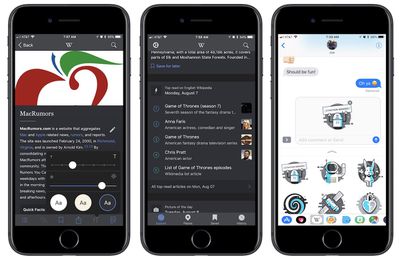
The official Wikipedia app for iOS [Direct Link] has been updated this week with an all-new dark mode, letting users adjust the app for better Wikipedia browsing and reading in low-light environments. Aside from expected darker colors, the new dark mode is said to include "image dimming," so brighter pictures aren't as harsh when scrolling through Wikipedia entries.
wikipedia dark mode
A separate option in sepia colors is available now as well, and Wikipedia said that users will also be able to adjust text size in appearance controls.

Dark mode! Read in comfort with new Appearance controls, including dark colors and image dimming. Make those late night Wikipedia sessions easier on the eyes. Choose between sepia, dark or white themes to read Wikipedia your way!

The version 5.6 update also introduced an iMessage sticker pack for Wikipedia users, and a few new ways for readers to explore and discover new articles. In the Explore feed, an "on this day" card will highlight interesting events that happened on the day in question throughout history, with a timeline that users can scrub through to see other events on the same day.

Standalone iOS apps have been gaining support for dark mode individually over the years, although a system-wide solution introduced on Apple's part remains omitted from any version of iOS. The upcoming launch of iOS 11 will include a new "Smart Invert" feature in accessibility options, reversing the display's colors with an overall effect that's similar to what users want out of dark mode. But the feature doesn't extend to all UI elements in iOS 11, including exceptions related to images, media, and some apps.

The official Wikipedia app is available to download for free from the iOS App Store. [Direct Link]


Top Rated Comments

silvetti Avatar
119 months ago
What is the big advantage of using a specific app for Wikipedia (for example their own app) vs Safari and just visit Wikipedia website ?
Score: 3 Votes (Like | Disagree)
119 months ago
It's unbelievable how the whole world knowledge (almost) is in our pockets all the time and yet we choose to use it to "snap" our food and collect "likes"
Right? The iPhone on its own is basically a Tricorder, but with Wikipedia on it the only thing missing is a leather cover with "Don't Panic" embossed on the front. I don't know how much plainer it could be. But all people seem to care about is selfies and reps.
[doublepost=1502223103][/doublepost]
Erm, maybe because you set your search engine to DuckDuckGo.

I just tried and it works.(Default search engine)
Right, DDG is my default search engine. What are you talking about?
Score: 2 Votes (Like | Disagree)
iDento Avatar
119 months ago
I love this app and these updates are awesome.

It's unbelievable how the whole world knowledge (almost) is in our pockets all the time and yet we choose to use it to "snap" our food and collect "likes"
Score: 2 Votes (Like | Disagree)
119 months ago
Have you ever considered just saving the front page of Wikipedia to your home screen? You end up with an icon just like an app, and you go right to the page, all without the storage overhead of an app.
Even easier is to pull down from top of the screen and enter "wiki xyz" in the search box. After the suggested websites (from Wikipedia), you get a brief paragraph from Wikipedia about your specific search phrase and a direct link to the Wikipedia page.
Score: 2 Votes (Like | Disagree)
earthTOmitchel Avatar
119 months ago
What is the big advantage of using a specific app for Wikipedia (for example their own app) vs Safari and just visit Wikipedia website ?
Ease of access? I wikipedia everything, and the idea of going to safari, going to bookmarks, choosing wiki... it's just too cumbersome. Most wiki apps also have neat features like saving favorite articles, which I do when I'm watching a TV show on cable and want to keep up with what number episode it's on and how far there is left to go in the season.
Score: 2 Votes (Like | Disagree)
Jessica Lares Avatar
119 months ago
Compared to some of the brand awareness I've seen some attempt with iMessage stickers, theirs is pretty good.

---

Another thing that the apps do better is keep the search button in reach so you don't have to scroll around to get back to it.

Despite not offering a dark mode, I prefer V for Wiki.
Love V for Wiki. Switched to it after Inquire didn't update for awhile and stopped working for me.
Score: 1 Votes (Like | Disagree)

Popular Stories

iOS 27 Next to iPhone

Here's When iOS 27 Rolls Out Today in Every Time Zone [Update: It's Out]

Sunday September 13, 2026 3:00 am PDT by
Update 10:04 a.m.: iOS 27 is rolling out now, though it may take a bit for all users to see it, so keep checking! Apple is about to release iOS 27, which will finally deliver more advanced Siri AI capabilities as well as a variety of other refinements, improvements, and new features to iPhones. It's Apple's biggest software update of the year, and Apple announced at Wednesday's iPhone event...
iOS 27 Icon iPhone

iOS 27 Available Now With These 8 New Features

Monday September 14, 2026 9:00 am PDT by
Update — 10 a.m. Pacific Time: Apple has released iOS 27. During its iPhone 18 Pro and iPhone Duo event last week, Apple announced that iOS 27 will be released widely on Monday, September 14. iOS 27 should be available around 10 a.m. Pacific Time / 1 p.m. Eastern Time today via the Settings app, under General → Software Update. Below, we have highlighted eight new features and...
Apple iCloud Plus expansion hero

iCloud+ Now Includes Apple TV, Apple Arcade, and Curated Apple Music Stations in Over 100 Countries

Tuesday September 15, 2026 1:43 am PDT by
Apple today announced a new subscription initiative that turns paid iCloud+ subscriptions into a broader services bundle in more than 100 countries. In select countries, Apple says every paid iCloud+ plan, including the cheapest 50GB tier, now includes Apple TV and Apple Arcade "at no additional cost," while family sharing extends the storage, TV and Arcade access to up to five people....