

Apple Pay Now Available at Nearly 16,000 Cardless Chase ATMs - MacRumorsOpen MenuShow RoundupsShow Forums menuVisit ForumsOpen Sidebar
Skip to Content

Apple Pay Now Available at Nearly 16,000 Cardless Chase ATMs

Chase, one of the major banks in the United States, today announced that customers can now use Apple Pay and other mobile wallet services at nearly all of the company's 16,000 ATMs, which have been upgraded with card-free access.

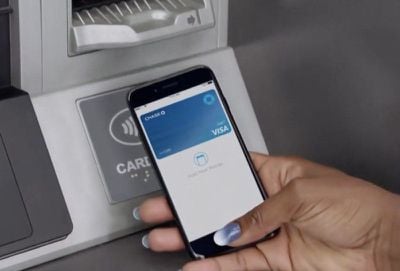
To access an ATM and withdraw money, customers no longer need a physical debit card or access code for authentication, with the contactless ATMs supporting a "tap" from a smartphone to use the ATM.
applepaychaseatms2
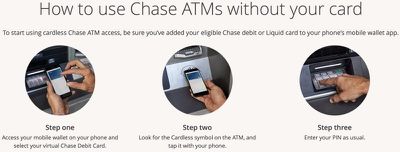
On its website, Chase walks users through the steps necessary to use the new ATM functionality.

For iPhone users, after adding a Chase card to the Wallet app on the iPhone, at an ATM, customers will need to open up the Wallet app, select the virtual Chase debit card and tap the iPhone on the "Cardless" symbol on the ATM, authenticating via Face ID or Touch ID.
applepaychaseatms1
A PIN code will need to be entered for verification purposes, so it's not quite as simple as a standard payment with Apple Pay, but it does prevent Chase card users from needing to pull out a physical card.

Chase says that cardless ATM access is available to all customers with a Chase debit or Liquid card that's been added to Apple Pay, Google Pay, or Samsung Pay. All Chase ATMs with the Cardless symbol support Apple Pay.

Chase first announced plans to update its ATMs with contactless money withdrawals in 2016, and has since then been rolling out the technology. Today's update suggests the rollout is nearly complete and available to most Chase customers.

Both Wells Fargo and Bank of America, Chase competitors, have also been rolling out card-free Apple Pay access to ATMs. Wells Fargo added Apple Pay support to over 5,000 ATMs last year, while Bank of America began implementing the feature in 2016.

Related Roundup: Apple Pay

Popular Stories

macOS 27 on MacBook Pro

Apple Says macOS 27 Won't Be Compatible With These Macs

Wednesday June 3, 2026 8:29 am PDT by
During WWDC 2025, Apple revealed that macOS 26 Tahoe would be the final major macOS version for Intel-based Macs. macOS 27 will be compatible with Apple silicon Macs only, meaning that you will need a Mac with an M-series chip or a MacBook Neo with an A18 Pro chip in order to install the software update. Apple will unveil macOS 27 during its WWDC 2026 keynote this Monday, June 8, and the...
MacBook Neo on Yellow Feature

MacBook Neo is So Popular That Apple Reportedly Doubled Production

Wednesday June 3, 2026 9:24 am PDT by
On an earnings call in late April, Apple's CEO Tim Cook said that customer response to the MacBook Neo was "off the charts," and the popularity of the laptop has reportedly led the company to significantly boost production. Apple supply chain analyst Ming-Chi Kuo this week said he believes that MacBook Neo shipments to Apple were doubled from an initial target of 5 million units to 10...
iphone 18 pro blue%402x

iPhone 18 Pro: Dark Cherry, Light Blue, and Dark Gray Chassis Leaked [Update]

Thursday June 4, 2026 5:18 am PDT by
Update: Since publication, new information has come to light suggesting the images have been AI-manipulated and are not in fact iPhone 18 Pro chassis parts. The original article follows. The color options Apple is reportedly planning for the upcoming iPhone 18 Pro and ‌iPhone 18 Pro‌ Max have appeared online today in the form of images of chassis parts of unknown authenticity....

Top Rated Comments

102 months ago
We need more Apple Pay!
Score: 7 Votes (Like | Disagree)
MyMacintosh Avatar
102 months ago
Was literally at my Chase atm the other day wondering when this would be a thing. Thank God!
Score: 7 Votes (Like | Disagree)
McTaste Avatar
102 months ago
I can't even remember the last time I used an ATM. If I get birthday money that small amount is more than enough to last me the entire year for cash only purchases.
We need to get you buying more weed.
Score: 6 Votes (Like | Disagree)
102 months ago

[LIST=1]
* Take out Debit Card
* Slide card into slot in ATM
* Enter pin #

vs.

[LIST=1]
* Take out iPhone
* Unlock (if you don't have FaceID
* Find app & launch it
* Scroll/select Chase Debit Card
* Tap Phone on ATM machine pad
* Enter pin #


I guess I'm not seeing an advantage here...
You can double tap power button on the iPhone X or double click the home button to bring up the wallet from the home screen. Doing this instant authenticates me as I do it.
Score: 5 Votes (Like | Disagree)
102 months ago

[LIST=1]
* Take out Debit Card
* Slide card into slot in ATM
* Enter pin #

vs.

[LIST=1]
* Take out iPhone
* Unlock (if you don't have FaceID
* Find app & launch it
* Scroll/select Chase Debit Card
* Tap Phone on ATM machine pad
* Enter pin #


I guess I'm not seeing an advantage here...
The advantage is that you don't have to carry or babysit a card anymore. Your instructions are a bit biased towards the card though--I'd argue that carrying/retrieving a card that is located in a wallet that is possibly located in a bag has at least as many steps as using your iPhone.

My instructions for card use would look like this:

1) Take out bag to retrieve wallet
2) Remove card from wallet
3) Slide card into slot in ATM
4) Enter PIN
5) Conduct transaction
6) Remove card from slot in ATM
7) Replace card in wallet
8) Replace wallet in bag

And for anyone that uses an Apple Watch and has their Chase card set as the default payment, it's literally as easy as pressing the watch's side button twice and holding it to the pad. This is how I do all of my ApplePay transactions--there's no way it's easier to use a card.
Score: 4 Votes (Like | Disagree)
102 months ago
I can't even remember the last time I used an ATM. If I get birthday money that small amount is more than enough to last me the entire year for cash only purchases.
What? You get Birthday money Macduke? Lucky.

Anyways. Completely agree. The only time I used an ATM is if I needed cash for a small purchase, otherwise Apple Pay (More specifically with the Apple Watch) is so convenient and has become a necessity in most applications.
Score: 4 Votes (Like | Disagree)















