Apple Updates iMovie and iWork Apps for iOS With Trackpad and Mouse Support - MacRumorsOpen MenuShow RoundupsShow Forums menuVisit ForumsOpen Sidebar
Skip to Content

Apple Updates iMovie and iWork Apps for iOS With Trackpad and Mouse Support

by

After releasing new Keynote, Pages, and Numbers updates for the Mac earlier today, Apple has also started rolling out updates for the iWork apps designed to work on iPhones and iPads.

imovie iwork ios icons
The updates to Keynote, Pages, and Numbers for iOS bring support for the upcoming Magic Keyboard, mice, and trackpads when using the iWork apps on an iPad. The new versions of the software also include support for collaborative work using iCloud Folder Sharing along with other new features outlined in the release notes below.

Pages for iOS Release Notes

  • Use Pages on an ‌iPad‌ with Magic Keyboard, a mouse, or a trackpad for a new way to work with your documents. Requires iPadOS 13.4.
  • Select from a variety of gorgeous new templates to help you get started.
  • Add a Pages document to a shared iCloud Drive folder to automatically start collaborating. Requires iPadOS 13.4 or iOS 13.4.
  • Add a drop cap to make a paragraph stand out with a large, decorative first letter.
  • Apply a color, gradient, or image to the background of any document.
  • Touch and hold, then drag across multiple objects to select them.
  • Easily access recently used templates in a redesigned template chooser.
  • Print or export a PDF of your document with comments included.
  • Edit shared documents while offline and your changes will upload when you're back online. Requires iPadOS or iOS 13 or later.
  • Enhance your documents with a variety of new, editable shapes.

Keynote for iOS Release Notes

  • Use Keynote on an ‌iPad‌ with Magic Keyboard, a mouse, or a trackpad for a new way to work with your presentations. Requires iPadOS 13.4.
  • Add a Keynote presentation to a shared ‌iCloud Drive‌ folder to automatically start collaborating. Requires iPadOS 13.4 or iOS 13.4.
  • Edit shared presentations while offline and your changes will upload when you're back online. Requires iPadOS or iOS 13 or later.
  • Select from a variety of gorgeous new themes to help you get started.
  • Touch and hold, then drag across multiple objects to select them.
  • Easily access your recently used themes in a redesigned theme chooser.
  • Print or export a PDF of your presentation with comments included.
  • Add a drop cap to make text stand out with a large, decorative first letter.
  • Enhance your presentations with a variety of new, editable shapes.
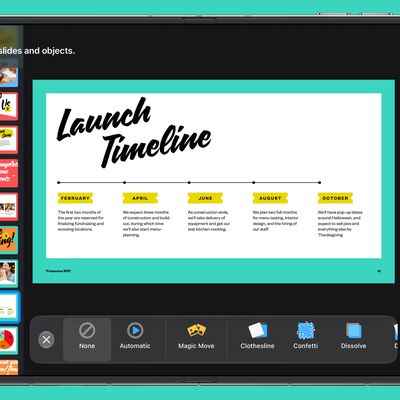
  • New "Keyboard" text build in and build out animation

Numbers for iOS Release Notes

  • Use Numbers on an ‌iPad‌ with Magic Keyboard, a mouse, or a trackpad for a new way to work with your spreadsheets. Requires iPadOS 13.4.
  • Create spreadsheets with more rows and columns than ever before.
  • Apply a color to the background of a sheet.
  • Add a Numbers spreadsheet to a shared ‌iCloud Drive‌ folder to automatically start collaborating. Requires iPadOS 13.4 or iOS 13.4.
  • Edit shared spreadsheets while offline and your changes will upload when you're back online. Requires iPadOS or iOS 13 or later.
  • Touch and hold, then drag across multiple objects to select them.
  • Easily access your recently used templates in a redesigned template chooser.
  • Print or export a PDF of your spreadsheet with comments included.
  • Add a drop cap to text in a shape.
  • Enhance your spreadsheets with a variety of new, editable shapes.

Apple has also released a new iMovie update for the iPhone and the ‌iPad‌, which includes mouse and trackpad support. The update also features new keyboard shortcuts.

  • Use iMovie on ‌iPad‌ with Magic Keyboard, a mouse, or a trackpad for a new way to create movies and trailers (requires iPadOS 13.4)
  • Use keyboard shortcuts to toggle between the five inspector modes when a clip is selected: Action, Speed adjustments, Volume, Titles, and Filters
  • Use keyboard shortcuts to quickly rotate video 90-degrees clockwise or counterclockwise
  • Tap the Download All button at the top of the soundtracks list to download all bundled soundtracks at once
  • Add PNG, GIF, TIFF, and BMP files to your movie
  • Performance and stability improvements

Apple's iMovie and iWork for iOS apps are free and can all be found in the App Store on iPhone and ‌iPad‌.

Top Rated Comments

iDento Avatar
86 months ago
Now we’re talking. iWork is so good I stopped looking for alternatives, I doubt u would anytime soon.
Score: 5 Votes (Like | Disagree)
BWhaler Avatar
86 months ago
Great update to the best office suite (imho)

Now bring on the magic keyboard for iPad.

Score: 5 Votes (Like | Disagree)
kamilstudios Avatar
86 months ago
Nice! I use Keynote all the time to make presentation and also motion graphic to be use in Final Cut Pro / editing software. This update will make me use the iPad version more!
Score: 3 Votes (Like | Disagree)
cgsnipinva Avatar
86 months ago

Better than MS Office?
MS Office is the workplace standard in large organizations - but iWork's continual improvements and added features is closing the a gap to where personal and small business use is a good use case for iWork. I will break it down like this:

1.) Keynote is equal to or slightly better than Power Point
2.) Pages has received a lot of features that add desktop publishing features from iBook author and I think has 90-95 % of MS Word functionality. It is a cleaner and tighter application than MS Word - so I give it a slight edge over Word.

3.) Numbers - well this is where Excel still has an advantage for power users - but Numbers now that is has Categories (Pivot table functionality) and an increase in row and column capacity - it is getting closer. I think if Apple would include some data tools like 'Text to Column', Remove Duplicates, Flash Fill, and Group/Ungroup -- it would have all the functionality I need.

Apple has done a good job about adding work collaboration on their iWork products and integrating iCloud into its capabilities.

While the total reboot of iWork was frustrating to a lot of users- in the long run it was a good idea as the software was recreated from the ground up and is lighter and tighter than before. As long as Apple keeps investing in it - it will get better. Now if they could just add a flow-charting application. ;)


Great update to the best office suite (imho)

Now bring on the magic keyboard for iPad.

Agree with you here. If you look at the iPad as a tablet - the iPad OS combined with the refined applications that come native with it - you can do quite a bit. For personal productivity it cannot be beat for flexibility and the ability to do work. Compare it to Android tablets and its not even close.

The iPad could be a great personal computer replacement if it could be attached to a monitor (using full resolution) and keyboard/mouse combo so it can leverage the iPadOS applications in a work station format and then be used in mobile form by just unplugging it.

It has been interesting to see how this platform has evolved.
Score: 2 Votes (Like | Disagree)
86 months ago

Great update to the best office suite (imho)

Now bring on the magic keyboard for iPad.

I really love iwork, especially “numbers” that I use with a lot of pleasure, every day, on my iPad or my Mac, but.....

I would like to have also scripting language. You can use AppleScript, of course (and I use, sometimes), but
it's far behind EXCEL, so unfortunately I HAVE to use it instead of “numbers”.
Different talk is “pages”. It's, in my opinion, the best word processing app, much easier and funny to use compared to “word”.
Score: 2 Votes (Like | Disagree)
iDento Avatar
86 months ago

Better than MS Office?
iWork is way much cleaner and fun to use. I use it all the time for personal and small business documents and presentations. However, there’s no Access, Onenote, outlook, share point.
Score: 2 Votes (Like | Disagree)

Popular Stories

iphone duo keynote

Apple's iWork Apps Get 'Intelligent Assistant' and iPhone Duo Support

Thursday October 22, 2026 1:02 pm PDT by
Apple today added an "Intelligent Assistant" to Keynote, Numbers, and Pages. The feature is available in beta for Apple Creator Studio subscribers. The update is available again following the temporary removal of the apps from the App Store. In Numbers, Intelligent Assistant can build formulas, visualize data, help generate formulas with natural language, and generate tables. The Pages...
apple pro tell logo

Apple Launching Five New Products Today

Thursday November 5, 2026 12:59 am PST by
Apple is launching five new products on Friday, November 6, following pre-orders that opened last week, including its first touchscreen MacBook Pro models. The following new products will be available from today: iPad mini with OLED display and A20 Pro chip iMac with M6 chip 14-inch MacBook Pro with M6 chip 14-inch MacBook Pro with OLED touchscreen 16-inch MacBook Pro with OLED...
duo aquarium

More Fun iPhone Duo Apps: 30 New Picks to Try

Friday November 6, 2026 3:27 pm PST by
When the iPhone Duo launched, we shared a list of some of the fun apps developers created for the new form factor. Two weeks out, developers are continuing to come up with fresh ideas, so we thought we'd share some of our favorites. Games Marbles Unhinged ($2.99) - Marbles Unhinged is a marble maze designed for the Duo. When you fold it, the floor turns into a ramp. If you stand the top...
Latest Stories
Siri AI Rumored to Become 'More Like an Agent' as Early as Next Year
2 hours ago
Apple Taking New Approach to Developing iOS 28 and macOS 28
4 hours ago
Early Apple Black Friday Deals on Apple Watch, MacBook Air, and More
23 hours ago
'Backglow' Lets You Customize New MacBook Pro's Glowing Apple Logo
23 hours ago
Top Stories: Apple Product Launches, iOS 27.3 Beta, and More
1 day ago
More Fun iPhone Duo Apps: 30 New Picks to Try
2 days ago
Hands-On With Apple's New OLED Touchscreen MacBook Pro
2 days ago
Apple Store With All-New Design Opening Soon in Southern California
2 days ago
Control the Glowing Apple Logo on Your New MacBook Pro
2 days ago
Apple Shares New 'Apple Card: Apply and Use in Minutes' Ad
2 days ago
Apple Says More Than 100,000 Apps Optimized for iPhone Duo, Here's What's Still Missing
2 days ago
Early Black Friday Deals Kickoff With Steep Discounts on Apple Watch Ultras and More
2 days ago
The MacRumors Show: iOS 27.3 Looks Like a Huge Update
2 days ago
Best Buy's Black Friday Event Begins With Sitewide Savings on Apple, TVs, More
2 days ago
Apple Releasing Yet Another Two New Products Next Week
2 days ago
MacBook Air Drops to Lowest Price in Months With Amazon's $250 Discount
2 days ago
Apple Rumored to Drop the iPhone's Action Button Next Year
2 days ago
Apple's Extended Return Policy Now in Effect for 2026 Holiday Season
2 days ago
Apple Music Classical Updated With New Icon and Refreshed Design
2 days ago
OLED iPad Mini, M6 iMac, and New MacBook Pros Available From Today
2 days ago
Apple Surveys iPhone Duo Buyers About Crease and Camera
3 days ago
Apple's First Touchscreen Mac is Now Arriving to Customers
3 days ago
Claude Gets Personal Finance Feature With Bank Account Linking
3 days ago
Apple Arcade Adds Crossy Road Rush and NBA 2K27
3 days ago
Apple's New HomeView Smart Home Hub: Here's How Much RAM It Has
3 days ago
iPad Mini vs. iPad Air Buyer's Guide: Now Just $50 Apart
3 days ago
First iOS 27.3 and macOS Golden Gate 27.3 Public Betas Now Available
3 days ago
Apple Announces a New Mac Sales Record
3 days ago
Paid $200 for Logic Pro? Apple Says You Won't Get This New Feature
3 days ago
Instagram's Edits Video Editor is Now Available on Mac
3 days ago