App Recap: 'Usage' System Activity, 'Backdrops' Wallpapers, and Major App Updates - MacRumorsOpen MenuShow RoundupsShow Forums menuVisit ForumsOpen Sidebar
Skip to Content

App Recap: 'Usage' System Activity, 'Backdrops' Wallpapers, and Major App Updates

In this week's App Recap, we've highlighted two apps worth checking out. We've also compiled a list of apps that received major updates this week.
App Recap Usage Backdrops e1589661652158

Apps to Check Out

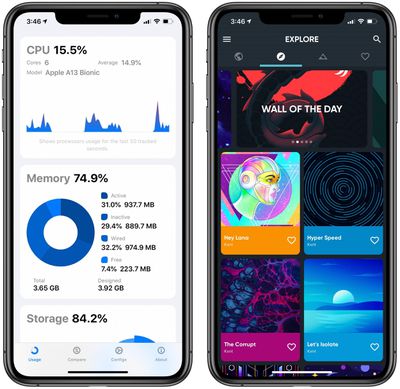
  • Usage: System Activity & Info (iOS, Free) - Although not a particularly new app, Usage recently received a major update with version 3.0 in which the app was completely redesigned using SwiftUI. Complete with a sleek and modern design, Usage now features both an extended functionality with device and battery information and deeper, more detailed view of metrics.The app creates metrics based on network activity, connection speed, data usage, and more. Usage also allows users to customize the app to their own likings through six different color options, options to order the various metrics, and four customizable today widget options. Usage is free to download and features no ads, but users looking for the most functionality can purchase the app's compare feature for $1.99, which provides a detailed hardware breakdown of your device and allows you to compare it with any other iPhone. It is also worth pointing out that users can unlock the premium compare feature for one day by simply sharing the app!
  • Backdrops (iOS, Free) - Backdrops is a new wallpaper app that features original, high quality designs by the Backdrops team. The app features a wide variety of different wallpapers themes including abstract, scenery, geometric, dark AMOLED friendly, and more. Users can also upload and submit their own wallpapers to be featured in the Community tab. Although free to download, the app does feature a Backdrops Pro in-app purchase for $3.99 which removes ads and unlocks exclusive wallpaper collections. Backdrops also supports Sign in With Apple, so users who sign up for an account using an Apple ID have the option to mask their personal email address.

App Updates

  • Apple Store - The Apple Store app was revamped this week with Dark Mode support. Apple has continued to add ‌Dark Mode‌ support to all of its apps after first introducing the feature in iOS and iPadOS 13.
  • Logic Pro X (Mac) - Apple this week released Logic Pro X version 10.5 with a new Live Loops feature first introduced in GarageBand for iPhone and iPad, a completely redesigned sampling workflow, new beat-making tools, and many other new features. In addition, the app received several performance improvements, and Apple has referred to the new update as being the "biggest update to Logic since the launch of Logic Pro X."
  • Microsoft Word and PowerPoint (iPad) - Microsoft this week updated its Word and PowerPoint apps with Split View, which now allows users to open two documents simultaneously side-by-side. Split View can be accessed by touching and holding on a document in any file view and then dragging it to the left or right side of the screen.
  • Norbyte (iOS) - Developer Norbyte this week updated its painting apps HuePaint and iPastels with support for Apple's universal purchases feature, so buying the app once will allow you to have access to it across all of your devices.
  • Slack (iOS) - The Slack iPhone app this week was updated with both a redesigned interface and a new navigation bar. In addition to these new features, some of the app's swiping gestures have improved.
  • Spark - The Spark email app this week received an update with full mouse and trackpad support for iPadOS. In addition, users who participate in Spark for Teams are now able to react to emails and chats of shared conversations with emojis.
  • Spotify - Spotify this week updated its app with a new Group Session feature, which allows two or more Premium users in the same location to share control over the music that's being played. The new feature can be used after the person in charge taps the Connect menu in the bottom left corner of the Play screen which shares the scannable QR code with additional users. Once connected, participants can play, pause, skip, and select tracks to add to the queue with Spotify's controls.
  • Twitter - Twitter this week announced a new feature that makes it easier for users to recognize retweets with comments. On Twitter's iPhone and iPad apps, all retweets with comments are now shown in a list that can be accessed by tapping on a tweet and then choosing the "Retweets" option.

Popular Stories

apple pro tell logo

Apple Launching Five New Products Today

Thursday November 5, 2026 12:59 am PST by
Apple is launching five new products on Friday, November 6, following pre-orders that opened last week, including its first touchscreen MacBook Pro models. The following new products will be available from today: iPad mini with OLED display and A20 Pro chip iMac with M6 chip 14-inch MacBook Pro with M6 chip 14-inch MacBook Pro with OLED touchscreen 16-inch MacBook Pro with OLED...
duo aquarium

More Fun iPhone Duo Apps: 30 New Picks to Try

Friday November 6, 2026 3:27 pm PST by
When the iPhone Duo launched, we shared a list of some of the fun apps developers created for the new form factor. Two weeks out, developers are continuing to come up with fresh ideas, so we thought we'd share some of our favorites. Games Marbles Unhinged ($2.99) - Marbles Unhinged is a marble maze designed for the Duo. When you fold it, the floor turns into a ramp. If you stand the top...
silver iphone 18 pro

Apple Rumored to Drop the iPhone's Action Button Next Year

Friday November 6, 2026 6:07 am PST by
Apple plans to merge the iPhone's Action button with the Camera Control starting next year, according to the leaker known as "Instant Digital." In a new post on Weibo, the leaker claimed that a single press of the combined button would open the camera, while a long press would trigger the function assigned to the Action button. They explicitly clarified that the dedicated Action button would ...

Top Rated Comments

Siriosys Avatar
85 months ago

Not sure what the purpose of that Usage app is on iOS, but I guess it's pretty
You summed it up right! It lacks substance of any kind - it appears even the paid version doesn't provide much additional info.


Processor Stats - There's no way to see which process or App is causing spikes or continually high processor usage
Storage - It doesn't provide any way to tell what's taking up all the space on your device
Memory - You can't see which Apps are hogs
Network Stats - Doesn't show which protocols, ports, or Apps are uploading / downloading / using mobile data
Battery - Just repeats the stuff you can get from the top of your screen, with some additional static info about the battery which will never change, unless you change the battery.


Thankfully however, it's free.
Score: 3 Votes (Like | Disagree)
EM2013 Avatar
85 months ago
Downloaded wallpaper app and deleted right after.

Barely browsing for a minute or two and my xs Max starting heating up. No app or game I use does this.

Wallpapers are poorly optimized.
Score: 2 Votes (Like | Disagree)
sideshowuniqueuser Avatar
85 months ago
Who in their right mind willingly downloads a backdrop app that comes with ads?
Score: 2 Votes (Like | Disagree)
85 months ago
4 bucks for Backdrop Pro? The wallpapers look, sort of, average (at best).
Score: 2 Votes (Like | Disagree)
EM2013 Avatar
85 months ago

I wonder why Apple stopped including good wallpapers in their iOS, and even made certain wallpapers exclusive to certain devices. It's such a cheap shot move. Their iOS wallpaper photography used to be some of the best in the game around the time of iOS 7-10, before it ended up into today's bland collection of blobs, funeral flowers (6) and flat desaturated rainbows (7!)


I hate how they make wallpapers exclusive to certain devices. I also hate how they remove wallpapers. Yes you can find them online but what’s the purpose of removing them or having to have a certain device.

The ones we have now are so awful. I’ve never used the flowers or the rainbows.
Score: 1 Votes (Like | Disagree)
justperry Avatar
85 months ago

Not sure what the purpose of that Usage app is on iOS, but I guess it's pretty
Agreed, just downloaded it, look at it once then forget about it.
Score: 1 Votes (Like | Disagree)
Latest Stories
Early Apple Black Friday Deals on Apple Watch, MacBook Air, and More
11 hours ago
'Backglow' Lets You Customize New MacBook Pro's Glowing Apple Logo
11 hours ago
Top Stories: Apple Product Launches, iOS 27.3 Beta, and More
17 hours ago
More Fun iPhone Duo Apps: 30 New Picks to Try
1 day ago
Hands-On With Apple's New OLED Touchscreen MacBook Pro
1 day ago
Apple Store With All-New Design Opening Soon in Southern California
1 day ago
Control the Glowing Apple Logo on Your New MacBook Pro
1 day ago
Apple Shares New 'Apple Card: Apply and Use in Minutes' Ad
2 days ago
Apple Says More Than 100,000 Apps Optimized for iPhone Duo, Here's What's Still Missing
2 days ago
Early Black Friday Deals Kickoff With Steep Discounts on Apple Watch Ultras and More
2 days ago
The MacRumors Show: iOS 27.3 Looks Like a Huge Update
2 days ago
Best Buy's Black Friday Event Begins With Sitewide Savings on Apple, TVs, More
2 days ago
Apple Releasing Yet Another Two New Products Next Week
2 days ago
MacBook Air Drops to Lowest Price in Months With Amazon's $250 Discount
2 days ago
Apple Rumored to Drop the iPhone's Action Button Next Year
2 days ago
Apple's Extended Return Policy Now in Effect for 2026 Holiday Season
2 days ago
Apple Music Classical Updated With New Icon and Refreshed Design
2 days ago
OLED iPad Mini, M6 iMac, and New MacBook Pros Available From Today
2 days ago
Apple Surveys iPhone Duo Buyers About Crease and Camera
2 days ago
Apple's First Touchscreen Mac is Now Arriving to Customers
2 days ago
Claude Gets Personal Finance Feature With Bank Account Linking
2 days ago
Apple Arcade Adds Crossy Road Rush and NBA 2K27
2 days ago
Apple's New HomeView Smart Home Hub: Here's How Much RAM It Has
2 days ago
iPad Mini vs. iPad Air Buyer's Guide: Now Just $50 Apart
2 days ago
First iOS 27.3 and macOS Golden Gate 27.3 Public Betas Now Available
3 days ago
Apple Announces a New Mac Sales Record
3 days ago
Paid $200 for Logic Pro? Apple Says You Won't Get This New Feature
3 days ago
Instagram's Edits Video Editor is Now Available on Mac
3 days ago
Prevent Siri and Search From Accessing Specific iPhone Apps
3 days ago
Best Early Black Friday Deals on iPhone 18 Pro and iPhone Duo
3 days ago










































