Darkroom Photo Editing App Gets New Album Manager - MacRumorsOpen MenuShow RoundupsShow Forums menuVisit ForumsOpen Sidebar
Skip to Content

Darkroom Photo Editing App Gets New Album Manager

by

Darkroom, a popular camera app designed for iOS devices, has been updated with new features that enable users to manage albums within the app, rather than in the Photos app.
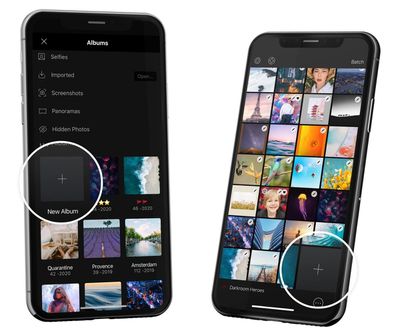
darkroom up date new album button
Once the update is installed, users no longer have to exit the app to manage their photo collection – they can create and edit albums from within the Darkroom interface, and the changes they make will be reflected in their device's native photo library.

Today's update adds complete Album Management workflows to Darkroom. From the library, you can now create, rename, and delete albums. You can also select photos and add them to an album. All changes are reflected in your photo library and vice versa.

When browsing albums, the Batch tool can be used to select multiple photos. Doing so reveals a row of actions at the bottom of the screen, and new to that list is "Add To." Users can tap this option to move the selected photos to any existing album or create a new one.

For more information on the update and suggested album workflows, check out this Medium post by the Darkroom development team. Darkroom is available to download from the App Store for iPhone and iPad. [Direct Link]

The app swapped to a subscription-based business model for new users back in February and recently renamed that subscription service to Darkroom+. Darkroom+ provides access to video editing and all of Darkroom's filters and editing tools, and costs $3.99 per month, $19.99 per year, or a one-time fee of $49.99.


Top Rated Comments

79 months ago
Gee. Pretty soon the transition of every app having it's own way of storing everything will be complete and we'll be right back in the 1970's.
Score: 3 Votes (Like | Disagree)
79 months ago

Cool, I’m really looking forward to being able to save pictures as a uuencoded ASCII text stream on decks of punched cards.
There's a guy that keeps connecting things like floppy drives to iPhones just to see if it can be done. He did something, maybe just a reader?, with punched cards. It would be interesting to see how many cards a "modern" program would take. Probably a small forest-worth. :)
Score: 1 Votes (Like | Disagree)

Popular Stories

iCloud iPhone 17 Pro

iPhone Users Who Pay for iCloud Storage Get Two New Perks on iOS 27

Thursday July 2, 2026 6:10 am PDT by
If you pay for certain iCloud+ storage plans beyond the 5GB that Apple offers for free, you will receive two more perks on iOS 27 at no additional cost. A summary of the two new iCloud+ perks on iOS 27:Increased daily usage limits for some new Apple Intelligence features, including image generation in the revamped Image Playground app. HomeKit Secure Video cameras receive generated video...
iPhone 4 on Black Feature

Apple Facing One of Its Worst Leaks Since the iPhone 4

Thursday July 2, 2026 9:53 am PDT by
Apple supplier Tata Electronics recently suffered a cyberattack that resulted in thousands of confidential files being published on the dark web, and this reportedly included some photos and documents related to the upcoming iPhone 18 Pro. We have elected not to share any of the leaked photos in this story due to the illegal nature in which they were obtained, but they can easily be found...
American Express Gold Apple Pay Feature

American Express Announces New Apple Pay Feature

Tuesday June 30, 2026 10:27 am PDT by
American Express today announced that you can now redeem Membership Rewards points when checking out with Apple Pay on the web and in apps on the iPhone and iPad. When checking out with Apple Pay on iOS 18 or iPadOS 18 or later, tap on your eligible American Express card (Platinum, Gold, Green, and others) and select the Membership Rewards points option. You can use points to cover all or...