macOS Big Sur Adds Battery Usage History and Brings Back Remaining Battery Estimates - MacRumorsOpen MenuShow RoundupsShow Forums menuVisit ForumsOpen Sidebar
Skip to Content

macOS Big Sur Adds Battery Usage History and Brings Back Remaining Battery Estimates

macOS Big Sur does away with the "Energy Saver" section of System Preferences, replacing it with a new "Battery" section that expands the battery reporting capabilities of the Mac.
macosbigsurbatteryusage
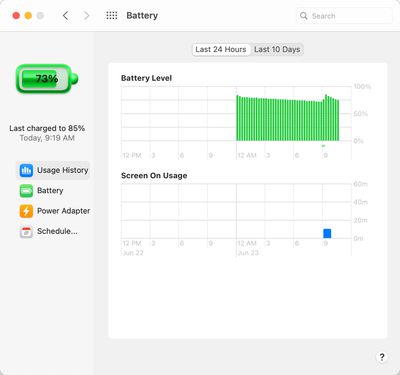
A new Usage History feature provides details on the Mac's battery life over the course of the last 24 hours or the last 10 days, broken down into Battery Level and Screen On Usage so you can see how your battery is performing.

There does not appear to be a detailed rundown on which apps used the battery the most as there is on iOS, but it does provide a better look at how the battery is being consumed over time.

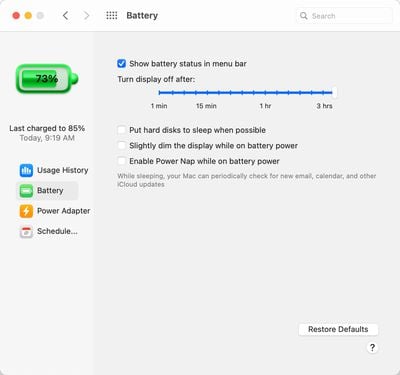
Along with the Usage History section, there are Battery and Power Adapter sections that replace the functionality that was previously available through Energy Saver. You can choose when to turn the display off, enable or disable power nap, and more, with the settings split for battery usage and usage when connected to power. The schedule feature is also present.
macosbigsurbatterysettings
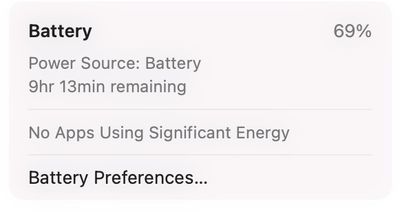
In the menu bar, clicking the battery icon now provides an estimate of remaining battery life, a feature that was removed from macOS Sierra back in 2016. At the time, Apple said that the battery life indicator in macOS Sierra was inaccurate and led to confusion about battery performance.
macosbigsurtimeremaining
The menu bar battery icon also displays apps that are using significant energy, as in macOS Catalina, and it provides an option for opening up Battery Preferences. There does not appear to be an option to display current battery life percentage right in the menu bar, however.

macOS Big Sur is limited to developers at the current time, but Apple plans to make a public beta available this July ahead of when the software sees a full release in the fall.


Related Forum: macOS Big Sur

Popular Stories

macOS 27 on MacBook Pro

Apple Says macOS 27 Won't Be Compatible With These Macs

Wednesday June 3, 2026 8:29 am PDT by
During WWDC 2025, Apple revealed that macOS 26 Tahoe would be the final major macOS version for Intel-based Macs. macOS 27 will be compatible with Apple silicon Macs only, meaning that you will need a Mac with an M-series chip or a MacBook Neo with an A18 Pro chip in order to install the software update. Apple will unveil macOS 27 during its WWDC 2026 keynote this Monday, June 8, and the...
MacBook Neo on Yellow Feature

MacBook Neo is So Popular That Apple Reportedly Doubled Production

Wednesday June 3, 2026 9:24 am PDT by
On an earnings call in late April, Apple's CEO Tim Cook said that customer response to the MacBook Neo was "off the charts," and the popularity of the laptop has reportedly led the company to significantly boost production. Apple supply chain analyst Ming-Chi Kuo this week said he believes that MacBook Neo shipments to Apple were doubled from an initial target of 5 million units to 10...
iphone 18 pro blue%402x

iPhone 18 Pro: Dark Cherry, Light Blue, and Dark Gray Chassis Leaked [Update]

Thursday June 4, 2026 5:18 am PDT by
Update: Since publication, new information has come to light suggesting the images have been AI-manipulated and are not in fact iPhone 18 Pro chassis parts. The original article follows. The color options Apple is reportedly planning for the upcoming iPhone 18 Pro and ‌iPhone 18 Pro‌ Max have appeared online today in the form of images of chassis parts of unknown authenticity....

Top Rated Comments

78 months ago
Who came up with that battery icon. Ugliest thing I’ve seen in years!
Score: 95 Votes (Like | Disagree)
78 months ago
That battery icon is awful.
Score: 63 Votes (Like | Disagree)
sunapple Avatar
78 months ago
Looks like a free add-supported app from some sketchy website.
Score: 54 Votes (Like | Disagree)
Squuiid Avatar
78 months ago
Ugliest screen in the whole OS. What the hell happened to Apple design? Ive? ...Ive? Oh, that’s right, he’s gone.
Score: 52 Votes (Like | Disagree)
gemoritzt Avatar
78 months ago
Yup the battery icon is just awful. They can’t be serious with this one.
Score: 45 Votes (Like | Disagree)
78 months ago
Gawd that Icon, amongst many other bad ones in this iOSification of MacOS
Score: 28 Votes (Like | Disagree)