

Apple Explains Why You Might See 'Not Charging' When a Mac is Plugged In - MacRumorsOpen MenuShow RoundupsShow Forums menuVisit ForumsOpen Sidebar
Skip to Content

Apple Explains Why You Might See 'Not Charging' When a Mac is Plugged In

If you have a Mac and have seen a "Not Charging" warning when plugging it in to power, Apple last week released a support document that explains why.
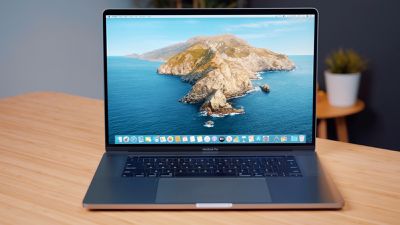
macbookpro16inchdisplay
Macs running macOS 10.15.5 or later have a Battery Health Management feature to preserve the life of the battery, and occasionally, the Battery Health Management option will cause the Mac to pause its charging for calibration purposes.

Depending on its settings, your Mac might temporarily pause charging to help calibrate battery health management, a feature designed to improve the lifespan of your battery.

Apple says that when Battery Health Management is activated, "Not Charging" could be displayed and the charge level might be lowered temporarily, which is a normal function of the feature. Charging to full will resume based on usage habits.

When battery health management is turned on, you might occasionally see "Not Charging" in the battery status menu of your Mac, and your battery's maximum charge level might be lowered temporarily. This is normal, and it's how battery health management optimizes charging. Your Mac resumes charging to 100 percent depending on your usage.

Battery Health Management features are available on Mac notebooks that have Thunderbolt 3 ports and that run macOS Catalina 10.15.5 or later. The option improves the lifespan of a Mac's battery by reducing the amount of time that the battery spends at a maximum charge, which can cut down on chemical aging.

Battery Health Management works based on the battery's temperature history and charging patterns, so if you often leave your Mac charging overnight after using it during the day, the Mac might charge up to around 85 percent and sit there for a bit before charging to full ahead of when it's needed in the morning.

If you use your Mac while Battery Health Management is active, you might see the "Not Charging" warning that Apple mentions. Battery Health Management is enabled by default, but it can be turned off by checking the Battery Health Management option in the Energy Saver section of the System Preferences app once ‌macOS Catalina‌ 10.15.5 or later has been installed.

There are some other reasons that Mac users might see the "Not Charging" warning, such as when the Mac isn't getting enough power to charge the battery. In these situations, Apple recommends people follow the steps in its support document covering charging with a USB-C power adapter.


Popular Stories

macOS 27 on MacBook Pro

Apple Says macOS 27 Won't Be Compatible With These Macs

Wednesday June 3, 2026 8:29 am PDT by
During WWDC 2025, Apple revealed that macOS 26 Tahoe would be the final major macOS version for Intel-based Macs. macOS 27 will be compatible with Apple silicon Macs only, meaning that you will need a Mac with an M-series chip or a MacBook Neo with an A18 Pro chip in order to install the software update. Apple will unveil macOS 27 during its WWDC 2026 keynote this Monday, June 8, and the...
MacBook Neo on Yellow Feature

MacBook Neo is So Popular That Apple Reportedly Doubled Production

Wednesday June 3, 2026 9:24 am PDT by
On an earnings call in late April, Apple's CEO Tim Cook said that customer response to the MacBook Neo was "off the charts," and the popularity of the laptop has reportedly led the company to significantly boost production. Apple supply chain analyst Ming-Chi Kuo this week said he believes that MacBook Neo shipments to Apple were doubled from an initial target of 5 million units to 10...
iphone 18 pro blue%402x

iPhone 18 Pro: Dark Cherry, Light Blue, and Dark Gray Chassis Leaked [Update]

Thursday June 4, 2026 5:18 am PDT by
Update: Since publication, new information has come to light suggesting the images have been AI-manipulated and are not in fact iPhone 18 Pro chassis parts. The original article follows. The color options Apple is reportedly planning for the upcoming iPhone 18 Pro and ‌iPhone 18 Pro‌ Max have appeared online today in the form of images of chassis parts of unknown authenticity....

Top Rated Comments

szw-mapple fan Avatar
76 months ago
This is a terrible UI decision on Apple’s part. It should at least say something like “charging paused for battery health”
Score: 35 Votes (Like | Disagree)
samelot628 Avatar
76 months ago

This is a terrible UI decision on Apple’s part. It should at least say something like “charging paused for battery health”
Agree. Maybe it should just say "Charging paused" to distinguish from other states when there is an issue with the battery or charger.
Score: 21 Votes (Like | Disagree)
zorinlynx Avatar
76 months ago
Some people tend to use their Macbooks at their desk all day, every day, only occasionally taking it out and about and using the battery. Is this feature smart enough to leave those Macbooks at 80-85% all the time?
Score: 12 Votes (Like | Disagree)
TheOldChevy Avatar
76 months ago

How low can this get? I have a non-Apple USB-C cable and thought something was wrong with it when I saw this happening. Seems like it wouldn't be ideal if it decided to dip low for someone about to do some traveling and needing their laptop charged to the max.
Yes, the UI is not good. We need to know when it happens, and we need a way to by-pass it when we want to.
Score: 11 Votes (Like | Disagree)
Apple_Robert Avatar
76 months ago
Thanks for the informative article, MacRumors. I like what Apple has been doing lately with better battery management.
Score: 10 Votes (Like | Disagree)
xnu Avatar
76 months ago
So "Your charging it wrong." There is an attorney somewhere preparing something I am sure.
Score: 6 Votes (Like | Disagree)














