

Hands-On With iOS 14 Widgets, Custom Icons, and Home Screen Setup - MacRumorsOpen MenuShow RoundupsShow Forums menuVisit ForumsOpen Sidebar
Skip to Content

Hands-On With iOS 14 Widgets, Custom Icons, and Home Screen Setup

Apple with iOS 14 introduced widgets on the Home Screen, leading to unprecedented levels of customization for the iPhone. Combined with Shortcuts that let you change an app's icon, iOS 14 lets you create a whole new look for your ‌Home Screen‌.


We've been following along with some of the creative alternative Home Screen designs that MacRumors readers have come up with and thought we'd even try to build out a custom app icon and home screen setup to mimic an old school Mac design. In the video up above, you can check out our superficial attempt at making iOS 14 look like Mac OS X Aqua, arguably one of the most iconic Mac looks.

Widgets are simple enough to use and hundreds of apps are now updating with innovative widgets that you can add to the Today Center and the ‌Home Screen‌ with just a few taps. ‌Widgets‌ run the gamut from weather to fitness to finance and travel, so there's a good chance most of your favorite apps have widgets you can incorporate into a design.

There are also apps that are dedicated just to making different customizable widgets with unique styles and functions, such as Widgetsmith, or Widgeridoo, which are essential to custom designs. We've used Widgetsmith for our OS X setup because it lets us create widgets with custom graphics.

‌Widgets‌ are simple enough to use, but taking a ‌Home Screen‌ design to the next level requires custom icons, something possible through Apple's Shortcuts app. Custom icons are more pretty than useful, and everything you create a custom icon for will route through the Shortcuts app, which is less than ideal.
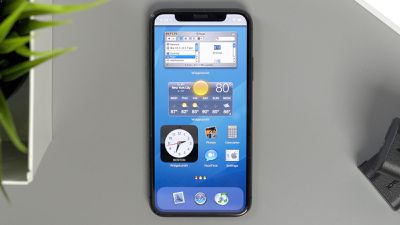
iOS 14 home screen
We've seen custom designs that have taken hours upon hours to create, and even our own Aqua theme took quite some time to complete, so expect to invest some time if you want a unique iPhone ‌Home Screen‌. Our setup looks fantastic and is reminiscent of an old-school Mac, but it's worth noting that it's not particularly functional. Most of our widgets are really just for show, so creating a design that's nice looking and useful is a real effort.

If you want to recreate our "Mac OS X Aqua theme" for the iPhone, we've got a link to the assets available here. All the elements, however, are really just a carefully crafted illusion. But we'd love to see a developer build functional Mac OS X Dashboard styled widgets, and for Apple to allow for transparency in icons and widgets.

Wondering how to set it all up? Just check out our how to on using Home Screen widgets and our how to on customizing app icons using Shortcuts.

Have you made an awesome ‌Home Screen‌ setup that you want to share? Post it down below in the comments, and feel free to share your icon skins, wallpapers, and widget setups.


Related Forum: iOS 14

Popular Stories

Apple Card iPhone 16 Pro Feature

Apple Card Promo to Offer Free AirPods Pro 3

Friday May 15, 2026 8:59 am PDT by
Starting as early as next week, customers who sign up for an Apple Card at Apple's retail stores in the U.S. will receive $249 cash back when they purchase AirPods Pro 3, according to Bloomberg's Mark Gurman. The promotion has yet to be officially announced by Apple, so exact terms and conditions are not available at this time. AirPods Pro 3 are priced at $249 in the U.S., so customers who...
Apple WWDC25 iOS 26 CarPlay Light mode 250609

Six Popular iPhone Apps Now Available on CarPlay

Thursday May 14, 2026 9:10 am PDT by
Apple's CarPlay system for accessing iPhone apps on a vehicle's dashboard screen has received six popular apps in recent weeks: ChatGPT, Perplexity, Grok, Google Meet, WhatsApp, and the indie artist streaming platform Audiomack. Make sure you have the latest version of each app and they will automatically appear on CarPlay. ChatGPT Starting with iOS 26.4, CarPlay supports voice-based...
ipad mini 7 blue

OLED iPad Mini: Release Date, Pricing, and What to Expect

Thursday May 14, 2026 5:08 am PDT by
According to the latest rumors, Apple is close to launching its next-generation iPad mini. So what should we expect from the successor to the iPad mini 7 that Apple released over a year ago? Read on to find out. Processor and Performance Apple is working on a next-generation version of the iPad mini (codename J510/J511) that features the A19 Pro chip, according to information found in code...

Top Rated Comments

Harvey Zoltan Avatar
74 months ago
Looks awful, I'm surprised Apple allows this.
Score: 12 Votes (Like | Disagree)
pdaholic Avatar
74 months ago
I would love it if Apple would just let us place icons wherever we want instead of making them snap to the upper left corner of the screen. 14 operating systems later and we still can’t position icons on the bottom of the screen (easier to reach one-handed) without putting apps above them to push them down.
Score: 11 Votes (Like | Disagree)
SDJim Avatar
74 months ago
Gotta be honest - that home screen is hideous. Why would I regress to iOS 3?
Score: 11 Votes (Like | Disagree)
JGIGS Avatar
74 months ago

Looks awful, I'm surprised Apple allows this.
Man are people so brainwashed by Apple these days that they feel like Apple should restrict and decide every aspect of what we can do with our own devices that we pay money for? If this is the case things really need to change. Mindsets need to change.
Score: 10 Votes (Like | Disagree)
rafark Avatar
74 months ago
Wonder what would Jobs think of this
Score: 9 Votes (Like | Disagree)
Tsuki415 Avatar
74 months ago
The whole “opening Shortcuts” for each app seriously turns me off. Everyone is so on board but loading Shortcuts to load an app isn’t a great implementation. I’m surprised that people enjoy doing this. But hey, to each their own...
Score: 8 Votes (Like | Disagree)














