Somfy Tahoma Gateway to Gain HomeKit Support From December 1, 2020 - MacRumorsOpen MenuShow RoundupsShow Forums menuVisit ForumsOpen Sidebar
Skip to Content

Somfy Tahoma Gateway to Gain HomeKit Support From December 1, 2020

European smart home company Somfy will make its Tahoma gateway hub HomeKit compatible from the beginning of next month, according to the iFun.de tech website.
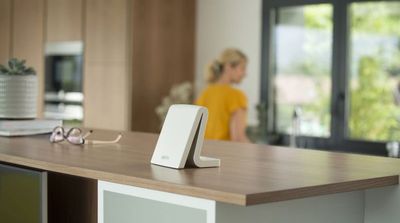
tahoma gateway
The gateway is used to control the France-based company's shutters and blinds, including external blinds, vertical awnings, patio awnings and pergolas, so if the company sticks to its scheduled rollout, owners of these Somfy products will be able to control them via Apple's Home app from December 1.

According to the German tech website, Somfy is delivering the promised ‌HomeKit‌ support around a year late. Compatibility was reportedly planned for a 2019 rollout, but the update had to be postponed several times. Somfy security cameras, on the other hand, have been ‌HomeKit‌ compatible for some time.

As noted by HomeKitNews, the Tahoma gateway is also capable of controlling other areas of the home, including smart lights, gates and garage doors, which is why it's already compatible with Google Home, Amazon Alexa, and IFTTT, in addition to integrations with Sonos, Philips Hue, and Velux.

Popular Stories

iPhone 17 17 Pro and Air Feature

Smartphone Sales Are Falling Worldwide, But Apple Keeps Growing

Friday August 21, 2026 6:38 am PDT by
Apple gained ground in India, Latin America, and Europe even as all three markets contracted, according to a new series of Counterpoint Research reports. Between late March and the beginning of August, Indian smartphone sales ran 14% behind the equivalent stretch of 2025, and the market slipped for three straight weeks once major promotions in July had finished. Apple outperformed every...
iOS 27 Next to iPhone

Here's When iOS 27 Rolls Out Today in Every Time Zone [Update: It's Out]

Sunday September 13, 2026 3:00 am PDT by
Update 10:04 a.m.: iOS 27 is rolling out now, though it may take a bit for all users to see it, so keep checking! Apple is about to release iOS 27, which will finally deliver more advanced Siri AI capabilities as well as a variety of other refinements, improvements, and new features to iPhones. It's Apple's biggest software update of the year, and Apple announced at Wednesday's iPhone event...
iOS 27 Icon iPhone

iOS 27 Available Now With These 8 New Features

Monday September 14, 2026 9:00 am PDT by
Update — 10 a.m. Pacific Time: Apple has released iOS 27. During its iPhone 18 Pro and iPhone Duo event last week, Apple announced that iOS 27 will be released widely on Monday, September 14. iOS 27 should be available around 10 a.m. Pacific Time / 1 p.m. Eastern Time today via the Settings app, under General → Software Update. Below, we have highlighted eight new features and...

Top Rated Comments

JamesLeSmash Avatar
76 months ago
So there are lots of moving part to this. But to summarise: if your wireless devices are 'RTS' or 'IO' compatible then you can add them to the Tahoma hub. You need to do some research before buying.

For example, I have some velux motorised blinds which are IO compatible. To be clear, these are not part of the Integra Range (Velux's true Smart Blinds) but they are controlled by a wireless remote, which is IO compatible. I have these blinds added to my Tahoma hub, which makes them controllable.

I also have some internal patio blinds which are Somfy, using RTS. Now these blinds are controlled by the Somfy RTS remote, which also can be added to the Tahoma hub.

However, RTS and IO are not equal.

IO is two-way so allows the motor to feed back to the blind whether a command was successful. So for example, "Hey Siri, set the IO Blind to 70%" works.

RTS is one way (point and shoot) so the motor does not feed back. The hub/remote only have three options for RTS: Open, Closed and 'My' (which is a preset height). You can ask Siri to Open or Close the blind. You cannot set a %.
Somfy is bringing out it's own version of IO (called io-homecontrol ('https://www.somfy.co.uk/support/somfy-motor')) which is new hardware motors which will make them function like IO.

Note: I am running HomeBridge on a RaspberryPi with the Somfy Tahoma plugin. This makes the blinds visible to HomeKit. IO works as above. RTS can only be opened or closed (even though the UI allows for the % slider, it doesn't not work). The Tahoma plugin also allows the Tahoma Scenes to be created as HomeKit Switches, which allows you to control multiple blinds or groups, but only with Open, Closed and 'My' control.

What is not clear is:
- how the native Tahoma HomeKit update will handle the RTS blind limitations (mentioned above)
- whether the native Tahoma HomeKit update will allow the 'My' reset height issue.


I’m curious what exactly this does. Does it receive signals from ANY wireless items such as my garage door or blinds. Or do I need special compatible ones to connect to this box? I should be more clear. My blinds are wireless on the 433mhz range. Just connected to a standard remote. Does this box take that remotes place I guess I’m asking
Score: 4 Votes (Like | Disagree)
JPSaltzman Avatar
76 months ago
Oh, to have such a spotless, clean, modern kitchen/living area with minimal electronics, no plugs, no wires, no dongles. Just peace and serenity and let the high-tech world just take care of your every need and care and worry.
/s (I just find these stock photos or ones supplied by the companies just so ridiculous.)

PS. Still waiting for that Flying Car and "The Jetsons" world that all the visionaries said we would have by the end of the 20th century. Hmm.
Score: 2 Votes (Like | Disagree)
JamesLeSmash Avatar
68 months ago

Thanks James … at the risk of asking for free tech support, how hard would it be to do using Hoobs? Does Hoobs sync with Somfy Tacoma device or do I need to add RTS roller blinds in some other way? Is this something a amateur like me could do without freaking out? Cheers, Barry
I haven't used Hoobs myself, but I'm told it's very easy. You plug in the dongle to your router, looks like this guide is pretty straight forward: https://support.hoobs.org/docs/5e875bda0ab68b0344e872c8

Before spending any money I would recommend just installing HomeBridge on a laptop, installing the Tahoma Plugin & having a play with your devices to see the features & limitations of this approach. Hoobs is essentially a branded packaged version of HomeBridge.

Score: 1 Votes (Like | Disagree)
JamesLeSmash Avatar
68 months ago

Is it possible to "see" the RTS devices in Homekit without RasberrtPi? I have connected my Tahoma Hub and added a bunch of RTS roller shades, but nothing shows in Homekit. Could that be because RTS devices don't work with Heomkit? Any ideas? Cheers, Barry
Correct, RTS doesn't work with natively with HomeKit, even with Tahoma's HomeKit update. You have to expose your Somfy RTS devices to HomeKit via something like HomeBridge (doesn't have to be a raspberry pi, you could run it on a local machine) or Hoobs https://hoobs.org
Score: 1 Votes (Like | Disagree)
dannys1 Avatar
76 months ago

Thank you - guess my raspberryPi Tahoma-plugin hackaround will remain in place until I upgrade the RTS motors in favour of io-homecontrol ('https://www.somfy.co.uk/support/somfy-motor') 🤷‍♂️
I hope they're just plug and play with my current RTS motors - being able to actually control 0-100% open and every percent along the way with the controller actually know where it was would be a big upgrade though.
Score: 1 Votes (Like | Disagree)
76 months ago

so did they say what they were going to do with RTS motors? Just omit them from Tahoma native HomeKit...? Any source documentation would be greatly appreciated
The official list is here, page 21 for HomeKit: https://service.somfy.com/downloads/fr_v5/liste-des-compatibilites-tahoma-novembre-2020.pdf
And yes, other things simply won't show up in HomeKit, they actually specifically mentioned RTS as incompatible in their news article.
Score: 1 Votes (Like | Disagree)