

Apple Launches 'Apple for Kids' Support Portal for Parents and Guardians - MacRumorsOpen MenuShow RoundupsShow Forums menuVisit ForumsOpen Sidebar
Skip to Content

Apple Launches 'Apple for Kids' Support Portal for Parents and Guardians

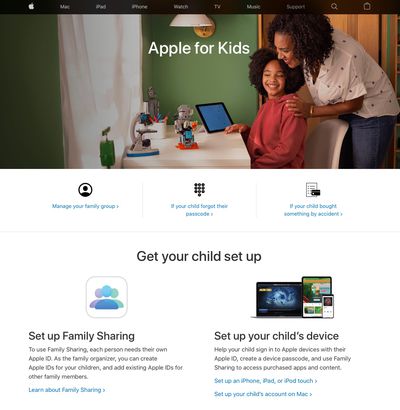
Apple today added a new "Apple for Kids" portal to its support website, offering parents and guardians a one-stop hub for getting their children set up on Apple's devices, services, and platforms, and managing their usage.
apple for kids support portal
The section includes quick links at the top for managing your family group and resolving common issues, such as what to do if your child forgot their passcode, or if they bought something from Apple's stores or services by accident.

Further down the page is a set-up sub-section, pointing adults in the right direction if they want to set up Family Sharing or get a child set up on an iPhone, iPad, iPod touch, or Mac. Also included are details about how to set up an Apple Watch for a family member who doesn't have their own iPhone, using Family Setup.

In the U.S., users over 13 can also find links showing them how to update their Apple ID birth date. Apple advises that if a child is under 13 and their ‌Apple ID‌ birth date is wrong, a parent or guardian will need to contact Apple Support on their behalf. The age cut-off for both actions varies by country or region.

Further down the page, adults can learn how "Ask to Buy" works. With Ask to Buy enabled, kids get permission from the designated "family organizer" before making a purchase. There are also links explaining how to locate missing devices with Find My, and how to send Apple Cash to your children so they can use Apple Pay.

The last sub-section introduces ways to prevent kids from making in-app purchases, set limits with Screen Time, and use parental controls on a child's device.


Popular Stories

macOS 27 on MacBook Pro

Apple Says macOS 27 Won't Be Compatible With These Macs

Wednesday June 3, 2026 8:29 am PDT by
During WWDC 2025, Apple revealed that macOS 26 Tahoe would be the final major macOS version for Intel-based Macs. macOS 27 will be compatible with Apple silicon Macs only, meaning that you will need a Mac with an M-series chip or a MacBook Neo with an A18 Pro chip in order to install the software update. Apple will unveil macOS 27 during its WWDC 2026 keynote this Monday, June 8, and the...
MacBook Neo on Yellow Feature

MacBook Neo is So Popular That Apple Reportedly Doubled Production

Wednesday June 3, 2026 9:24 am PDT by
On an earnings call in late April, Apple's CEO Tim Cook said that customer response to the MacBook Neo was "off the charts," and the popularity of the laptop has reportedly led the company to significantly boost production. Apple supply chain analyst Ming-Chi Kuo this week said he believes that MacBook Neo shipments to Apple were doubled from an initial target of 5 million units to 10...
iphone 18 pro blue%402x

iPhone 18 Pro: Dark Cherry, Light Blue, and Dark Gray Chassis Leaked [Update]

Thursday June 4, 2026 5:18 am PDT by
Update: Since publication, new information has come to light suggesting the images have been AI-manipulated and are not in fact iPhone 18 Pro chassis parts. The original article follows. The color options Apple is reportedly planning for the upcoming iPhone 18 Pro and ‌iPhone 18 Pro‌ Max have appeared online today in the form of images of chassis parts of unknown authenticity....

Top Rated Comments

69 months ago

The obvious thing would have been to finally grant family iPad's with separate login and setup for every user
BURN THE HERETIC!

Next you'll be wanting touch screens on Mac Laptops in penance for the required exorcism of the touch bar and magsafe fiascos.
Score: 2 Votes (Like | Disagree)
Rooskibar03 Avatar
69 months ago
Could we maybe make screen time actually work? My kids spend hours a day on apps that I have time restrictions on and I can’t for the life of me sort out how they are beating the system
Score: 1 Votes (Like | Disagree)
LeadingHeat Avatar
69 months ago
Is that page poorly formatted for anyone else? For me when I follow that link I am able to scroll sideways on the page, there’s extra blank space on the right side.
Score: 1 Votes (Like | Disagree)














