Hands-On With the Apple TV's New Color Balance Calibration Feature - MacRumorsOpen MenuShow RoundupsShow Forums menuVisit ForumsOpen Sidebar
Skip to Content

Hands-On With the Apple TV's New Color Balance Calibration Feature

With the launch of tvOS 14.5, Apple introduced a new Color Balance calibration option that's available for the Apple TV 4K models and the ‌Apple TV‌ HD models. The feature was technically designed for and introduced alongside the new ‌Apple TV‌ 4K, but it works on existing ‌Apple TV‌ models too.


Available in the video section of the ‌Apple TV‌ settings app, Color Balance asks you to hold your iPhone to the screen as the television set flashes through a series of colors. Your iPhone reads the colors and compares them to industry-standard color profiles, recommending optimizations.

In some situations, the changes that are recommended are going to be minor and may not look like a significant difference, but some people will see more dramatic and noticeable color profile adjustments. The color changes should help ‌Apple TV‌ content look more realistic, true to life, and as content creators intended it to look.

In the test that Dan shows in the video, for example, the color differences are minor, but others of us here at MacRumors have seen more noticeable results. Apple's demo is below.
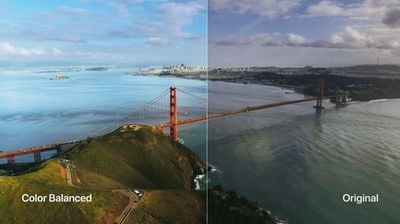
apple tv color balance
The color balance feature is super simple and takes just a few minutes, and it's a much easier process than adjusting a television set's settings. For the feature to work, you need to have an iPhone with Face ID, which includes the iPhone X and later, and it's also worth noting that it can't be used with Dolby Vision.

If you haven't upgraded to tvOS 14.5 yet, it's worth doing so to check out the color balance feature. The update also adds a few other useful features like support for the latest PlayStation 5 DualSense and Xbox Series X controllers.


Related Roundup: Apple TV
Buyer's Guide: Apple TV (Don't Buy)

Popular Stories

General visionOS watchOS and tvOS Betas Feature Redux

Apple Releases Third watchOS 26.6, tvOS 26.6 and visionOS 26.6 Betas

Monday June 29, 2026 10:08 am PDT by
Apple today provided developers with the third betas of upcoming watchOS 26.6, tvOS 26.6, and visionOS 26.6 betas for testing purposes. The software comes two weeks after Apple seeded the second betas. The software updates are available through the Settings app on each device, and because these are developer betas, a free developer account is required. There's no word on what's in the...
Apple TV 2025 Thumb 2 Sans Text

iOS 27 Lets You Update Your Apple TV Using Your iPhone

Tuesday June 23, 2026 9:09 am PDT by
If the idea of digging out your Siri Remote to install a tvOS update on your Apple TV sounds like too much effort, Apple's upcoming iOS 27 software will have a new feature you'll surely welcome. Based on the latest iOS 27 beta 2, you can push Apple TV software updates straight from your iPhone, and you don't even need to turn the Apple TV on first. Apple's set-top box now appears in the...
Chase Sapphire Reserve Apple Perk Feature

Chase Sapphire Credit Cards Offering New Apple TV and Apple One Perks

Wednesday June 24, 2026 7:00 am PDT by
Chase recently introduced new Apple TV and Apple One perks for its Sapphire Preferred and Sapphire Reserve credit cards in the United States. Sapphire Preferred cardholders ($95 annual fee) are now eligible to receive a complimentary one-year Apple TV streaming subscription, or a $7.50/month discount on an active Apple One subscription for 12 months instead. Sapphire Reserve cardholders...

Top Rated Comments

wolfshades Avatar
68 months ago
Tried mine about half a dozen times. Failed each time. I gave up.
_________________________________________________________-
UPDATE:
I finally got it to work. Prior to that, each time it would begin to calibrate, get halfway through and then fail.

I looked on Reddit for solutions. One guy said to turn off HDR+ on your TV set and then re-run the color calibration. I don't have that setting on my TV but in the video section of my TV settings there's one for "dynamic video" or "standard video". It was set to "dynamic" so I switched it to "standard" instead. Then I re-ran the color calibration and this time it worked!!

That's the good news.

The bad: totally not worth the time and effort. I ended up using the original (brighter) settings.
Score: 15 Votes (Like | Disagree)
matrix6028 Avatar
68 months ago
I have 3 TVs.
Each one error during the process. It never worked.
Score: 15 Votes (Like | Disagree)
68 months ago
Unfortunately it doesn't support a projector... since to put your phone one inch from the screen the shadow blocks the image it's supposed to be looking at.
Score: 13 Votes (Like | Disagree)
Phuz01 Avatar
68 months ago
Am I the only person who had a surprisingly positive experience with this feature? Yes, it took two attempts to work; the first time, I wasn't holding the phone close enough to the screen. But the ability to toggle between the two options allowed me to see which one I found to be preferable, and the color balance was much richer and more realistic.

I like the fact it calibrates the Apple TV and not my 8-year-old Samsung (I have an extensive 3D BluRay collection and will not move to a 4K monitor until it dies), and I went down a rabbit hole last night watching scenes from favorite films just to see how much better they looked.
Score: 11 Votes (Like | Disagree)
68 months ago
My fails every time when the the test cycles to the off-white (sort of a warm white) color. It stays on that color for a few seconds and then gives the error and asks to try again.
Score: 7 Votes (Like | Disagree)
Macintosh IIvx Avatar
68 months ago
Just seems to crank up the warmth from everything I've seen from others.

My TV has 4K Doby Vision which takes care of balancing things between the Apple TV and the TV. Seems to do a much better job of adjusting based on content on its own.

It's a bit like those that try to use Mac Fan Control to adjust the fans on their Mac. Pretty sure the engineers who designed it know how to better operate it than you do. I'll trust the pros.
Score: 6 Votes (Like | Disagree)