macOS Monterey Allows You to Erase a Mac Without Needing to Reinstall the Operating System - MacRumorsOpen MenuShow RoundupsShow Forums menuVisit ForumsOpen Sidebar
Skip to Content

macOS Monterey Allows You to Erase a Mac Without Needing to Reinstall the Operating System

It's been a few days since Apple announced macOS Monterey, and we continue to dig through new features that weren't mentioned during the WWDC keynote, including a much more convenient way of erasing a Mac.
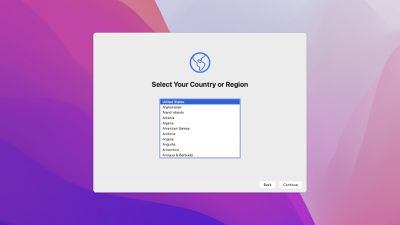
macos monterey setup assistant
Following in the footsteps of the iPhone and iPad, the Mac has gained an "Erase All Content and Settings" option on macOS Monterey. The option allows you to erase all user data and user-installed apps from your Mac without needing to reinstall the macOS operating system, making it far easier to restore a Mac to like-new factory settings.

From the macOS Monterey features page on Apple's website:

Erase all contents and settings
System Preferences now offers an option to erase all user data and user-installed apps from the system, while maintaining the operating system currently installed. Because storage is always encrypted on Mac systems with Apple silicon or the T2 chip, the system is instantly and securely "erased" by destroying the encryption keys.

In the macOS Monterey beta, the new option can be found by opening the System Preferences app, clicking on System Preferences in the menu bar at the top of the screen, and clicking on "Erase All Content and Settings" in the drop-down menu. An administrator password is required to proceed with restoring the Mac to factory settings.

Erasing a Mac running an earlier version of macOS requires formatting the startup disk and reinstalling macOS, so this new option will make it far more convenient to restore your Mac to factory settings, whether you simply want to start fresh with your Mac or are planning to sell or gift the Mac to another person. After erasing a Mac, it will display the Setup Assistant and be ready to be set up like new.

macOS Monterey is available now in beta for developers, with a public beta to follow in July.

Related Forum: macOS Monterey

Popular Stories

iCloud iPhone 17 Pro

iPhone Users Who Pay for iCloud Storage Get Two New Perks on iOS 27

Thursday July 2, 2026 6:10 am PDT by
If you pay for certain iCloud+ storage plans beyond the 5GB that Apple offers for free, you will receive two more perks on iOS 27 at no additional cost. A summary of the two new iCloud+ perks on iOS 27:Increased daily usage limits for some new Apple Intelligence features, including image generation in the revamped Image Playground app. HomeKit Secure Video cameras receive generated video...
Apple Event Logo

Apple Just Released a New Product

Thursday July 2, 2026 8:04 am PDT by
Apple's first product release of summer 2026 occurred this week, but do not get too excited, as it is merely the Beats Solo Buds in a new color. Beats Solo Buds are now offered in orange through Best Buy in the U.S., with availability set to expand to 7-Eleven stores in Japan on July 4. Apple already offered orange Solo Buds in India for free with the purchase of an iPhone 15 or iPhone 15 ...
iPhone 4 on Black Feature

Apple Facing One of Its Worst Leaks Since the iPhone 4

Thursday July 2, 2026 9:53 am PDT by
Apple supplier Tata Electronics recently suffered a cyberattack that resulted in thousands of confidential files being published on the dark web, and this reportedly included some photos and documents related to the upcoming iPhone 18 Pro. We have elected not to share any of the leaked photos in this story due to the illegal nature in which they were obtained, but they can easily be found...

Top Rated Comments

66 months ago

Insta-deleting all personal files seems very useful for certain criminals.
It’s also useful for those of us who are not criminals!
Score: 57 Votes (Like | Disagree)
turbineseaplane Avatar
66 months ago
This is perhaps the best thing I've heard about Monterey honestly
Score: 21 Votes (Like | Disagree)
FightTheFuture Avatar
66 months ago
This is a welcome feature. But I would still feel more secure reformatting the disk under recovery mode.
Score: 20 Votes (Like | Disagree)
PatriotInvasion Avatar
66 months ago
I’ve only been waiting for a feature like this since Tiger in 2006. I’ll take it 15 years later!
Score: 17 Votes (Like | Disagree)
nouvejetzt Avatar
66 months ago
Nice! I had to erase my mac two days ago. This would’ve made things easier.
Score: 15 Votes (Like | Disagree)
Apple_Robert Avatar
66 months ago
This is awesome news. :D So glad to see this. Will it replace using Configurator 2 on the M1 to restore / revive?

Great coverage on the new OS releases, MR. I appreciate the hard work.
Score: 14 Votes (Like | Disagree)