MacRumors Giveaway: Win a Magnetic iPad Stand From Lululook - MacRumorsOpen MenuShow RoundupsShow Forums menuVisit ForumsOpen Sidebar
Skip to Content

MacRumors Giveaway: Win a Magnetic iPad Stand From Lululook

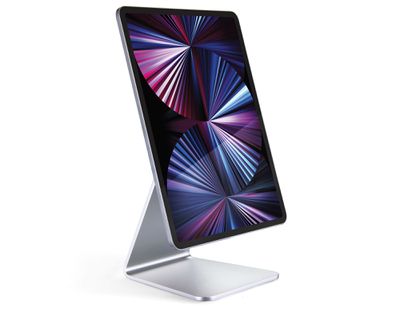
For this week's giveaway, we've teamed up with Lululook to offer MacRumors readers a chance to win a Magnetic iPad Stand that's great for hands-free iPad use.
lululook ipad stand 1
Priced at $55, the Lululook Magnetic ‌iPad‌ Stand is an adjustable mount for the ‌iPad‌. Apple's modern iPads attach magnetically to the stand, putting the ‌iPad‌ at an ideal viewing angle for pairing with a keyboard, drawing, watching shows, and more.

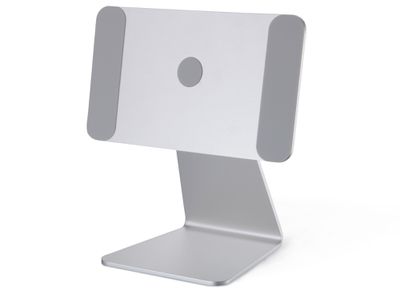
The stand features strong built-in magnets that ensure the ‌iPad‌ is perfectly aligned when it's put in place, and anti-slip silicone keeps the ‌iPad‌ from being scratched.

lululook ipad stand 2
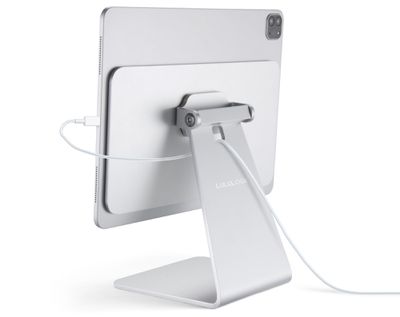
You can use the Magnetic ‌iPad‌ Stand in either landscape or portrait mode, and it has a 360-degree adjustable angle so you can position it any way that you want.

Design wise, the Magnetic ‌iPad‌ Stand is made from an aluminum alloy material that matches well with Apple devices, so it looks good on a desk or table. Non-slip feet at the bottom of the stand keep it stable and make sure that it's not going to move around while in use.
lululook ipad stand 3
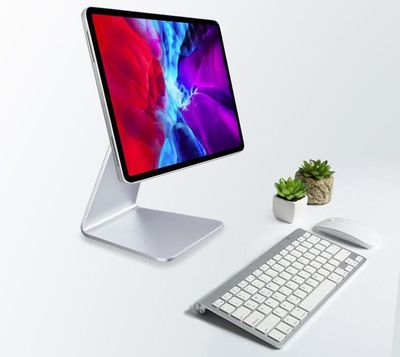
The Magnetic ‌iPad‌ Stand works well with double-sided magnetic cases, but in most cases, it's best to use it with a naked ‌iPad‌ as a case without a magnet weakens the connection. This is a great solution if you're looking for a more affordable alternative to something like Apple's Magic Keyboard because you can use the Magnetic ‌iPad‌ Stand with any Bluetooth keyboard that you have on hand.

The Magnetic ‌iPad‌ Stand is compatible with all 11-inch iPad Pro models, the third, fourth, and fifth-generation 12.9-inch ‌iPad Pro‌ models, and the fourth-generation iPad Air models. Those are all of Apple's most recent iPads, including the versions that came out in 2020 and 2021.
lululook ipad stand 4
We have 10 Magnetic ‌iPad‌ Stands to give away to MacRumors readers. To enter to win, use the Gleam.io widget below and enter an email address. Email addresses will be used solely for contact purposes to reach the winners and send the prizes. You can earn additional entries by subscribing to our weekly newsletter, subscribing to our YouTube channel, following us on Twitter, following us on Instagram, or visiting the MacRumors Facebook page.

Due to the complexities of international laws regarding giveaways, only U.S. residents who are 18 years or older and Canadian residents (excluding Quebec) who have reached the age of majority in their province or territory are eligible to enter. To offer feedback or get more information on the giveaway restrictions, please refer to our Site Feedback section, as that is where discussion of the rules will be redirected.

The contest will run from today (June 11) at 11:00 a.m. Pacific Time through 11:00 a.m. Pacific Time on June 18. The winners will be chosen randomly on June 18 and will be contacted by email. The winners will have 48 hours to respond and provide a shipping address before new winners are chosen.



Popular Stories

iOS 28 AI

Apple Taking New Approach to Developing iOS 28 and macOS 28

Sunday November 8, 2026 7:42 am PST by
Apple has made a change to its development process for iOS 28, macOS 28, and corresponding software updates, according to Bloomberg's Mark Gurman. In his Power On newsletter today, he said Apple separates development of each year's new operating systems into three major stages. Typically, he said each stage consists of four weeks of coding followed by a four-week "convergence" period where...


duo aquarium

More Fun iPhone Duo Apps: 30 New Picks to Try

Friday November 6, 2026 3:27 pm PST by
When the iPhone Duo launched, we shared a list of some of the fun apps developers created for the new form factor. Two weeks out, developers are continuing to come up with fresh ideas, so we thought we'd share some of our favorites. Games Marbles Unhinged ($2.99) - Marbles Unhinged is a marble maze designed for the Duo. When you fold it, the floor turns into a ramp. If you stand the top...
apple pro tell logo

Apple Launching Five New Products Today

Thursday November 5, 2026 12:59 am PST by
Apple is launching five new products on Friday, November 6, following pre-orders that opened last week, including its first touchscreen MacBook Pro models. The following new products will be available from today: iPad mini with OLED display and A20 Pro chip iMac with M6 chip 14-inch MacBook Pro with M6 chip 14-inch MacBook Pro with OLED touchscreen 16-inch MacBook Pro with OLED...

Top Rated Comments

torontotim Avatar
71 months ago

Why is Quebec not eligible for the giveaway?
Elect new lawmakers.
Score: 2 Votes (Like | Disagree)
71 months ago
Wouldn’t it be great if they used the charging connectors on the back of the iPad so that, gee I dono, you don’t have to manually connect the ugly stick out cable whenever you attach the iPad and need power. 🤔
Score: 1 Votes (Like | Disagree)
pdaholic Avatar
71 months ago

Was tempted to get this, but will stick with what i have, using my old Rain macbook stand and keyboard/trackpad i kept from selling a iMac. Not as clean looking setup but i can take the iPad with keyboard and go or just the iPad, or use at my desk, has better height too.


I’ve got the exact same setup. It’s so versatile!
Score: 1 Votes (Like | Disagree)
SFjohn Avatar
71 months ago
Looks cool, but usability without a keyboard & trackpad would be a nightmare.
Score: 1 Votes (Like | Disagree)
71 months ago

I definitely like this solution over magic keyboard. I generally do have a thin case on the iPad, and don't want to load it with the heavy magic keyboard, since I do use it for painting. But at the same time, I'd like to be able to pair it with a bt keyboard for the occassional productivity apps. Would be great if these were reliable with a case.
I've had one of these since January. I have the ESR rebound case (the magnetic one) on my 2020 12.9" iPP. Worked perfectly and very reliably the week I tested it (only issue was where to put the cover part... I didn't like it hanging underneath but I didn't want to start putting my iPad with volume controls on the bottom and flipping the cover over the top of the unit. I'm sure that would have worked fine though, just not for me (in terms of where the iPP port is and my desk setup).
Score: 1 Votes (Like | Disagree)
rickpoet Avatar
71 months ago
Haha naked ipad.
Score: 1 Votes (Like | Disagree)
Latest Stories
Apple Releases macOS Golden Gate 27.2.1
32 minutes ago
Apple Releases iOS 27.2.1 With Bug Fixes
36 minutes ago
Apple Releases watchOS 27.2.1 and visionOS 27.2.1 With Security Fixes
38 minutes ago
Apple Watch Ultra 4 Gets $99 Amazon Discounts, Starting at $699.99
47 minutes ago
Apple Pay Ad Features Martial Arts Convenience Store Food Fight
54 minutes ago
Apple Continues to Say Some AI Features Will Have Fees for Extra Usage
1 hour ago
Apple Announces Türkiye Expansion Plans as Tim Cook Visits
2 hours ago
Singapore Saved Apple $2.7 Billion in Taxes This Year
2 hours ago
Apple Music's 2026 Artist of the Year is Olivia Dean
3 hours ago
This Could Be Your Last Chance to Pre-Order the HomeView at a Discount
3 hours ago
Some HomePod Mini 2 Buyers Returning Units Over Mac Speaker Issues
3 hours ago
MacBook Pro With PROLED XDR Display: Details You Might Have Missed
3 hours ago
Satechi Offers MacRumors Readers 30% Off Select Accessories in Early Black Friday Sale
4 hours ago
Leaker Envisions a Shorter iPhone With a New iOS Layout
4 hours ago
Apple to Give You More Control Over When Your Mac Passwords Lock
5 hours ago
Siri Is Getting a Better Memory
6 hours ago
iPhone 18e Could Feature Bigger Display and Battery
6 hours ago
Apple's Siri Boss May Leave - Here's Who Could Take Over
6 hours ago
Apple Launching Two More New Products This Friday
6 hours ago
Apple Store Subscription Sign-Up Controversy Exposed
15 hours ago
Siri AI Rumored to Become 'More Like an Agent' as Early as Next Year
1 day ago
Apple Taking New Approach to Developing iOS 28 and macOS 28
1 day ago
Early Apple Black Friday Deals on Apple Watch, MacBook Air, and More
2 days ago
'Backglow' Lets You Customize New MacBook Pro's Glowing Apple Logo
2 days ago
Top Stories: Apple Product Launches, iOS 27.3 Beta, and More
2 days ago
More Fun iPhone Duo Apps: 30 New Picks to Try
3 days ago
Hands-On With Apple's New OLED Touchscreen MacBook Pro
3 days ago
Apple Store With All-New Design Opening Soon in Southern California
3 days ago
Control the Glowing Apple Logo on Your New MacBook Pro
3 days ago
Apple Shares New 'Apple Card: Apply and Use in Minutes' Ad
3 days ago