Everything New in iOS 15 Beta 3: New Safari Search, Address Bar Relocation and Reload - MacRumorsOpen MenuShow RoundupsShow Forums menuVisit ForumsOpen Sidebar
Skip to Content

Everything New in iOS 15 Beta 3: New Safari Search, Address Bar Relocation and Reload

Apple today released the third betas of iOS 15 and iPadOS 15, and the company is continuing to refine the suite of new features that are coming in the update. There have been multiple complaints about Safari on iOS, so in the third beta, Apple has introduced some refinements.
iOS 15 General Feature Yellow
This article covers everything that's new in the third beta of iOS 15.

Safari Search

When you tap into a URL bar on a Safari tab, the interface for entering another URL or a search term has been relocated to above the keyboard. Previously, it was located at the top of the start page. The search interface has also been streamlined.
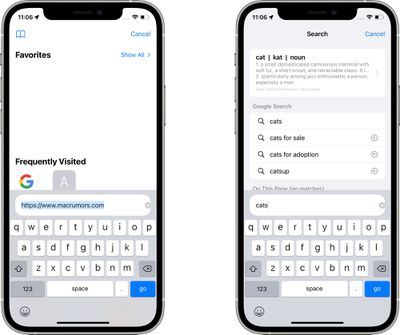
safari search interface

Safari Reload

There's now an option to long press on a floating tab bar to initiate a reload, which is an alternative to using the built-in menu option.
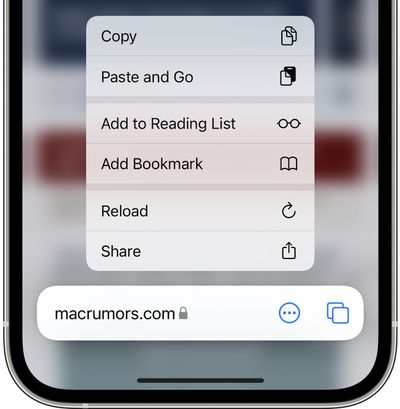
safari reload
When you reload a tab in Safari, the tab gets a permanent reload icon that can then be tapped to refresh again. The reload icon is only available in portrait mode on iPhone, but it shows up in both portrait and landscape mode on iPad. Making the button appear requires an initial reload, something that Apple may streamline in the future.
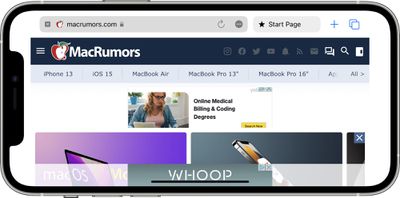
safari reload ios 15

Safari Updates for iPadOS 15

The new Safari features introduced in iOS 15 and macOS Monterey were not brought to the ‌iPad‌, so iPadOS 15 in beta 3 offers the same Safari experience as beta 2. Apple is, however, planning to add Safari updates to a future version of iPadOS 15, improving the usage experience on the ‌iPad‌ as well.

Daring Fireball's John Gruber says some of the same changes brought to iOS 15 and macOS Monterey will also be added in iPadOS 15.

The good news is that today's betas show that Apple has taken criticism of the new Safari UI designs seriously -- on MacOS, Safari once again defaults to showing the tab bar as a discrete UI element in the window, with one URL address bar. (Similar changes are coming for iPadOS, but didn't make it for today's beta.) The iOS changes today aren't as significant, but, having talked to folks at Apple, there are a lot of changes and refinements still to come as summer progresses.

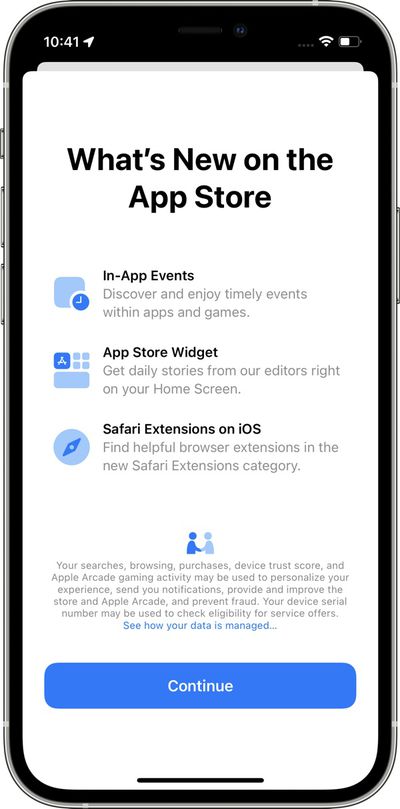
App Store Splash Screen

There is a new App Store splash screen that highlights new features available in the ‌App Store‌ in iOS 15 such as in-app events in apps and games, the ‌App Store‌ widget, and Safari Extensions on iOS.

app store splash screen

Focus Updates

In the Focus interface in the Settings app, Apple has removed the Focus Status and Phone Calls options from the main interface, relocating them into each Focus section.
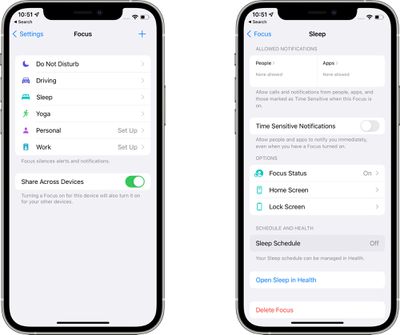
ios 15 focus mode

Apple Music Widget

The Apple Music widget now changes color and art based on the individual song that's playing rather than using album art. It's also more clear when a song is playing and when it's paused thanks to a new "Paused" label.
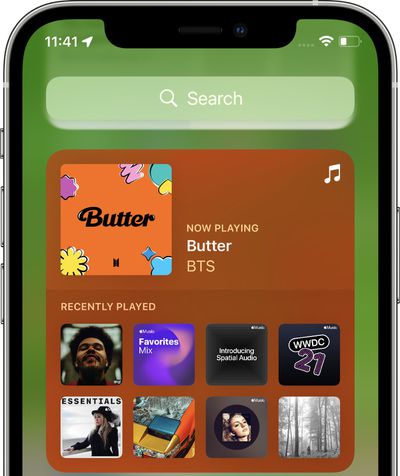
apple music widget ios 15

Resetting iPhone

In the Settings app under General, the "Reset" button for the iPhone is now "Transfer or Reset iPhone." In this interface, the "Prepare for New iPhone" option is front and center. Prepare for New iPhone was an option in the prior beta, but Apple is now assuming that most people want to use this section to set up a transfer to a new iPhone. All of the reset options for Network Settings, Keyboard Dictionary, Home Screen Layout and more are still there, but are now housed under the "Reset" button.
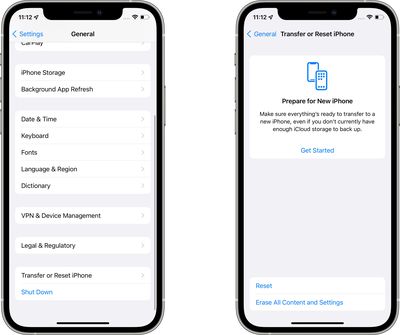
ios 15 prepare for new iphone

Shortcuts

There are actions for Background Sounds in the Shortcuts app to set a sound track, adjust volume, tweak volume when media is playing, and more.

Know of a feature that we left out? Let us know in the comments.

Related Forum: iOS 15

Popular Stories

apple pro tell logo

Apple Launching Five New Products Today

Thursday November 5, 2026 12:59 am PST by
Apple is launching five new products on Friday, November 6, following pre-orders that opened last week, including its first touchscreen MacBook Pro models. The following new products will be available from today: iPad mini with OLED display and A20 Pro chip iMac with M6 chip 14-inch MacBook Pro with M6 chip 14-inch MacBook Pro with OLED touchscreen 16-inch MacBook Pro with OLED...


duo aquarium

More Fun iPhone Duo Apps: 30 New Picks to Try

Friday November 6, 2026 3:27 pm PST by
When the iPhone Duo launched, we shared a list of some of the fun apps developers created for the new form factor. Two weeks out, developers are continuing to come up with fresh ideas, so we thought we'd share some of our favorites. Games Marbles Unhinged ($2.99) - Marbles Unhinged is a marble maze designed for the Duo. When you fold it, the floor turns into a ramp. If you stand the top...
silver iphone 18 pro

Apple Rumored to Drop the iPhone's Action Button Next Year

Friday November 6, 2026 6:07 am PST by
Apple plans to merge the iPhone's Action button with the Camera Control starting next year, according to the leaker known as "Instant Digital." In a new post on Weibo, the leaker claimed that a single press of the combined button would open the camera, while a long press would trigger the function assigned to the Action button. They explicitly clarified that the dedicated Action button would ...

Top Rated Comments

70 months ago

Missing the days when iOS updates were exciting. Love Apple but this is worse than meh. Long list of user requested features still ignored.
I'm glad that they seem to be focusing on stability for this release based on the early beta reports that I've heard. We don't need big changes each year. refinement is a feature too
Score: 11 Votes (Like | Disagree)
69 months ago
Still not a fan of the address bar being at the bottom. It gets in the way when trying to click things at the very bottom of pages.
Score: 9 Votes (Like | Disagree)
WannaGoMac Avatar
69 months ago
Apple i have PLENTY of space at the top of safari. Stop hiding every damn icon for no reason. Geesh, now even the reload button is hidden in a menu.

How bored are these GUI people at Apple?
Score: 8 Votes (Like | Disagree)
GMShadow Avatar
69 months ago
Just bring back old Safari. It was fine. This release is just fiddling with things to say you did.
Score: 8 Votes (Like | Disagree)
70 months ago

While I’m sure they went through countless hours testing the UI/UX, having the url bar in the middle (top of keyboard) like that just seems so clunky. Plus how huge it is vs the size now. I’m sure it’ll be a transition at first, and I’ll get used to it. But I wonder why the change when macOS Safari is still at the top of the page.
I agree. The floating url bar gains nothing and screws up a vast swathe of the internet. So many sites/apps use a fixed footer and this makes them orphaned in the middle of the screen. Feels like change for changes sake.
Score: 8 Votes (Like | Disagree)
LeadingHeat Avatar
70 months ago
While I’m sure they went through countless hours testing the UI/UX, having the url bar in the middle (top of keyboard) like that just seems so clunky. Plus how huge it is vs the size now. I’m sure it’ll be a transition at first, and I’ll get used to it. But I wonder why the change when macOS Safari is still at the top of the page.
Score: 7 Votes (Like | Disagree)
Latest Stories
Early Apple Black Friday Deals on Apple Watch, MacBook Air, and More
10 hours ago
'Backglow' Lets You Customize New MacBook Pro's Glowing Apple Logo
10 hours ago
Top Stories: Apple Product Launches, iOS 27.3 Beta, and More
16 hours ago
More Fun iPhone Duo Apps: 30 New Picks to Try
1 day ago
Hands-On With Apple's New OLED Touchscreen MacBook Pro
1 day ago
Apple Store With All-New Design Opening Soon in Southern California
1 day ago
Control the Glowing Apple Logo on Your New MacBook Pro
1 day ago
Apple Shares New 'Apple Card: Apply and Use in Minutes' Ad
2 days ago
Apple Says More Than 100,000 Apps Optimized for iPhone Duo, Here's What's Still Missing
2 days ago
Early Black Friday Deals Kickoff With Steep Discounts on Apple Watch Ultras and More
2 days ago
The MacRumors Show: iOS 27.3 Looks Like a Huge Update
2 days ago
Best Buy's Black Friday Event Begins With Sitewide Savings on Apple, TVs, More
2 days ago
Apple Releasing Yet Another Two New Products Next Week
2 days ago
MacBook Air Drops to Lowest Price in Months With Amazon's $250 Discount
2 days ago
Apple Rumored to Drop the iPhone's Action Button Next Year
2 days ago
Apple's Extended Return Policy Now in Effect for 2026 Holiday Season
2 days ago
Apple Music Classical Updated With New Icon and Refreshed Design
2 days ago
OLED iPad Mini, M6 iMac, and New MacBook Pros Available From Today
2 days ago
Apple Surveys iPhone Duo Buyers About Crease and Camera
2 days ago
Apple's First Touchscreen Mac is Now Arriving to Customers
2 days ago
Claude Gets Personal Finance Feature With Bank Account Linking
2 days ago
Apple Arcade Adds Crossy Road Rush and NBA 2K27
2 days ago
Apple's New HomeView Smart Home Hub: Here's How Much RAM It Has
2 days ago
iPad Mini vs. iPad Air Buyer's Guide: Now Just $50 Apart
2 days ago
First iOS 27.3 and macOS Golden Gate 27.3 Public Betas Now Available
2 days ago
Apple Announces a New Mac Sales Record
3 days ago
Paid $200 for Logic Pro? Apple Says You Won't Get This New Feature
3 days ago
Instagram's Edits Video Editor is Now Available on Mac
3 days ago
Prevent Siri and Search From Accessing Specific iPhone Apps
3 days ago
Best Early Black Friday Deals on iPhone 18 Pro and iPhone Duo
3 days ago