

Apple Says Scanner Permission Error Fixed in macOS 11.6 - MacRumorsOpen MenuShow RoundupsShow Forums menuVisit ForumsOpen Sidebar
Skip to Content

Apple Says Scanner Permission Error Fixed in macOS 11.6

In an updated support document, Apple has indicated that a permission-related error when using a scanner on a Mac has been fixed as of macOS 11.6.
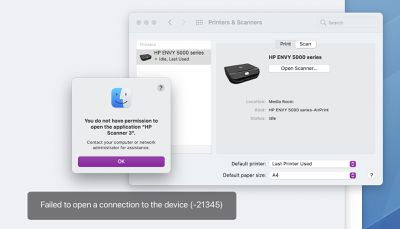
mac scanner permission error
When attempting to use a scanner with a Mac, Apple said users might have received an error message indicating they did not have permission to open the application. The error message said to contact a computer or network administrator for assistance, or indicated that the Mac failed to open a connection to the device.

Users may have encountered the error in the Image Capture app, Preview app, or the Printers & Scanners section of System Preferences, according to Apple.

For users who elect not to update to macOS 11.6 at this time, Apple previously shared step-by-step instructions on how to temporarily resolve the issue:

  1. Quit any apps that are open.
  2. From the menu bar in the Finder, choose Go > Go to Folder.
  3. Type /Library/Image Capture/Devices, then press Return.
  4. In the window that opens, double-click the app named in the error message. It's the name of your scanner driver. Nothing should happen when you open it.
  5. Close the window and open the app you were using to scan. A new scan should proceed normally. If you later choose to scan from a different app and get the same error, repeat these steps.

The issue has presumably also been fixed in the latest macOS Monterey beta.

Related Forum: macOS Big Sur

Popular Stories

iOS 27 Next to iPhone

Here's When iOS 27 Rolls Out Today in Every Time Zone [Update: It's Out]

Sunday September 13, 2026 3:00 am PDT by
Update 10:04 a.m.: iOS 27 is rolling out now, though it may take a bit for all users to see it, so keep checking! Apple is about to release iOS 27, which will finally deliver more advanced Siri AI capabilities as well as a variety of other refinements, improvements, and new features to iPhones. It's Apple's biggest software update of the year, and Apple announced at Wednesday's iPhone event...
iOS 27 Icon iPhone

iOS 27 Available Now With These 8 New Features

Monday September 14, 2026 9:00 am PDT by
Update — 10 a.m. Pacific Time: Apple has released iOS 27. During its iPhone 18 Pro and iPhone Duo event last week, Apple announced that iOS 27 will be released widely on Monday, September 14. iOS 27 should be available around 10 a.m. Pacific Time / 1 p.m. Eastern Time today via the Settings app, under General → Software Update. Below, we have highlighted eight new features and...
Apple iCloud Plus expansion hero

iCloud+ Now Includes Apple TV, Apple Arcade, and Curated Apple Music Stations in Over 100 Countries

Tuesday September 15, 2026 1:43 am PDT by
Apple today announced a new subscription initiative that turns paid iCloud+ subscriptions into a broader services bundle in more than 100 countries. In select countries, Apple says every paid iCloud+ plan, including the cheapest 50GB tier, now includes Apple TV and Apple Arcade "at no additional cost," while family sharing extends the storage, TV and Arcade access to up to five people....

Top Rated Comments

CheesePuff Avatar
65 months ago

Because maybe they just found out about it?
You're not making any sense... this was acknowledged that it was a bug by Apple prior to 11.6, they said it will be fixed in a future release, and then they released 11.6 with no release notes other then the standard 'bug fixes and general enhancements' boilerplate message they always use. Do you think it was just magically fixed in 11.6 and they don't QA their work and then were amazed when they randomly found out it was fixed?
Score: 4 Votes (Like | Disagree)
CheesePuff Avatar
65 months ago
This is why Apple should include actual release notes in updates. Not to find out weeks later through a support doc.
Score: 4 Votes (Like | Disagree)
65 months ago
A lot of printers flat out don’t work on Arm Macs
Score: 3 Votes (Like | Disagree)
deific Avatar
65 months ago

And I've been a programmer for over 40 years.

I've only peripherally read this thread, but can say that scanners have always been a PITA with macs. I've always had HP scanners, and my history started with the hideously expensive flat bed scanner I owned. Eventually Apple/HP just stopped even trying to pretend they supported it. The next scanner I bought was a very beautiful standup scanner, all glass, and amazing, and it lasted a year or so, then another scanner, *POOP* stopped working with every update, and took either major gyrations or waiting for software support many times. Then I got an expensive 'all-in-one', and it had features dripping off of it, and most of them don't/won't work, and the same fun started with updates and it not working. Now, it works on mine, but refuses to scan on the wife's. (She actually thinks it works for me because it's afraid of what will happen to it if it fails. SCRAPPED)

I haven't had many printers fail to work after an update, but had a client that had to reload all their drivers, and I have had to reset the printer software system on a mac at least a few times back in the day.

So Apple has a problem with testing their updates. Apple has a problem with their contracted (most likely) programmers breaking things that worked previously. Apple is guilty of a lot of things, and attention to detail in testing 'their' software and updates is the biggest one in my mind. So permission errors in trying to scan makes me laugh. Apple appears to be unable to learn from their massive wake of screw ups in previous versions of macOS.

So how that makes me ignorant on 'how software development works' is kind of a reach, isn't it?

Apple *should* know when their software breaks things. Apple *should* know when previous fixes break from installing their updates. Apple *should* be doing a lot more testing than they obviously don't do.
I totally agree as I have to support all these bugs. Bugs like the printer/scanner issue mentioned take hours of trial and error to figure out as "sorry your printer or scanner won't work after I recommended you update to the latest OS" is not an appropriate answer.

Apple needs to slow down its release schedules for the major releases. Every year for a major release is a big ask and really isn't giving enough time to iron out issues fully.

Apple also needs to start focusing on issues that have been around for a while and not "just happened with the last update" -- it's common info that they'll ignore an issue that has been around for multiple Mac OS revisions. Take a look at Image Capture, Apple Mail, and other older apps that might have a new UI but still face the same irritating issues in every version.
Score: 1 Votes (Like | Disagree)
PinkyMacGodess Avatar
65 months ago

Lol you have zero clue how software development works then.
And I've been a programmer for over 40 years.

I've only peripherally read this thread, but can say that scanners have always been a PITA with macs. I've always had HP scanners, and my history started with the hideously expensive flat bed scanner I owned. Eventually Apple/HP just stopped even trying to pretend they supported it. The next scanner I bought was a very beautiful standup scanner, all glass, and amazing, and it lasted a year or so, then another scanner, *POOP* stopped working with every update, and took either major gyrations or waiting for software support many times. Then I got an expensive 'all-in-one', and it had features dripping off of it, and most of them don't/won't work, and the same fun started with updates and it not working. Now, it works on mine, but refuses to scan on the wife's. (She actually thinks it works for me because it's afraid of what will happen to it if it fails. SCRAPPED)

I haven't had many printers fail to work after an update, but had a client that had to reload all their drivers, and I have had to reset the printer software system on a mac at least a few times back in the day.

So Apple has a problem with testing their updates. Apple has a problem with their contracted (most likely) programmers breaking things that worked previously. Apple is guilty of a lot of things, and attention to detail in testing 'their' software and updates is the biggest one in my mind. So permission errors in trying to scan makes me laugh. Apple appears to be unable to learn from their massive wake of screw ups in previous versions of macOS.

So how that makes me ignorant on 'how software development works' is kind of a reach, isn't it?

Apple *should* know when their software breaks things. Apple *should* know when previous fixes break from installing their updates. Apple *should* be doing a lot more testing than they obviously don't do.
Score: 1 Votes (Like | Disagree)
65 months ago
Armageddon averted.
Score: 1 Votes (Like | Disagree)















