iOS 16 Tidbits: Built-In Currency Converter, Undo for Photo Edits, and More - MacRumorsOpen MenuShow RoundupsShow Forums menuVisit ForumsOpen Sidebar
Skip to Content

iOS 16 Tidbits: Built-In Currency Converter, Undo for Photo Edits, and More

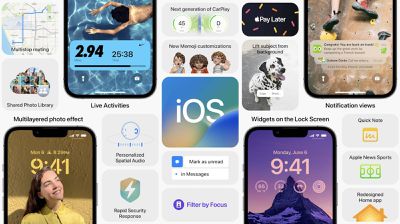
iOS 16 is a significant release with major changes across the board, from an entirely redesigned and customizable Lock Screen to updates to Focus mode, CarPlay, and more.
f1654537364
Outside the major changes, there are plenty of smaller changes and new features Apple is introducing this year. While there will be many more to discover over the next several weeks and months, we've compiled a few notable ones below.

Built-In Currency Converter
ios 16 currency converrison
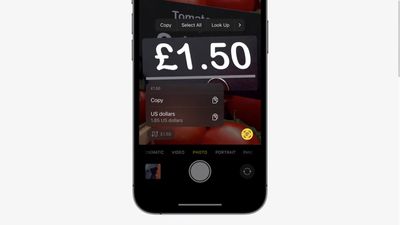
With iOS 16, Apple is giving Live Text, introduced last year, some new tricks. Within the Camera app on iOS 16, point your iPhone camera to a price tag and Live Text will offer a currency conversion in the bottom left-hand corner.

Live Text and Quick Actions now also support translation within the Camera app. The Translate app is also gaining a new Camera mode dedicated to picture-to-text translation.

Undo and Redo for Photo Edits
ios 16 photo undo redo
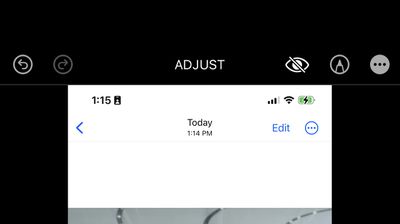
The Photos app on iOS 16 and iPadOS 16 is gaining undo and redo abilities, meaning if you accidentally make a change to your photo you may not like, you can easily undo or redo.

Notfications for Shared Reminders List

With the Reminders app on iOS 16, users who are in a shared list with friends and family will now receive a notification when a specific task is marked as complete or when a new task is added.

Disable Spotlight Home Screen Shortcut
ios 16 home screen search shortcut
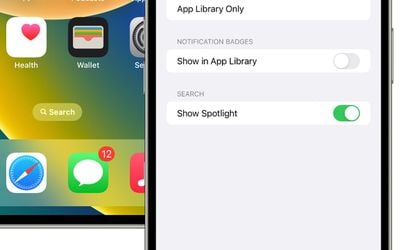
On iOS 16, by default, the home screen page indicators right above the dock on the Home Screen serves as a Spotlight Search shortcut. Some users may not like this, and thankfully, Apple has provided an option to turn it off in Settings under ‌Home Screen‌.

The first betas of iOS 16 and iPadOS 16 are currently available to developers with a public beta planned for July. Find a cool tidbit or feature on iOS 16? Let us know down in the comments or mention us on Twitter @MacRumors.


Related Forum: iOS 16

Popular Stories

iOS 28 AI

Apple Taking New Approach to Developing iOS 28 and macOS 28

Sunday November 8, 2026 7:42 am PST by
Apple has made a change to its development process for iOS 28, macOS 28, and corresponding software updates, according to Bloomberg's Mark Gurman. In his Power On newsletter today, he said Apple separates development of each year's new operating systems into three major stages. Typically, he said each stage consists of four weeks of coding followed by a four-week "convergence" period where...


duo aquarium

More Fun iPhone Duo Apps: 30 New Picks to Try

Friday November 6, 2026 3:27 pm PST by
When the iPhone Duo launched, we shared a list of some of the fun apps developers created for the new form factor. Two weeks out, developers are continuing to come up with fresh ideas, so we thought we'd share some of our favorites. Games Marbles Unhinged ($2.99) - Marbles Unhinged is a marble maze designed for the Duo. When you fold it, the floor turns into a ramp. If you stand the top...
apple pro tell logo

Apple Launching Five New Products Today

Thursday November 5, 2026 12:59 am PST by
Apple is launching five new products on Friday, November 6, following pre-orders that opened last week, including its first touchscreen MacBook Pro models. The following new products will be available from today: iPad mini with OLED display and A20 Pro chip iMac with M6 chip 14-inch MacBook Pro with M6 chip 14-inch MacBook Pro with OLED touchscreen 16-inch MacBook Pro with OLED...

Top Rated Comments

Shanghaichica Avatar
58 months ago
Currency converter is very useful.
Score: 7 Votes (Like | Disagree)
DanteHicks79 Avatar
58 months ago
That any program in this world lacks undo/redo is criminal. It's like a basic function, going all the way back to the first Macintosh.
Score: 5 Votes (Like | Disagree)
Justin Cymbal Avatar
58 months ago
I really wish that Apple would bring back the battery percentages for iOS devices in the ‘Find My’ app - preferably leave it on no matter what the percentage is - something that is very much technologically feasible as Google Maps already has this feature for family members

Up until a few years ago, if you or your family’s devices had less than 20%, it would indicate the exact percentage of battery remaining but Apple has since gotten rid of that and now there is no way for a user to tell whether that device is 20% or 1% because the red indicator is the same for both

If Apple is for some reason choosing this route for aesthetic reasons alone, which they often do, then Apple should at least do what they used to do and indicate battery percentage once the device goes below 20% or whatever percentage that Apple deems reasonable - Any indicator, even 5% is better than nothing and can allow family members to let their parents or whomever know that their phone is about to die so that they can either conserve power with low power mode, put it in airplane mode or turn their phone off

We’ll have to wait and see if this is included in iOS 16 - maybe someone running the beta can let us know
Score: 5 Votes (Like | Disagree)
SmugMaverick Avatar
58 months ago
Really pleased with the live currency converter and the ability to remove that crappy spotlight button.
Score: 3 Votes (Like | Disagree)
58 months ago
Thanks for the instructions! Initially, I couldn’t figure out how to get rid of search on the home screen since I never use Spotlight. It’s finally gone now.
Score: 3 Votes (Like | Disagree)
58 months ago

Good job Sami and the rest of the MacRumors team! You guys are doing a great job handling all these updates/posts.
Thank you! 🥺
Score: 2 Votes (Like | Disagree)
Latest Stories
Apple Watch Ultra 4 Gets $99 Amazon Discounts, Starting at $699.99
5 minutes ago
Apple Pay Ad Features Martial Arts Convenience Store Food Fight
12 minutes ago
Apple Continues to Say Some AI Features Will Have Fees for Extra Usage
19 minutes ago
Apple Announces Türkiye Expansion Plans as Tim Cook Visits
2 hours ago
Singapore Saved Apple $2.7 Billion in Taxes This Year
2 hours ago
Apple Music's 2026 Artist of the Year is Olivia Dean
2 hours ago
This Could Be Your Last Chance to Pre-Order the HomeView at a Discount
2 hours ago
Some HomePod Mini 2 Buyers Returning Units Over Mac Speaker Issues
3 hours ago
MacBook Pro With PROLED XDR Display: Details You Might Have Missed
3 hours ago
Satechi Offers MacRumors Readers 30% Off Select Accessories in Early Black Friday Sale
3 hours ago
Leaker Envisions a Shorter iPhone With a New iOS Layout
4 hours ago
Apple to Give You More Control Over When Your Mac Passwords Lock
4 hours ago
Siri Is Getting a Better Memory
5 hours ago
iPhone 18e Could Feature Bigger Display and Battery
5 hours ago
Apple's Siri Boss May Leave - Here's Who Could Take Over
6 hours ago
Apple Launching Two More New Products This Friday
6 hours ago
Apple Store Subscription Sign-Up Controversy Exposed
15 hours ago
Siri AI Rumored to Become 'More Like an Agent' as Early as Next Year
1 day ago
Apple Taking New Approach to Developing iOS 28 and macOS 28
1 day ago
Early Apple Black Friday Deals on Apple Watch, MacBook Air, and More
2 days ago
'Backglow' Lets You Customize New MacBook Pro's Glowing Apple Logo
2 days ago
Top Stories: Apple Product Launches, iOS 27.3 Beta, and More
2 days ago
More Fun iPhone Duo Apps: 30 New Picks to Try
3 days ago
Hands-On With Apple's New OLED Touchscreen MacBook Pro
3 days ago
Apple Store With All-New Design Opening Soon in Southern California
3 days ago
Control the Glowing Apple Logo on Your New MacBook Pro
3 days ago
Apple Shares New 'Apple Card: Apply and Use in Minutes' Ad
3 days ago
Apple Says More Than 100,000 Apps Optimized for iPhone Duo, Here's What's Still Missing
3 days ago
Early Black Friday Deals Kickoff With Steep Discounts on Apple Watch Ultras and More
3 days ago
The MacRumors Show: iOS 27.3 Looks Like a Huge Update
3 days ago








































