

macOS Ventura Tidbits: 'About This Mac' Redesigned, New Game Controller Menu, Background Sounds, and More - MacRumorsOpen MenuShow RoundupsShow Forums menuVisit ForumsOpen Sidebar
Skip to Content

macOS Ventura Tidbits: 'About This Mac' Redesigned, New Game Controller Menu, Background Sounds, and More

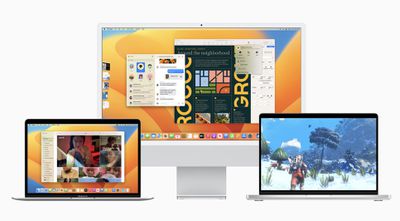
Apple seeded the first beta of macOS Ventura to developers yesterday for testing, and early adopters are beginning to discover smaller changes in the update. We've rounded up some of the more notable macOS Ventura tidbits that we have uncovered below.
macos ventura 1

"About This Mac" Redesigned

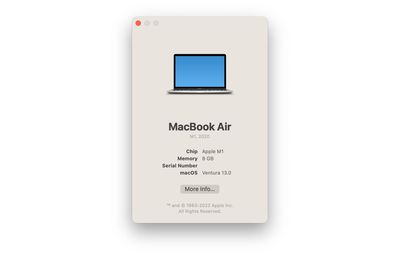
Apple has simplified the About This Mac window on macOS Ventura. The window still lists a Mac's type of processor, amount of memory, serial number, and the macOS version installed, but all other system information has been migrated to the System Settings app, which is a redesigned and renamed version of the former System Preferences app.
About This Mac macOS Ventura
Clicking on the "More Info" button at the bottom of About This Mac opens the General menu of System Settings, which itself contains a "System Report" button that leads to a more advanced overview of a Mac's hardware, software, networking, and more.

Game Controller Menu

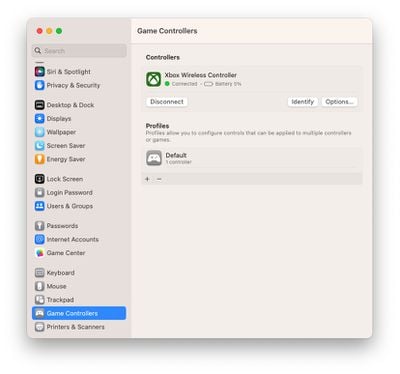
Speaking of System Settings, there is a new game controller menu in the app for managing game controllers connected to a Mac. The menu allows macOS Ventura users to map a controller's buttons and thumbsticks to a Mac's keyboard, adjust haptic feedback levels, create profiles with presets for multiple controllers, and more.
Game Controllers Menu macOS Ventura
macOS Ventura features newly added support for some of the most popular racing wheels, pedals, and shifters for use in racing games on the Mac, including Logitech's G920 and G29 racing wheels, according to Apple's developer website. Apple also says that macOS Ventura supports many additional Bluetooth and USB game controllers, with users discovering that this includes the Nintendo Switch's Joy-Cons and Pro Controller.

Background Sounds

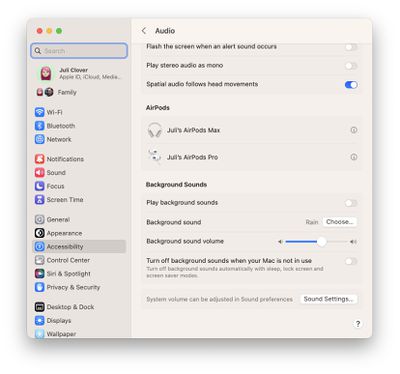
macOS Ventura brings preinstalled background sounds to the Mac. Apple says this feature allows calming sounds, such as ocean or rain, to mask unwanted environmental noise and help minimize distractions. The background sounds feature first launched on the iPhone and iPad with the release of iOS 15 and iPadOS 15 last year.
macOS Ventura Background Sounds
Background sounds on the Mac can be turned on in the System Settings app under Accessibility > Audio. In this menu, you can choose which background sound to play, adjust the background sound volume separate from system volume, and optionally turn off background sounds when your Mac is asleep or in screensaver mode.

Other Features and Tidbits

  • macOS Ventura adds Clock and Weather apps to the Mac.
  • In the Photos app, the Hidden and Recently Deleted albums are now locked by default and can be unlocked using your Mac's password or Touch ID.
  • Playlists have improved sorting options in the Music app.
  • Siri has received a slight redesign with a focus on simplicity and "more focused" results.

macOS Ventura will be released to all users in the fall — likely around October. Apple said a public beta will be available starting in July.

Image Sources: MacRumors Forums and Reddit

Related Forum: macOS Ventura

Popular Stories

iCloud iPhone 17 Pro

iPhone Users Who Pay for iCloud Storage Get Two New Perks on iOS 27

Thursday July 2, 2026 6:10 am PDT by
If you pay for certain iCloud+ storage plans beyond the 5GB that Apple offers for free, you will receive two more perks on iOS 27 at no additional cost. A summary of the two new iCloud+ perks on iOS 27:Increased daily usage limits for some new Apple Intelligence features, including image generation in the revamped Image Playground app. HomeKit Secure Video cameras receive generated video...
Apple Event Logo

Apple Just Released a New Product

Thursday July 2, 2026 8:04 am PDT by
Apple's first product release of summer 2026 occurred this week, but do not get too excited, as it is merely the Beats Solo Buds in a new color. Beats Solo Buds are now offered in orange through Best Buy in the U.S., with availability set to expand to 7-Eleven stores in Japan on July 4. Apple already offered orange Solo Buds in India for free with the purchase of an iPhone 15 or iPhone 15 ...
iPhone 4 on Black Feature

Apple Facing One of Its Worst Leaks Since the iPhone 4

Thursday July 2, 2026 9:53 am PDT by
Apple supplier Tata Electronics recently suffered a cyberattack that resulted in thousands of confidential files being published on the dark web, and this reportedly included some photos and documents related to the upcoming iPhone 18 Pro. We have elected not to share any of the leaked photos in this story due to the illegal nature in which they were obtained, but they can easily be found...

Top Rated Comments

ct2k7 Avatar
53 months ago
I prefer the old 'About this Mac'
Score: 28 Votes (Like | Disagree)
Apple Knowledge Navigator Avatar
53 months ago
Don't understand why they put background sounds in Accessibility. You don't need to have additional needs in order to benefit from some choice of background noise, they should have put into Control Centre (unless it's been overlooked).
Score: 15 Votes (Like | Disagree)
jav6454 Avatar
53 months ago
Some of these reskins are pointless.
Score: 12 Votes (Like | Disagree)
53 months ago
It's giving me some old-school OS X vibes...


Attachment Image
Score: 8 Votes (Like | Disagree)
TheYayAreaLiving 🎗️ Avatar
53 months ago
Does it look like "True Tone" is on or am I tripping? The screen looks too yellow.
Score: 7 Votes (Like | Disagree)
53 months ago

Don't understand why they put background sounds in Accessibility. You don't need to have additional needs in order to benefit from some choice of background noise, they should have put into Control Centre (unless it's been overlooked).
Accessibility settings in MacOS, iOS and iPadOS have become a dumping ground for settings that have nothing to do with physical accessibility. Clearly, Apple is trying to score political points by moving settings from application/hardware preferences and burying them in Accessibility, in order to inflate the number of available settings. Apple wants to say "Look at us, we have this Accessibility thing with all these settings" when many of those settings should be located in more appropriate places.

MacOS

On a Mac laptop, trackpad scrolling speed is not located in trackpad preferences, but is buried in Accessibility (even though mouse scrolling speed is located in mouse preferences).

Mouse pointer size is not located in mouse preferences, but is buried in Accessibility.

To turn off spring loaded folders in the Finder, you don't go to Finder Preferences. Instead, that setting is buried in Accessibility.

iPhone/iPad

On iPhone and iPad if you go to Settings >Display & Brightness, there is no setting to control auto brightness. Instead, you have to go to Accessibility.

On iPads that have Touch ID, the setting to unlock by pressing the home button once and leaving your finger on the button is not located in Touch ID settings, but is buried in Accessibility.

Dynamic head tracking for Spatial Audio is not located in the Spatial Audio setting, but is buried in Accessibility.

Moving settings from the application/hardware preferences and burying them in Accessibility is not helpful at all. It just causes more irritation because people now have to look in two places to find things: the application/hardware preferences and Accessibility. Accessibility has become as convoluted as iTunes and this helps no one.
Score: 5 Votes (Like | Disagree)















