Apple Seeds First Public Beta of macOS 13 Ventura - MacRumorsOpen MenuShow RoundupsShow Forums menuVisit ForumsOpen Sidebar
Skip to Content

Apple Seeds First Public Beta of macOS 13 Ventura

Apple today seeded the first beta of macOS Ventura to its public beta testing group, allowing non-developers to test the new macOS Ventura operating system ahead of its release.
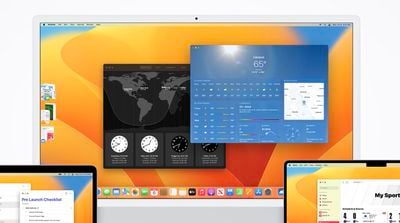
clock weather macos ventura
Public beta testers can download the macOS 13 Ventura update from the Software Update section of the System Preferences app after installing the proper profile from Apple's beta software website.

macOS Ventura introduces Stage Manager, a new multi-tasking option for focusing on a task while having other apps waiting in the wings. ‌Stage Manager‌ puts your main app front and center, tucking your other apps to the side for quick access.

Continuity Camera allows you to use your iPhone as a webcam for your Mac, offering much better camera quality than the built-in Mac camera. Apple is building special stands to hold the iPhone with a Mac, and there are neat features like Desk View, which uses the Ultra Wide lens.

Handoff now works with FaceTime so you can answer calls on the Mac and then transfer them over to another device, and Messages is gaining undo, edit, and mark as unread features. SharePlay now works in Messages in addition to ‌FaceTime‌, and the Mail app has been overhauled. Search is more relevant, emails can be scheduled, and there's even an option to undo an email for up to 10 seconds after it's sent.

Apple brought the Weather and Clock apps to the Mac, redesigned System Preferences and renamed it System Settings, and added support for Shared Tab Groups. Passwords are being replaced with more secure Passkeys in iOS 16 and macOS Ventura, and there are updates to Spotlight, Visual Lookup, Live Text, and more.

There are a ton of other features in macOS Ventura, and we have a full rundown available in our dedicated macOS Ventura roundup.


Popular Stories

iPhone 18 Pro and Pro Max Feature

'Apple Upgrade' Program Reportedly Launching Next Week

Tuesday July 21, 2026 8:30 am PDT by
Apple and Klarna are partnering on a new "Apple Upgrade" leasing program set to launch in the U.S. on Tuesday, July 28, according to Bloomberg's Mark Gurman. The program will allow you to finance most iPhone, iPad, Mac, and Apple Watch models, with a 24-month term for iPhones and Apple Watches and a 36-month term for iPads and Macs. Customers will be able to pay off the device early during...
iPhone 18 Pro Deep Red Feature

iPhone 18 Pro Launching in Two Months With These 12 New Features

Friday July 17, 2026 10:39 am PDT by
It is now mid-July, and that means the iPhone 18 Pro and iPhone 18 Pro Max are now just two months away. The devices are expected to look similar to the iPhone 17 Pro and iPhone 17 Pro Max, but there will still be many year-over-year changes, with rumored features including a smaller Dynamic Island, 5G via satellite, and more. Apple is expected to unveil the iPhone 18 Pro, iPhone 18 Pro Max, ...
iPhone 18 Pro Deep Red Feature

iPhone 18 Pro Launching in Two Months With These 12 New Features

Tuesday July 21, 2026 6:22 am PDT by
It is now mid-July, and that means the iPhone 18 Pro and iPhone 18 Pro Max are now just two months away. The devices are expected to look similar to the iPhone 17 Pro and iPhone 17 Pro Max, but there will still be many year-over-year changes, with rumored features including a smaller Dynamic Island, 5G via satellite, and more. Apple is expected to unveil the iPhone 18 Pro, iPhone 18 Pro Max, ...

Top Rated Comments

chrisdazzo Avatar
53 months ago
Oh boooy I think it's time to install this on a daily driver!

guys, I'm kidding, don't do it (and come back here to complain how it's all a mess and you broke ur mack)
Score: 12 Votes (Like | Disagree)
zorinlynx Avatar
53 months ago
By the way, for folks who want to try out the beta mostly risk free (things can still go wrong with firmware but that's rare), APFS makes it really easy to create a second volume and install the beta there. You can even have Migration Assistant copy your home folder and settings over from the primary Monterey installation.

The two systems are separate with distinct home folders and you can choose which one to boot into on startup. This is something I wish iOS could do. Been playing with Ventura now for the past couple weeks and I can easily boot back into my main install if something is broken. It's been surprisingly good though!

Apple even sanctions it with a support article:

https://support.apple.com/en-us/HT208891
Score: 11 Votes (Like | Disagree)
BanjoDudeAhoy Avatar
53 months ago

Install macOS Ventura Beta on my main computer ✅
Install iOS 16 Beta on my main phone ✅
Here's the soundtrack for your endeavors 😜

Score: 6 Votes (Like | Disagree)
53 months ago
I absolutely despise their change to System Preferences to make it look more like iOS. As someone who supports all the Macs in my company (not to mention friends and family), this is going to cause huge confusion and problems. Not only is it a big change and makes settings much harder to find, but to limit an OS that generally has lots of screen real estate available to a long scrolling list (necessary on limited screen like iPhone) is just stupid. I was really hoping they would dump this silly idea before it made it to Beta. Hopefully enough people will complain and Apple will come to its senses.
Score: 5 Votes (Like | Disagree)
Colstan Avatar
53 months ago

By the way, for folks who want to try out the beta risk free
I appreciate you sharing your advice, but it's not entirely risk free. The firmware will be updated to a beta version regardless of where you install Ventura. I'm sure Apple will try to minimize errors, but it's still there. For instance, if the firmware update goes awry with a T2 Intel Mac, then you'll need a second Mac capable of capable of DFU mode ('https://mrmacintosh.com/how-to-restore-bridgeos-on-a-t2-mac-how-to-put-a-mac-into-dfu-mode/') to revert to the old version. So, public beta or not, there are risks involved.
Score: 5 Votes (Like | Disagree)
zorinlynx Avatar
53 months ago

yup. I've never used a beta that was SO bad I had to revert, but carefully read all of the info at beta.apple.com and go (or don't) from there :)
Keep in mind that the process is different than it used to be.

Before you could restore everything including the operating system itself from a Time Machine backup. You could even boot from it.

Now (Since at least Big Sur) you have to wipe the disk, reinstall the previous version of MacOS manually, then restore from the backup using Migration Assistant. It's a longer process that involves downloading the OS if you don't have a copy already handy.

Trying to make people aware as it's a bit more involved now.
Score: 4 Votes (Like | Disagree)