Getting the iPhone 14 Pro? Five Major Features to Check Out First - MacRumorsOpen MenuShow RoundupsShow Forums menuVisit ForumsOpen Sidebar
Skip to Content

Getting the iPhone 14 Pro? Five Major Features to Check Out First

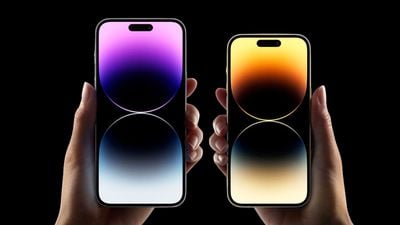
The iPhone 14 Pro and iPhone 14 Pro Max officially begin arriving to customers on Friday. Apple’s latest high-end phones sport major new features, changes, and design updates that make them an attractive choice for customers still using older models.
iPhone 14 Pros in Hand Black Background Feature
If you're getting a new iPhone 14 Pro or iPhone 14 Pro Max tomorrow, you may be slightly overwhelmed or simply interested in what new features and changes you should try out. To try and help, we've outlined five of the iPhone 14 Pro's biggest features you should look forward to using below.

Dynamic Island
iPhone 14 Pro Dynamic Island 3
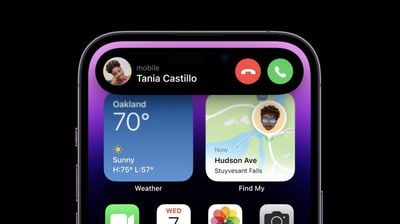
Dynamic Island on the iPhone 14 Pro and iPhone 14 Pro Max is an entirely new way to interact with your iPhone. Instead of the notch at the top of the display, Apple has replaced it with a new pill-shape area made up of two smaller cutouts digitally merged.

Instead of leaving the area unused and intrusive at the top of the display, Apple developed ‌Dynamic Island‌, which brings system-wide alerts, notifications, and system-related operations to the top of the display. You'll notice ‌Dynamic Island‌ fluidly adapt as you use your phone, from listening to music to starting a timer and more. Here's a quick list of some of the different types of system alerts and notifications ‌Dynamic Island‌ supports straight out of the box:

  • Incoming call banner
  • AirPods connected alert
  • Face ID authentication
  • Apple Pay
  • AirDrop
  • Low battery alert
  • Charging
  • Live Activities (coming in iOS 16.1)
  • Ongoing call
  • Music/Now playing apps

Learn more about ‌Dynamic Island‌ with our detailed explainer here.

ProMotion Display
iphone 14 pro 120hz promotion blue
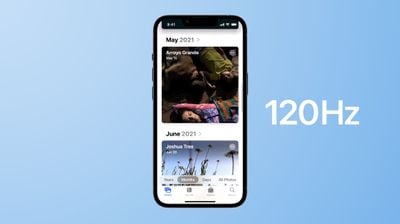
If you're upgrading from an iPhone older than the iPhone 13 Pro, as many customers likely are, you'll be experiencing ProMotion for the very first time on iPhone. ProMotion is a technology that Apple first developed for the iPad in 2017 and just last year made its way to the iPhone.

Most displays have a refresh rate of up 60Hz, which means the screen is refreshing 60 times every second. Starting with the iPhone 13 Pro and now the iPhone 14 Pro, the iPhone's display supports a refresh rate of up to 120Hz, which allows it to refresh 120 times every second.

The higher pace of refreshes every second means that when you're scrolling in an app, you'll notice your iPhone feels faster and smoother thanks to the 120Hz refresh rate. Of course, the higher refresh rate also requires more power. Thankfully, on the iPhone 13 Pro and iPhone 14 Pro, iOS intelligently changes the display's refresh rate depending on what you're doing. For example, when you start scrolling, the display will increase its refresh rate compared to if you're viewing a static image.

Always-On Display
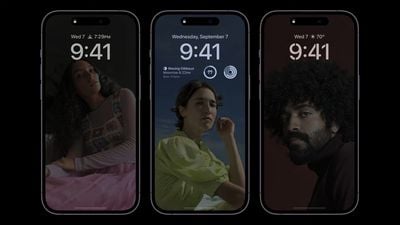
iphone 14 pro always on display
Regardless of which iPhone you're upgrading from, you'll be experiencing the first iPhone with an always-on display. An always-on display, as the name suggests, is a display that's always on and displaying information. The display on the iPhone 14 Pro and iPhone 14 Pro Max always shows the time, wallpaper, and widgets from the iOS 16 Lock Screen.

This can be useful when you just want to glance at the time or see relevant information from your Lock Screen widgets without unlocking your iPhone and going directly into an app. With Live Activities coming in iOS 16.1, the always-on display may be even more helpful for some customers.

The display always remains on by intelligently lowering its brightness and refresh rate to as low as 1Hz to save battery life. If you don't like the always-on display, you can turn it off inside Settings -> Display & Brightness, which could help extend your battery life. The always-on display is not currently customizable. Learn more about the iPhone 14 Pro's always-on display here.

The New Cameras
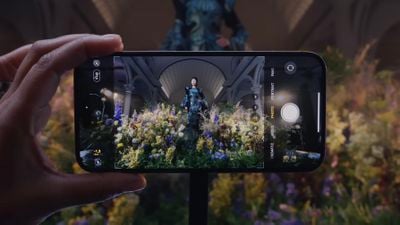
iPhone 14 Pro Dynamic Island Camera
The new iPhone 14 Pro and iPhone 14 Pro Max feature a suite of new camera features and hardware improvements. The most notable you'll be able to take advantage of is a new 48MP Main camera that takes even sharper and more detailed photos.

You'll be able to take 48MP cameras when you use the ProRAW format, which is a format designed by Apple that combines the iPhone's powerful photo-processing with high detail that allows for fine-tune editing. If you're planning to take many 48MP photos, be aware that those photos will take up almost three times the amount of storage on your device.

The front selfie camera on the iPhone 14 Pro and iPhone 14 Pro Max also got an upgrade as it now supports autofocus, which ensures that your photos turn out more detailed and lifelike. All cameras, including the selfie camera, have improved performance for low-light situations, making nighttime pictures clearer and brighter.

Enjoy Longer Battery Life
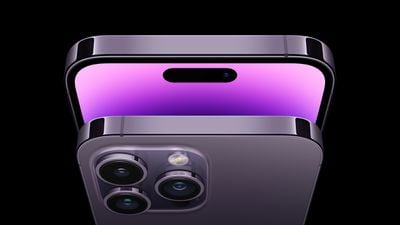
iphone 14 pro max deep purple
Thanks to advancements in iOS optimization, more efficient processors, and newer technologies, regardless of the iPhone you're upgrading from, you'll be the beneficiary of longer battery life on the iPhone 14 Pro and iPhone 14 Pro Max.

While it's impossible to say just how much longer your iPhone's battery life will be with your specific usage habits, Apple is claiming that its newer displays and the A16 Bionic chip are more power efficient than older models, yielding longer battery life.

For a rough estimate of how much longer battery life will be, a battery test earlier this week with the iPhone 14 Pro Max showed it lasting two hours longer than last year's iPhone 13 Pro Max, which already held the title for the longest battery life in an iPhone.

There's More!
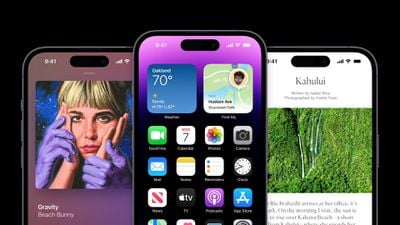
iphone 14 pro dynamic island
The iPhone 14 Pro and iPhone 14 Pro Max run iOS 16, the latest version of iOS that has major new features, such as a customizable Lock Screen, the ability to unsend and edit messages in iMessage, new features in Apple Maps, and more.


As you use your new iPhone 14 Pro, you'll also discover iOS 16 and all that it has to offer. Below we've listed some helpful guides and resources on iOS 16 and its features.

Related Forum: iPhone

Popular Stories

apple pro tell logo

Apple Launching Five New Products Today

Thursday November 5, 2026 12:59 am PST by
Apple is launching five new products on Friday, November 6, following pre-orders that opened last week, including its first touchscreen MacBook Pro models. The following new products will be available from today: iPad mini with OLED display and A20 Pro chip iMac with M6 chip 14-inch MacBook Pro with M6 chip 14-inch MacBook Pro with OLED touchscreen 16-inch MacBook Pro with OLED...
duo aquarium

More Fun iPhone Duo Apps: 30 New Picks to Try

Friday November 6, 2026 3:27 pm PST by
When the iPhone Duo launched, we shared a list of some of the fun apps developers created for the new form factor. Two weeks out, developers are continuing to come up with fresh ideas, so we thought we'd share some of our favorites. Games Marbles Unhinged ($2.99) - Marbles Unhinged is a marble maze designed for the Duo. When you fold it, the floor turns into a ramp. If you stand the top...
silver iphone 18 pro

Apple Rumored to Drop the iPhone's Action Button Next Year

Friday November 6, 2026 6:07 am PST by
Apple plans to merge the iPhone's Action button with the Camera Control starting next year, according to the leaker known as "Instant Digital." In a new post on Weibo, the leaker claimed that a single press of the combined button would open the camera, while a long press would trigger the function assigned to the Action button. They explicitly clarified that the dedicated Action button would ...

Top Rated Comments

antiprotest Avatar
54 months ago
First thing I'm checking out is making sure the always on display is turned on! Loved it on my Apple Watch and it should be dimmed on the iPhone like it is, not blacked out like Android.
Score: 25 Votes (Like | Disagree)
54 months ago

I hope I can turn off "Dynamic Island"
I hope I can turn off "Always On Display"
New Cameras - OK I guess
Better Battery Life - Great
Customizable Lock Screen - No interest
Unsend and Edit Messages - No interest
Apple Maps - no interest
That's the iPhone 14!
Score: 8 Votes (Like | Disagree)
NightFox Avatar
54 months ago

OMG. Actually having to touch the phone to view a notification. The worst! Luckily, once you view that notification you can interact with it telepathically. Really, the screen not being on is the only weak point.
Always good to ridicule people because their priorities are different from yours 👍
Score: 7 Votes (Like | Disagree)
54 months ago
First thing I’m checking out is turning off the always on display! Can’t stand it on my Apple Watch and it should just be blacked out on the iPhone, not dimmed.
Score: 6 Votes (Like | Disagree)
NightFox Avatar
54 months ago

Sounds like real first world problems to me.
Of course it is, it's a first world forum discussing $1000+ luxury devices.
Score: 5 Votes (Like | Disagree)
NightFox Avatar
54 months ago

I hope I can turn off "Dynamic Island"
I hope I can turn off "Always On Display"
New Cameras - OK I guess
Better Battery Life - Great
Customizable Lock Screen - No interest
Unsend and Edit Messages - No interest
Apple Maps - no interest
There's something for everyone down at your local Apple Store


Attachment Image
Score: 5 Votes (Like | Disagree)
Latest Stories
Early Apple Black Friday Deals on Apple Watch, MacBook Air, and More
9 hours ago
'Backglow' Lets You Customize New MacBook Pro's Glowing Apple Logo
9 hours ago
Top Stories: Apple Product Launches, iOS 27.3 Beta, and More
16 hours ago
More Fun iPhone Duo Apps: 30 New Picks to Try
1 day ago
Hands-On With Apple's New OLED Touchscreen MacBook Pro
1 day ago
Apple Store With All-New Design Opening Soon in Southern California
1 day ago
Control the Glowing Apple Logo on Your New MacBook Pro
1 day ago
Apple Shares New 'Apple Card: Apply and Use in Minutes' Ad
2 days ago
Apple Says More Than 100,000 Apps Optimized for iPhone Duo, Here's What's Still Missing
2 days ago
Early Black Friday Deals Kickoff With Steep Discounts on Apple Watch Ultras and More
2 days ago
The MacRumors Show: iOS 27.3 Looks Like a Huge Update
2 days ago
Best Buy's Black Friday Event Begins With Sitewide Savings on Apple, TVs, More
2 days ago
Apple Releasing Yet Another Two New Products Next Week
2 days ago
MacBook Air Drops to Lowest Price in Months With Amazon's $250 Discount
2 days ago
Apple Rumored to Drop the iPhone's Action Button Next Year
2 days ago
Apple's Extended Return Policy Now in Effect for 2026 Holiday Season
2 days ago
Apple Music Classical Updated With New Icon and Refreshed Design
2 days ago
OLED iPad Mini, M6 iMac, and New MacBook Pros Available From Today
2 days ago
Apple Surveys iPhone Duo Buyers About Crease and Camera
2 days ago
Apple's First Touchscreen Mac is Now Arriving to Customers
2 days ago
Claude Gets Personal Finance Feature With Bank Account Linking
2 days ago
Apple Arcade Adds Crossy Road Rush and NBA 2K27
2 days ago
Apple's New HomeView Smart Home Hub: Here's How Much RAM It Has
2 days ago
iPad Mini vs. iPad Air Buyer's Guide: Now Just $50 Apart
2 days ago
First iOS 27.3 and macOS Golden Gate 27.3 Public Betas Now Available
2 days ago
Apple Announces a New Mac Sales Record
2 days ago
Paid $200 for Logic Pro? Apple Says You Won't Get This New Feature
3 days ago
Instagram's Edits Video Editor is Now Available on Mac
3 days ago
Prevent Siri and Search From Accessing Specific iPhone Apps
3 days ago
Best Early Black Friday Deals on iPhone 18 Pro and iPhone Duo
3 days ago