Top Stories: Emergency SOS via Satellite Launches, iOS 16.2 Beta Features, and More - MacRumorsOpen MenuShow RoundupsShow Forums menuVisit ForumsOpen Sidebar
Skip to Content

Top Stories: Emergency SOS via Satellite Launches, iOS 16.2 Beta Features, and More

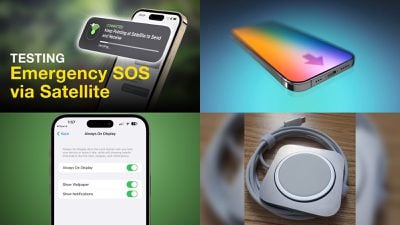
Meeting its promise of a November launch, Apple this week activated its Emergency SOS via Satellite service for iPhone 14 and iPhone 14 Pro models in the U.S. and Canada, with more countries to come.
top stories 19nov2022
This week also saw some new additions for iOS 16.2 as it works its way through the beta testing process ahead of a public launch next month, while we saw fresh rumors about next year's iPhone 15 and leaked photos of an unreleased "Magic Charger" from Apple. We're also about to head into the holiday shopping season, so keep an eye out for some great deals!

Testing Apple's New Emergency SOS via Satellite Feature

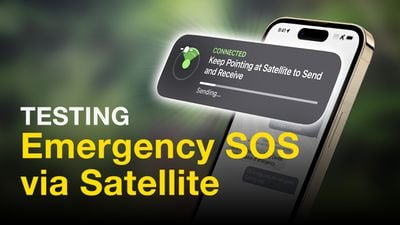
All four iPhone 14 models support a new Emergency SOS via Satellite feature that allows the devices to connect directly to a satellite, enabling users to send text messages to emergency services when outside the range of cellular and Wi-Fi coverage. The service launched in the U.S. and Canada this week and is free to use for the first two years.
Testing Emergency SOS via Satellite Thumb
Emergency SOS via Satellite includes a demo mode in the Settings app, allowing us to test out the feature without actually contacting emergency services. Check out our hands-on video.

Apple said the service will be expanded to the UK and three additional countries in Europe in December.

Kuo: iPhone 15 and iPhone 15 Plus Will Have Slower USB-C Ports Compared to Pro Models

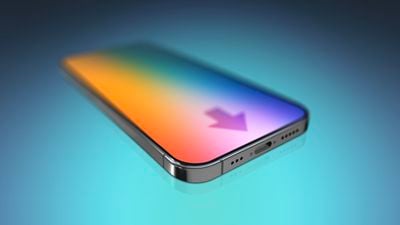
iPhone 15 Pro models will feature a USB-C port with support for at least USB 3.2 or Thunderbolt 3, according to analyst Ming-Chi Kuo. This would result in significantly faster wired data transfer speeds compared to existing iPhones with Lightning.
iPhone 15 to Switch From Lightning to USB C in 2023 feature
While the standard iPhone 15 and iPhone 15 Plus are also expected to have a USB-C port, Kuo said those devices will remain limited to USB 2.0 speeds of up to 480 Mbps.

iOS 16.2 Will Let You Disable Wallpaper and Notifications for Always-On Display

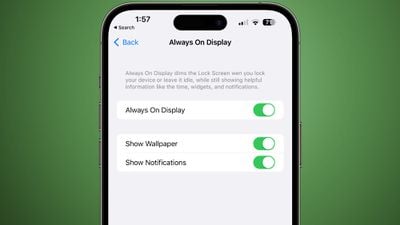
Starting with iOS 16.2, currently in beta and expected to be released in December, iPhone 14 Pro users can hide the wallpaper and notifications in Always-On display mode. This results in the Lock Screen having a solid black, minimal appearance in Always-On mode, similar to many Android smartphones.
always on display options
In the iOS 16.2 beta, the new "Show Wallpaper" and "Show Notifications" toggles are located in the Settings app under Display & Brightness → Always On Display.

Images of Unreleased 'Apple Magic Charger' Surface Online

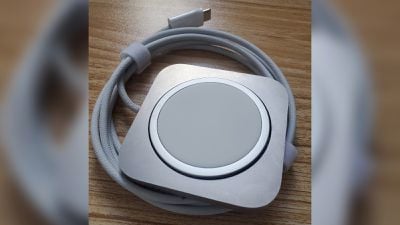
Images of an unreleased MagSafe accessory called the "Apple Magic Charger" have surfaced online over the past couple of weeks. It appears that Apple decided against releasing the accessory.
unreleased apple magic charger
The accessory features an aluminum rounded square with an embedded MagSafe charger that can be pushed out into a vertical position. It looks similar to Apple's discontinued iPhone Lightning Dock.

Apple to Hold Black Friday Event Starting November 25

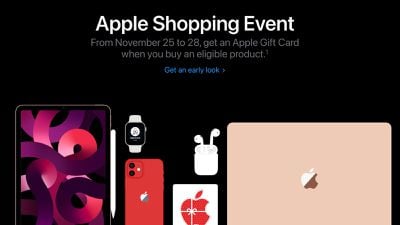
Apple's annual four-day shopping event from Black Friday through Cyber Monday begins November 25 in the U.S., Canada, the U.K., France, Italy, Spain, Germany, Australia, and many other countries.
apple shopping event 2022
As usual, customers can receive a free Apple gift card with the purchase of a qualifying product, ranging from any iPhone 13 model to the second-generation AirPods Pro. For more deals, check out our Black Friday roundup and our summary of all the best deals already available.

iOS 16.2 for iPhone Expected to Launch in December With These 8 New Features

iOS 16.2 is currently in beta testing and is expected to be released to the public in December. The update includes many new features and changes for the iPhone, such as Apple's new whiteboard app Freeform.
iOS 16
We've rounded up eight new features coming to the iPhone with iOS 16.2, including two new Lock Screen widgets from Apple, improvements to Live Activities, a revamped Home app, and more.

MacRumors Newsletter

Each week, we publish an email newsletter like this highlighting the top Apple stories, making it a great way to get a bite-sized recap of the week hitting all of the major topics we've covered and tying together related stories for a big-picture view.

So if you want to have top stories like the above recap delivered to your email inbox each week, subscribe to our newsletter!
Popular Stories

top stories 2026 06 27

Top Stories: Massive Apple Price Increases, iOS 27 Beta 2, and More

Saturday June 27, 2026 6:00 am PDT by
The Apple community was rocked this week as the company instituted massive price hikes on a broad array of products, with many products seeing increases of 10–20 percent and a few as high as 50 percent or more. The move led many Apple fans to flock to Amazon and other retailers in attempts to make purchases before the price increases trickle down to third-party sellers. Other major news...
top stories 2026 07 04

Top Stories: 'MacBook Ultra' and iPhone 18 Rumors, iOS 26.5.2 Security Fixes, and More

Saturday July 4, 2026 6:00 am PDT by
After last week's craziness around Apple's major price hikes, things returned to a bit more of a normal flow this week, with the rumor mill offering up tidbits about the long-rumored touchscreen MacBook, the iPhone 18 lineup, and more. This week also saw minor updates for iOS, iPadOS, and macOS that included a surprising number of security fixes, while a cyberattack at an Apple manufacturing ...
top stories 2026 07 11

Top Stories: 'iPhone Ultra' and Apple TV Rumors, iOS 27 Beta 3, and More

Saturday July 11, 2026 6:00 am PDT by
Apple's annual iPhone event is just two months away, but we're still not quite clear on when and in what quantities the new foldable "iPhone Ultra" will be available. It sounds like we could end up in a situation similar to that of the iPhone X where it was introduced at the September event but didn't become available for pre-orders until around six weeks later. Other news this week included ...

Top Rated Comments

JM Avatar
48 months ago

Like you I had originally turned all that off. But I’m not completely sure if it was connected through that one button. I’m pretty sure it was that one but for awhile I just turned it all on. So if you just flipped that one switch wait a while and see if it connects. If not throw them all on and see what happens.


All Apple does is connect your device to a server to activate. The program was already downloaded to your device and you had to agree to it. So you are the test subject here. Let us know how it goes.


BTW: I turned all that auto stuff off when I got functionality. I’m funny that way…
I can now stop raging.


Attachment Image
Score: 1 Votes (Like | Disagree)
Fat_Guy Avatar
48 months ago

Yah know… I turned that off so maybe that’s the secret 😳

I’ll update if your suggestion worked. Thanks for idea
Like you I had originally turned all that off. But I’m not completely sure if it was connected through that one button. I’m pretty sure it was that one but for awhile I just turned it all on. So if you just flipped that one switch wait a while and see if it connects. If not throw them all on and see what happens.


All Apple does is connect your device to a server to activate. The program was already downloaded to your device and you had to agree to it. So you are the test subject here. Let us know how it goes.


BTW: I turned all that auto stuff off when I got functionality. I’m funny that way…
Score: 1 Votes (Like | Disagree)
JM Avatar
48 months ago

Go to settings, Software Update, Automatic Updates, Security Responses and System Files and make sure that is on. This was on after the last update as I never have auto download and install checked. Just a shot in the dark…


What is your general area anyway. Toronto got it on Thursday night?
Yah know… I turned that off so maybe that’s the secret 😳

I’ll update if your suggestion worked. Thanks for idea
Score: 1 Votes (Like | Disagree)
JM Avatar
48 months ago

Go to settings, Software Update, Automatic Updates, Security Responses and System Files and make sure that is on. This was on after the last update as I never have auto download and install checked. Just a shot in the dark…


What is your general area anyway. Toronto got it on Thursday night?
Texas. Yee-haw.
Score: 1 Votes (Like | Disagree)
Fat_Guy Avatar
48 months ago

What emergency SOS via satellite? I sure don’t have it on my 14 pro yet.

I’m surprised I am one of two people saying anything about it.
Go to settings, Software Update, Automatic Updates, Security Responses and System Files and make sure that is on. This was on after the last update as I never have auto download and install checked. Just a shot in the dark…


What is your general area anyway. Toronto got it on Thursday night?
Score: 1 Votes (Like | Disagree)