

Apple Expands Do-It-Yourself Repair Program to Desktop Macs With M1 Chips and Studio Display - MacRumorsOpen MenuShow RoundupsShow Forums menuVisit ForumsOpen Sidebar
Skip to Content

Apple Expands Do-It-Yourself Repair Program to Desktop Macs With M1 Chips and Studio Display

Apple today expanded its self-service repair program to include Mac desktops with Apple silicon, as noted by Jason Snell at Six Colors. Parts, tools, and repair manuals are now available for the iMac, Mac mini, and Mac Studio with the M1 series of chips, and the Studio Display, allowing customers to complete do-it-yourself repairs.
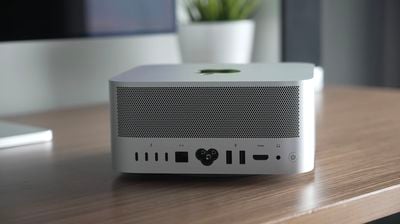
Mac Studio IO
Availability of parts for Mac desktops and the Studio Display is limited to the U.S. for now, despite the program expanding to Belgium, France, Italy, Germany, Poland, Spain, Sweden, and the UK earlier this month. Repair manuals for Mac desktops with Apple silicon and the Studio Display can be found on Apple's website.

Tool kits for Mac desktops and the Studio Display can be rented from Apple's self-service repair store for $49 each and must be returned after seven days.

The program first launched in the U.S. in April, providing customers with access to genuine Apple parts, tools, and manuals to complete do-it-yourself repairs of iPhone 12, iPhone 13, and third-generation iPhone SE models. The program was expanded in August to include MacBook Air and MacBook Pro models with the M1 series of chips.

Apple says the program is intended for individuals who are "experienced with the complexities of repairing electronic devices." For the "vast majority" of customers, Apple says visiting a "professional repair provider" like an Apple Store is a better choice.


Popular Stories

iCloud iPhone 17 Pro

iPhone Users Who Pay for iCloud Storage Get Two New Perks on iOS 27

Thursday July 2, 2026 6:10 am PDT by
If you pay for certain iCloud+ storage plans beyond the 5GB that Apple offers for free, you will receive two more perks on iOS 27 at no additional cost. A summary of the two new iCloud+ perks on iOS 27:Increased daily usage limits for some new Apple Intelligence features, including image generation in the revamped Image Playground app. HomeKit Secure Video cameras receive generated video...
iPhone 4 on Black Feature

Apple Facing One of Its Worst Leaks Since the iPhone 4

Thursday July 2, 2026 9:53 am PDT by
Apple supplier Tata Electronics recently suffered a cyberattack that resulted in thousands of confidential files being published on the dark web, and this reportedly included some photos and documents related to the upcoming iPhone 18 Pro. We have elected not to share any of the leaked photos in this story due to the illegal nature in which they were obtained, but they can easily be found...
American Express Gold Apple Pay Feature

American Express Announces New Apple Pay Feature

Tuesday June 30, 2026 10:27 am PDT by
American Express today announced that you can now redeem Membership Rewards points when checking out with Apple Pay on the web and in apps on the iPhone and iPad. When checking out with Apple Pay on iOS 18 or iPadOS 18 or later, tap on your eligible American Express card (Platinum, Gold, Green, and others) and select the Membership Rewards points option. You can use points to cover all or...

Top Rated Comments

46 months ago
Mac Studio Flash modules available. Told you so.


Attachment Image
Score: 12 Votes (Like | Disagree)
46 months ago

No you cannot. It is not an SSD, it has no controller on board. It has already been demonstrated that swapping in a higher capacity module does not work. And I would guess you cannot order a higher capacity module to replace the one that shipped. And you cannot order these from a third party either as they are NOT SSDs in the classic sense.
This is simply wrong. You can upgrade, and this is why Apple sells modules in different sizes. Due to the fact those are pure flash modules and not SSDs you of course have to play by the rules set by the SSD controller inside the M1 Max / Ultra SoC. The controller expects a specific combination of flash capacity, and they also need to be put into the correct slots.

Some stupid YouTubers tried putting invalid configurations in their machines and claimed you can't upgrade because it didn't work. They did not realize they simply did not use an allowed configuration. If you use the exact module configuration like Apple would do and initialize properly using Apple Configurator 2, upgrading works just fine.

Also, in theory, you could use third party modules if someone would make them. However, this is unlikely to give you much benefit in terms of cost. The specs of the flash memory NEED to match exactly the original Apple parts, which would be expensive to manufacture, especially when considering this is a niche replacement part. So it's very likely Apple's self service repair store will remain the only place you can get them - aside from sourcing used modules on for example eBay.

Edit: Forgot to add that it's exactly the same on the last Intel Mac Pro by the way. Same flash module concept, same limitations.
Score: 9 Votes (Like | Disagree)
Danfango Avatar
46 months ago

All Macs are so difficult to tear down so I feel that Apple is handing over the repair responsibility to us when we make mistakes and break parts. Then they should make Mac to be repairable with easy assembling design, not like Mac Studio.
Nah they're looking quite easy. Only realistically difficult bit is cutting the display adhesive and that's not really that hard.

The hardest bit of repairing any of these things is not dinking any of the parts by dropping them and the manuals go to great extremes telling you how to hold things to avoid that.

This stuff is so much better than a lot of consumer trash out there.
Score: 8 Votes (Like | Disagree)
46 months ago
So for the Studio Display, does this mean I could now swap out the mount/stand? Like right now, I've got the Studio Display with the VESA mount option. Could I get all of the necessary parts to move to the Tilt-and-Height stand?
Score: 7 Votes (Like | Disagree)
46 months ago
people complaining about right to repair for the past several years still going to be sending it to apple for repairs

i swore i saw so many people convey "we're not asking apple to change the design to make it easier to repair, we're just asking for the ability to do it ourselves". now people are saying "no thanks, that's too difficult"

🤦‍♂️
Score: 6 Votes (Like | Disagree)
Pressure Avatar
46 months ago

So you can upgrade the SSD after the fact?
Yes, this had already been tested.

You need to put the SSD blades in the correct slots and use Apple Configurator on another Mac to restore it.
Score: 5 Votes (Like | Disagree)














