

Everything New in iOS 17.1 Beta 2 - MacRumorsOpen MenuShow RoundupsShow Forums menuVisit ForumsOpen Sidebar
Skip to Content

Everything New in iOS 17.1 Beta 2

Apple today released the second beta of an upcoming iOS 17.1 update, and the software further refines some of the new features that were added both in iOS 17 and the initial iOS 17.1 beta.
iOS 17
This guide covers everything new in the second iOS 17.1 beta.

StandBy Display Options

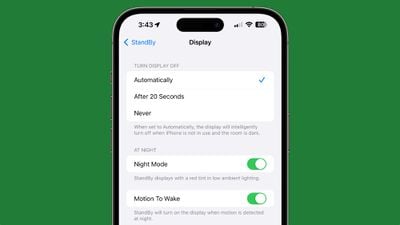
Apple added a new "Display" section to the StandBy section of the Settings app, which houses some new customization options. The display can be set to turn off automatically, after 20 seconds, or never.
standby display settings ios 17 1
The existing Night Mode function that adds a red tint and dims the screen has been relocated to this section, as has the Motion to Wake toggle. The Display section also replaces the prior Always On toggle that limited the display to turning off intelligently.

Ringtones and Text Tones

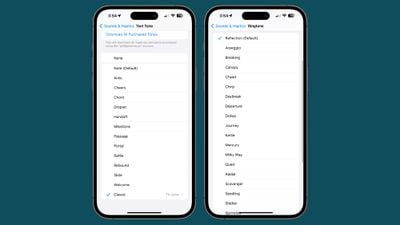
iOS 17.1 beta 1 removed the more than 20 ringtones and text tones that were added in the launch version of iOS 17, but they have been reintroduced.
ios 17 1 ringtones
The new ringtones include Arpeggio, Breaking, Canopy, Chalet, Chirp, Daybreak, Departure, Dollop, Journey, Kettle, Mercury, Milky Way, Quad, Radial, Scavenger, Seedling, Shelter, Sprinkles, Steps, Storytime, Tease, Tilt, Unfold, and Valley. Reflection continues to be the default ringtone option.

Compared to the old ringtones, many of the new ringtones are longer in length and sound more modern. Apple has moved all of the prior ringtones to the "Classic" section so they are still accessible for those who prefer options like Illuminate, Night Owl, Constellation, and Twinkle.

There are more than 10 new text tones that can be used for incoming text messages, voicemails, incoming mail alerts, reminder alerts, and more.

80% Charging Limit Fix

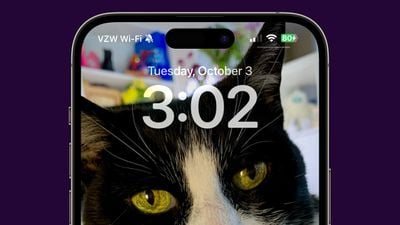
With the iPhone 15 models, Apple added a toggle that prevents the devices from charging past 80 percent in order to keep the battery healthy for a longer period of time. In the prior beta, the iPhone would ignore this setting and charge past 80 percent, but that no longer happens following the second beta update.
ios 17 1 80 percent charge

Double Tap

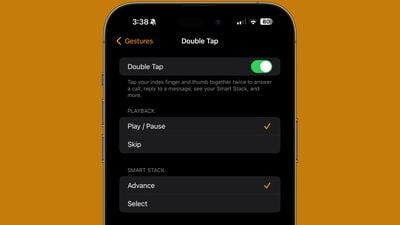
Double Tap is enabled in the second watchOS 10.1 beta that was provided to developers today, but the settings for it can be managed using the Apple Watch app.
watchos 10 1 double tap

More iOS 17.1 Beta 2 Features

Know of a feature that we left out in this list? Let us know in the comments below.

Related Forums: iOS 17, iPadOS 17

Popular Stories

Apple Card iPhone 16 Pro Feature

Apple Card Promo to Offer Free AirPods Pro 3

Friday May 15, 2026 8:59 am PDT by
Starting as early as next week, customers who sign up for an Apple Card at Apple's retail stores in the U.S. will receive $249 cash back when they purchase AirPods Pro 3, according to Bloomberg's Mark Gurman. The promotion has yet to be officially announced by Apple, so exact terms and conditions are not available at this time. AirPods Pro 3 are priced at $249 in the U.S., so customers who...
Apple WWDC25 iOS 26 CarPlay Light mode 250609

Six Popular iPhone Apps Now Available on CarPlay

Thursday May 14, 2026 9:10 am PDT by
Apple's CarPlay system for accessing iPhone apps on a vehicle's dashboard screen has received six popular apps in recent weeks: ChatGPT, Perplexity, Grok, Google Meet, WhatsApp, and the indie artist streaming platform Audiomack. Make sure you have the latest version of each app and they will automatically appear on CarPlay. ChatGPT Starting with iOS 26.4, CarPlay supports voice-based...
ipad mini 7 blue

OLED iPad Mini: Release Date, Pricing, and What to Expect

Thursday May 14, 2026 5:08 am PDT by
According to the latest rumors, Apple is close to launching its next-generation iPad mini. So what should we expect from the successor to the iPad mini 7 that Apple released over a year ago? Read on to find out. Processor and Performance Apple is working on a next-generation version of the iPad mini (codename J510/J511) that features the A19 Pro chip, according to information found in code...

Top Rated Comments

AppleTO Avatar
34 months ago

With the iPhone 15 models, Apple added a toggle that prevents the devices from charging past 80 percent in order to keep the battery healthy for a longer period of time
Why only iPhone 15 models? Clearly the percentage can be determined on every model.
Score: 27 Votes (Like | Disagree)
klasma Avatar
34 months ago

I created an automation to tell me to stop charging once the battery hits 80%.
Very convenient to be woken up at night.
Score: 15 Votes (Like | Disagree)
34 months ago

>Standby Display Options

Is anybody using this? I have a stand that I can wirelessly charge in landscape orientation, and expected to use the mode a lot. I used it for the first day, and forgot about it until I read this article.
Every night. It’s fantastic as a bedside clock.
Score: 10 Votes (Like | Disagree)
34 months ago
They fixed a layout issue where the dynamic island was too wide in third-party apps

Attachment Image
Score: 10 Votes (Like | Disagree)
JosephAW Avatar
34 months ago
New tones are nice but I like to make my own but hate having to use GarageBand to make them and the 1.6GB it consumes on my iPhone.
Be nice if they opened up apps to save them directly. :rolleyes:
Score: 10 Votes (Like | Disagree)
34 months ago

I don’t let my phone charge over night. This is how you get a low battery health.
I wouldn't stress it unless you keep your phones for 5 years.
Score: 7 Votes (Like | Disagree)















