Everything You Can Do With the Double Tap Gesture on Apple Watch - MacRumorsOpen MenuShow RoundupsShow Forums menuVisit ForumsOpen Sidebar
Skip to Content

Everything You Can Do With the Double Tap Gesture on Apple Watch

With the watchOS 10.1 update that came out today, Apple has added Double Tap to the Apple Watch Series 9 and Apple Watch Ultra 2 devices. Double Tap was announced when the new models were introduced, but it took some time for Apple to implement it. With Double Tap, you can activate some Apple Watch functions with just one hand.
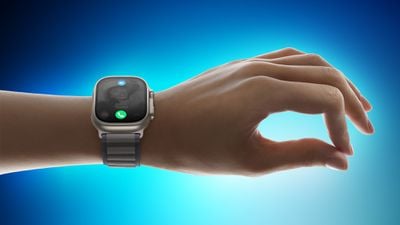
Apple Watch Ultra 2 double tap gesture 230912 Faeture Blue
Using Double Tap requires you to tap your thumb and index finger together twice, and when you do this, you'll see a little icon on the Apple Watch to let you know that the tap was recognized. Double Tap uses the sensors in the Apple Watch to detect minute movements and blood flow when the fingers are positioned in a certain way.
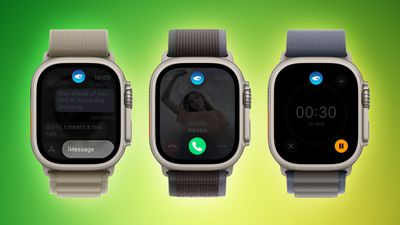
apple watch ultra double tap feature green
There are a number of things you can do with Double Tap, and Apple has made it work with some of the most common actions that you might need to perform with one hand.

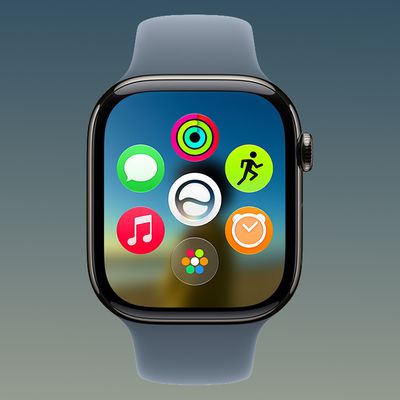
  • Open the Smart Stack from the watch face, and then Double Tap again to scroll through widgets.
  • Answer phone or FaceTime calls.
  • Hang up phone or ‌FaceTime‌ calls.
  • When you get an iMessage, Double Tap to view it, and then Double Tap again if you need to scroll.
  • Reply to a Message using dictation and then send it with Double Tap.
  • Act on notifications - Apple says a Double Tap on an incoming notification will activate the primary action, such as snoozing a reminder or replying to a message.
  • Pause, resume, and end a timer.
  • Stop and resume the stopwatch.
  • Snooze an alarm.
  • Play and pause music, podcasts, or audiobooks (or skip a track, depending on settings).
  • Change to the Elevation view in the Compass app.
  • Start or stop automatic Workout reminders when a workout is detected.
  • Take a photo with the Camera Remote.
  • Record a voice memo in the Voice Memo app.
  • Change Flashlight modes.

In the Apple Watch app under Gestures, you can opt to change the playback option from play/pause to skip, and the Smart Stack option from Advance (swaps through the widgets) to Select (opens a widget's associated app).

While Double Tap can be used with third-party apps through incoming notifications, there is no Double Tap API for third-party apps at the current time. Developers can still customize their apps for Double Tap to an extent by assigning the action that should occur when a Double Tap gesture is used on an incoming notification.

Double Tap is limited to the Apple Watch Series 9 and the Apple Watch Ultra 2 because, as Apple executives said in a recent interview with Tom's Guide, the S9 chip in the new models is the first that is powerful enough for the gesture system.

To use Double Tap, Apple Watch Ultra 2 and Apple Watch Series 9 owners will need to update their devices to watchOS 10.1 through the Apple Watch app on the iPhone. watchOS 10.1 requires an iPhone running iOS 17 or later.

Note that Double Tap will not work when Low Power Mode, Sleep Focus, Theater Mode, or Water Lock is activated, and you must first raise your wrist to wake the Apple Watch to perform the gesture. Double Tap also does not work on watches that are paired as a Family Setup watch.

Related Roundups: watchOS 26, watchOS 27
Related Forum: Apple Watch

Popular Stories

watchos 27

Apple Releases watchOS 27.2 With Siri AI Enhancements

Monday October 26, 2026 10:47 am PDT by
Apple today released watchOS 27.2, the first major update to the watchOS 27 operating system. watchOS 27.2 can be downloaded through the Settings app on the watch or the Apple Watch app on a connected iPhone. Software can only be installed when the Apple Watch is on the charger and has over 50 percent battery. According to Apple's release notes, watchOS 27.2 introduces new Siri AI...
watchos 27

Apple Seeds Updated watchOS 27.2 Release Candidate

Friday October 23, 2026 12:28 pm PDT by
Apple today seeded an updated version of the watchOS 27.2 release candidate, four days after the first RC became available. Registered developers and public beta testers can download software through the Apple Watch Settings app or using the Apple Watch app on iPhone. watchOS 27.2 adds new Siri AI features and extends Siri AI to more languages. This update provides enhancements to Siri...
siri recap live rewind

watchOS 27.3 Brings Live Rewind and Siri Recap to Apple Watch

Tuesday November 3, 2026 10:35 am PST by
With the first beta of watchOS 27.3, Apple is introducing new Audio Intelligence features it previewed for the Apple Watch Series 12 and Ultra 4 earlier this year. Powered by the S11 chip, Audio Intelligence includes Live Rewind, Siri Recap, Sound Recognition, and Shazam Music Recognition. Sound Recognition and Shazam are already on the watch, but Live Rewind and Siri Recap are now available ...

Top Rated Comments

Akrapovic Avatar
40 months ago

Sorry to be late to the party on this... So Double Tap works on other generations of Apple Watch, not just S9 and U2?
No, it does not, despite these posts.

On previous watches if you enable the Assistive Touch option in the Accessibility Features section of your watch then you can get a similar feature where hand gestures can do certain controls. This is what they're referring to. However, it isn't as fast or accurate as Double Tap, as the previous generation watches do not have the neural engine which this runs on. So yes you can do it - it just isn't quite as good. I do use this accessibility feature on my AWU.
Score: 16 Votes (Like | Disagree)
Akrapovic Avatar
40 months ago

Why do people keep acting like this is new? This has been an accessibility feature for a long while.
Why do people keep posting this thinking their post is new? It's been a post for a long while!
Score: 12 Votes (Like | Disagree)
Minecatt48 Avatar
40 months ago
Why do people keep acting like this is new? This has been an accessibility feature for a long while.
Score: 10 Votes (Like | Disagree)
40 months ago
I think the Apple Watch should also detect the "middle finger" gesture. It could be used to automatically reply with "F*** you!" to an incoming message.
Score: 9 Votes (Like | Disagree)
Akrapovic Avatar
40 months ago

Do you have an older watch and know for a fact that Double Tap on WatchOS 10 doesn't work on it?
I think there is some confusion. The Double Tap feature is only available to Apple Watch Series 9 and Apple Watch Ultra 2.

Assistive Touch works on all current Apple Watches that support watchOS8, however it isn't as smooth or reliable as Double Tap. But this works on any watch. I've been using that for a few years.


Edit: Corrected myself. Assistive Touch works on watchOS8/9 as well of course.
Score: 4 Votes (Like | Disagree)
slippery-pete Avatar
40 months ago

Why do people keep acting like this is new? This has been an accessibility feature for a long while.
Did you actually try/use the accessibility feature? Comparing it to this is comparing and apple to an orange.
Score: 3 Votes (Like | Disagree)
Latest Stories
Apple Announces Türkiye Expansion Plans as Tim Cook Visits
36 minutes ago
Singapore Saved Apple $2.7 Billion in Taxes This Year
41 minutes ago
Apple Music's 2026 Artist of the Year is Olivia Dean
1 hour ago
This Could Be Your Last Chance to Pre-Order the HomeView at a Discount
1 hour ago
Some HomePod Mini 2 Buyers Returning Units Over Mac Speaker Issues
2 hours ago
MacBook Pro With PROLED XDR Display: Details You Might Have Missed
2 hours ago
Satechi Offers MacRumors Readers 30% Off Select Accessories in Early Black Friday Sale
2 hours ago
Leaker Envisions a Shorter iPhone With a New iOS Layout
3 hours ago
Apple to Give You More Control Over When Your Mac Passwords Lock
3 hours ago
Siri Is Getting a Better Memory
4 hours ago
iPhone 18e Could Feature Bigger Display and Battery
4 hours ago
Apple's Siri Boss May Leave - Here's Who Could Take Over
5 hours ago
Apple Launching Two More New Products This Friday
5 hours ago
Apple Store Subscription Sign-Up Controversy Exposed
14 hours ago
Siri AI Rumored to Become 'More Like an Agent' as Early as Next Year
1 day ago
Apple Taking New Approach to Developing iOS 28 and macOS 28
1 day ago
Early Apple Black Friday Deals on Apple Watch, MacBook Air, and More
2 days ago
'Backglow' Lets You Customize New MacBook Pro's Glowing Apple Logo
2 days ago
Top Stories: Apple Product Launches, iOS 27.3 Beta, and More
2 days ago
More Fun iPhone Duo Apps: 30 New Picks to Try
3 days ago
Hands-On With Apple's New OLED Touchscreen MacBook Pro
3 days ago
Apple Store With All-New Design Opening Soon in Southern California
3 days ago
Control the Glowing Apple Logo on Your New MacBook Pro
3 days ago
Apple Shares New 'Apple Card: Apply and Use in Minutes' Ad
3 days ago
Apple Says More Than 100,000 Apps Optimized for iPhone Duo, Here's What's Still Missing
3 days ago
Early Black Friday Deals Kickoff With Steep Discounts on Apple Watch Ultras and More
3 days ago
The MacRumors Show: iOS 27.3 Looks Like a Huge Update
3 days ago
Best Buy's Black Friday Event Begins With Sitewide Savings on Apple, TVs, More
3 days ago
Apple Releasing Yet Another Two New Products Next Week
3 days ago
MacBook Air Drops to Lowest Price in Months With Amazon's $250 Discount
3 days ago








































