

Astropad's New 'Slate' App Lets You Control Your Mac With Your iPad and Apple Pencil - MacRumorsOpen MenuShow RoundupsShow Forums menuVisit ForumsOpen Sidebar
Skip to Content

Astropad's New 'Slate' App Lets You Control Your Mac With Your iPad and Apple Pencil

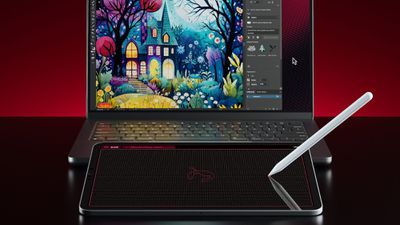
After several months of beta testing, Astropad is today officially launching its Astropad Slate app for the iPad. Slate turns an ‌iPad‌ into a large trackpad for a Mac, complete with Apple Pencil control.
astropad slate
With Slate, you can use an ‌iPad‌ and ‌Apple Pencil‌ to perform several useful tasks. The ‌Apple Pencil‌ serves as a cursor for controlling the desktop mouse, and a tap on the screen is used as a click.

When you write on the ‌iPad‌, it is translated into typed text on the Mac, and there are two-finger gestures for actions like scrolling and zoom. If you have a newer ‌iPad‌ that supports ‌Apple Pencil‌ hover, you can use the hover gestures. For older iPads, Astropad added a simulated hover option.

In Mac apps that support drawing, sketching, and other creative work, you can use the ‌iPad‌ as a drawing tablet. It essentially serves as a no-screen interface for drawing, with the focus on the Mac.


You'll need an ‌iPad‌ that runs iPadOS 15 or later and a Mac that runs macOS 11 or later to use Astropad Slate. The devices can be connected over Wi-Fi, Peer-to-Peer networking, or an appropriate USB cable.

The Astropad Slate app is priced at $19.99 and can be purchased from the App Store. [Direct Link]

Popular Stories

iCloud iPhone 17 Pro

iPhone Users Who Pay for iCloud Storage Get Two New Perks on iOS 27

Thursday July 2, 2026 6:10 am PDT by
If you pay for certain iCloud+ storage plans beyond the 5GB that Apple offers for free, you will receive two more perks on iOS 27 at no additional cost. A summary of the two new iCloud+ perks on iOS 27:Increased daily usage limits for some new Apple Intelligence features, including image generation in the revamped Image Playground app. HomeKit Secure Video cameras receive generated video...
American Express Gold Apple Pay Feature

American Express Announces New Apple Pay Feature

Tuesday June 30, 2026 10:27 am PDT by
American Express today announced that you can now redeem Membership Rewards points when checking out with Apple Pay on the web and in apps on the iPhone and iPad. When checking out with Apple Pay on iOS 18 or iPadOS 18 or later, tap on your eligible American Express card (Platinum, Gold, Green, and others) and select the Membership Rewards points option. You can use points to cover all or...
series 10 apple watch titanium digital crown

Report: Apple Watch Redesign Coming Next Year With New Band System

Tuesday June 30, 2026 8:45 am PDT by
A "major overhaul" of the Apple Watch's design is due to arrive next year with a new system for connecting bands, according to a known Weibo leaker. In a set of recent posts, the leaker known as "Instant Digital" linked the new claim to older rumors about an "Apple Watch X" model, which was said to introduce a fresh design and break compatibility with the existing watch band system. Citing...

Top Rated Comments

tweaknmod Avatar
31 months ago
Imagine working hard on something then finally releasing it - and an accompanying media release - only to see the comments full of people mocking your product, even though they are in no way the target audience, would never be interested in such a product, and don’t understand it - yet they feel the need to tell the world how useless they think it is.

It’s a niche product. If this isn’t for you, and you “don’t get it”, ask about it respectfully or just move on with your life, maybe?

The widespread acceptance of disrespectful comments by people who don’t realize/care that people who worked on this stuff read them will never stop frustrating me. And I refuse to stop calling it out when I see it.

To the team who launched this - and I know they’re monitoring these forums, cause I do that for a living: Congrats on the launch! Good luck 👍
Score: 23 Votes (Like | Disagree)
Jhonjhon236 Avatar
31 months ago

So … a Wacom tablet?
Pretty much, but great if you have an iPad but not a Wacom.
Score: 21 Votes (Like | Disagree)
turbineseaplane Avatar
31 months ago
So … a Wacom tablet?
Score: 8 Votes (Like | Disagree)
31 months ago

Why not just a touchscreen Mac? Odd solution to, well I'm not sure.
I'm not an artist, but it seems like this would be much more convenient than drawing on my laptop screen.
Score: 6 Votes (Like | Disagree)
31 months ago

True!

I just wonder if the person this is truly targeted at wouldn’t prefer a dedicated device targeted at this usage, like a Wacom

Seems like a good update either way
An iPad app that works as well as a Wacom tablet would be even better than having just the tablet, because you could obviously use the iPad for so many other things. I'd swap my Wacom tablet for an iPad if the responsiveness was the same.
Score: 5 Votes (Like | Disagree)
31 months ago

Pretty much, but great if you have an iPad but not a Wacom.
What's the use case here?? "I have a tablet which is great for drawing, but I hate direct visual feedback and would instead prefer to use that tablet which is great for drawing as a slave device to a big monitor."

If that, why not just mirror the tablet's screen to a monitor?
Score: 5 Votes (Like | Disagree)














