iOS 18.2 Lets You Track Progress of Safari Downloads on Lock Screen - MacRumorsOpen MenuShow RoundupsShow Forums menuVisit ForumsOpen Sidebar
Skip to Content

iOS 18.2 Lets You Track Progress of Safari Downloads on Lock Screen

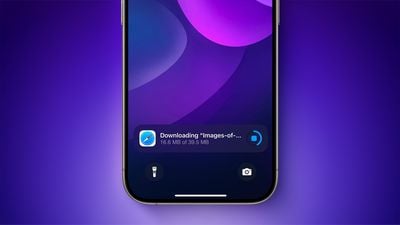
iOS 18.2 expands Live Activities support to ongoing Safari downloads, allowing you to quickly track the progress of file downloads on the iPhone's Lock Screen, and in the Dynamic Island on iPhone 14 Pro models and newer.
iOS 18
This is a minor but useful improvement coming with iOS 18.2. The update is currently in beta, and it will be released in December, according to Apple.

Check out our lists of new features and changes in the first and second betas of iOS 18.2 to see what else is coming with the update, including additional Apple Intelligence features like Genmoji, Image Playground, and ChatGPT integration for Siri.

Related Forums: iOS 18, iPadOS 18

Popular Stories

Apple Wallet

iOS 27 Will Add Two New Apple Wallet Features to Your iPhone

Monday June 1, 2026 12:15 pm PDT by
Apple is set to unveil iOS 27 during its WWDC 2026 keynote on Monday, June 8, and the update will reportedly include two new Apple Wallet features. First, iOS 27 will reportedly let users create their own digital passes by scanning items like movie tickets, concert passes, and gym membership cards. Many apps already offer Apple Wallet passes, but now users will be able to create a custom...
Dynamic Island iPhone 18 Pro Feature

iPhone 18 Pro Battery Capacities Allegedly Leaked

Tuesday June 2, 2026 1:54 am PDT by
Battery capacities for Apple's upcoming iPhone 18 Pro have allegedly surfaced, and the numbers suggest only a modest increase over the iPhone 17 Pro. According to prolific Weibo-based leaker Digital Chat Station, Apple is testing the iPhone 18 Pro with different battery capacities for the China and U.S. versions of the device, similar to last year's iPhone 17 Pro models. The Chinese model is ...
macOS 27 on MacBook Pro

Apple Says macOS 27 Won't Be Compatible With These Macs

Wednesday June 3, 2026 8:29 am PDT by
During WWDC 2025, Apple revealed that macOS 26 Tahoe would be the final major macOS version for Intel-based Macs. macOS 27 will be compatible with Apple silicon Macs only, meaning that you will need a Mac with an M-series chip or a MacBook Neo with an A18 Pro chip in order to install the software update. Apple will unveil macOS 27 during its WWDC 2026 keynote this Monday, June 8, and the...

Top Rated Comments

sniffies Avatar
21 months ago
Will come in handy when I’m downloading a 50 KB file and lock the phone to check the progress.
Score: 27 Votes (Like | Disagree)
21 months ago

There are so many times where I start downloading something off Safari and immediately have to lock the phone.
This is in case the new Apple cell phone chips can only achieve 3G speeds.
Score: 9 Votes (Like | Disagree)
WarmWinterHat Avatar
21 months ago
Huh, I don't think I've ever downloaded anything other than a pdf or similar on my phone. I figured big downloads would cancel or time-out when the phone locked.
Score: 6 Votes (Like | Disagree)
klasma Avatar
21 months ago
Such a tease.

Attachment Image
Score: 5 Votes (Like | Disagree)
21 months ago
In addition to having 235 tabs open on my favorite sites I usually have 37 downloads happening at any one moment. This will really help my consumption workflow and know when an important document has finished downloading so that I may start another download.

If only they would have a widget showing the number of active widgets too.
Score: 4 Votes (Like | Disagree)
sw1tcher Avatar
21 months ago

You realize that on iPhone chrome and safari run on the same engine?

They don't. Desktop Chrome uses Blink, while Desktop Safari uses WebKit. Chrome’s implementation still performs more reliably on certain websites, while Safari can behave oddly or doesn't work as expected. I encounter these issues several times a month, and I've been an Apple browser user since Apple Cyberdog.
🤦‍♂️ iPhone ≠ desktop
Score: 4 Votes (Like | Disagree)