

Over the holiday season, capturing photos and videos of the festivities with family and friends is an important activity for many. The iPhone has a suite of camera features that can significantly elevate the quality and creativity of your holiday photos and videos.

It's easy to forget about many of the individual camera features the iPhone has to offer, and many capabilities go unused by most users, so the holidays is the perfect time to revisit them and try something new. For users of Apple's latest models, the iPhone 16 takes things even further with several enhanced camera features and the all-new Camera Control.
Spatial Video Capture
For users of more recent iPhone models, the holiday season presents an ideal opportunity to experiment with Spatial Video capture feature. Available on the iPhone 15 Pro and iPhone 15 Pro Max, and all iPhone 16 models, the feature allows users to record videos in a three-dimensional format, bringing a new level of depth and realism to holiday memories.
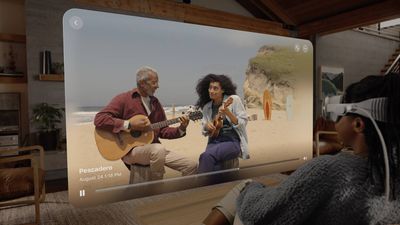
While Apple's Vision Pro or a device like the Meta Quest 3 is required for the best experience when playing back Spatial Video, this should not deter users from exploring the feature. Spatial Video capture is available to help users begin creating a library of immersive videos right away, regardless of whether they have a headset device yet. Spatial Videos can also be played back as normal 2D content on other devices.
The technology behind Spatial Video Capture involves using the iPhone's Main and Ultra Wide cameras. When recording, the iPhone seamlessly combines inputs from these cameras to create a single video file that encapsulates a three-dimensional perspective. This is achieved through sophisticated computational videography techniques, which intelligently scale the field of view from the Ultra Wide camera to match that of the Main camera.
The result is a video that, while technically 2D in format, contains depth information that can be utilized by compatible devices to produce a 3D viewing experience. The spatial dimension added to these videos creates a sense of immersion and presence that far surpasses traditional video, supposedly making the viewer feel as if they are actually part of the captured moment. However, it's worth noting that Spatial Video capture works best in good lighting.
Ultra Wide-Angle Lens for Group Shots
The holiday season presents the perfect opportunity to utilize the often under-utilized Ultra Wide camera lens. This lens, available on most iPhone models starting from the iPhone 11, offers unique advantages that are particularly useful during the holidays.
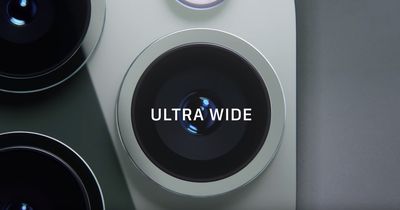
The Ultra Wide lens is particularly adept at photography in confined spaces that would be difficult to capture fully with the standard Wide lens. One of the most significant advantages of the Ultra Wide lens is its ability to fit more into the frame without needing to move back, and the iPhone displays the Ultra Wide camera's feed outside the frame of the Wide camera by default in the camera app. This is especially helpful during family gatherings where you might want to capture a large group of people in one photo.
The Ultra Wide camera got a considerable upgrade with the iPhone 16 Pro, jumping to 48-megapixels to match the Main camera, resulting in considerably sharper, higher-resolution output and better low-light performance.
Cinematic Mode
The holiday season is a good time for iPhone 13 and newer model users to try out Cinematic mode, a feature that adds a depth-of-field effect to videos. Cinematic mode uses advanced computational algorithms to automatically focus on subjects and creatively blur the background, akin to what you would see in high-end cinematography.
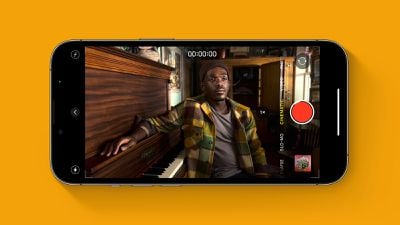
Cinematic mode allows users to focus on details in a creative way, by shifting focus smoothly from one subject to another. Cinematic mode also simplifies capturing these moments by automatically adjusting focus when people enter or leave the frame, or when the subject of the video looks in a different direction.
Photographic Styles
Photographic Styles, a feature introduced in the iPhone 13 series, offers a personalized photography experience that can help enhance holiday photos. The feature allows users to choose and customize a photographic style that automatically applies to their photos, ensuring that every shot reflects their preferred aesthetic.
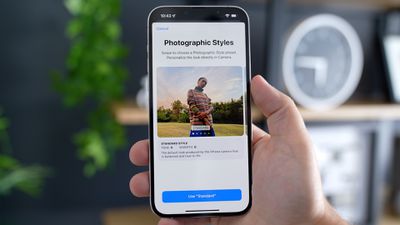
Photographic Styles are not one-size-fits-all filters. Instead, they are smart adjustments that apply selectively to different parts of the photo, such as skin tones and sky. Photographic Styles intelligently adapt to the lighting conditions in each shot, adjusting to preserve natural-looking skin tones and textures.
- Customizing Your iPhone 16 Images With Photographic Styles
- iPhone 16: Edit Photographic Styles After Shooting
- How to Use Photographic Styles in the Camera App (iPhone 13, 14, and 15)
Users can choose from preset styles like Rich Contrast, Vibrant, Warm, and Cool, each offering a unique look. During the holidays, this means you can select a style that best suits the festive mood and give your images a distinctive look.
With the iPhone 16 lineup, Apple overhauled Photographic Styles from the ground up. These newer Photographic Styles adjust specific colors in select parts of your photos to adjust the overall appearance, for a more specialized, richer look compared to the previous version.
The first five Photographic Styles are tuned for skin undertones, including Cool Rose, Neutral, Amber, Rose Gold, and Gold. Cool Rose accentuates cool pinkish undertones, while neutral neutralizes warm undertones. Amber, Rose Gold, and Gold accentuate those specific tones. These can be fairly subtle, depending on the settings you choose.
Other Styles are closer to what you get with a filter, adding more dramatic effects that impact the mood of the image. On the iPhone 16, Photographic Styles can also be added and edited retrospectively.
Enhanced Portrait Mode
The iPhone 15 lineup introduced some substantial improvements to Portrait mode. Now, users can adjust the focus of an image or add background blur after its capture, even if Portrait mode isn't initially selected.
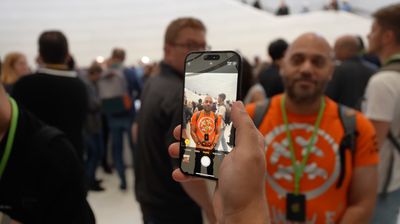
Post-shot editing capability allows you to experiment with different focal points, ensuring that each portrait captures the subject in the most flattering and interesting way. This improvement is especially useful for snapping quick, candid shots of family members and pets over the holiday period. The iPhone 15's Portrait mode has also been refined to perform better in low-light conditions.















































